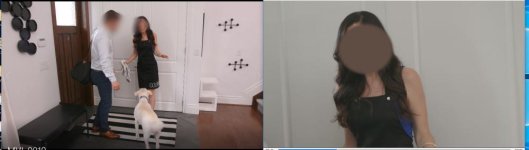
I'm working on a series right now and I chose to shoot with the Canon C100 MII. Mostly because my personal cam is a C100MII and I really like the picture, especially in WIDE DR.
Problem is, I rented a second camera and they don't match. Was I naive in thinking that the same brand, model, PP and settings should match?
My camera is as it always is, but the other one, at the same settings, was more magenta against a white card.
I went through and double, tripled checked all settings. Reset all PPs and even transferred settings from SD card from mine to theirs. Still wasn't matching.
Next I went into edit the WIDE DR picture profile and manually adjusted the white balance until they matched. This seemed to have worked as I was using a controlled light source and nothing really changed.
Unfortunately, I just looked at the footage from the shoot yesterday and there's still a noticeable difference. The wall behind the subject is rendering different on both cameras (that's the best example I have)
It's important to note that I did tests with different lenses and this was not the issue. When shooting everything, and I mean literally everything, was set the exact same way. (except for the WIDE DR white balance that I had to adjust after testing to bring them close together in my tests)
Any ideas on what to do? I'd rather not have to adjust the PP white balance settings manually to a white card every time we change lighting setups.
Oh, and I didn't like the results I was getting with an auto white balance. Both cameras seemed to favour it going slightly green for something reason. Did not like.
Problem is, I rented a second camera and they don't match. Was I naive in thinking that the same brand, model, PP and settings should match?
My camera is as it always is, but the other one, at the same settings, was more magenta against a white card.
I went through and double, tripled checked all settings. Reset all PPs and even transferred settings from SD card from mine to theirs. Still wasn't matching.
Next I went into edit the WIDE DR picture profile and manually adjusted the white balance until they matched. This seemed to have worked as I was using a controlled light source and nothing really changed.
Unfortunately, I just looked at the footage from the shoot yesterday and there's still a noticeable difference. The wall behind the subject is rendering different on both cameras (that's the best example I have)
It's important to note that I did tests with different lenses and this was not the issue. When shooting everything, and I mean literally everything, was set the exact same way. (except for the WIDE DR white balance that I had to adjust after testing to bring them close together in my tests)
Any ideas on what to do? I'd rather not have to adjust the PP white balance settings manually to a white card every time we change lighting setups.
Oh, and I didn't like the results I was getting with an auto white balance. Both cameras seemed to favour it going slightly green for something reason. Did not like.