Greenscreen chroma key HPX170

KWR

Member
I'm shooting with an HPX170 and I'm using FCP and Motion for Keying. I watched the Lynda.com Final Cut Studio 2: Chroma Keying and I've tried several effects. My best results are in Motion so far but I'm still getting stair stepping on my subject. I've been adjusting the lights and I'm wondering if I need to change my settings in my camera.

I noticed Barry Green suggesting 1080i 24P and I'll try that next, I have been shooting 720p 24p.

Camera Settings? FCP or Motion tips? I also tried Primatte Keyer Pro in FCP, but I found Motion to work best. I tried the 4:2:2 color smoothing first before Motion, but I didn't any difference. Thanks.
 
Last edited:
I shoot green screen at 720/60p and use DVMattePro to key.

That looks like a little spill, but without knowing how you are using the key, I can't help much
 
Also, are there benefits to record straight to the computer?
No; what gets recorded on the P2 card is identical to what gets streamed out the firewire.

Now, if you're talking about an HD-SDI capture board, yes that would give you some benefit.

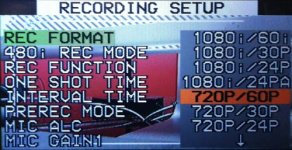
Definitely use 1080/24pA mode for any chroma key work. And note the "a" there; don't use 1080/24p mode, use 1080/24pA.
 
im with david. i shoot chroma green in 720 60p all the time with perfect results using dvmatte pro (3rd party plug-in) inside FCP

FCP's built in keyer BLOWS! no experience with motion.
 
Barry, I've had mixed results keying out green. Can you point me to someplace that I might get a technical understanding of why to use the pA mode? Much appreciated...
 
pA mode is understood by all modern NLEs, and they'll automatically strip out the interlaced pulldown that gets added when recording.
 
So far I'm getting the best results from 720 60p, I'm shooting 30 fps. Should I consider 60 fps?
Thanks, Rod
 
One tip that really helped me with keying in gelling your lights.

Put Full Plus Green Gel on the lights for the screen
Use minus green on the subject lights. It's a HUGE help for us, as we're in a really small green screen studio (so small I don't know if you can even call it a studio!)
 
Shooting Chroma Key with HPX170

Shooting Chroma Key with HPX170

I'm been using the HPX170 for about a year now and just found this forum, SWEET! I've been shooting in 720p/60p for green screen and pretty much everything because I heard P was the way to go for the key. I feel like the results are mixed. Yea, it looks great and all, it better, but when you try full body, not just waist up... eh. Talking heads are pretty clean. I have a larger studio with a stage. Clients never complain. I dunno, maybe I want more. Should I try the 1080i/30p? I want 1080x1920 Progressive... that sounds like it would be so cool. But what problems will I run into here... interlacing?

I have a chroma key shoot today that will be sent off to an editor in LA, I plan on shooting 720p/60p for that, tried and tested. Motion does work best! PrimatteRT but I just switched to FCPX now that we have multicam and all. keyer there seems TIGHT!

I love my cam... it shoot beautiful footage.

Whose a pro? What should it be ladies and gentleman?

record-format.jpg
 
The point is, you want it to be progressive, not interlaced. 1080 is often preferable because it gives you the largest frame size, so you have the smallest pixels and thus the least chance for blockiness along the matte line.

As for the frame rate, that entirely depends on how you want the object to move. Every frame rate has a different look; pick the one which best serves your purposes.
 
Is there a loss shooting 1080/30p rather than 24pA? I need to mix some green screen stuff I have to shoot with 30fps footage.
 
Back
Top