C100: Greens showing as blue?

Tim Nitsch

Well-known member
Is anyone having an issue with certain colors looking completely different?

For example I was filming an interview where the person was wearing a greenish shirt and in camera it came out blueish.

I tried the following profiles and all had this issue even Wide DR and CINEMA looked off. But NTtc2b was the closest to being correct.
709Log
CineLog
Cinema 2
NTclog1
NTtc1
NTtc2b (this was the only one that actually looked somewhat correct)
EOS Std
Wide DR
CINEMA

I thought I properly white balanced. But even so I went from 3200 to 5600 to see if it would have any effect and it didn't really turn the blue back to green.

Now I'm sure I can fix this in post but I feel like I shouldn't have this issue.

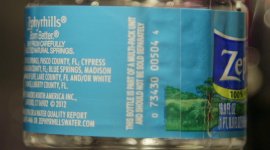
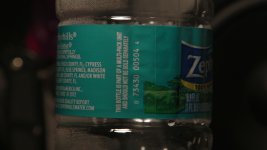
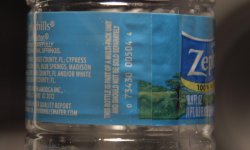
Here's an example so you can see what I mean. Shot in Wide DR.
IMG_0109.jpg


After some tweaking in photoshop, This is what it should have looked like:
IMG_0109 copy copy.jpg
 
Last edited:
I find alot of WIDE DR to look blueish/green. I created this preset to adjust for that, its been mentioned in some other recent threads and is called WIDE PF, but give it a try. Start with the base WIDE DR then adjust these settings:
Gamma curve is L:5, M:8, H:5
Gamma: Wide DR
Black-Master Ped: -1
Knee ON: Slope: -15 Point:109
COLOR MATRIX (This is the biggy) WIDE DR Gain:+30, Phase: +3, R-G: -20, R-B: +11, G-R:-23, G-B: -14, B-R: -10, B-G: +1

Hope it helps.
 
@ Paul

I tried your profile and here's what I got:
IMG_0110.jpg

It helped, but its still a little more blue then I feel it should be.

I also noticed that my iPhone had the same issue. Is it just a hard color for digital sensors to replicate/capture?

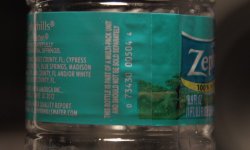
I have a color checker chart and I don't have an issue with getting the colors on the chart to look accurate in camera, it just seems to be this color in particular because look at the green grass in the lower right corner of the label, that green looks fine. It looks exactly as it does in person. It's just this blue green color that's giving me issues.
 
Last edited:
Is anyone having an issue with certain colors looking completely different?

For example I was filming an interview where the person was wearing a greenish shirt and in camera it came out blueish.

When I've seen this before, it was because I was filming under fluorescent lights. Some of the colors typically used in packaging seemed to fluoresce, particularly blues. This was a cooking class, and about half the product labels that had any blue in them did this.

The interesting thing is that the colors look fine to the eye at the time, but the camera sees the change. So I'm thinking it probably has to do with the short wave length sensitivity of the sensor -- probably extends out into the ultraviolet where the normal human visual system can't see anything, but the camera sensor can.

Either the particular fluorescent lamps I was shooting under were producing some near ultraviolet and the blue pigments in the packaging were reflecting it to the camera, or the blue pigments were fluorescing a bit of near ultraviolet. In either case, the camera software would probably record this as... blue. Thus your blue shift.

And while I'm thinking about that... I think it was a Canon camera. Don't remember which one. Before the C100 came out anyway.
 
@ Bruce

The frame grabs above we're shot under tungsten light, but the project I had that first alerted me to this issue was under Florescent light. But I do think it has something to do with how the sensor captures that specific color.
 
@ Bruce

The frame grabs above we're shot under tungsten light, but the project I had that first alerted me to this issue was under Florescent light. But I do think it has something to do with how the sensor captures that specific color.

It may also be a design feature of the packaging inks. To make the colors brighter and more vibrant -- so you'll pick, say, one bottled water over another when they are sitting on the shelf side-by-side.

Fluorescence is an interesting phenomenon. Usually what happens in fluorescense is the pigment absorbes photons at a shorter wave length and emits photons at a longer wave length. This is how "black light" works, UV is "translated" into visible light and a little heat.

But... you can go the other direction. Absorb longer wave lengths and emit shorter. I seem to remember that this is more "costly" in that it takes more than one photon absorbed to get a single photon back at the shorter wave length. This would be an interesting packaging technique -- make a color look brighter and more vibrant anywhere -- even in sunlight, or under tungsten.

Still, I doubt that's what's going on here. I suspect that what we're seeing is just that the cameras are balanced for skin tones. The farther we get from skin tones, the less accurate it's going to be. And this is happening way out on the edge of the gamut for the camera. Still, I would hope for a little better than what you're showing. That's not just a little off, that's quite a bit off.

It would be interesting to see if this is a Canon problem only -- maybe Sony, Panasonic, and JVC, etc. don't have this problem. Hmmm.....
 
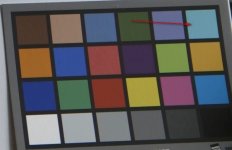
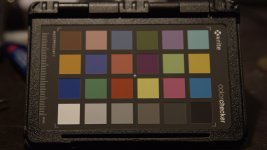
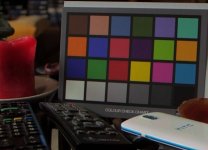
Here are some grabs with my ColorChecker chart:

This is with Wide DR:
IMG_0113.JPG
Color looks pretty good, the top right green-ish color looks very accurate to what it should be.

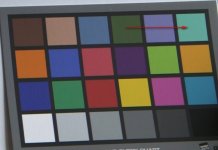
This is with CineLOG
IMG_0114.JPG
Now notice the top right green-ish color is now looking blue-ish.

I'm also noticing the red is looking kinda orange with the CineLog.

Here a question that I just thought of, what if the profiles that I downloaded where intended for the C300? Could that explain the color shifts that I'm experiencing? Simply the wrong color profiles?

EDIT:
Downloaded the "Arri" Profiles and I'm really liking the results:

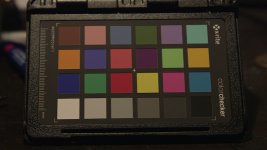
This is with the ARRI3200 profile
IMG_0141.JPG

Easily the most accurate of the bunch. Greens stay green and blues stay blue.
 
Last edited:
dear paul, would it be possible for you to make Wide PF available as download? this might be very helpful for people who are not used to fiddle with the custom picture settings (like me).

something else. i also run into noise issues with wide dr and high iso. what is you suggestion?

thanks a lot, namor
 
dear paul, would it be possible for you to make Wide PF available as download? this might be very helpful for people who are not used to fiddle with the custom picture settings (like me).

something else. i also run into noise issues with wide dr and high iso. what is you suggestion?

thanks a lot, namor

I'm afraid I don't know how to do that namor! Maybe someone else here can? As for high noise, I just made another profile and increased the noise reduction setting. Dont have my camera handy to say what I set it at but it looks pretty clean with minimal softness. I use it when I get over 5000ISO.
 
something else. i also run into noise issues with wide dr and high iso. what is you suggestion?

thanks a lot, namor

Try cine1 or normal3 or normal4 gamma for higher iso (2000 - 4000), or set on Noise Reduction (from4 to 5) with coring from +18 to +30. You will lost some resolution but image will be more clean. It's better to use speed lens with F1.5 - 2.0 for iso above 3600.

I hope this help.

--

Today I tried cine1 and log gamma with daylight CP by Art Adams (my C100 has still the first firmware) and canon log has a good cyan color now. Thanks for this arri CP, it's work.
 

Attachments

  • 011b eos log corrected.jpg
    011b eos log corrected.jpg
    285 KB · Views: 0
Last edited:
Back
Top