GH4 GH5 Owner / User Reports

Odd thing is that despite having the brightness of my screen set to 1 and all sleep functions completely off, the screen still goes darker if I haven't touched it in a few seconds. Any ideas?
 
No GH5 here yet. Anyone available to perform this test?

I've arrived to the conclusion tap-to-focus is the best way to safely go forward on 4K AF video. Do you mind to check this and try it with your GH5? Please read the following information:

1)
A) (from minute 0:37 on) https://youtu.be/tjSviTxLLqY?t=37
B) (from minute 7:39 on) https://youtu.be/AEsSsdTKJs4?t=459

Touch to focus is part of AF system and maybe a good solution to overcome eventual limitations. Fastest settings tested ain't anything helping to prevent the hunting hence pulsing. Please test all slower ones available.

2)
http://www.eoshd.com/comments/topic...ll-is-revealed/?do=findComment&comment=189260
http://www.eoshd.com/comments/topic...ll-is-revealed/?do=findComment&comment=189282

3)
(from minute 13:23 on) https://youtu.be/BAuEmp3fKQI?t=803
(from minute 41:23 on) https://youtu.be/WSAc3hU1v3k?t=2483

But not prone to introduce hunting (as will likely happen with fast settings) !

4)
http://www.dvxuser.com/V6/showthrea...s-Test&p=1986693286&viewfull=1#post1986693286


I guess different settings and distinct setups will get rid of the issue. Seems 4K/60p or/and external recording helps, so why not too if we're looking for the best automatic or semi-automatic focus setup to work out?
 
Can anyone test how long does 6K Photo mode (4992 x 3744 in 4:3; 5184 x 3456 in 3:2) take? How many seconds or minutes?
 
Tried that and OFF isn't an option. But I did manually turn off the switch on the 12-60 lens and now I get a red hand with OFF on the LCD !!! Still no OFF select in that menu. I can and have switched off the E_ stabilizer which is the extra electronic stabilizer when in video mode.

It appears that you only have the option of turning off IBIS with an un-stabilized lens; or with a stabilized lens with a lens switch, by switching that off. Both or none, it seems.
 
It appears that you only have the option of turning off IBIS with an un-stabilized lens; or with a stabilized lens with a lens switch, by switching that off. Both or none, it seems.

Yes I figured that out when I turned the switch off I got the little red OFF hand.
 
When I met with Panasonic about features to implement on the GH5 most the technical improvements were already in the works so I mostly focused on ergonomics.

Top of list was a linear focus response for their fly-by-wire lenses. Panasonics Reps were a bit surprised by the request, & thought Photographers in particular preferred their inertia driven system, which seems off-track to that profession's needs too.

Also a focus distance readout on the EVF/LCD similar the AF100's.

A tilting EVF, & better V-Log L, were some of the other items near the top of my list.
Thanks for suggesting these things to them, Bern. I always thought that it would be so easy for manufacturers to add two menu options for controlling focus-by-wire response:

Focus Ring Response: Accelerated / Linear
Focus Ring Multiplier: 1X / 2X / 3X / etc

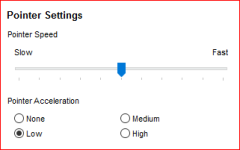
Or even simpler, something similar to mouse pointer speed and acceleration controls that have been around for decades:

Capture.PNG

Think about it. If you could turn off acceleration completely, you could have reproducible focus pulls. If you could adjust the multiplier (speed), you could adjust the focus arc of the lens from stop to stop (180, 270, 360 degrees, etc).

Such a feature should have been obvious right from the beginning, at least on advanced cameras. Anytime that you are arbitrarily deciding how to translate between analog motion and digital interpretation of that motion (or vice versa), there should be options to adjust it. Otherwise there will always be people who are unhappy with the values you choose.
 
I honestly really appreciate this thread and everyone buying the GH5 before me. I'll probably end up buying it, but threads like this help save time e.g. me standing in the shop seeing how long batteries last etc. - I can take people's word for it and put that particular issue to rest.

However, separate to everyone here, I think it's funny how these days when any new products come out there's this huge race to post the first videos, of course with clickbait video titles. It's as if they need the traffic from the reviews more than the tools they're reviewing. Pretty twisted!

Back to the early reports...
 
I find the battery life to be less than what was claimed. I haven't run a scientific test on it. But on the GH4 I just got back from India filming very full days with the camera pretty much on all day, and used 1-2 batteries a day (1.5 batteries usually).

With GH5 with IBIS and light use (just shooting short film tests and messing with menu settings, etc.) I am finding myself hitting 2 batteries day, and I feel like I am using it WAY less than when I was actually working...
 
Just got my gh5 - with a speedbooster Ultra XL. Works perfectly so far with the 24mm Sigma art series 1.4, using Sandisk 128g 90MBs cards. The only hiccup is that the camera would crash if i tried recording when it wasn't formatted in Panasonic format(the sd card came from an a7s).

Will be testing with a tamron 24-70 2.8VC, tamron 70-200 2.8VC and canon 100macro IS tonight. All speedbooster ultra XL.
 
For those who may not be aware - IBIS as a system is always on when the camera is powered. The difference is that when you select it OFF, the system holds in place with zero movement. When it's ON the system moves to compensate for camera movements. In BOTH cases, it still draws power to the IBIS system because it has to. There's no physical stopper in place for holding the sensor - it's purely the magnetic field it uses to work which holds it steady, or moves it in accordance with its lens programming.

Therefore the battery life is not affected by it being selected ON of OFF, since it's always technically on even if it's not actively stabilising lenses.

HTH

Paul :)
 
Here's a few of my findings after using the GH5 on a couple shoots:

1) Battery life is noticeably worse than the GH4. With the GH4 I would often take only one battery for a day of run n gun shooting and feel confident I had plenty of juice. Not the case with the GH5. It drains much more quickly.

2) When using the Metabones XL with my Sigma 18-35 and Canon 24-105, in VFR mode at 120fps, the exposure will drop by 2 stops when I hit record.

3) There is no option to custom WB when the camera is in any 10bit mode. You must switch to 8bit, perform custom WB, then switch back.

4) The XLR jacks on the XLR-1 are VERY tight. I highly recommend plugging in mics with the unit OFF the camera then sliding it into the hotshoe. The strain of plugging mics into the unit while on the hotshoe is immense IMO.

5) Use your zebras and waveform. To my eyes, there is a DR increase compared to the GH4 but only if you preserve the highlights. Shadows seem to retain more detail. Although this could be a product of 10bit 4:2:2.

6) Initializing the Metabones XL in green mode works every time. It's an effective workaround until MB updates their firmware

7) EX Tele works in VFR up to 120fps. After that, no dice.

8) The EVF is fantastic. Combined with its IBIS, this is an excellent run n gun setup.

9) Transcoding to ProRes HQ using Media Encoder has been the only way I can edit the 10 bit footage in Premiere.
 
Last edited:
4) The XLR jacks on the XLR-1 are VERY tight. I highly recommend plugging in mics with the unit OFF the camera then sliding it into the hotshoe. The strain of plugging mics into the unit while on the hotshoe is immense IMO.

What XLR connectors were you plugging in to the adapter ?

I've generally found Neutrik XLR connectors to be a smoother fit than the generic brands.
 
Here's a few of my findings after using the GH5 on a couple shoots:

1) Battery life is noticeably worse than the GH4. With the GH4 I would often take only one battery for a day of run n gun shooting and feel confident I had plenty of juice. Not the case with the GH5. It drains much more quickly.

2) When using the Metabones XL with my Sigma 18-35 and Canon 24-105, in VFR mode at 120fps, the exposure will drop by 2 stops when I hit record.

3) There is no option to custom WB when the camera is in any 10bit mode. You must switch to 8bit, perform custom WB, then switch back.

4) The XLR jacks on the XLR-1 are VERY tight. I highly recommend plugging in mics with the unit OFF the camera then sliding it into the hotshoe. The strain of plugging mics into the unit while on the hotshoe is immense IMO.

5) Use your zebras and waveform. To my eyes, there is a DR increase compared to the GH4 but only if you preserve the highlights. Shadows seem to retain more detail. Although this could be a product of 10bit 4:2:2.

6) Initializing the Metabones XL in green mode works every time. It's an effective workaround until MB updates their firmware

7) EX Tele works in VFR up to 120fps. After that, no dice.

8) The EVF is fantastic. Combined with its IBIS, this is an excellent run n gun setup.

9) Transcoding to ProRes HQ using Media Encoder has been the only way I can edit the 10 bit footage in Premiere.
I want to clear up a couple of points for you:

2. This seems to be a bug but the solution is to use shutter speed, not shutter angle. And use Constant Preview ON.

3. This is wrong. I have no issue white balancing in 10bit 4:2:2 mode on any profile. Not sure how you are getting an error message?

Aside from those, the rest seem valid :)

Cheers,

Paul :)
 
I want to clear up a couple of points for you:

2. This seems to be a bug but the solution is to use shutter speed, not shutter angle. And use Constant Preview ON.

3. This is wrong. I have no issue white balancing in 10bit 4:2:2 mode on any profile. Not sure how you are getting an error message?

Aside from those, the rest seem valid :)

Cheers,

Paul :)

Thanks for responding, Paul!

2) Good to know. It's funny because I only ever used shutter speed with the GH4 and switched to shutter angle for the GH5. Looks like I'll switch back until there's a FW fix.

3) To clarify, I'm speaking about white balancing using a grey card. Normally, when you are on one of the custom WB presets you can push up to set a custom WB using a grey/white card. The option is not there in 10 bit. This was also the case on the GH4 when you were outputting 10 bit via HDMI. Unless I'm missing something? When I get home tonight I can post photos of what I mean.
 
Last edited:
Back
Top