
Navigation
Install the app
How to install the app on iOS
Follow along with the video below to see how to install our site as a web app on your home screen.
Note: This feature may not be available in some browsers.
More options
You are using an out of date browser. It may not display this or other websites correctly.
You should upgrade or use an alternative browser.
You should upgrade or use an alternative browser.
GH4 GH4 SD Cards
- Thread starter David W. Jones
- Start date

Thomas Smet
Veteran
Yeah, I have some concern about the idea that the card could drop out on really highly detailed scenes. That said, it looks like this sample of the card can easily do 50MB/s write speed, which is equivalent to about 400Mb/s. As long as it can sustain those write levels when full, I'm not sure that 200Mbp/s max recording bit rate should offer much of a challenge. I should say I did some screen/grass and some persian carpet shots, and I got the 24 FPS all I up to 85Mb/s. I'll keep trying, but so far I haven't maxed out the codec, or the card.
200mbps all-I is a pretty darn high bitrate. Even mpeg2 at 200mbps all-I was virtually perfect and that was with 4:2:2. It is going to take one very complex shot to push the encoder to 200mbps. Especially with an encoder that is well optimized like the one in the GH3 and GH4.
Ryan Lightbourn
Well-known member
Well I filled the card, and it played back fine, but when I look at the data rate in QT player, it says 80Mbps, which I'm confused about. MOV mode, recording 60FPS Progressive 200Mbps.
24fps / 60fps = 0.4
0.4 x 200 Mbps = 80 Mbps
If you're playing back @ 24p it makes perfect sense
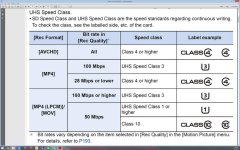
200mb(megabits)ps = 25 MB(megabytes)ps - Those Sandisk Extreme UHS-I Class 10 cards should be more than sufficient for 200Mbps mode.

joe1946
Veteran
Why would anyone want to buy a cheaper U1 card for the GH4 than the 128GB Transcend U3 card ? If you have a problem with the cheap U1 card then what are you going to do with the $20 you saved ?Did anyone ever try out the Transcend 128GB 600x card? It seems to be essentially the same as the U3 version of the card, but a bit cheaper!
Last edited:
Keep in mind the GH3 also recommended class 10 cards to shoot the 50mbps mode yet I have shot dozens of hours of footage sometimes using SanDisk class 6 cards. If I still had any class 4 cards I bet those would work as well. Panasonic lists cards to save their butt. Probably mostly comes from a decision from legal more than anything. This could be due to some manufacturers making crappy cards. It is difficult for Panasonic to make a huge list of the tested cards and is much easier to just pick a level where there is a 100% guarantee to work regardless of the shoddy manufacturing standards for a particular card. Even the most pathetic U3 card should work for 4k.
Chances are much lower rated SanDisk cards will work fine but Panasonic will never legally tell you that. You use them at your own risk.
Eeeeep, no, because at 50Mbps, it roughly translates to 6MBps... which is exactly what a class 6 card is rated at. A class 4 card is unlikely to keep up.
Why would anyone want to buy a cheaper U1 card for the GH4 than the 128GB Transcend U3 card ? If you have a problem with the cheap U1 card then what are you going to do with the $20 you saved ?
Because if it's really 600x, it will be U3 compliant.
I posted this point earlier already: There will be class 6 cards with class 10 performance, and there will be class 10/U1 cards with U3 performance, because the different speed ratings were not formally introduced at the same time. Class 10 ratings came after 2,4 and 6, while the U3 rating came about 6 months ago, compared to the U1 rating which has been out for a few years now.
Plus, I wouldn't buy Transcend cards anyway. Don't trust them after a couple of friend's cards failed in their own separate photoshoots. But that's just my own observational bias.

Do y'all remember that Vitaly, IIRC, made a little tool that would show you the bitrate of a particular clip over time, so you could see if there were any spikes? He used it for the GH13 hack.
Chris Brandin's StreamParser
...But keep in mind that it does not work with the MOV video format. (alternative tools are listed near the end of the thread)
snowblindfilm
Carbonite Member
Have you had a chance to do more tests with 45MB/s cards? I just wanted to see if they work with GH4 in all situations.I just recorded a sunset using 1080 60p 200Mbps All-I with a 128GB SanDisk Extreme SDXC 45MB/s card. Got over 40 minutes recorded, spanned across five clips. Here's the size - time - bitrate breakdown of the clips.
4.233GB - 10:09 - 55.6Mbps
4.237GB - 8:43 - 64.8Mbps
4.236GB - 9:51 - 57.3Mbps
4.234GB - 8:32 - 66.2Mbps
4.215GB - 5:53 - 95.5Mbps
Obviously this slow sunset didn't stress the codec's bitrate, so it's a poor test of the card. I'm sorry I can't be of more help. I'll run more tests tomorrow at our local farmers market. There's usually some jugglers there. Should make for a more complex shot that may better test the limits of this card.
FWIW, I was using the Lumix 100-300mm with F8 and shutter 1/8000th (no ND on lens). Picture profile was CINE-D with contrast, sharpness, color, and denoiser all turned down to -4. The Highlight/Shadow control was set to Low Contrast. Luminance Levels were 0 - 255. I love that the GH4's shutter goes to 1/8000th. My GH3 can only go up to 1/4000th. I'm looking forward to taking stills with this camera.
Have you had a chance to do more tests with 45MB/s cards? I just wanted to see if they work with GH4 in all situations.
I can't say that I have. I've been shooting with the camera in both 4K and 1080 mode, but I've been using a SanDisk Extreme Pro 95MB/s card that I purchased specifically for the GH4 before I knew that a 45MB/s card would work.
In case anyone is interested, here's a short snippet of that sunset time lapse with a before/after of the unprocessed/processed footage.
Hi Guys,
I started a new thread for this, but It was suggested that I repost here.
I went out to the barn with the wife today to help feed the horses and shoot a little slow mo with the GH4.I had the camera in MOV shooting 23.98 with variable frame rate set to 96 fps.I was using some new Transcend 64GB SDXC U3R95-W85WB/s cards.I have not had any issues with the cards shooting any of available resolutions or frame rates until this.Nor have I had any issues with my Sandisk Extreme 32 GB 95MB/s cards.Anyway while shooting the forth clip and about twenty seconds in I noticed that the horses were no longer moving in the rear OLED monitor and the red record light was on solid.The record button (shutter button) was ineffective as was the power switch.I had to pull the battery to unlock the camera and shut it down.I will spend some time tomorrow trying to duplicate the failure with that specific card and if that happens I will try to achieve the same results with one of my Sandisk cards.I will report back if I am successful at getting the camera to lock up again.The corrupted file read P1000216.mdtI can’t open or view the video file.When I check the properties of the file it says that there is 236 MB for size.
Wayne Mann
www.HeliCamHDmedia.com
I started a new thread for this, but It was suggested that I repost here.
I went out to the barn with the wife today to help feed the horses and shoot a little slow mo with the GH4.I had the camera in MOV shooting 23.98 with variable frame rate set to 96 fps.I was using some new Transcend 64GB SDXC U3R95-W85WB/s cards.I have not had any issues with the cards shooting any of available resolutions or frame rates until this.Nor have I had any issues with my Sandisk Extreme 32 GB 95MB/s cards.Anyway while shooting the forth clip and about twenty seconds in I noticed that the horses were no longer moving in the rear OLED monitor and the red record light was on solid.The record button (shutter button) was ineffective as was the power switch.I had to pull the battery to unlock the camera and shut it down.I will spend some time tomorrow trying to duplicate the failure with that specific card and if that happens I will try to achieve the same results with one of my Sandisk cards.I will report back if I am successful at getting the camera to lock up again.The corrupted file read P1000216.mdtI can’t open or view the video file.When I check the properties of the file it says that there is 236 MB for size.
Wayne Mann
www.HeliCamHDmedia.com
Ryan Lightbourn
Well-known member
Hi Guys,
I started a new thread for this, but It was suggested that I repost here.
I went out to the barn with the wife today to help feed the horses and shoot a little slow mo with the GH4.I had the camera in MOV shooting 23.98 with variable frame rate set to 96 fps.I was using some new Transcend 64GB SDXC U3R95-W85WB/s cards.I have not had any issues with the cards shooting any of available resolutions or frame rates until this.Nor have I had any issues with my Sandisk Extreme 32 GB 95MB/s cards.Anyway while shooting the forth clip and about twenty seconds in I noticed that the horses were no longer moving in the rear OLED monitor and the red record light was on solid.The record button (shutter button) was ineffective as was the power switch.I had to pull the battery to unlock the camera and shut it down.I will spend some time tomorrow trying to duplicate the failure with that specific card and if that happens I will try to achieve the same results with one of my Sandisk cards.I will report back if I am successful at getting the camera to lock up again.The corrupted file read P1000216.mdtI can’t open or view the video file.When I check the properties of the file it says that there is 236 MB for size.
Wayne Mann
www.HeliCamHDmedia.com
I'm assuming the minimum write speed on the Transcend is causing the issue (they always quote max write speed).
I made a bunch of attempts to get the camera to lockup again today shooting 96 fps, but I had no luck. It may have just been a fluke.
Wayne Mann
www.HeliCamHDmedia.com
Wayne Mann
www.HeliCamHDmedia.com
Last edited:
I made a bunch of attempts to get the camera to lock again today shooting 96 fps, but I had no luck. It may have just been a fluke.
I've read that shooting still photos while shooting video in 200 Mbps mode will overload the camera, which is something I would expect. Only so much tiny little ASIC chips can do.
Mike_Raddport
Well-known member
I've had the camera for 2 days and it froze on me twice - much in the same way as above - power light stayed on, even if I turned it on or off, and the screen either froze on a still or went black. I had to pop the battery. Once when shooting 96FPS and once when just shooting stills. I called the seller. It's been suggested to me that it could be a read/write error of the card. I've been using a brand new Kingston UHS I class 3 64gig. I switched to my sandisk 64gig 45mbs and so far nothing. I think I'll return the Kingston and pick up the sandisk 95mbs since some are saying that you can capture 4K with that card. I certainly hope that it is the card and not the camera. More tests to be done!
Mike_Raddport
Well-known member
What card were you using, Estimeh?