GH4 GH4 SD Cards

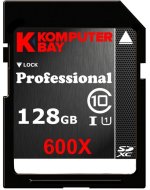
the Komputerbay card is speed class 1, and will be unlikely to support sustained 100mbps.

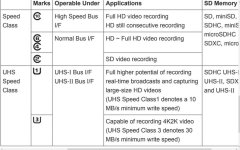
while some speed class 1 cards claim very high write speeds, they do not have the capacity to sustain those speeds adequately for video recording. the speed class 3 (U3) cards indicate sustainable read/write speeds.
 
If that ends up being the case then I have an $80 128GB card I can use in my AF100.

At this point we have very few class 3 cards available.
 
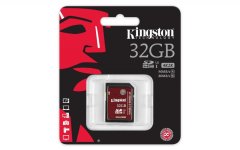
I will wait to see if B&H gets the new Kingston SDHC/SDXC UHS-I U3 cards next month before my GH4 ships from them. They have the regular 64GB Kingston SDXC UHS-1 Class 10 (10MB/s min write) card for $57.95. If the new Sandisk UHS-II Speed Class 3 cards drop in price I might get one but not at the current price of $244.95 for the 64GB SDXC card. If I do get the Sandisk UHS-II card I will also get their UHS-II USB 3.0 card reader for fast uploads up to 280MB/s .
 
the Komputerbay card is speed class 1, and will be unlikely to support sustained 100mbps.

while some speed class 1 cards claim very high write speeds, they do not have the capacity to sustain those speeds adequately for video recording. the speed class 3 (U3) cards indicate sustainable read/write speeds.

The tested Sequential Write Speeds (most relavent to Video) from StorageReview.com show that the Komputebay card can record sequential data up to 58.3MB/s which was only marginally less the than the Kingston U3 card which tested at 59 MB/s.

The max internal write speed required on the GH4 is 200 Mb/s (Megabits per second) which equates to about 25MB/s. 25MB/s is well under the rated sequential write speed of the Komputerbay card. Lets not forget that the current GH3 requires a max write speed of 100 Mb/s which is the same data rate as required to record 4K on the GH4. The GH3 can record at it's top rate on the U1 Class 10 cards that have been available for a few years now.

My guess is that the Komputerbay 60MB/s cards will be more than capable of recording the highest data rates required by the GH4
 
The tested Sequential Write Speeds (most relavent to Video) from StorageReview.com show...

For those of you who are like me, desiring to read the exact details of the aforementioned StorageReview, have a look here:

http://www.storagereview.com/komputerbay_128gb_sdxc_600x_uhsi_review

http://www.storagereview.com/kingston_sdhc_sdxc_uhsi_u3_review

A 128GB card for $79 (at Amazon) seemed almost too good to be true, so I kept my eye focused on those 1-star Amazon reviews. Although a bit worrying, I did note those reviews were from 2011 and 2012. Further, I see that the card has a lifetime warranty, which means if your card does eventually die, you can exchange it for free. How hard or time consuming it is to obtain a replacement in that case has not been made known, but it would seem to be most prudent to get the little known KomputerBay 128GB card if you need a lot of storage for a great price. And with the Lumix GH4's 4K being one of its biggest selling points, a lot of fast storage is certainly on all of our minds right now.
 
Just be carefull. If it really matters use high quality brands that you trust.

I do second this. I had a cheapish off brand 16GB that tested fast in both burst and continuous write speeds. It worked with all the hacks that I put on my GH2, so I thought, "what a bargain!" A bargain until it lost the primary shot from a wedding when it had serious errors when I went to read it. I was able to recover some of it using testdisk, but ever since then the cheapest ones I've gone with are Transend, and only use those when I fill up my Sandisks.
 
For those of you who are like me, desiring to read the exact details of the aforementioned StorageReview, have a look here:

http://www.storagereview.com/komputerbay_128gb_sdxc_600x_uhsi_review

http://www.storagereview.com/kingston_sdhc_sdxc_uhsi_u3_review

A 128GB card for $79 (at Amazon) seemed almost too good to be true, so I kept my eye focused on those 1-star Amazon reviews. Although a bit worrying, I did note those reviews were from 2011 and 2012. Further, I see that the card has a lifetime warranty, which means if your card does eventually die, you can exchange it for free. How hard or time consuming it is to obtain a replacement in that case has not been made known, but it would seem to be most prudent to get the little known KomputerBay 128GB card if you need a lot of storage for a great price. And with the Lumix GH4's 4K being one of its biggest selling points, a lot of fast storage is certainly on all of our minds right now.

If you click on the 1 star reviews, then sort them by date, there have still been a lot of failures recently too. If you do get them you just have to hope you get a good one and that it doesn't completely fail on you when you need that footage.
 
If you do get them you just have to hope you get a good one and that it doesn't completely fail on you when you need that footage.
But how much do we also have to "hope" when it comes to even the big brands like SanDisk? For example, if I pay almost double for this slower speed (yet GH4-ready) SanDisk 128GB card, how much more assurance would I have that the SanDisk card would "never fail during a shoot" versus the KomputerBay 128GB card?

http://www.amazon.com/Sandisk-128GB-Extreme-Card-Memory/dp/B006ZH1WVS

Ditto for this Lexar:

http://www.amazon.com/Lexar-Professional-128GB-Memory-LSD128CTBNA400/dp/B007BZRXK2

Kingsington doesn't seem to have a 128GB version SD in a high-speed GH4 4k ready version yet. And honestly, there don't appear to be many choices when it comes to a fast 128GB SD. A 64GB card may be enough for some GH4 users, but certainly not all.
 
The bottom line is you get what you pay for. The GH4 4K specs call for UHS speed class 3 U3 (30MB/s minimum) cards and the 128GB Komputerbay card is a UHS class 10 U1 (10MB/s) card.
http://www.photographybay.com/2014/02/06/kingston-unveils-sdhcsdxc-uhs-i-speed-class-3-cards-for-4k-video-capture/

https://www.sdcard.org/consumers/speed/speed_class/

The Komputerbay card is not a 10MB/s card. You might be confused with the U1 specs which states "UHS Speed Class1 denotes a 10 MB/s MINIMUM write speed" with key emphasis on the word MINIMUM. As has been posted on this thread, the Komputerbay 128GB card was independently tested at 58.3MB/s which was JUST slightly less than the U3 Kingston Card which tested at 59MB/s.
 
The Komputerbay card is not a 10MB/s card. You might be confused with the U1 specs which states "UHS Speed Class1 denotes a 10 MB/s MINIMUM write speed" with key emphasis on the word MINIMUM. As has been posted on this thread, the Komputerbay 128GB card was independently tested at 58.3MB/s which was JUST slightly less than the U3 Kingston Card which tested at 59MB/s.
Why would they not mark it as a Speed class 3 UHS U3 card if it is ? The last time I checked class 10 and U1 is a minimum 10MB/s rating.
71OVmBAGJyL._SL1500_.jpg

13202924295_ca4265ca32_b.jpg

13112844274_550a515d71_o.jpg

Komputerbay scam:
http://i.imgur.com/bKZ4rRg.jpg
http://i.imgur.com/Kr7Z4Dw.jpg
 
Last edited:
Why would they not mark it as a Speed class 3 UHS U3 card if it is ? The last time I checked class 10 and U1 is a minimum 10MB/s rating.

Could be because the card was released before speed class 3 UHS U3 was ever released. Class 10 U1, as backed by your links, IS a MINIMUM (not maximum) of 10MB/s.
 
Komputerbay scam

Interesting about the Mac RAM "rebranding." But in terms of SD cards, there are 1258 reviews of the said card, and the majority of those people seem to be giving it high start ratings, as evidenced by the fact it has 4.5 stars.

But the fact remains that we have limited choices when it comes to a 128GB SD card whose guaranteed minimum speed is "fast enough" to be compliant with the GH4 (i.e., a card that can handle the GH4's fastest write speed of 200Mbps).
 
Could be because the card was released before speed class 3 UHS U3 was ever released. Class 10 U1, as backed by your links, IS a MINIMUM (not maximum) of 10MB/s.

The review says: "Switching to random large-block transfers, we measured a write speed of 10.3MB/s for the Komputerbay SDXC 128GB card. "

I think we'd find the card will struggle and stop recording on certain loads when it dips down to 10.3MB/s, which is below the 12.5MB/s (100Mb/s) threshold needed on some GH4's recording quality.
 
Interesting about the Mac RAM "rebranding." But in terms of SD cards, there are 1258 reviews of the said card, and the majority of those people seem to be giving it high start ratings, as evidenced by the fact it has 4.5 stars.

But the fact remains that we have limited choices when it comes to a 128GB SD card whose guaranteed minimum speed is "fast enough" to be compliant with the GH4 (i.e., a card that can handle the GH4's fastest write speed of 200Mbps).
I have not seen any ratings in 4K cameras and people were using it for backup etc that means nothing when you need it for 4K recording with no dropped frames. I will test my GH4 with the 94MB/s UHS=1 U1 Sony cards that I have but I will buy at least one UHS U3 speed class 3 card like the new Kingston 64GB SDXC .


http://www.magiclantern.fm/forum/index.php?topic=8412.0

We ran into a lot of trouble with CF cards. I had purchased 2x 128gb, 2x 64gb and 2x 32gb KomputerBay cards for the shoot and half of them didn’t work for more than a few frames right out of the package. One of the 64gb cards was usable but I found its record speeds to be inconsistent. Between each full minute take we always had a 200ish frame take that would drop a frame and quit. This was consistent with the card. –Though they required me to shoot at a lower resolution my 128GB SanDisk Extreme Pro cards were much more reliable.
http://www.eoshd.com/content/10697/...ium=feed&utm_campaign=Feed:+EOSHD+(EOSHD.com)
 
There's no need to bicker, because it's clearly stated by the company itself and the benchmark reviews... ?

It's not a case of if it dips down to 10MB/s, it's a case of when. Because it absolutely will. It's just how the card's writing ups and downs and seeking blocks works.
 
Back
Top