GH4 GH4 FW 2.2 is out

Vesku

Well-known member
  1. [Anamorphic(4:3)] mode is available which optimizes the settings for 3328x2496 video recording with a 4:3 anamorphic lens.* To convert the footage to a cinemascope aspect for playback, corresponding software and device are required.
  2. 1/16000 sec shutter speed can be selected manually when using [Electronic Shutter].
  3. Fixed the issue which video recorded in rec format AVCHD got misdated when imported to some editing software.

http://av.jpn.support.panasonic.com/support/global/cs/dsc/download/fts/index.html
 
i need to get up early tomorrow, but i am weak...

b4lkVAW.jpg
 
So when shooting with a slr magic anamorphot 1,3 does this have any advantages over doing it without this firmware?

Thanks
 
So when shooting with a slr magic anamorphot 1,3 does this have any advantages over doing it without this firmware?

Thanks

Main advantage is 24p for 2x anas. With the 'photo mode' it was limited to 30p. Now it is a true motion mode. HDMI out as well in 10 bit with the black bars - may be useful at times. In the case of 1.5x anamorphics and 1.3x I would assume that using the 16:9 QHD mode has always worked to get to 2.35:1. ( 1.5 needs a small crop I think?).
So the old firmware works fine for you. It was mainly for folk with 2X anas. Nice thing is with 1.3x you are always good to go on a 16:9 sensor AFAIK with no resolution loss. Would have been good to get 3:2 as well at 24p for us 1.5x guys - but however you skin it this cam is now a colossus!
 
Anybody have a good link that would explain the workflow process with the new firmware and what would be the native anamorphic lens choices?
As I only have premiere, can I make the footage normal there?
The manual says:
"* To convert the footage to a cinemascope aspect for playback, corresponding software and device are required." But it does not mention any software..
 
Last edited:
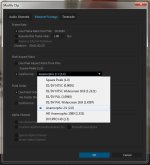
In Premiere, just import your footage as normal, then right click on the clips and choose Modify - Interpret Footage. Choose the Anamorphic 2:1 setting and then OK, and your footage should be scaled appropriately.

Premiere_Anamorphic_Setting.jpg

HTH!

Cheers from Berlin,

Paul :)
 
In Premiere, just import your footage as normal, then right click on the clips and choose Modify - Interpret Footage. Choose the Anamorphic 2:1 setting and then OK, and your footage should be scaled appropriately.

View attachment 100267

HTH!

Cheers from Berlin,

Paul :)

Oh, thanks !
It says 2.1 but n the brackets is (2.0). Does that mean that the correct anamorphic lenses to use would be 2x anamorphics?
 
Oh, thanks !
It says 2.1 but n the brackets is (2.0). Does that mean that the correct anamorphic lenses to use would be 2x anamorphics?

yes. you'll note that it actually says 2:1. expressing it as a ratio. pixels will be scaled twice as wide as they are high.
 
Oh, thanks !
It says 2.1 but n the brackets is (2.0). Does that mean that the correct anamorphic lenses to use would be 2x anamorphics?

Also, the less scientific (or more?) way to do it is to shoot a circular object, import the footage, and use the "Motion" effect in the effects panel, uncheck scale proportionally and then scale the width until the circle is circular again. Then use this as your guide. You can use this method regardless of the ration of your anamorphic.
 
Also, the less scientific (or more?) way to do it is to shoot a circular object, import the footage, and use the "Motion" effect in the effects panel, uncheck scale proportionally and then scale the width until the circle is circular again. Then use this as your guide. You can use this method regardless of the ration of your anamorphic.
At 2x you should just scale the width to 200% (or conversely scale height down 50%), right? No guessing needed. 1.5x with 16x9 source footage would be width at 150%. Or just use the interpret footage, which is far easier and less time consuming, allowing you to hit all the footage at once in your bin rather than one by one/copy&pasting as you bring it into the timeline.
 
At 2x you should just scale the width to 200% (or conversely scale height down 50%), right? No guessing needed. 1.5x with 16x9 source footage would be width at 150%. Or just use the interpret footage, which is far easier and less time consuming, allowing you to hit all the footage at once in your bin rather than one by one/copy&pasting as you bring it into the timeline.

Yes, but depending on the quality of your lens/adapter/setup it may not be quite perfect 2x. It's always been within a percent or two, not noticeable to anyone not paying attention, but I still like to do it that way.
 
Back
Top