GH4 GH4 4K crops....

wwjd

Well-known member
what is the real crop factor for C4K and UHD 4K in the GH4? I've read 2.3 and 2.34? Does anyone actually know? If the image from 1080 is 2x, and C4k is less wide, and UHD is the LEAST wide, wouldn't the crop factor number for UHD be the largest?

I'm making an m43 spread sheet of prime cine lens MM conversions with and without speedbooster.
 
Yes, for UHD crop is the largest. I've read differing numbers about the crop factors as well. Not sure if anyone has done a definitive test.
 
Here's the crop factors compared to a full frame 41.3mm diagonal vs the GH4's 19.85 diagonal for 16:9 video:

-GH4 16x9 1080p: 41.3/19.85 = 2.08x

-GH4 17x9 C4K: 41.3/((4096/4608)*19.85) = 2.34x

-GH4 16x9 UHD: 41.3/((3840/4608)*19.85) = 2.49x

I've done a definitive test and these are the actual correct numbers you should use when trying to get comparable FOV between GH4 filming formats.

Cheers,
Pete
 
Awesome Pete, Thanks!
So, if I use those as multipliers when trying to calulate actual lens MM, that will make it accurate, right?

Inversely, if I DIVIDE by that, it will tell me where to set my zoom lens to actually be for example 50mm. 50 / 2.34 = 21.367... if I set my lens to 21, it equals 50mm, correct?
 
Last edited:
Yes, that is how I've been using the conversion factors.

Now just add using a speedbooster into the equation and the circle of confusion grows :)

hint, just divide by the speedbooster factor of 0.71x again :)

Cheers,
Pete
 
yes! I am making a spreadsheet for with and without speed booster settings to match common "Cine Prime Lens" sizes.
 
I've been working on something similar. Just keep in mind that FF for stills is bigger than a 35mm film frame. So if you're trying to match what a Cine Prime will look like shooting on film, you don't want to use a FF conversion. You can thank the 5DmkII for the fabulous maelstrom of confusion around "actual" lens focal lengths for video.

-DES
 
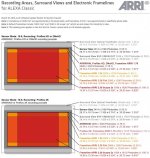
You also need to factor in exactly what super35mm sensor/camera/crop mode are you trying to match to? Every s35mm camera uses a slightly different sized sensor. To make this even more complicated a camera like the ARRI Alexa has many crop shooting modes similar to how the GH4 uses a crop for its 3 different modes. The ARRI just has more. Hollywood uses a lot of these and there is no standard. They are all in the ballpark but because it is just a ballpark it makes little sense to worry about the exact crop factor from the GH4. Unless you know exactly which camera/sensor/mode you are matching to.

ALEXA_Classic_Recording_Areas-Surround_Views_and_Framelines_SUP_9.11-e1409071520814.jpg

Have fun with that one.

There is also a difference from the total pixel amount and the effective pixel amount from every sensor. For example a FF sensor is 36mm wide but the effective size comes out to be exactly 35mm wide after some very funky math. This is exactly the width of good ole 35mm film which is why it can be called FF. Not because the sensor is 36mm wide but once you get to the effective pixels and cut out the garbage on the sides of the sensor you really are getting exactly 35mm. The crop factor you need to compare to is not the 36mm sensor but the effective 35mm portion of the sensor. The little extra outside of that space is only used for calculations and not part of the actual image. Every sensor has a different amount of loss from the effective pixels so we can't just assume the same amount is lost on every camera. Crop modes don't have this loss since they are already cropped. Are we having fun yet?

Many a man has gone insane trying to accurately figure out exact crop factor.
 
You know, I felt in my GUT there was way more to it than I was seeing. And that is fine. In the end, I am ready to settle with "ball parking" and fuzzy logic. And that is okay. Rather settle for: some work on it gets me "close enough", then years of stats and time wasted to never match a slightly moving number. :)
Just kinda want 35mm to MEAN 35mm and not 75mm on my GH4. :) Just getting the real crop factor numbers listed above is great.
I think I'm in the ballpark, so am happy with the help you guys provided here! Thanks again.
 
Yes, that is how I've been using the conversion factors.

Now just add using a speedbooster into the equation and the circle of confusion grows :)

hint, just divide by the speedbooster factor of 0.71x again :)

Cheers,
Pete
You mean multiply, not divide.
 
You know, I felt in my GUT there was way more to it than I was seeing. And that is fine. In the end, I am ready to settle with "ball parking" and fuzzy logic. And that is okay. Rather settle for: some work on it gets me "close enough", then years of stats and time wasted to never match a slightly moving number. :)
Just kinda want 35mm to MEAN 35mm and not 75mm on my GH4. :) Just getting the real crop factor numbers listed above is great.
I think I'm in the ballpark, so am happy with the help you guys provided here! Thanks again.

In my experience none of this really means much. It is more of a placebo effect to make us feel better but in all reality why does it matter? You use the lens that works well for your given shooting situation. It doesn't really matter what that lens is on a FF or s35mm camera. All that matters is how it works for you to get the shot you need.

There are only two situations where crop factor really matters.

1. You absolutely must match the look from another camera on the same project. For example a GH4 and ARRI Alexa are used on the same production and the DP wants to make sure they have the same look and feel. Even if you can figure out the absolute exact crop factor finding a lens to perfectly match another with a different crop factor is highly unlikely. Again you might get close but sometimes the two could be off by a mm or two. The longer the lens the harder it will be to find a match. For example if you want to match a 135mm look on FF you will have a very hard time finding a lens that gives you that exact 135mm look on m43. There is just too much of a gap between focal lengths on longer lenses.

2. VFX match moving where you want to create virtual cameras that perfectly match the real camera setup. I do this with 3D animation in Blender and have a library built of virtual cameras for the crop factors and lens combinations I use. This way I can create 3D environments to scale and dial in the exact aperture used to perfectly match the DOF and FOV of the real world camera. Blender is open source but it has one of the most physically accurate cameras I have ever seen in a 3D package. They even have simulated chromatic aberration to perfectly match a real lens. Even in a heavy VFX shot this isn't always done and many times it is just faked to be good enough.

Outside of these two cases worrying about crop factor doesn't really serve much of a purpose at all other than personal satisfaction.

If you are in fact trying to calculate for s35mm and you are using the SpeedBooster you really don't have to do anything at all. A 35mm lens on a s35mm is 35mm on the GH4 with the SpeedBooster. Give or take a bit for crop variations and which s35mm you are comparing to. If you are trying to compare to FF, why on earth would you do that?
 
You mean multiply, not divide.

no, when we are going backwards with this math, we divide. forward tells you what it REALLY is: multiplying. I am mapping out various cine prime lens BACK to the lenses I have for GH4
 
Last edited:
thomas, I am trying to find the proper settings on my lenses to match cine lenses: 14 35 50 85 135 and some inbetween. it's just for my personal fun (since I cant afford a full set of cine lenses) and for training of knowing what to grab, when, for the look desired.
 
thomas, I am trying to find the proper settings on my lenses to match cine lenses: 14 35 50 85 135 and some inbetween. it's just for my personal fun (since I cant afford a full set of cine lenses) and for training of knowing what to grab, when, for the look desired.


Focal lengths of cine lenses would be exactly the same as the lenses you use now.

The only difference would be the sensor size of the camera the lens is mounted to.

If you truly want your GH4 to emulate what a S35 cine camera would look like, grab a focal reducer like a SpeedBooster.

As a side note... I find that pCAM which is a smart phone app, has a great little focal length match section which can be very helpful matching lenses mounted to different cameras. It also contains a number of other very useful cine tools. It's very well worth the money.

Dave
 
Thanks David, I have the .64XL speed booster and that Zyhongi one at .72 crop. I don't think they return the lens to the actual MM rating on GH4. Say the sigma 18-35mm @ 35mm * 2.34 * .64 = a 52.4mm. If I want 35mm, 35 / 2.34 /.64 = 23.3mm. Set my 18-35mm lens to 23 to see near true 35mm
 
Those SpeedBoosters will get you in the very close ballpark of where a S35 cine sensor camera will be. That was the point I was trying to make.

As noted, if you need an exact measurement use one of the many lens match applications. There are many free ones out there including this one from Abel.... http://www.abelcine.com/fov/
 
thomas, I am trying to find the proper settings on my lenses to match cine lenses: 14 35 50 85 135 and some inbetween. it's just for my personal fun (since I cant afford a full set of cine lenses) and for training of knowing what to grab, when, for the look desired.

I'm not sure if I'm just not reading this right, but matching the focal length of a cine lens is as simple as using a lens with the same focal length. In other words, a 14mm will match a 14mm cine lens, a 35mm will match a 35mm cine lens, and so forth.

For a more concrete example, Panasonic's 14mm pancake lens will give you roughly the same field of view (FOV) on the GH4 as a 14mm cine lens. In the same way, setting Sigma's 18-35mm to 35mm will give you roughly the same FOV as a 35mm cine lens on the GH4.
 
not a cine lens on GH4, but close to the REAL lable on the side: what is the FOV of a 35mm on full frame/s35/etc? just trying to match that.
 
Back
Top