GH2 NO HDMI TO BLACK MAGIC INTENSITY, or what's wrong ¿?

GOODYES

Member
Hi,
New Panasonic DMC-GH2K (from Spain), with brand new mini-hdmi to hdmi, with brand new BM intensity pro and i can't capture.

I buy another mini-hdmi to hdmi cable (2nd one) and nothing.

I try with blackmagic media express, virtual vcr and others and i can't preview or record video from hdmi output of panny GH2.

Last i read on the manual: hdmi out not possible when connected to the computer or print.

What's happen ¿?
 
why use the black magic card to capture? why not just download the footage via a card reader?
 
I Want to capture video from GH2 HDMI to get uncompressed. Record live's from camcorder to computer through intensity pro.
 
Let me see what I can add....most of it speculation but I hope it helps...

Definitely check the other thread...

You need to make sure that you have chosen the correct signal format in the software. i.e 60i or 50i etc. If not it will probably show a blank screen. I have done this with a nano which correctly recognises the signal. Others have successfully captured to hdmi using the intensity so the problem is on your side.

In 720 60p there is no HDMI output. Using the EX tele function - there is no HDMI output. Set the camera to 1080p and the HDMI output to auto.

Bottom line IMHO - at this stage you are probably wasting your time unless you really want to jump through hoops for a slightly sharper picture. The HDMI quality is not as good as the uncompressed captures I have made with other cameras - in other words it does not stand up very well to colour grading as it ought to. I do not know what Panasonic have done to it but there are issues with the quality as far as colour goes. It is however the sharpest picture of all my cams so it may be worth it to capture but not as things stand. You may try to follow the AVI synth thread as well to determine if you wish to do this to every single file you capture.

There is a theory that it is actually a diverted LCD signal that is sent to the HDMI port hence the screen flipping on the LCD and the HDMI output and lack of audio.
 
Anyone with a GH2 and BM intensity can capture ?

I try Settings in soft. and in camera and nothing.

The Media Express capture screen shows "No Remote" on top right corner. I search o internet but no found a solution.
I Uninstall drivers, download last drivers from website, and so on ... and nothing.

Ever the same Black Screen on media express, premiere cs5, virtual vcr, virtualdub.

The related link seems (its unclear for me) for a related to gh2 captures (recorded on camera) as it explain how to use soft to transform for appropiate result. Other posts mention to output the hdmi from gh2 to TV, but i can't find anyone saying he is enable to record/capture online (DDR) within intensity from gh2.

Does any with a GH2 (non Japanese, preferably PAL) do capture direct to disk through intensity pro ?
Whats about the words on GH2 instructions-book-manual "hdmi out not possible when connected to the computer or print" (page 192 in spanish or at the last pages under "TV, PC and Print" ?
 
I know you mean well - I have captured to HDMI and do not think it is worth the hassle. I am not alone in this. The colour is probably 4.2.0 and the fields don't always line up. It looks better than AVCHD but even when you get this to work you may well be disappointed that your footage is not usable. If you want to do landscapes it may be okay but once you get things moving in the shot - things get pretty unpredictable. Good luck anyway....
 
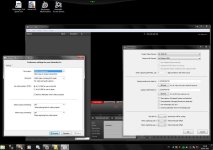
Set the prefs in Media Express like this:


If you're using PAL, I assume you should set Format to HD 1080 50i.


Set the Blackmagic Control Panel like this:


Be sure you're using the latest drivers, 3.9.4.
 
Things seem OK at your computer end. Let's check the camera.
Unplug the HDMI cable from the camera. Verify that you can go into ETC mode.
Plug HDMI cable back into camrea. Now try to go into ETC mode. Can you?
If you can, it means the camera is not recognizing the HDMI cable.
If you can't, it means the camera is recognizing the HDMI cable.
 
Things seem OK at your computer end. Let's check the camera.
Unplug the HDMI cable from the camera. Verify that you can go into ETC mode.
Plug HDMI cable back into camrea. Now try to go into ETC mode. Can you?
If you can, it means the camera is not recognizing the HDMI cable.
If you can't, it means the camera is recognizing the HDMI cable.

Hi, i discover how to access ETC mode (EX. TELE ZOOM (Motion picture menu tab 3))
I follow your steps, and after plugin again i CAN'T set ETC ON ..
 
What do you mean to ETC mode ? How to access ETC mode or where is supposed to be if hdmi is recognized?

Go to the camera menu - Motion Picture - page 3 - EX. TELE CONV.

This is where you can turn it on and off. When ETC is on the camera only uses the central part of the sensor. It's a high resolution magnification. But, it doesn't work when an HDMI cable is plugged into the camera. So, using it is a way to test whether the camera's HDMI output is working properly.
 
Hi, i discover how to access ETC mode (EX. TELE ZOOM (Motion picture menu tab 3))
I follow your steps, and after plugin again i CAN'T set ETC ON ..

Your camera is OK. Your software is OK. It appears the Intensity board is defective. I would return it for a new one.
 
Somewhere else (other forums searching on internet) some (1 or 2 people) saying issues with the hdmi cable.

First i buy the camera with a Hama FullHD hdmi cable (25€) then on the black screen and reading that forums i go to another shop asking for a +- 50€ cable (hig quality) as the other forums have, they ask don't have that kind of super hi-q. cables but they can sell me a litle more height cable, so i buy (the 2nd one)(also around 25€).

Even at the shop, the first cable was tested with other handycam (brand new from the shop) and the cable was able to send hdmi out to the TV, so .. its rare ! (problem is that i don't have a TV with hdmi input now).

Regardless card & win7 pro 64bit config. i also see and follow: http://www.youtube.com/watch?v=A3KdcKztgq0&feature=related
Video where the boy said configuring the intensity is a litle bit of complex (see) (any case he don't mention any camera, but you can see on that video the lot of things you maybe need to do for the card working).

Related to the camera ..
The more strange is the words i read on the manual of the camcorder .. (see my 1st post on this thread)
Also words from last year about the hdmi output for this camera, some said that only available for japanese models or first units.

HI RALPH B
Whats the model of your GH2 ? .. Its European, US or Japanase version ?

TO OTHERS
Any other have a GH2 and can capture realtime to the intensity (via hdmi) ?
I said that beacuse i read a lot of post people talking about, but a fewer (1 or 2) that have the GH2 and capture via intensity (1 is Ralph B, and 2nd i dont remember .. if exists ¿?)
 
Last edited:
I have the US model. Everything works fine.
If you have another computer available, try putting the Intensity board in there.
 
Somewhere else (other forums searching on internet) some (1 or 2 people) saying issues with the hdmi cable.

First i buy the camera with a Hama FullHD hdmi cable (25€) then on the black screen and reading that forums i go to another shop asking for a +- 50€ cable (hig quality) as the other forums have, they ask don't have that kind of super hi-q. cables but they can sell me a litle more height cable, so i buy (the 2nd one)(also around 25€).

Even at the shop, the first cable was tested with other handycam (brand new from the shop) and the cable was able to send hdmi out to the TV, so .. its rare ! (problem is that i don't have a TV with hdmi input now).

Regardless card & win7 pro 64bit config. i also see and follow: http://www.youtube.com/watch?v=A3KdcKztgq0&feature=related
Video where the boy said configuring the intensity is a litle bit of complex (see) (any case he don't mention any camera, but you can see on that video the lot of things you maybe need to do for the card working).

Related to the camera ..
The more strange is the words i read on the manual of the camcorder .. (see my 1st post on this thread)
Also words from last year about the hdmi output for this camera, some said that only available for japanese models or first units.

HI RALPH B
Whats the model of your GH2 ? .. Its European, US or Japanase version ?

TO OTHERS
Any other have a GH2 and can capture realtime to the intensity (via hdmi) ?
I said that beacuse i read a lot of post people talking about, but a fewer (1 or 2) that have the GH2 and capture via intensity (1 is Ralph B, and 2nd i dont remember .. if exists ¿?)

Have you tried re-loading the drivers/firmware on the card (assuming you have the newest) or perhaps rolling back to older driver/firmware to see if that has any effect? Also, dumb question, but you made sure your plugged into the cards input not output right? Tried both?

Also, side note, for any sort of HDMI cable I never pay more then $10 US... nevermind pounds. Unless of course the cable's extremely long.. but anything under 15ft shouldn't cost very much.

http://www.monoprice.com/products/subdepartment.asp?c_id=102&cp_id=10242&cs_id=1024201
 
Last edited:
Reinstalled drivers-firmware update completely.
Right input port. All computer is ok. BUT DONT CAPTURE NOTHING (Black screen)
 
Last edited:
Back
Top