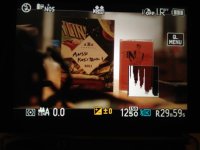
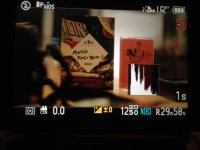
GH2 LCD screen issues

asingfield

Active member
Having issues with the LCD screen. When I press the record button, the screen changes colour..then when I press the button again ( to finish recording) the screen goes back to the original colour. I've read elsewhere on the forum about resetting your "My colours", but it doesn't work. Wondering if anyone else has this problem....
Cheers
:embarasse
 
Yes, indeed. I am having the same problem, though I wouldn't describe it as "changing colour". Rather, the screen gets darker during record. And it's a real darkening, not just a display issue. If you turn on the histogram, you will see it shift when recording starts, and then shift back when recording ends. What's annoying about this is, if you set your exposure properly before you shoot, the recorded picture is going to be darker than what you thought you had.

I believe what's going on is related to what I discovered with the HDMI output. In standby the camera is outputing the digital video standard of 16-235, while in record it's outputing full range 0-255. The curious thing is here it appears to be the reverse!

The mind reels at what Panasonic's engineers were thinking.
 
I see the issue too, fwiw. And others have seen it too -- unfortunately, this thread seems to have died on Jan 1:

http://www.dvxuser.com/V6/showthread.php?232798-Colour-Shift-on-GH2

Some people in that thread suggested it might be a problem with My Picture custom settings...haven't tested it yet myself.

@Ben B: I'm shooting in CMM with exposure set to M.

@ timbook2: The issue can't be anything to do with "Preview" mode, in part because Preview doesn't even work in CMM. Perhaps you should, um, read the manual?

@Ralph B: Very intriguing theory about 16-235 and 0-255. If that's the case, it sounds like the only way this is getting fixed is with a firmware update or hack.
 
Is your camera in Creative Movie mode and set to M exposure for movie mode?

Yes, and I tried it with A, S and P. Same thing. Also tried it with some of the "still" image modes - same thing. I truned Constant Preview on and off - no difference.

As far as I can see, it's just the way this camera is.

If your LCD/viewfinder is NOT changing brightness when you go into record, I would sure like to hear about it.

Also, I repeat, turn on the histogram and watch it as well.
 
I don't know why you think that it must not change.
Firmware changes sensor mode. This is the reason.

I have no doubt that firmware is the cause!

All I'm saying, is it would be nice if the monitor stayed the same all the time.
The monitor's brightness changes about 1/2 stop, so it's not really a big deal.

There are more important things in the world...like pizza! :grin:
 
There are, of course, more important things in the world. But regarding this camera, it's one of the bigger issues. if I'm going to base exposure on what I see on a camera's monitor, it would be nice for it NOT to change after pressing the record button. To me, it seems like a basic principle of camera design -- not something that should have to be fixed by a 3rd party hack. This seems like a bug.

If the manual had an explanation for such a thing maybe I wouldn't feel that way, but as others have noted the manual is poorly written and organized. I've used the Canon 7D and Nikon D7000 and I found those manuals are far more usable and readable.
 
Almost all current manuals are outsourced and are made as cheap as possible.
All Panasonic cameras need special illustrated book.
 
Any updates on the issue?

some say footage is not affected by the change.
but then again others say it is and you can see the change at the beginning of every clip.

i just got the camera and haven't tested this yet. Just realized the viewfinder changes when I press record, every time, in every mode.

A couple people said that going into color mode and switching it to custom helps, but this did not help me. Any fixes or is every gh2 owner just dealing?
 
My new GH2 from Panasonic Facebook EPP connection does not show this issue. My Serial starts with WE1DA. is it possible some cameras have this issue and others don't?
 
Hi,

Just bought a GH2 today and seeing the same issue here. It certainly looks like it's changing the color space.

IMG_2230.jpg IMG_2231.jpg
 
its changing colorspace for this reason: there the live view video that is being outputted.. thats a different processing from the camera's sensor like vitaly says. and theres a different processing when it is recording.

i think this is one of the reason why video looks sharp, sensor probably does a different capture when in live view and while recording.. well thats a theory anyway.

bottomline its different because its in a different mode when not recording and recording.
 
It should be in the same mode though logically. I base my exposure on the histogram and the monitor and if they both change slightly it's a problem. It doesn't sound like there's a solution though. Gotta just be aware of this and compensate.
 
Heres what i did that supports my theoryIn creative mivie mode 24p, without recording swing the cam around, live preview is smooth 60p but once you hit record it goes 24p stuttery and contrastier
 
Oh yes! Definately. I was just curious! I'm trying to setup as accurate way to see the image as I can. I bought a Sony CLM-V55 monitor, I don't think I would've noticed this without that.
 
Back
Top