GH2 + Atomos Ninja?

But the codec is capturing the accurate representation of what the camera is generating. The monitor output is the one that's creating the inaccurate representation.
+1. I saw just little gamma shift and definitely more details in dark when avchd mts was transcoded to dnxhd mov. I don't think the transcoding generated more details out of nothing. The same details were in original mts file. I guess it's mostly due to a media player that optimizes playback on highly compressed format.

BTW the transcoding seems a lot of work, but I walked through each source file clipping in/out and queuing up to Adobe Media Encoder. This selective transcoding & queuing worked out pretty nicely. DNxHD 175 10 bit generated so large file that it actually slowed down the editing process. DNxHD 36 8 bit did just fine. DNxHD 75 or 115 seems good option for hacked GH1.
 
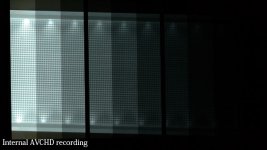
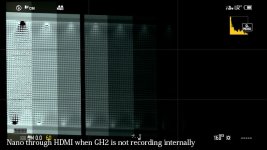
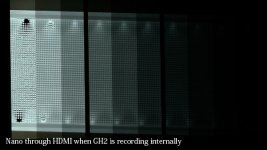
Okay, just tested dynamic range. I pointed the camera at a 17-stop DSC dynamic range chart. This is not an ideal and absolute test yet, as I'm still waiting for one piece of the puzzle, but -- as a strict comparison between what the monitor gives you, vs. what the native codec gives you, it should be spot-on.

Result is identical, as far as how many stops the camera could see. Toggling back and forth with the waveform on, there's just no difference. I even overexposed in the brightest chip to ensure that we would see into the deepest shades possible. No difference.

My conclusion is there is no dynamic range gains to be had from using an external recorder - at least when using it during camera record mode.
 
Further verified -- using the GH2 in non-rec mode results in a massive loss of available dynamic range. You really don't ever want to try to record the GH2's output at all, unless the GH2 is simultaneously recording.

Interesting additional observation -- the luminance is represented accurately on the monitor output. The dynamic range and luminance/brightness are correct. It's just the color that's pooched.

Here are some frame grabs... each step is one stop. Just count the bars you can discern to see the comparative dynamic range.
Note: the black in the leftmost bar is from the white highlight toggling on and off. I left it in this frame so I could be certain when I was comparing them that I was looking at different pix...
DynRng-Nano-Not-Recording.jpgDynRng-Nano-Recording.jpgDynRng-AVCHD-Recording.jpg
pencil.png
 
You do realize this makes no sense whatsoever though, right? In fact, it's pretty much diametrically opposed to anything and everything to do with how a codec would be designed.

A codec is designed to faithfully capture and reproduce an image, as best it can. To think that a codec is oversaturating the colors is just backwards thinking. There are no color saturation parameters in a codec, it just captures the digital data and stores it.

In my testing I came to the absolute conclusion that the codec is storing the accurate image, and the monitor output is pale, flat, muted and blech, as compared to what the camera is generating. Now, if you happen to like the monitor output, that's a whole different question, and feel free to enjoy whichever you prefer.

But the codec is capturing the accurate representation of what the camera is generating. The monitor output is the one that's creating the inaccurate representation.

You may be right in what you said Barry but if I really thought this made no sense I wouldn't have suggested it , right? :)

In all seriousness though I don't necessarily mean the codec but I believe the problem might be going on somewhere in the camera's digital signal processor. I understand that a codec is supposed to "faithfully" represent what the camera is generating and not "designed" to affect color but what it's generating in the DSP could be (unless I am misunderstanding how an in-cam DSP works). Before I'm told that this is also "backwards thinking (I admit I'm ignorant on this whole thing)" I'll say this...I think both the onboard recording and HDMI output are messed up (in a way). I played with the sample (side by side) footage and seen issues in the AVCHD codec that I would have otherwise ignored. DR was WAY off. Image was "smoothed over" in dark areas because of difficulty in resolving detail. The "Blocking" on flat surfaces was visually loud. The fine pattern noise of the HDMI capture (which I personally liked) was absent on the AVCHD generated side...as if the image went through a single pass of NR.

EDIT: Maybe all of this will be fixed with a higher bit rate hack.

So you think the colors from the HDMI out looks "blech" just because it doesn't represent what the captured footage looks like? Or does it, by itself" look terrible? Not being able to monitor that seems like it could be a pain. But, I dunno....as much as most of us have been striving for the flatest image possible in terms of saturation, contrast and overall dynamic range (which I see from your latest test has not benefited at all from HDMI capture) I don't necessarily see this as a bad thing. That's just me though. YMMV

How does Panasonic cameras get their....Pana Mojo?" Would it be fair to assume that these two cameras, with two totally different sensors, can be "color tuned" to match one another? If they can be color tuned to match one another then I can only deduce that what we are getting from our captured footage vs what we are seeing in "Live View" can be "processed" seperatley????? (I'm just seeking some knowledge here)

... when it comes to a camera's analog signal --> to ADC --> to DSP ---> to DAC ---> to analog signal....where does the "Live View" come into play? Before, after or during signal processing? I'm thinking "after" simply because of its many issues No wonder folks assume that it's crippled on purpose. But as you say...some corners had to be cut in an $899 product.


Ok, so, maybe its time to do more scientifics test on dynamic range, color saturation, channles noise between onboard codec and hdmi output (its impossible to match via CC? if do maybe is worse the HDMI output). Maybe its innacurate, but its good in other aspects...

Personally, from the sample video I mentioned about earlier I think it (the HDMI capture) is just a desaturated representation of the captured footage. It's not like the blues look magenta or the reds look orange etc.(in others words the colors to me are not way way off) Outside of what seems to be a purposely crippled color scheme (just an opinion of many folks here) and funky cadence I think the HDMI output looks great and can certainly be color corrected "back to life." But.....what do I know? I need a Ninja. :)
 
Last edited:
You may be right in what you said Barry but if I really thought this made no sense I wouldn't have suggested it , right? :)
Doh! Sorry, that did come out goofier than I intended it. Could have phrased it better.

I'll say this...I think both the onboard recording and HDMI output are messed up (in a way). I played with the sample (side by side) footage and seen issues in the AVCHD codec that I would have otherwise ignored. DR was WAY off. Image was "smoothed over" in dark areas because of difficulty in resolving detail. The "Blocking" on flat surfaces was visually loud. The fine pattern noise of the HDMI capture (which I personally liked) was absent on the AVCHD generated side...as if the image went through a single pass of NR.
That's entirely possible. The codec isn't great. It's better than the GH1 by a huge stretch, but it's no match for NXCAM or AVCCAM. So, yeah, the shadows probably get smushed out and blocked up and all that stuff. Look at the difference in the GH1 vs. the GH13, it definitely made a big difference in every aspect, so yes, I'd suspect that the codec is likely not really up to the task. Although I think the codec is about on par with the GH13 when using "reliable" settings that never locked up, so ... it's not that far off.

EDIT: Maybe all of this will be fixed with a higher bit rate hack.
Entirely possible, perhaps even probable.

So you think the colors from the HDMI out looks "blech" just because it doesn't represent what the captured footage looks like?
Well, yeah. It's "off". It's not accurate or right.

Or does it, by itself" look terrible?
No, not necessarily. I mean, like I said before -- if you were never going to use the native footage and never going to try to intercut, then maybe you'd be happy with what the monitor out is providing. And in fact at least the monitor output looks like the Nano recording, so when using the native codec you can't really rely on the monitor, but when using the Nano/Ninja etc. you probably could.

Not being able to monitor that seems like it could be a pain.
It is. That was perhaps the most frustrating discovery I've ever had with the GH2, and made me want to kick it. But, after I settled down and put it back in context, I'm back in love with it.

But, I dunno....as much as most of us have been striving for the flatest image possible in terms of saturation, contrast and overall dynamic range (which I see from your latest test has not benefited at all from HDMI capture) I don't necessarily see this as a bad thing. That's just me though. YMMV
No, that's a perfectly valid way to look at it. If what the monitor is giving you is what you wanted anyway, then this doesn't have to be a dealbreaker. That's what I tried to say in the memo before. If someone is counting on the monitor to accurately represent the internal footage recording, they are screwed. It is just plain faulty. But if all you want to record is what the monitor output is anyway, then it might be fine. As long as you're willing to work around the double-pulldown removal and chroma fixing and always recording internally simultaneously and all the other restrictions, then you could probably get a really nice looking image out of it.

Would it be fair to assume that these two cameras, with two totally different sensors, can be "color tuned" to match one another?
I presume you mean AF100 and GH2? That's what I was trying to do, and it was enormously frustrating, and then I found out that it was the live monitor that was screwing me over. So in the end I got them fairly close, but not truly matching.

... when it comes to a camera's analog signal --> to ADC --> to DSP ---> to DAC ---> to analog signal....where does the "Live View" come into play? Before, after or during signal processing? I'm thinking "after" simply because of its many issues No wonder folks assume that it's crippled on purpose. But as you say...some corners had to be cut in an $899 product.
It should be after everything, but before compression. It's after all processing because you can see the effects of changing the color saturation or the sharpness or contrast right on the monitor (well, you can see that things changed; you can't see a true representation of it though). So in a normal system it would be split off after all processing -- there should be one final frame of uncompressed processed digital data, and that frame gets fed to the codec and to the monitor. As to whether the GH2 does it that way or not, I don't know...

And as far as "crippling" goes -- I just plain reject that notion. Is a Toyota Corolla "crippled" because it has a 130 horsepower engine instead of the 300hp of the Avalon? Of course not. One is a $15,000 car and it comes with a little four-banger. The other is a $40,000 car that comes with a big ol' V6. It's not that the Corolla is "crippled" -- it's that hey, that's what fifteen grand gets you. That's what you bought. That's what that car is.

And with the GH2, it's the same way. They have crammed a heck of a lot of really good stuff in that tiny little body! And they gave it what they could, to fit the size requirements and the price point and the power draw (remember a GH2's battery is about 1/10th the size of an AF100 battery). So it has a smaller engine -- I mean, duh, right? Of course it hasn't got all the horsepower that the bigger model does. That's why it costs less. It's not that it's "crippled". To me, it being "crippled" would be if it was all the exact same hardware and they just disabled features. I sincerely don't think that's the case here. It has what it has, and they made it be the best it could be for $899.


Personally, from the sample video I mentioned about earlier I think it (the HDMI capture) is just a desaturated representation of the captured footage. It's not like the blues look magenta or the reds look orange etc.(in others words the colors to me are not way way off) Outside of what seems to be a purposely crippled color scheme (just an opinion of many folks here) and funky cadence I think the HDMI output looks great and can certainly be color corrected "back to life." But.....what do I know? I need a Ninja. :)
I think in general you're probably right -- and no, I don't think it's "purposely crippled". It just is what it is. To me the biggest problem with it is that jacked-up sawtooth chroma issue, but it looks like Ralph & co. can fix that.

I think it all comes down to this: if you decide to record externally, you're going to be giving up a lot of features (no ETC mode, no 720p, no "zebras", no sync'd sound recording) and inherit a lot of workflow hassles (having to strip out the 60.00i pulldown, then having to strip out the 3:2 pulldown, then having to reconstruct the chroma, then having to manually sync up all the audio), all to gain one and only one benefit - fewer compression artifacts. You're not going to be getting 10 bit, because the camera doesn't deliver that. You're not going to be getting 4:2:2, because the camera doesn't deliver that. You're not going to be getting increased dynamic range, or even accurate color as per the onboard recording. You will get entirely and solely one benefit: fewer compression artifacts.

If that's worth it to you, full steam ahead. If that's more trouble than it's worth, then you saved yourself the cost of an external recorder and all the various post workflow issues. Whichever way you decide to go is up to you, no worries at all, I'm just trying to get to the bottom of it so people know exactly what they're getting into.
 
+1 Yup, I love the way Barry puts it out there in black and white. Literally. lol But yeah this compelling evidence that it's not worth the effort involved for the very small gain. Well, I wouldn't even call it a gain. Thanks for testing Barry, you saved a lot of people a lot of time and money.
 
I think it all comes down to this: if you decide to record externally, you're going to be giving up a lot of features (no ETC mode, no 720p, no "zebras", no sync'd sound recording) and inherit a lot of workflow hassles (having to strip out the 60.00i pulldown, then having to strip out the 3:2 pulldown, then having to reconstruct the chroma, then having to manually sync up all the audio), all to gain one and only one benefit - fewer compression artifacts.

And that's a HUGE benefit! Plus, you also gain increased resolution - the fine detail and texture is extraordinary through the HDMI.

You make it out that fixing all these problems is such an ordeal - it's not. (well, it was for me creating the Avisynth script, but not for the end user). I just posted an Advanced script which fixes EVERYTHING in one fell swoop, including audio.

The only issue for the enduser is taking the time to install the software and getting familiar with it. But after that, it's a total no-brainer, automated process.
 
And that's a HUGE benefit!
I'm not minimizing the benefit, I'm narrowing down the list to what actually is gained. If people didn't know any better, they might think that using a 10-bit 4:2:2 Ninja with a GH2 means that they're getting 10-bit 4:2:2 recordings, but they're not. I think any potential user should know about that before spending $1,000 on an external recorder that may not give them what they were (incorrectly) expecting.

The codec in the GH2 isn't great. It can definitely be improved upon. And an external recorder provides a significant benefit in that aspect. It is up to each individual to decide how much that benefit is worth to them.

Plus, you also gain increased resolution - the fine detail and texture is extraordinary through the HDMI.
I think that's another manifestation of compression artifacts though. I can see why you'd spell it out separately.

You make it out that fixing all these problems is such an ordeal - it's not. (well, it was for me creating the Avisynth script, but not for the end user). I just posted an Advanced script which fixes EVERYTHING in one fell swoop, including audio.
I'm not trying to make it sound like anything. I'm pointing out the complications that exist. The fact that you have created a script to fix all that, and done so for free, is absolutely awesome and deserving of applause. Thanks very much for contributing so much effort to help the users! It would be frickin' amazing if Atomos could license it from you and build it into a future version of the Ninja (although I think it's simply not possible with the existing hardware; Dave Shapton said that they can't do 2:3 pulldown removal as-is with the existing hardware, that's one of the things the Samurai could do and a reason why the Samurai costs more).

The only issue for the enduser is taking the time to install the software and getting familiar with it. But after that, it's a total no-brainer, automated process.
To run that software, yes. They still have the complications of no audio, of no 720p mode, of no ETC, of not being able to use the zebras, and of having to watch out that they don't turn the LCD around or upside down. Those are things that can't be fixed.

Bottom line -- life is tradeoffs. If you find that the lessened compression artifacts is worth giving up the features mentioned and a thousand bucks for a Ninja, then go for it. All I'm trying to do is spell out what grass exists on each side of the fence, so that people can informedly choose which side of the fence they want to go to. There are absolutely benefits to going with the external recorder and AVISynth script approach -- and there are drawbacks to it. There are absolutely benefits to just going with the internal recording and not bothering with anything else -- and there are drawbacks to that. There is no one overall absolute "right" answer -- there is only a choice to be made by the end user. And as long as they have both sides of the story, they're empowered to then make that choice.
 
I'd hate to give up working with a proper monitor that has false color mode, crop marks, etc. because the HMDI port on the GH2 is being used by the Ninja. That's the only thing to stop me from getting a Ninja for my GH2. Would be amazing if the Ninja could loop out to an external HDMI monitor.

Another option is to use a monitor that has loop-through. Anyone happen to know if the new HDMI loop-through Marshall monitors will send a out signal that the Ninja can record reliably? I would hope that the loop-through process doesn't introduce some kind of signal instability or device to device communication issues.
 
Last edited:
There is no one overall absolute "right" answer -- there is only a choice to be made by the end user. And as long as they have both sides of the story, they're empowered to then make that choice.

Of course, and that's why we're all here.

The only thing I want to point out is you keep mentioning there is no audio, and the user has to manually sync it up in post. Not true! Just about every HDMI capture device has analog audio inputs. Rather than feeding the mic into the camera, connect it into the HDMI capture device and record audio along with the picture. The GH2 introduces a slight delay to the picture when it sends it out the HDMI, but that delay is corrected when you run the script.

So, after running the script not only have you removed the 3:2 pulldown, removed the duplicate fields, reconstructed any missing frames, fixed the chroma, you also have frame accurate audio, ready for editing. And all you have to do is push a button!

If you haven't done so already, check out the latest posts in the Avisynth thread where I describe the advanced script in detail.
 
I'd hate to give up working with a proper monitor that has false color mode, crop marks, etc. because the HMDI port on the GH2 is being used by the Ninja. That's the only thing to stop me from getting a Ninja for my GH2.

I hear you, and would add peaking into the mix. There is hope however. These are all features that can be added into the Ninja via firmware, and Atomos has stated that they are going to issue frequent firmware updates. The Ninja is a new device, so we can't expect immediate action, but send them an email and let them know what features you would like.
 
Is the HDMI output signal is indeed a pristine uncompressed signal or is it an inferior signal than the one that is later compressed inside the camera?
If it is capable of pushing out an uncompromised pure signal, there may be other recorders out there (and more to come) that may take advantage of it.
I was just about ready to pull the trigger on the Ninja for my GH2 when I read this post. I am now, at best, on the fence.
 
Last edited:
Is the HDMI output signal is indeed a pristine uncompressed signal or is it an inferior signal than the one that is later compressed inside the camera?
If it is capable of pushing out an uncompromised pure signal, there may be other recorders out there (and more to come) that may take advantage of it.
I was just about ready to pull the trigger on the Ninja for my GH2 when I read this post. I am now, at best, on the fence.

If you record the HDMI signal from the GH2, you will need to process it in a computer to remove the 3:2 pulldown and other issues. See this thread for details.
http://www.dvxuser.com/V6/showthread.php?237584-HDMI-Capture-Problem-SOLVED-AviSynth-RULES!

All of these issues originate in the GH2, not the Ninja. You will encounter the same thing no matter what HDMI capture device you use.

If you are willing to take the time to install Avisynth and related software and learn to use it, you will be rewarded with images that are superior to what is recorded in camera.
 
I hear you, and would add peaking into the mix. There is hope however. These are all features that can be added into the Ninja via firmware, and Atomos has stated that they are going to issue frequent firmware updates. The Ninja is a new device, so we can't expect immediate action, but send them an email and let them know what features you would like.
But I don't get it..... Isn't this something that can be solved by utlizing an HDMI splitter?

By the way Ralph, (just a suggestion) why don't you shoot some nice pristine video on the Atmos recorder for all of us to sample (with people, places and things etc.) in a new thread. Put it on Vimeo and allow it to download (not a pro res video but one at around 10 mbps or so). Let folks see the video and your script in action so that they can judge for themselves how they want to proceed.
 
Last edited:
But I don't get it..... Isn't this something that can be solved by utlizing an HDMI splitter?

By the way Ralph, (just a suggestion) why don't you shoot some nice pristine video on the Atmos recorder for all of us to sample (with people, places and things etc.) in a new thread. Put it on Vimeo and allow it to download (not a pro res video but one at around 10 mbps or so). Let folks see the video and your script in action so that they can judge for themselves how they want to proceed.

+
 
But I don't get it..... Isn't this something that can be solved by utlizing an HDMI splitter?

Sure, but wouldn't it be nicer if it could all be done within the Ninja? And from what I understand, there's really no reason why it can't.

By the way Ralph, (just a suggestion) why don't you shoot some nice pristine video on the Atmos recorder for all of us to sample (with people, places and things etc.) in a new thread. Put it on Vimeo and allow it to download (not a pro res video but one at around 10 mbps or so). Let folks see the video and your script in action so that they can judge for themselves how they want to proceed.

I would love to, except I don't own a Ninja! I'm still doing my work with the Blackmagic Intensity card, tethered to my desktop machine.
 
Back
Top