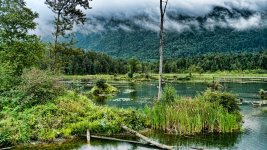
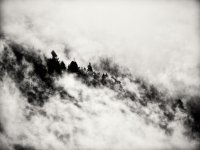
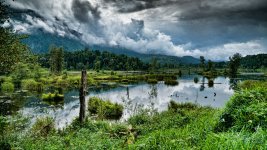
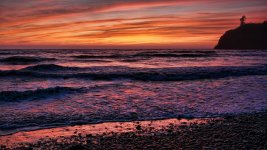
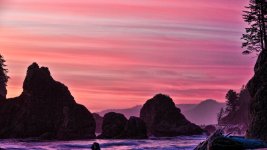
Gh1 Stills Image

looks awesome, how the hell did you do that?
I guess, that kind of editing should be very good with the GH1

The GH1 has an HDR option. It allows you to take a series of photographs at different exposures. It is then combined into one image to make an HDR image. After that I tone map it and tweak it to the style I like. The GH1 is a great camera. :thumbup:
 
yes, Nitsuj I would also LOVE to know how you did that? please tell or link a tutorial? :) :)

There are a lot of steps but basically you take the images which are 3 or more (I used 7 images on that one) and merge them as an HDR in Photoshop. After your tweaking there you save the hdr and then open it up in tone mapping software. I use Photomatix. You do some more tweaking there along with your tone mapping. Then save your tone mapped image. I use Adobe Bridge in between all of this. I open it in Bridge and do some fine tuning before I bring it over to Photoshop for some more fine tuning and then your done. :beer:
 
I like the GH1 a lot for stills. They have a different feel from the other DSLRs I've used (Nikon D50 & D90, Canon 5D MKII) but not bad. I especially appreciate that the GH1 can meter with my old manual Nikon lenses while my D90 can't! Love the multiple aspect ratios too - stills in 16x9 is really fun and very useful for location scouting.

Here's a few random snaps with the GH1 (graded with ACR):

3854346720_a932239ae0_b.jpg


3902170243_c8853332d1_b.jpg


3908549304_bf9c8ce0ca_b.jpg


3908574324_03d66ce2aa_b.jpg
 
Last edited:
There are a lot of steps but basically you take the images which are 3 or more (I used 7 images on that one) and merge them as an HDR in Photoshop. After your tweaking there you save the hdr and then open it up in tone mapping software. I use Photomatix. You do some more tweaking there along with your tone mapping. Then save your tone mapped image. I use Adobe Bridge in between all of this. I open it in Bridge and do some fine tuning before I bring it over to Photoshop for some more fine tuning and then your done. :beer:

I was trying to do this with some shots I got, pretty backlit (sunset) and all I get is a multicolored image that has severe gradient banding emenating from the light sources. I tried pulling some photos out and adjusting exposure but then it doesn't give much dynamic range. Help?
 
here's a few with different lenses (they're all very amateurish) just fwiw.

here's a couple I quickly snapped of my 2 kids... lightly (and quickly) graded in LR.
1252644333.jpg

nikon 50mm f1.8 everything manual
and
1252644369.jpg

panaleica 25mm f1.4 manual except for focus (man it's nice to have a prime with autofocus on the GH1!)

and a bit of greenery... untouched, straight out of the cam.
1252644657.jpg

olympus fisheye 8mm f3.5
and
1252645174.jpg

same fisheye lens but in macro (this one is first frame of video, so I was just a smidge too close and out of focus right at the head of the shot - the macro fisheye in video is a lot of fun!)


1252644810.jpg

panasonic 14-140 kit lens

and finally another kit lens one, B&W in LR.
1252645328.jpg


You can tweak the GH1 RAWs in LightRoom, as of LightRoom 2.4 with camera raw 5.4, but I find that you can already push the jpegs a bit without running into too many issues (up to a point of course, it is still just jpeg...)
 
I was trying to do this with some shots I got, pretty backlit (sunset) and all I get is a multicolored image that has severe gradient banding emenating from the light sources. I tried pulling some photos out and adjusting exposure but then it doesn't give much dynamic range. Help?

My best guess is it had movement in the shot. Movement will do that sometimes with highlights. It's best to use a tripod. Also the exposure may have been too high to start with. Try underexposing before starting the series. I have gotten what you talk about but found it was usually movement or exposure that is causing it. Keep practicing. :thumbup:
 
My best guess is it had movement in the shot. Movement will do that sometimes with highlights. It's best to use a tripod. Also the exposure may have been too high to start with. Try underexposing before starting the series. I have gotten what you talk about but found it was usually movement or exposure that is causing it. Keep practicing. :thumbup:


Oh hahaha...I took them in the wrong order and didn't relabel so it was trying to combine them high to low instead of low to high (brighter exposures first)...I just renamed and it's working a lot better now....or maybe I changed something else without thinking? Would this ever really have an effect on it?

When I did mine I just used aperture and then eventually an ND to really get the sky (factoring in how much it was cutting to keep it continuous.) I wasn't using the kit lens so I don't think the HDR feature would have worked...is this an ok way to do it or should I be adjusting shutter or something more linear?
 
Are you guys noticing a lot of banding in your still shots? I am seeing it much more with the GH1 than my old G1.
 
Some great shots in this thread, makes a nice change from the usual mud bollocks

Nitsuj, loved your HDR, would make a great stylised look for a film if we could get exposure bracketing at 24/25p ;-)

What are other mac users here using for RAW processing?
 
Spent the morning at a friend's shop, here are some stills. GH1/Konica M 50mm/1.2, the first ones are ISO 800, the last two are 1600.

3912367571_a0011454ce_o.jpg


3913151348_6445ee9b66_o.jpg


3912364871_11df3c4b71_o.jpg


3912366445_772cb03538_o.jpg


3913150014_413525f58b_o.jpg
 
Back
Top