GF1 testing and footage goes HERE

Am I the only one who can't seem to get an increase in AVCHD bitrate? I have been able to beef up MJPEG like crazy, but the suggested (44Mbit) settings in Ptool yield the exact same bitrate as the FHD/SH default setting. Any idea what I could be doing wrong?

Using PTool v3.04d with GF1 1.22 firmware as base.
 
You're not doing anything wrong, per se. But if you've done the firmware modification properly, you will only see increases in bit rate during scenes of extreme detail and motion. Grass on a lawn moving in the breeze on a bright summer day, etc. Also, be aware that the AVCHD codec is variable, not constant, so it stays low for static shots that don't change much from frame to frame, only spiking up near max when the scene has enough detail and movement to push the encoder. Monitoring the bit rate of my AVCHD clips with Toast Video Player (Mac) has been very revealing, as even with the latest and greatest GH/F13 hacks, the SH bit rate stays pretty close to stock most of the time, even shooting relatively detailed scenery. I only see spikes to the new max bit rate during moments of extreme detail and movement, just as a high-efficiency codec is supposed to do.

I think there is a general misunderstanding of the hack and what it brings to the table. Modding the firmware to raise AVCHD bit rate doesn't equate to a heightened level of video quality at all times, even if you're just shooting a static scene. Rather, the mod simply makes more data available on a momentary basis for those brief moments which need it.

When I first learned about the hack and applied it to my GF1, I expected everything to look better, like I was going from compressed VGA to uncompressed HD. It doesn't work that way. But the hack does significantly improve the image quality of scenes that would have starved the stock bit rate and resulted in unpleasant visual artifacts.

Am I the only one who can't seem to get an increase in AVCHD bitrate? I have been able to beef up MJPEG like crazy, but the suggested (44Mbit) settings in Ptool yield the exact same bitrate as the FHD/SH default setting. Any idea what I could be doing wrong?

Using PTool v3.04d with GF1 1.22 firmware as base.
 
thanks shaveblog, that's very clear and easy to understand

it seems i am getting similar results with the mjpeg 400,10 settings. i am testing them to hell and back, and although the top bitrates (during clips of high detail) are 100-107mbits, the average stuff i shoot (long lens nature, so lots of blurred (actually, pleasant bokeh lol) backgrounds) seems to be around 40-50mbits.

till now i have been trying to increase these lower figures to record at a higher level, 70-80mbits, but what i am wondering now is how the real DVCPRO HD codec handles these lower detailed clips. i shall test footage shot with DVCPRO HD codec and post my results
 
Last edited:
Hi everyone, I've had the GF1 for a while but I only tried the firmware hack recently. The increase in image quality is astounding, congratulations to the developers and testers for turning the GF1 into an awesome shooting platform :beer:

I'm currently using these settings for 720p MJPEG without any problems:
422 sampling on
e1q 300 e1t 24
e2q 280 e2t 24
e3q 260 e3t 24
e4q 240 e1t 24

Usual bitrates I've seen are around 65 mbit/s.

On camera, shooting in P(Camera) mode with Shutter priority, i.Exposure turned off, ISO set manually, manual or autofocus. I'm using the 20/1.7 pancake with a stock Panasonic 8GB Class 4 card that came with the camera. It could be that the card is faster than it's labelled.

Previously I tried 1080p MJPEG but I kept getting a write error even though the maximum bitrate was 49 mbit/s. Too bad high bitrate MJPEG movies can't be played back in the camera itself.
 
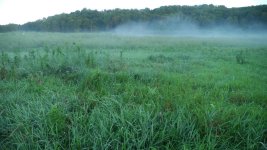
Well, the "C" settings crash a SanDisk Class 10 card when you try and film scenes like this.

Going to try the "B" settings and see if I can shoot more than a few seconds without crashing the camera.
 

Attachments

  • Prairie_C.jpg
    Prairie_C.jpg
    112.1 KB · Views: 0
for all those in europe, hopefully my second gf1 body arrives next week, so i shall test it with the hack and let everyone know if it still works.

my question is this: i cannot believe that all the shops in europe have sold off all their stock, and there hasn't been recall with every shop returning the cameras to panasonic, so how can panasonic change the firmware? it is not possible. i cant imagine most shop owners here in spain, trying to upgrade the firmware for panasonic themselves, that would be a disaster lol

plus, surely if these cameras are made in japan, or china, they would have to be imported in the thousands, and then sit in a warehouse somewhere locally. again can you imagine some poor guy going through every box, unpacking the camera, updating the 'hackproof' panasonic firmware, packing the camera carefully back into the box, all without damaging either the camera, the box, or losing any of the parts. i dont know about japan, but that ain't gonna happen in spain lol

'please don't feed the trolls' :)
 
Guys, there is no such thing as hackless GF1s. A friend bought one on Amazon last week, fresh off the boat, hacked in 30 secs. If you read the simple instructions, then read them again, out loud so they stick, you will be successful. Remember, the first time you create the hack firmware, you need to name it one version up from the firmware in your camera. So, if you've got GF1__122.bin, you name yours GF1__123.bin. And the first time you hack, you tick the very first box in Ptool. Thereafter, when you make new hack firmwares to load, you keep naming them 123 but you leave the first Ptool box unticked and just tick the 2nd box ( I think i have that right, I'm away from my desktop ).
 
Purchased 2 more GF1s and they both arrived today, one was sent brand new from england and the other bought here in shop in barcelona, spain. Both i had to wait for new stock to arrive, the shops had none in stock when i ordered.

They both came with firmware 1.1 and hacked no problemo.

:) On a side note maybe this will start a more ethical revolution of buying from smaller mom and pop local dealers instead of the huge online stores. which do you prefer, saving yourselves 10 percent or getting a hackable camera :)
 
this was quoted from vitaliy from another thread. why dont we GF1ers push things forward and get back to supplying test info.

Panasonic made much more than simple blocking.
They successfully blocked most real development help.
As I no longer see any useful systematic tests made using new available patches.
All I see is collecting of serial numbers and pointless discussion.

swamp the site with test info:Drogar-BigGrin(DBG)

in my previous tests, you'll remember that i found out that there is no difference when doing 100mbit if you set the q/t values to different numbers or to the same number, as in the '400 10' settings. with or without different numbers, we are all getting the write speed error the first time, and then not again till you switch the camera off.

so i use the same numbers for all Q/T because it is easy to remember and simple for other people to use.

so to try to achieve a stable codec at 100 mbits 4:2:2:, i have worked my way from '200 5' (which is the highest codec stable on my card, recording 50 mbits on gf1) up to '450 50' , but with these higher than 50mbit settings always i get the write error.

however, i am trying out a slight variation on these now, with the q/t numbers inclining, not declining which is the normal way people are doing it, and so far
the codec is stable.

i shall post the settings and results as soon as i have something conclusive :2vrolijk_08:
here is an example of what i mean. not the current settings i am using, but similar in structure.
q 380
t 10
q 390
t 15
q 400
t 20
q 380
t 20
 
I've been reading and testing as much as I can and currently I have been able to achieve a 90mbit file all the way to 2gb limit (1.92 actually) in 422 on a Delkin class 6 card and it looks fantastic but the next clip I try and I do get another full 2gb limit is now only 52mbit and then the next only 39 mbit. From what I can understand that the camera records a variable bit rate but determines said bit rate in the first several seconds of the recording.

My questions are as follows:

-First, am I correct in my understanding about the veriable bit rate and the first several seconds determining this bit rate for the clip?

-Second, is there any way to lock this bit rate so its always high even if its not 90mbits but say 50 mbits?

-Third, Am I doing something wrong in the in the hack?

-Forth,
well I'll save that for later.

Thanks for all the help and great work on this everyone. Its why I sold my 7D and I've been very happy about that, now we just need 60fps for slow mo.
 
Hi guys, I did read much of this thread here and there but didn't find exactly what I was looking for and I need to buy asap so could someone please help me out and answer these questions? Thanks:

1) Does the hack give manual control over aperture, iso, and shutter speed when in video mode and is it easy to do on the fly if so?

2) Can you still leave it in auto even after you have the hack and just have the high bitrate when you are fooling around and then switch it to full manual for more serious stuff?

3) Still no 24p? And is quicktime 30p what everyone here is using?

4) How does it compare to the gh1?

5) WHERE CAN I BUY ONE!??!?!

I am probably going to buy a used one but you guys seem to be having luck ordering them... how? How do you find the places, do you just look for small stores? And can you find ones with US warranties or do you just not bother since you are voiding the warranty anyways?

Thanks. Please help!
 
Looking at the new Amazon deal today for the GF1 and 20mm ($674), are these units likely to be too new to be hacked. I have two GH1's and want a GF1 to shoot video at some concerts soon where the GH1 will look a bit too "pro".
 
I've switched to Sony NEX and can't afford to keep both the GF1 and the NEX-5 (and all their lenses). I'll be selling my hacked GF1. It's in good condition, and I will include a C-mount with the excellent Pentax 25mm f/1.4. You can see some of my pics at http://sumitsphotos.tumblr.com (all of which is from the GF1).

I just found I wasn't using the video capabilities often enough as I'm very busy with other work. The NEX has better low-light performance, which is important to me. I actually do much prefer the Panasonic's color quality, which I'll miss.
 
@gambaphoto - the AVCHD codec is adaptive. The hack allows setting the upper limit. So the codec is constantly analyzing the scene (not just the first few seconds). The less detail and information the lower the bit rate needed to record it all. Higher bitrate will record more detail before things become mud from compression. For example, if you set your hacked bitrate to 40mbps then your video will use whatever rate is necessary UP TO 40mbps. There would be no reason to want your whole clip to record at 40 if the scene didn't warrant it. Your bit rate will be variable. In your question, locking it to 90 would only give you a bigger file, not a better image.
 
@lacounty, Thanks for clearing things up. I sorry I forgot to mention that I'm using the mpeg video and not the AVCHD, does that make any difference or is it the same theory for the variable bit rate?
 
Using the lpowell "Reliable In-Camera Playback Patch" with the latest version of ptool applied to the GF1, I'm getting 33.6 Mbps with mjpeg at 30 fps and 23.1 with AVCHD at 23.975 fps, as measured by MediaInfo straight out of the camera. Both on rather windless grass and trees in weak sunshine.
 
Guys, please answer this: How is the onboard mic? I need to use this camera for a project which requires a tiny camera that is high quality. I also do not want to record seperately onto my zoom for this particular project. Since I will also have a gh1, I want to get a gf1, not an epl1 which has the external mic. But I am very worried about the audio capabilites. What to do? How does it sound? How about for just pointing the camera at yourself and talking?

Thanks. Can anyone make a test or point me to a video of it's audio?
 
Back
Top