GH2 Getting the best image out of my GH2?

DanielRutter

Active member
Hey guys;

So for the last few months I've been filming various live performances, weddings and short films with my GH2. I have for the most part been happy with my purchase of this camera and its image quality, but I still feel I'm not using it to its full potential.

I've seen videos from other users here and other forums pushing the GH2 in dynamic range, and image quality. I know I can install a high bitrate hack (and I have... I'm currently testing "Moon") but my problem seems to be in the dynamic range department. I can expose well for subjects/talent, but I manage to get blown highlights and blown out skys.

For weddings, I'd really like to be able to expose for the face and dress, whilst keeping a decent exposure on everything else. Recently I filmed two outdoor weddings in which I had no choice but to blow highlights and ruin a perfectly blue sky just to expose for details in the dress and the bride & grooms face. Examples here & here (The close up shot on the grooms side is the GH2, the other side is the LX7)

Do you have any tips for someone at his wits end? I could use help here. I won't be upgrading to another camera any time soon, no matter how tempting the BMPCC is.
 
If you're shooting outside, reflectors. That will help equalize the exposure on the subject and background to help avoid blown out highlights and backgrounds.


Check out this shot:
2aj9er.jpg

http://youtu.be/HGjVXzI2g4M


And look at the difference the reflector makes at 0:35 here:


Always expose for the highlights you want to keep, and then use your video editor's gamma tools to adjust the gamma to bring up the shadows and darker tones.

The GH2 is a contrasty camera, so you have to try and add as much fill light as you can, and then use gamma controls to open up the darker tones when editing.
 
^^ Yep, really good advice. When in doubt, shoot a little under exposed. A hacked GH2 does a really good job of being able to recover darker areas in post. But as with just about any camera, if it's over-exposed, it's gone.
 
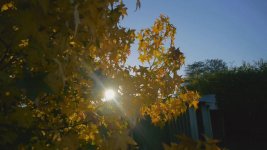
Thanks guys, this is all really good information that I didn't know before! I just ran outside earlier this morning to get some 8am sunrise shots and noticed that I can underexpose a little on my foreground subject (in this case, leaves) but I'm getting noise in my shadows (see attachment). This is with the GH2, Driftwood's "moon" hack (can't remember the exact name) with 14-42mm @3.5, 1/2000, ISO160. I'm not exactly sure why this is happening, possibly the use of "I.Dynamic" mode?


Image1.jpgImage2.jpg
 
Creative Motion Picture Mode/manual exposure/no iA is ideal.

You can put "REC HIGHLIGHT" on in the menu and will flash the areas that are overexposed.
 
The Aussie sun can be pretty brutal as you get out into the bush - reflectors at wedding are not even worth thinking about, underexpose slightly but you just have to live with some blown out highlights, I always shoot outside ceremonies with the 14-140 and and ND filter is it's bright, zoom in on the face to minimise bring sky behind.
 
Hey Daniel,

Stock 1.1 firmware here.
I discovered last night for the first time that I can underexpose by -3 or more on the meter and still get a very nice looking image,
if I'm not really that worried about foreground detail. The blacks were getting seriously crushed but I liked it.
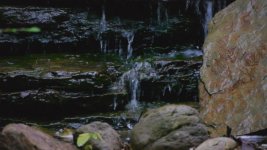
ISO was around 2000, shutter speed 60 but I'm not noticing any noise that bothers me. (attached image ... no gamma fix)
The gamma trick, works nicely in Vegas ... the gamma slider in the color corrector combined with a bit of offset to back off the "frosty" layer.

Drew shows it here
http://www.youtube.com/watch?feature=player_embedded&v=vPHIEU1X1Bo

Have you been testing the different film modes?

For the first time, last night, I has the time to try a few other than "cinema" which I had assumed was like "cine mode" in an HVxx.
Well, it's not at all.

There's some really good discussion about modes here:
http://www.personal-view.com/talks/...od-quantum-x-settings-series-2-sedna-a-b-c/p1
It's a long thread but it inspired me to try some different settings and then judge for myself.

I was shooting a small waterfall and stream the hour before sunset but under tree cover and in a small valley.
I left off with Vibrant at -2,-2, 0, 0 and for that environment it was better ( for me ) than any of the other modes.
Smooth with all at -2, was a bit too washed for that scene and lighting.

The stuff I shot in vibrant and from correctly exposed to obviously under exposed still looks nice and rich when getting it home
in spite of the crushed blacks.
I was using a Lumix 45-200mm f/4.0 - 5.6 and most often very close to the 200 end.
 

Attachments

  • no_gamma.jpg
    no_gamma.jpg
    70.6 KB · Views: 0
Last edited:
The NeatVideo noise-reduction app is very helpful when cleaning up noise in darker tones.

With my GH2 I shoot with Lee Powell's FlowMotion ver 2.02 patch, with everything set to -2 except for color saturation which is set to 0.
 
Are you favoring and particular mode or do you change, and if so what are your reasons for changing?
How do you see the difference between -2 and 0 for noise reduction?
 
Are you favoring and particular mode or do you change

I shoot almost everything in FlowMotion's 24H mode, because I like the look of 24p cadence, and this mode resolves very high detail. ( it will require high speed SDXC cards if you want to span in this mode )

How do you see the difference between -2 and 0 for noise reduction?

The NeatVideo noise-reduction app does a much better job with noise-reduction than the GH2 camera can, so I prefer the more "powder" like graininess of shooting with NR at -2. If noise becomes an issue, I use NeatVideo to clean it up.
 
So then Flowmotion adds other modes that are in the same general category as Smooth, Vibrant etc?
Not that they perform the same. I just want to be sure we're both seeing the term "mode" the same way.
 
Thanks guys, this is all really good information that I didn't know before! I just ran outside earlier this morning to get some 8am sunrise shots and noticed that I can underexpose a little on my foreground subject (in this case, leaves) but I'm getting noise in my shadows (see attachment). This is with the GH2, Driftwood's "moon" hack (can't remember the exact name) with 14-42mm @3.5, 1/2000, ISO160. I'm not exactly sure why this is happening, possibly the use of "I.Dynamic" mode?


View attachment 70796View attachment 70797


ISO160 is noisy as hell, as is 320, 640 and 1250. It's a 'quirk' of the camera. Shoot non multiples of 160. You can avoid the problem when selecting 160/320/640 by first selecting a very high ISO such as 3200 and then selecting the desired setting (160 etc).

There have been theories that it's because of analogue vs digital gain on the sensor and that starting from a very high ISO tricks the camera into a cleaner combination of A+D gain. If you go from 200 to 160 for example, the sensor will use the same analogue gain as 200 but 'underexpose' the image to 160 digitally. I'm not sure how true that all is so I just tend to shoot multiples of 200 and assume 200 as the base.
 
Back
Top