Getting a desired aspect ratio on my APS-C DSLR

tinpanalley

Active member
I have a 70D. I want to shoot 1.85:1 but obviously 16:9 is the only wide ratio on the camera. What would be some ways of going about doing this? Yes, the difference in ratio matters to me. I just want to know the different ways one might accomplish this from the footage being captured on the camera all the way through to importing the footage and editing. On an Arri-S with a 4:3 gate, I used to just use a ground glass that had the right ratio in the viewfinder and that way I knew that what I had framed could easily be cropped in post. There must be a hassle-free way to do this now.

Thanks!
 
I do not see the big deal. There is what, only a 42 pixel difference. 21 pixels cut off the top and 21 pixels cut off the bottom. Just crop your footage in post. That is the most hassle free way of doing it with your camera.
 

Attachments

  • Image 11.jpg
    Image 11.jpg
    15 KB · Views: 0
Measure it out and tape over the LCD display on the camera if you are worried about composition. Also, Magic Lantern allows you to overlay crop marks on the LCD.
 
I do not see the big deal. There is what, only a 42 pixel difference. 21 pixels cut off the top and 21 pixels cut off the bottom. Just crop your footage in post. That is the most hassle free way of doing it with your camera.
Well, it's hassle free but it's not exact. I need to know what can actually do it. Those diagrams aren't to scale, right? The full frame looks more 4:3 than 16:9.
Measure it out and tape over the LCD display on the camera if you are worried about composition. Also, Magic Lantern allows you to overlay crop marks on the LCD.
That's probably a good idea. I once masked an Arri-S ground glass like that. Not sure if there is any Magic Lantern for the 70D yet.
 
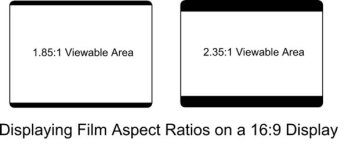
Here is an actual 1.85:1 fit into a 16:9 screen.

In reality 1.85 Academy flat is not much different than 1.78 16:9 wide screen.

Hardly something which would affect your framing!
 

Attachments

  • 185000.jpg
    185000.jpg
    5 KB · Views: 0
Last edited:
You're right, no ML for the 70D. Poor ML. Coders are dropping out of the project and the ones that are left are focusing primarily on RAW recording on the 5D. I used to be hoping for another universal stable release, but I now realize that will never happen due to the huge number of cameras Canon has dumped on the market and the fracturing of the ML project and team.
 
You're right, no ML for the 70D. Poor ML. Coders are dropping out of the project and the ones that are left are focusing primarily on RAW recording on the 5D. I used to be hoping for another universal stable release, but I now realize that will never happen due to the huge number of cameras Canon has dumped on the market and the fracturing of the ML project and team.
You know, I had the 7D until recently and there was magiclantern for it but what it really offered to people using video like me was nothing really compared to what it offered photographers. Also, it was never more than an alpha for any camera other than the 5Dmkii. And honestly, I know too much about tech and custom firmware on devices to ever run any device on something that isn't 100% stable. It can be risky in several ways. So, I always avoided magiclantern on the 7D because there was quite frankly never enough in the bug logs to convince me that it was safe enough for daily use.

In any event, I think the taping off could work as long as I was certain that the LCD screen actually displays a 100% image with no crop like the viewfinder, which on the 70D is 98%.
 
Last edited:
If you're using an external monitor and/or VF, most (nicer ones) can display safety bars/framing lines for different aspect ratios. Even though the difference between 16:9 and 1.85:1 is pretty negligible.
 
I do not see the big deal. [..] That is the most hassle free way of doing it with your camera.
When Magic Lantern will be available for the 70D, then here's some cropmarks that works great:
185B_WM.jpg


Hardly something which would affect your framing!
That's for sure, it doesn't change much in fact. Just that it looks a tad more professional than plain 16x9.

It's quite easy to add it with a .PSD file on an overlay track in any NLE software. Here's a 1.85:1 and 2.40:1 overlay that I made a while back:
View attachment PSD Templates.zip
Otherwise, you can always use Andrew Kramer's Aspect Ratio preset for After Effect, which works great and in any composition size.

Or, use an even simpler technique:
3046315268_372d07288f.jpg
 
That's for sure, it doesn't change much in fact. Just that it looks a tad more professional than plain 16x9.

Well, I think it being more professional looking is subjective, as I have seen plenty of videos posted in 1.85 & 2.40 that were, well you know. The majority of my work is shot in 16:9 because that is the aspect ratio of where people will be watching. TV commercials. But I happen to really like 2.40
 
...as I have seen plenty of videos posted in 1.85 & 2.40 that were, well you know.

That's for sure. Adding black bars to some videoish video won't make it look more professional.
But there's a little difference (visually) between plain 16x9 and 1.85:1 that I tend to affectionate and apply on my work.

1.85:1 work isn't always as "cinematic" as 2.40:1 can be, but sometimes it simply works just best in that ratio. Depends on the subject matter, then the Cinematography adapts to it.
 
If your monitor doesn't supply the frame lines you want, get a sheet of static cling material at the crafts store. Very easy to make marks with a fine point sharpie, and not get tape gunk on the coating of your screen. If you apply it carefully, it's totally invisible.
 
If your monitor doesn't supply the frame lines you want, get a sheet of static cling material at the crafts store. Very easy to make marks with a fine point sharpie, and not get tape gunk on the coating of your screen. If you apply it carefully, it's totally invisible.
I don't know what this cling material is but you just gave me another idea, which is to use a screen protector with the right ratio drawn on in fine point sharpie. Serves double duty.
 
That would be a very good way especially if you wanted a semipermanent solution. Something like the Lexerd or any similar "chrystal view" protector that could be peeled off with no residue left, and that wouldn't interfere with touchscreen function would be my answer. I would very carefully draw the guide lines with the fine point sharpie BEFORE separating the protector from the "carrier" layer.

I wouldn't apply the protector to the LCD first to prevent any of the Sharpie ink from getting on the LCD or LCD frame.

Good luck with it.
 
Back
Top