Mike Schell
Active member
An Interview with Mike Schell About Gemini 4:4:4
An Interview with Mike Schell About Gemini 4:4:4
Convergent Design Newsletter editor Amber Cowles, interviews Mike Schell, President of Convergent Design, about the new Gemini 4:4:4 full uncompressed recorder.
Can you give us a brief description of your new HD recorder: Gemini 4:4:4?
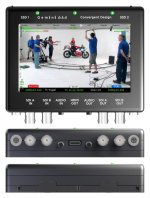
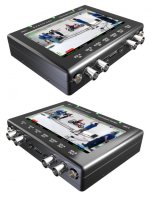
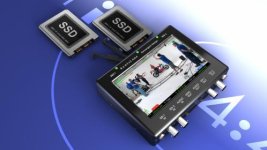
Gemini 4:4:4 is a revolutionary full uncompressed HD recorder which stores video/audio data onto two removable 1.8” SSDs (Solid State Drive) for playback/transfer to a PC/MAC. Gemini supports most HD/2K formats in 4:2:2/4:4:4, 8/10-bit formats with single-link HD-SDI/3G or dual-link. A built-in 5.0” sunlight viewable (800 cd/m²), 24-bit, 800x480 color LCD touch-screen serves as a high-quality monitor and playback screen. Gemini also features an industry first: the unique ability to record to both drives simultaneously, creating identical masters.
The 1-lb Gemini with milled aluminum case measures 5.4 x 4.5 x 1.1” or about the same size as the popular SmallHD DP6 monitor. But, of course, Gemini also includes recording, playback, image processing, etc, etc.
Convergent Design has been very successful with the nanoFlash, why go uncompressed?
With an installed base of over 3,500 recorders, nanoFlash has been a huge home-run for Convergent Design. However, while many users are very pleased with the 8-bit MPEG compressed video from the nanoFlash, we’ve received continual requests for higher bit-rates, 10-bit, and greater color sampling (4:4:4) as well as 2K/1080p50/60 support. All these goals were simply outside the design capabilities of nanoFlash.
After considerable technical research, we determined that an affordable uncompressed HD recorder was now feasible. This, coupled with the recent introduction of low-noise high-quality cameras, like the Sony F3, opened the market for our third-generation recorder.
Are you guys crazy, uncompressed is a ton of data?
Yes, uncompressed is a lot of data, typically in the range of 125 to 150 MBytes/sec (1000 to 1200 Mbits/sec). But, technology advancements now make full-uncompressed workflow quite manageable and affordable. For example, using the new 10Gbps Thunderbolt technology from Apple/Intel, it is now very reasonable to edit uncompressed using a laptop. New $180, 3-TByte (TeraByte) HDDs enable portable RAID arrays with 9-12 TBytes of storage (sufficient for 18-24 hours of uncompressed 1080p24 4:2:2 10-bit).
Full uncompressed capture/editing enables the ultimate in quality with no compression artifacts, added noise, or multigenerational losses. But, you still have the option to work in CineForm/DNxHD/ProRes, etc. via a simple encode process (using programs such as Compressor or Media Encoder).
So Gemini lets you choose any CODEC you want?
Precisely! The uncompressed HD-SDI output from your camera is exactly the same data that is fed to the internal in-camera hardware CODEC. While your camera (and most recorders) only supports one CODEC, Gemini frees you to use any CODEC/format.
We found that oftentimes the workflow and editing system is not well defined at the beginning of a production, or the client may want the footage in a different CODEC/format. Gemini gives you the flexibility to deliver accordingly, at the best possible quality levels. So after two weeks of shooting, when the director brings word that you’re changing from PC to MAC (or vice versa), you’re ready to encode that pristine uncompressed footage into a new CODEC / format, while maintaining the highest possible quality.
Consider also, that all professional video is ultimately transferred off the capture-media (typically Flash) onto HDDs, optical media or LTO Tape. Using high-performance multi-core processors, you can transfer and encode with little additional time penalty (compared to a simple transfer). For example, using an 8-core Mac Pro we’re getting transfer (SSD → HDD) + encode (to ProRes HQ) at 1/2 real-time. So, 30 minutes of uncompressed 1080p24 video requires a total of 15 minutes to transfer off the SSD and encode to ProRes. By comparison, a simple transfer of the same footage (without encode) occurs in 1/3 real-time, or 10 minutes.
Earlier you mentioned dual recording capability, can you elaborate on this feature?
Gemini offers two recording modes: span data across both drives, for longer record times or simultaneously record the same video to both SSDs, creating two masters (auto backup).
Two masters bring the added insurance against lost footage, while enabling some innovative work flows. For example, one SSD can go directly to the online edit station, while the second SSD can be used to generate offline proxies or H.264 footage for mobile devices / internet upload.
Speaking of media, why the switch from Compact Flash to SSD?
Compact Flash is a great choice for most compressed recorders, but it simply lacks the required performance for uncompressed video. Compact Flash tops out at about 90 Mbytes/sec, while uncompressed video ranges from 100 to over 300 Mbytes/sec; so clearly, it’s impossible to record uncompressed video onto a single CF card. Additionally, CF card capacity maxes out at 128GB, while SSDs are now available up to 512GB.
Built on cutting-edge 25nm technology, Gemini SSDs provide read/write speeds of 415/260 (Mbytes/sec) respectively. For most video formats, a single SSD has a sufficient bandwidth; however, 1080p50/60 formats generate over 300 Mbytes/sec, requiring us to strip the data across both drives. We do, however, combine the data into a single file during the offload of the SSDs to your MAC/PC.
High-Speed SSD media is currently available in the following sizes and storage capacities:
256GB SSD → 32 minutes @ 1080p24 4:2:2, 10-bit
512GB SSD → 64 minutes @ 1080p24 4:2:2, 10-bit
Using 512GB SSDs and spanning across the two drives, you’ll get a generous 128 minutes of uncompressed 1080p24 record time on Gemini (without swapping drives).
OK, but everyone knows that uncompressed recorders are big, heavy, power-hungry, and expensive. What makes Gemini so different?
Gemini follows the highly-successful design philosophy of nanoFlash to make the smallest, lightest-weight, lowest-power recorder that current technology will allow. So instead of building a PC-based recorder, which consumes 60 to 75 watts of power, we designed full-custom hardware drawing 8 to 15 Watts. Rather than designing proprietary Flash mags, we utilized off-the-shelf SSD drives, dramatically reducing both the media and transfer-station cost. (Editor’s note: The Gemini recorder package includes a 6Gbps SSD transfer station).
Machined from solid aluminum billets, the case is very strong and lightweight, making Gemini ideal for extreme environments. The lower power enables completely silent operation (no fans) and a wide operating temperature range (projected to be -30 to +50 C).
At a volume of only 10% greater than the hand-held nanoFlash, a weight of only 1 lb, and a low-power budget, Gemini is far smaller/lighter/less power hungry than most uncompressed or compressed recorders!
Gemini obviously supports 4:4:4, but what about S-Log?
S-Log, as you may know, maps 12-bit (or higher) linear data into a 10-bit log space (for transmission over HD-SDI, which is limited to 10-bits). Gemini maintains the highest possible quality, by recording 10-bit S-Log video in an uncompressed format, so there’s absolutely no added noise or artifacts.
Gemini also supports user-programmable 1D viewing LUTs, which can be selectively enabled for one or more of the SDI/HDMI outputs. Additionally, in dual record mode, you can simultaneously record the native S-Log video to one SSD (online) and the same video with burned-in LUTs to the second SSD (offline / H.264 generation).
Will Gemini have a 3D or stereo option?
Yes. From the beginning Gemini was conceived as a dual stream recorder. Gemini will independently record two video streams to individual SSDs, for all formats except 1080p50/60. You can synchronously play-out the two individual streams or combine into side-by side, 50/50 composite or anaglyph formats. Gemini uniquely allows you to simultaneously view 3D video in multiple formats, such as side by side and 50/50 composite, which should be very helpful in 3D camera alignment.
Is Gemini going to replace the nanoFlash?
By no means, Gemini compliments the nanoFlash. nanoFlash will continue to find applications needing long record times (10 hours), and/or requiring a strictly compressed workflow. At $1/minute (50 Mbps) for the Compact Flash media, nanoFlash still offers the lowest media cost for broadcast quality video.
Everyone hates to see their latest purchase upstaged, will Gemini be obsolete in 6 months?
HD will be the mainstream delivery format for the foreseeable future. Gemini already supports all the major HD formats up 1080p60 as well as S-Log, 4:4:4, Dual-Link, 3G, and 16-Channel Audio. 3D will be available, through an optional firmware upgrade. So, it’s really hard to imagine obsolescence any time soon.
Based on customer feedback, Convergent Design added feature after feature on the nanoFlash, at no charge. Will Gemini follow a similar pattern?
Yes, although most of the nanoFlash features, with the exception of pre-record buffer, should be enabled when Gemini ships. That said, we anticipated many special requests, so Gemini was designed with 5X the programmable logic compared to nanoFlash, giving us quite a bit of room to grow (feature-wise, that is).
What are the target markets/applications?
If you a filmmaker/cinematographer/Indie producer (or aspire to be one), then Gemini is a perfect choice. Sony F3 owners with S-Log and 4:4:4 will likely find Gemini an invaluable addition, as these capabilities are far beyond the native recording capability within the camera. The lightweight and low-power of the Gemini, make it ideal for Steadicam operators and anyone shooting in extreme environments, such in jungles, underwater, at high-altitude, etc.
OK, Gemini offers the ultimate quality and flexibility, but is it affordable?
The base Gemini package includes the recorder, an SSD to eSATA transfer-station, AC power supply and cables in a custom-fitted hard-case for US $5995 (retail). Prices for the 256GB and 512GB SSDs will be announced at NAB.
Other recorders may offer different features, but no recorder offers better video quality than Gemini 4:4:4.
An Interview with Mike Schell About Gemini 4:4:4
Convergent Design Newsletter editor Amber Cowles, interviews Mike Schell, President of Convergent Design, about the new Gemini 4:4:4 full uncompressed recorder.
Can you give us a brief description of your new HD recorder: Gemini 4:4:4?
Gemini 4:4:4 is a revolutionary full uncompressed HD recorder which stores video/audio data onto two removable 1.8” SSDs (Solid State Drive) for playback/transfer to a PC/MAC. Gemini supports most HD/2K formats in 4:2:2/4:4:4, 8/10-bit formats with single-link HD-SDI/3G or dual-link. A built-in 5.0” sunlight viewable (800 cd/m²), 24-bit, 800x480 color LCD touch-screen serves as a high-quality monitor and playback screen. Gemini also features an industry first: the unique ability to record to both drives simultaneously, creating identical masters.
The 1-lb Gemini with milled aluminum case measures 5.4 x 4.5 x 1.1” or about the same size as the popular SmallHD DP6 monitor. But, of course, Gemini also includes recording, playback, image processing, etc, etc.
Convergent Design has been very successful with the nanoFlash, why go uncompressed?
With an installed base of over 3,500 recorders, nanoFlash has been a huge home-run for Convergent Design. However, while many users are very pleased with the 8-bit MPEG compressed video from the nanoFlash, we’ve received continual requests for higher bit-rates, 10-bit, and greater color sampling (4:4:4) as well as 2K/1080p50/60 support. All these goals were simply outside the design capabilities of nanoFlash.
After considerable technical research, we determined that an affordable uncompressed HD recorder was now feasible. This, coupled with the recent introduction of low-noise high-quality cameras, like the Sony F3, opened the market for our third-generation recorder.
Are you guys crazy, uncompressed is a ton of data?
Yes, uncompressed is a lot of data, typically in the range of 125 to 150 MBytes/sec (1000 to 1200 Mbits/sec). But, technology advancements now make full-uncompressed workflow quite manageable and affordable. For example, using the new 10Gbps Thunderbolt technology from Apple/Intel, it is now very reasonable to edit uncompressed using a laptop. New $180, 3-TByte (TeraByte) HDDs enable portable RAID arrays with 9-12 TBytes of storage (sufficient for 18-24 hours of uncompressed 1080p24 4:2:2 10-bit).
Full uncompressed capture/editing enables the ultimate in quality with no compression artifacts, added noise, or multigenerational losses. But, you still have the option to work in CineForm/DNxHD/ProRes, etc. via a simple encode process (using programs such as Compressor or Media Encoder).
So Gemini lets you choose any CODEC you want?
Precisely! The uncompressed HD-SDI output from your camera is exactly the same data that is fed to the internal in-camera hardware CODEC. While your camera (and most recorders) only supports one CODEC, Gemini frees you to use any CODEC/format.
We found that oftentimes the workflow and editing system is not well defined at the beginning of a production, or the client may want the footage in a different CODEC/format. Gemini gives you the flexibility to deliver accordingly, at the best possible quality levels. So after two weeks of shooting, when the director brings word that you’re changing from PC to MAC (or vice versa), you’re ready to encode that pristine uncompressed footage into a new CODEC / format, while maintaining the highest possible quality.
Consider also, that all professional video is ultimately transferred off the capture-media (typically Flash) onto HDDs, optical media or LTO Tape. Using high-performance multi-core processors, you can transfer and encode with little additional time penalty (compared to a simple transfer). For example, using an 8-core Mac Pro we’re getting transfer (SSD → HDD) + encode (to ProRes HQ) at 1/2 real-time. So, 30 minutes of uncompressed 1080p24 video requires a total of 15 minutes to transfer off the SSD and encode to ProRes. By comparison, a simple transfer of the same footage (without encode) occurs in 1/3 real-time, or 10 minutes.
Earlier you mentioned dual recording capability, can you elaborate on this feature?
Gemini offers two recording modes: span data across both drives, for longer record times or simultaneously record the same video to both SSDs, creating two masters (auto backup).
Two masters bring the added insurance against lost footage, while enabling some innovative work flows. For example, one SSD can go directly to the online edit station, while the second SSD can be used to generate offline proxies or H.264 footage for mobile devices / internet upload.
Speaking of media, why the switch from Compact Flash to SSD?
Compact Flash is a great choice for most compressed recorders, but it simply lacks the required performance for uncompressed video. Compact Flash tops out at about 90 Mbytes/sec, while uncompressed video ranges from 100 to over 300 Mbytes/sec; so clearly, it’s impossible to record uncompressed video onto a single CF card. Additionally, CF card capacity maxes out at 128GB, while SSDs are now available up to 512GB.
Built on cutting-edge 25nm technology, Gemini SSDs provide read/write speeds of 415/260 (Mbytes/sec) respectively. For most video formats, a single SSD has a sufficient bandwidth; however, 1080p50/60 formats generate over 300 Mbytes/sec, requiring us to strip the data across both drives. We do, however, combine the data into a single file during the offload of the SSDs to your MAC/PC.
High-Speed SSD media is currently available in the following sizes and storage capacities:
256GB SSD → 32 minutes @ 1080p24 4:2:2, 10-bit
512GB SSD → 64 minutes @ 1080p24 4:2:2, 10-bit
Using 512GB SSDs and spanning across the two drives, you’ll get a generous 128 minutes of uncompressed 1080p24 record time on Gemini (without swapping drives).
OK, but everyone knows that uncompressed recorders are big, heavy, power-hungry, and expensive. What makes Gemini so different?
Gemini follows the highly-successful design philosophy of nanoFlash to make the smallest, lightest-weight, lowest-power recorder that current technology will allow. So instead of building a PC-based recorder, which consumes 60 to 75 watts of power, we designed full-custom hardware drawing 8 to 15 Watts. Rather than designing proprietary Flash mags, we utilized off-the-shelf SSD drives, dramatically reducing both the media and transfer-station cost. (Editor’s note: The Gemini recorder package includes a 6Gbps SSD transfer station).
Machined from solid aluminum billets, the case is very strong and lightweight, making Gemini ideal for extreme environments. The lower power enables completely silent operation (no fans) and a wide operating temperature range (projected to be -30 to +50 C).
At a volume of only 10% greater than the hand-held nanoFlash, a weight of only 1 lb, and a low-power budget, Gemini is far smaller/lighter/less power hungry than most uncompressed or compressed recorders!
Gemini obviously supports 4:4:4, but what about S-Log?
S-Log, as you may know, maps 12-bit (or higher) linear data into a 10-bit log space (for transmission over HD-SDI, which is limited to 10-bits). Gemini maintains the highest possible quality, by recording 10-bit S-Log video in an uncompressed format, so there’s absolutely no added noise or artifacts.
Gemini also supports user-programmable 1D viewing LUTs, which can be selectively enabled for one or more of the SDI/HDMI outputs. Additionally, in dual record mode, you can simultaneously record the native S-Log video to one SSD (online) and the same video with burned-in LUTs to the second SSD (offline / H.264 generation).
Will Gemini have a 3D or stereo option?
Yes. From the beginning Gemini was conceived as a dual stream recorder. Gemini will independently record two video streams to individual SSDs, for all formats except 1080p50/60. You can synchronously play-out the two individual streams or combine into side-by side, 50/50 composite or anaglyph formats. Gemini uniquely allows you to simultaneously view 3D video in multiple formats, such as side by side and 50/50 composite, which should be very helpful in 3D camera alignment.
Is Gemini going to replace the nanoFlash?
By no means, Gemini compliments the nanoFlash. nanoFlash will continue to find applications needing long record times (10 hours), and/or requiring a strictly compressed workflow. At $1/minute (50 Mbps) for the Compact Flash media, nanoFlash still offers the lowest media cost for broadcast quality video.
Everyone hates to see their latest purchase upstaged, will Gemini be obsolete in 6 months?
HD will be the mainstream delivery format for the foreseeable future. Gemini already supports all the major HD formats up 1080p60 as well as S-Log, 4:4:4, Dual-Link, 3G, and 16-Channel Audio. 3D will be available, through an optional firmware upgrade. So, it’s really hard to imagine obsolescence any time soon.
Based on customer feedback, Convergent Design added feature after feature on the nanoFlash, at no charge. Will Gemini follow a similar pattern?
Yes, although most of the nanoFlash features, with the exception of pre-record buffer, should be enabled when Gemini ships. That said, we anticipated many special requests, so Gemini was designed with 5X the programmable logic compared to nanoFlash, giving us quite a bit of room to grow (feature-wise, that is).
What are the target markets/applications?
If you a filmmaker/cinematographer/Indie producer (or aspire to be one), then Gemini is a perfect choice. Sony F3 owners with S-Log and 4:4:4 will likely find Gemini an invaluable addition, as these capabilities are far beyond the native recording capability within the camera. The lightweight and low-power of the Gemini, make it ideal for Steadicam operators and anyone shooting in extreme environments, such in jungles, underwater, at high-altitude, etc.
OK, Gemini offers the ultimate quality and flexibility, but is it affordable?
The base Gemini package includes the recorder, an SSD to eSATA transfer-station, AC power supply and cables in a custom-fitted hard-case for US $5995 (retail). Prices for the 256GB and 512GB SSDs will be announced at NAB.
Other recorders may offer different features, but no recorder offers better video quality than Gemini 4:4:4.