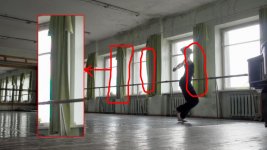
FS100 ugly edges! what is that?

Clipping color channel going berserk.

Pull down the exposure, put some light on your talent (a reflector would probably do the trick) and you are fine IMHO.

Frank
 
Is it normal to get that in overexposed places?

I could live with 1000$ DSLR moire and aliasing restrictions
but from 6000$ camera it is unacceptable...
 
I've ran into the same thing. Just gotta really watch exposure. I didn't even notice it as I was shooting. I also ran into purple rings around highlights as well.
Screen shot 2011-10-24 at 9.30.41 AM.jpg
 
A firmware update aint gonna change the laws of physics, sorry.

Put more fill light on your talant, put ND gel over the windows or change your angle to avoid them.

You could try a decent lens (Leitz are good), but really you're grosly overexposing the windows. Looking at the scene you may not have noticed how much brighter the windows are because of your eye's adaptability, but no cam is going to cope with that unaided.

Dave
 
I did a green screen shoot where I managed to screw up the kicker... overexposed. The editor had a fun time cleaning up and camouflaging my mess :S So take care to light properly. In your case I would probably go with the idea of lighting the talent to bring down the contrast and save your highlights.
 
Ii it the state of the world we live for now, so that people accuse someone because he criticize his camera. So it can't be a Sony error... So if the camera or codec does not handle highlight well it is the fault of the operator. So if for a reason I want some blown out window, it is impossible. They should put it on there sales brochure. No they will tell you that a 8 bit 24 mbit codec is nice. Should you ask more it will cost you thousands more because it requires so much technology r&d ... yes a little $ 800 gh2 can do 200 mbit intra frame video. I can't understand how some can believe this.

I can understand the esthetic of your shot, blown out windows creating some blooming and a nearly silhouette character, more so a dancer that will move gracefully into this frame. I guess many cannot understand such an artistic choice.


Now on the technical side, what I see it is like chromatic aberration from the lens, that is not handled gracefully by the camera or codec. Normally it should have been present in all places where you have this overexposure/contrast between light and dark part and it should have been much smaller. Its blockyness is a hint that it is more a codec problem, I guess at certain threshold where it is sampling the data/pixel it is just magnifying the magenta and green chromatic aberration. I don't know if I am right or explaining it well.

I don't know if it is possible for you to use an external recorder or a 1080p high resolution monitor or TV to see an uncompressed signal to know if it is the codec. If it is the case either you will have to use an external recorder, or light or gel the windows (but change the character of your shot). If it is the lens producing too much chromatic aberration, use a very good zoom, or prime or try to close the lens a bit to minimize it.
 
I've had no such problems with canon DSLRS

Cause the Knee protects against that.
You can do the same thing by setting your picture profiles to auto knee.
Not pretty ether, but the DSLR look.

The professional way of shooting would be to control your light and exposure though.

Frank
 
I've had no such problems with canon DSLRS

you over exposed the image, watch your histogram and you wont have any problems. I don't get why you thought you could shoot into bright windows for an indoor scene. the camera is not to blame, your problem is operator error.
 
Back
Top