C100: Flat and noisy on Avid-help

zavatta

Member
I try to figure out what is the best way to import my Avchd from the C100 in Avid MC 5. The quality is so bad and I don't understand why.
It works very well with FCP 7, the files transcoded in Prores via Clipwrap are sharp and detailed.
But when I import in Avid files transcoded with ClipWrap in DnxHd 145 or even 220, the final image in avid looks flat and noisy.
Same thing when I import directly the MTS in Avid.
I even tried importing directly from the Ninja2 (I recorded in DnxHD 145) It looks good when I read the .mov file on my computer but when I read it in Avid, same thing flat and noisy image.
Does anyone know what's happening here ? I can't edit on FCP because I have to deliver an Avid project.
Thanks
 
Can you post a sample for us/me to download and test? What are your project settings? Be sure that you are in an HD project that matches the framerate of your source. If you are in an SD project, your video will look like proxy low resolution.
 
DnxHd 220.jpgLink to Ama.jpgImport in Avid.jpg

Yes the project is in HD 1920x1080.
The link to AMA seems ok but still a little bit damaged.
Here is the capture screen
1st : transcode in DnxHD 220 via ClipWrap
2nd : Link to AMA
3rd : Import in Avid

Question : what does Avid do when it creates Media Files ? It compresses the original flles ?
 
Hi Zavatta

I've got an Avid project with perfectly good c100 files open. If you can give me an original mts, I can import it in my project to see if I get the same results. If so, it may be corrupt. Avid applies a compression, but nothing that would destroy footage. Importing as DNxHD 220 if anything should make the clips more robust and privy to color grading since the bit rate is much bigger.
 
Can you upload it to a file upload site, such as yousendit.com? Or perhaps another file upload site?
 
Hmm, looked great to me! Crisp and sharp. Are you sure you are in a 25p project? Is the color space set to ycbcr? DNxHD 220 should not be available in a 25p project. Does other media from other sources look good in Avid?

Can you try making a new project and importing it again? Something is clearly off here.
 
Oh, I just saw your other post. The fact that it is a 50i project could be your problem, though I doubt it. Can you try in 25p? Also, what are your viewing resolution settings set to? Is it yellow/yellow? This can be found in the bottom left hand corner of be time line. If it is yellow, try changing it to green/green.
 
The format is 1080i/50 and yes color space Ycbcr 709.
I imported in Avid using Dnx 120. I tried 185, same thing
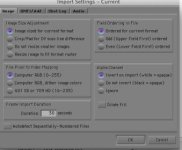
Here is a screenshot of image settings when I am importing. Is something wrong ?
Capture d’écran 2013-07-27 à 12.40.21.jpg
And oh I just realized that I selected Private project instead of Shared...Not good for me since I have to send the hard drive in France with the project. Where do I find the private Project file (.avp) ?
 
Were you able to confirm that the resolution is set to green/green at the bottom of the left hand corner of the timeline? The private folder is located at /Users/(Username)/Documents/Avid Projects/
 
The settings in the screenshot look fine to me. Those are the same ones that I am using. What sort of computer are you using? It could be that the specs, particularly of the graphics card, are not up to snuff with what is required. You may also consider uninstalling and reinstalling Avid to see if that solves the problem. If you do that, just be sure to deactivate your copy of Avid first.
 
Test.01.jpg this is what I'm getting with just linking before consolidate/transcode it seems to look better than what you posted. Having no trouble moving onto transcoding.
 
Maybe try what Omar said, deactivate your copy of MC and uninstall and try reinstalling. Otherwise I'm not sure why it would look so different from your computer and mine. I'm using a 2 year old macbook air.
 
I have a MacBookPro mid 2012, 2,3 Ghz, IntelCore i7, 16 Go Ram.
I never had a problem with this Avid before, I used to film with a Sony Z5. All started with the C100. And again I have no problem at all with FCP.
Yes I use the green/green.
May be here is a clue : Before those bad imports, I had to uninstall Avid because I couldn't import any file. I reinstalled it but I would have the same error message. So I called Avid Support and the guy fixed the problem and I could import again. He just deleted the msm files in the 1 folder and I changed my hard drive.
And now this is where I am. May be I should call the support again but I used my single free support call...It's now 200$ to buy a single incident support. Ouch. Thanks Omar and Maddchase
 
That's a lot for a phone call! Instead, I woe post your problem on the avid community forums. Many people who work at Avid post there, and they have been s ing my problems for many years.

The thing I would personally do at this point would be to uninstall everything Avid related and then do a completely fresh reinstall. I rarely ever have to do that, but when I do, it usually fixes whatever major issues I have. That may require doing a search for anything with the name "Avid" and manually deleting anything that the uninstalled does not remove, especially preference files. Hope this helps!
 
Ok thanks I will do that, once I finished this project. I'll send the project as is on a hard drive + originals MTS files. Hope they can relink it in France on their Avid.
 
Deleting the msm database files shouldn't cause any problems because Avid will rebuild that if it's missing upon start up. I do that once in a while if stuff is acting strange on my machine as well. Strange, anyway I agree I would hold off on paying for a phone call and try completely uninstalling everything Avid related. Sorry you have to go through these problems, I edit entirely on Avid now because it's less problematic for me than FCP.

Actually I'd be interested to see what happens if you transcoded a short clip in FCP 7 and then import that into Avid, so you're going from ProRes to DNxHD. It's a long and round about way to do it, but I'd be curious if that is a workable temporary fix. Keep us posted.
 
Back
Top