Brandon Freeman
Well-known member
The sad this is, that's what "STANDARD" is supposed to be. :-(
True that! Man, if that was the default look out of the camera none of this would matter.

Follow along with the video below to see how to install our site as a web app on your home screen.
Note: This feature may not be available in some browsers.
The sad this is, that's what "STANDARD" is supposed to be. :-(
It certainly seems to be a GH4-specific issue. Sony's FS7 uses XAVC-L with 4:2:0 8-bit, and log recording, and doesn't show the issue. The other cameras mentioned seem to get fine with 8-bit, so it doesn't seem to be 8-bit's fault.So it's something in the way the GH4 has implemented the log profile that is causing the YUV chroma smearing, at least in its 8 bit internal form.
Maybe, maybe not. Again, AFAIK the other cameras record YUV and they don't have a problem. The DVX200 uses (presumably) the same basic encoder, and doesn't exhibit the problem. I doubt that the blame can be laid on 8-bit, or on the bit depth of the VLOG-L profile, or on YUV encoding. If any of those were true (and especially if all of those were true) then we should be seeing the same issue on other cameras and especially on the DVX200. But we don't -- therefore, I say that the evidence is pretty compelling that those aren't the problem. If I had to place a bet on what the problem is, I'd say that it's the level of color saturation adjustment necessary to bring the colors back up to suitable levels. Others have said that the magenta/green exists in all GH4 profiles, but -- nobody ever noticed, and the GH4 has been roundly praised for how good its footage looks, right?YUV encoding seems to be the reason behind errors showing up as magenta/cyan/yellow, as opposed to RGB recording which would show up errors in the primary colour space.
As of the current firmware, the histogram clips at 80%, and the zebras will not show up past 79 IRE, when using VLOG-L. When using other gammas they have the full range of 0-109.Out of curiosity, what do the histogram and zebras show up like on the DVX200? Do they go from 0-100 IRE or are they clamped in some fashion?


Sony's FS7 uses XAVC-L with 4:2:0 8-bit, and log recording, and doesn't show the issue. .
It's all of the above, converging to reveal how a consumer-grade H.264 encoder falters when pushed past its limitations. The reason it's worse on the GH4 is because Panasonic limits V-Log-L to 79 IRE. The reason you see it on smooth gradients is because H.264 shortchanges low-contrast areas in favor of sharp details. The reason you see chroma smearing is because H.264 UV channels are bit-starved by design. The reason you see magenta/green hues is because those are "primary" colors in the YUV color space. The reason you need to boost color saturation in post is because it was suppressed in order to maximize dynamic range. None of these things are "errors" and if you expose and grade your footage carefully, no one will notice. But when they all come together at once...Again, AFAIK the other cameras record YUV and they don't have a problem. The DVX200 uses (presumably) the same basic encoder, and doesn't exhibit the problem. I doubt that the blame can be laid on 8-bit, or on the bit depth of the VLOG-L profile, or on YUV encoding. If any of those were true (and especially if all of those were true) then we should be seeing the same issue on other cameras and especially on the DVX200. But we don't -- therefore, I say that the evidence is pretty compelling that those aren't the problem. If I had to place a bet on what the problem is, I'd say that it's the level of color saturation adjustment necessary to bring the colors back up to suitable levels. Others have said that the magenta/green exists in all GH4 profiles, but -- nobody ever noticed, and the GH4 has been roundly praised for how good its footage looks, right?
Video Devices PIX-E5H : $1,195
Atomos Ninja Assassin : $1,295
...It's something that I had planned to buy anyway.
And yet... all of those same circumstances exist in the DVX200, and the problem simply doesn't happen there. VLOG-L is limited to the same 79 IRE; and even if it wasn't, the range from 80+ only affects the top two stops and has nothing to do with the first 12. h.264 uses the same processing on both cameras (at least when using AVCHD). The h.264 UV channels can be presumed to be processed the same on both cameras, you would presume. Yet -- the problem doesn't happen on the DVX200.It's all of the above, converging to reveal how a consumer-grade H.264 encoder falters when pushed past its limitations. The reason it's worse on the GH4 is because Panasonic limits V-Log-L to 79 IRE. The reason you see it on smooth gradients is because H.264 shortchanges low-contrast areas in favor of sharp details. The reason you see chroma smearing is because H.264 UV channels are bit-starved by design. The reason you see magenta/green hues is because those are "primary" colors in the YUV color space. The reason you need to boost color saturation in post is because it was suppressed in order to maximize dynamic range. None of these things are "errors" and if you expose and grade your footage carefully, no one will notice. But when they all come together at once...

The principle purpose of this test was to see whether white doors in a pale yellow room were a problem for the GH4 with Vlog-L or not. My answer is basically no: neither the SAT50 nor the SAT100 images show the kind of horrible blockiness reported elsewhere. But the images do show that color charts start looking very ugly and blocky when 2 stops underexposed. They also show that the GH4 can do brilliantly in the color department when the color charts are properly exposed, but that it lacks the dynamic range and highlight protection of the EPIC DRAGON, obviously.
I suspect that Vlog-L will do what I want, which is to make the GH4 easy to put into a Resolve grading workflow, but it won't do miracles. Specifically, it doesn't magically make the GH4 as good as EPIC DRAGON.
I'm talking about the ability to import LUTs through an SD card and put them on top of V-LOG L as a custom profile. My idea is to try to work around the 8-bit limitations while still recording internally, capturing a specific look, such as a FilmConvert film stock LUT in camera.
Not true though. Other log curves use the same (or extremely similar) encoding between the darkest stop and "90% white". The only limitation VLOG-L has is in recording the stops up above 90% white; VLOG uses the range from 61 to 79 IRE for all that, and other curves can use the range from 61 to 109 IRE. So the only place you'll see any difference between VLOG-L and SLog or CLog or (probably) J-Log is going to be in the two or three brightest stops. All the rest is being recorded fundamentally the same in all the various log gamma curves.Sure. But the 8bit limitation derives by the limitation of v-log v with IRE79.
SLOG does not use 0-255. SLOG uses 23-255. Log curves generally don't use the range from 0-23, since it would be adversely affected by the video compression algorithms used (specifically, MPEG-4 h.264).The only solution would be another log curve, using 0..255 in 8bit similar to s-log curves.
Wrong conclusion. It's not only the brightest few stops that are shortchanged to near 7-bit precision in 8-bit V-Log-L. The entire 12-stop range is scaled down to fit within the truncated 32-180 scale, degrading the tonal resolution of every stop along the way. The GH4's internal H.264 encoder is not well-optimized for deliberately underexposed footage, regardless of whether it's V-Log or a standard profile. It's a consumer-grade encoder tailored to produce brightly-colored, high-contrast home movies for direct viewing on laptops and HDTV's. It's frankly remarkable it works as well as it does, considerating how severely mismatched V-Log-L is to Rec 709.Other log curves use the same (or extremely similar) encoding between the darkest stop and "90% white". The only limitation VLOG-L has is in recording the stops up above 90% white; VLOG uses the range from 61 to 79 IRE for all that, and other curves can use the range from 61 to 109 IRE. So the only place you'll see any difference between VLOG-L and SLog or CLog or (probably) J-Log is going to be in the two or three brightest stops. All the rest is being recorded fundamentally the same in all the various log gamma curves.
Wrong conclusion. It's not only the brightest few stops that are shortchanged to near 7-bit precision in 8-bit V-Log-L. The entire 12-stop range is scaled down to fit within the truncated 32-180 scale, degrading the tonal resolution of every stop along the way. The GH4's internal H.264 encoder is not well-optimized for deliberately underexposed footage, regardless of whether it's V-Log or a standard profile. It's a consumer-grade encoder tailored to produce brightly-colored, high-contrast home movies for direct viewing on laptops and HDTV's. It's frankly remarkable it works as well as it does, considerating how severely mismatched V-Log-L is to Rec 709.
You left out the cost of media, batteries, cables, support structures, etc. which when all added up will total thousands of $$$
This is simply not true.Wrong conclusion. It's not only the brightest few stops that are shortchanged to near 7-bit precision in 8-bit V-Log-L. The entire 12-stop range is scaled down to fit within the truncated 32-180 scale, degrading the tonal resolution of every stop along the way.
No log gamma uses the entire 0-255 range, that I know of. They all have a floor of around 32, although I think SLOG1 goes down to 24. They all know they're going to be compressed by video compression, so they set a pedestal below which they do not use that range, to avoid what video compression does to that lower range.Exactly, that's what bothers me most about the profile not using the entire 0-255 range.
Sorry, but I don't think Canon's marketing brochures can persuade the GH4's V-Log-L implementation to work any differently in practice. Let's compare Canon's C-Log tone curve to your diagram of Panasonic's V-Log-L:If you take a gamma like CLOG, which delivers 12 stops, and expose it the same as the VLOG-L on the GH4, you'll get exactly (or nearly exactly) the same code values from pitch black to 90% white. The only area you'll see any difference at all is in the stops above 90% white, where the VLOG-L will compress them into 62-79 IRE, and CLOG/SLOG etc will have room to spread them out in the range of 62-109 IRE.
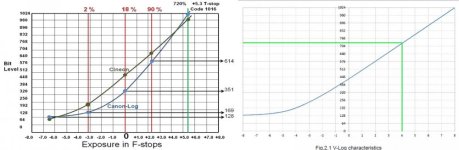
As I explained above, Canon's mathematical manipulations are based on their "720% reflectance" highlight scaling, which is physically impossible. Sorry, but that means your comparison of V-Log to C-Log scaling where you ask us to "pay attention only to the code values" is founded on Canon's misleading marketing bullshit. In reality, Canon C-Log cameras do not have two stops of highlight DR that "just don't exist" on Panasonic V-Log-L cameras; that is nothing more than a number-juggling fabrication. Both Canon and Panasonic cameras record the full highlight range captured by the image sensor, and their log profiles preserve every stop of highlight exposure in logarithmic proportion. Where they differ is purely a matter of how the cameras' tone curves scale the output of the image sensor, starting from max highlight saturation and extending downward toward black. With Canon C-Log, highlight saturation is at 109 IRE and with Panasonic V-Log-L, highlight saturation is at 79 IRE and we can all see what a difference that makes.If you look at both charts and pay attention only to the code values, CLOG starts at 128 (in 8-bit, that's 32). Canon's CLOG starts at 7 stops down from middle gray, Panasonic's starts at 8 stops down. However, if you look at the code values, middle gray on the Panasonic is 448 (using 10-bit codes to make it easier), and Canon's curve intersects 1 stop up from middle gray at ... wait for it ... 448. Which means that the first 8 stops (-8 to 0 on the VLOG, -7 to +1 on CLOG) are encoded in exactly, exactly the same code values, 128 to 448. There is NO penalty for the first 8 stops, at all, due to VLOG's early cutoff point.