GH4 Exposing V-LOG L

Video Devices PIX-E5H : $1,195

Atomos Ninja Assassin : $1,295

...It's something that I had planned to buy anyway.

Yup! Not thousands, just a thousand. :) And truthfully, if I had to choose between $1,200 on ProRes 422 HQ 10-bit footage from my existing camera, or $2,000-$3,000 for another 4:2:0 8-bit internal solution that STILL requires that $1,200 accessory -- wait, why is this a choice? ;)
 
Yup! Not thousands, just a thousand. :) And truthfully, if I had to choose between $1,200 on ProRes 422 HQ 10-bit footage from my existing camera, or $2,000-$3,000 for another 4:2:0 8-bit internal solution that STILL requires that $1,200 accessory -- wait, why is this a choice? ;)
The wildcard is Black Magic. An Ursa Mini for $3K is pretty cost competitive with the GH4 and an external recorder. If I was starting fresh, I'd have a hard time picking my GH4 again.
 
The wildcard is Black Magic. An Ursa Mini for $3K is pretty cost competitive with the GH4 and an external recorder. If I was starting fresh, I'd have a hard time picking my GH4 again.

Sure - but do you have the right lenses? Batteries? A fully kitted Ursa Mini is going to be closer to $5K at least, I'd wager. $3.5K will get you a GH4 with the 2.8 12-35mm and the PIX-E5H.

But really we're talking about two different things, because most of us in this situation *aren't* starting over, we've already got the GH4. So do we sell the GH4, get half or so of its price back in the sale, then put that money into a $5K package, or do we keep on rolling with a $1,200 accessory that will undoubtedly outlive the camera body anyway?
 
A fully kitted mini-Ursa is closer to £8,000 here in the UK. I called CVP (like a UK version of B&H yesterday) and that's what it came to... and the guy said for that money I'd be better off with an FS7. The GH4 is a great camera at the price.
 
Any chance you could run a comparable test with a C100, C300, JVC LS300, or any other 8-bit log? Would be nice to know if this is something inherent to 8-bit or if it's some peculiarity to the GH4...

Wish I could, but don't have access to those cameras. For the record, here is 1080p, 23.98 AVCHD 100mbps internal V-log-L, overexposed 2 stops, in a worst case scenario image for this problem, with the Varicam LUT in FCP X--

avchd1.jpg
 
Last edited:
Do you find similar artifacts in other 8-bit codecs? 8-bit digital has been used for at least 20 years, yet I don't recall anyone complaining about this issue before. HDV was an 8-bit 4:2:0 codec that was substantially more bit-starved than the GH4's 100-megabit h.264; yet, I don't recall anyone ever complaining about magenta/green smearing. XDCAM-HD on the EX1 is an 8-bit 4:2:0 codec that uses inferior MPEG2 as compared to today's modern h.264 codecs, yet XDCAM-HD's been used for almost 7 years and I don't recall anyone complaining about chroma smearing like this.
In the HDV era there were two major grunge factors that obscured YUV smearing issues. Interlaced video encoding produced temporal aliasing and jagged vertical artifacts that were more noticeable than subtle distortions in hue. In cases where it mattered, 4:2:2 encoding was used to double the horizontal spatial resolution of the UV channels. And with shadow detail, noise levels were typically high enough to obscure blotchy chroma artifacts with clouds of randomized dither.

The problem with consumer H.264 encoders is not specifically an 8-bit 4:2:0 phenomenom, it can occur in higher quality profiles as well. The first thing to understand is that H.264 video is compressed in YUV format, and 8-bit RGB pixel values do not map cleanly into the 8-bit YUV scale. These YUV components are not uniformly preserved in 8-bit precision, they are scaled down and truncated by complex weighting factors applied within each rectangular macroblock in the image. In general, less precision is used to encode subtle low-contrast details, because psycho-visual theory. In addition, UV chroma data is encoded at lower spatial resolution, because psycho-visual theory. These technical biases conspire to produce crude digitization of shadows and smooth gradients at much less than 8-bit precision.

Now let's consider the peculiar tonal qualities of the YUV color space. The native hues of this model do not correspond to the RGB primary colors, and they are esthetically quite ugly. Check out the YUV channels at the end of this informative article:

http://blogs.adobe.com/VideoRoad/2010/06/what_is_yuv.html

The U (or "Cb") channel is supposed to be some kind of blue, but to my eyes it varies from mauve to yellowish-green. The V (or "Cr") channel is supposedly red, but looks more pinkish to sea-green to me. Yecch, why did they have to choose those particular color axes? In practice, it doesn't matter because YUV encoding produces high-quality full-spectrum images, so long as you have enough bits to encode everything in near-perfect precision. But when you shortchange the bit-depth in certain key areas, the underlying seams can start to show in garish tones that rarely occur in nature. Technically, these are not encoding "errors", because the internal calculations are producing the intended numerical approximations, all compressed at optimal efficiency. It's just that in some cases, it subjectively looks like s*%t.

In my view, the fundamental flaw in YUV color science is a perceptual mismatch along the color saturation scale. We do not perceive highly saturated colors uniformly across the dynamic range from black to white. Our eyes are more responsive to hues in the midtones than in the shadows and highlights. What this means in practice, however, is not that it's ok to shortchange chromatic bit-depth in the darkest and brightest regions of an image. Gradients in these regions need more color precision to render subtle variations in near-gray tones, rather than blotchy approximations of artificial hues.

The fix, however, is not too problematic. I use Color Finesse in Adobe After Effects, but any color grading tool that provides a separate set of controls for shadow, midrange, and highlight regions will work similarly. First set color temperature, black level, gain, and gamma appropriately. Adjust midrange color and contrast to suit your style, and then lower the color saturation and/or vibrance in the shadows and highlights. Do this tastefully and no one will notice what you've done, it will just naturally look better.
 
Last edited:
For those who may want a common test file to play with from internal recording, I've uploaded the following:

http://downloads.visceralpsyche.com/pix_e5_vlog_test/P1010049.MP4 (112MB)

I posted this on Facebook earlier as a clip everyone can copy and do with what they wish.

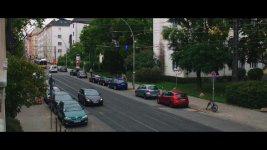
Exposed to hold the sky top left of frame. Internal, 8 bit 4:2:0 V-Log L profile, sharpness -3 NR -5. ISO 400, white balanced off 18% grey card held out the window.

It has tonnes of YUV chroma smearing all over the pavement/sidewalk, street, building sides, sky etc. This is to show that at 8 bit, the V-Log L profile is basically giving worse results than what I'm prepared to use on a shoot. External 10 bit 4:2:2 holds promise as long as you aren't editing in Premiere, but it requires buying an external 4K recorder along with the other accessories like batteries etc to make it all work.

I really think that Panasonic should acknowledge that V-Log L is really only worth buying if you have such a recorder, as 8 bit is functionally useless and looks awful with the YUV chroma smearing everywhere.

Cheers from Berlin!

Paul :)
 
Wish I could, but don't have access to those cameras. For the record, here is 1080p, 23.98 AVCHD 100mbps internal V-log-L, overexposed 2 stops, in a worst case scenario image for this problem, with the Varicam LUT in FCP X--
Okay, first things first -- that is astonishingly bad, profoundly unacceptable no matter how anyone wants to slice it.

But -- I'm still not sold that this is an 8-bit problem. It just isn't. Can't be. People have been using C-LOG for 3 years in AVCHD, 5 years in MPEG-2 8-bit, and nobody's complained about anything like this.

So -- while I don't have a GH4, I do have a DVX200 here, which uses VLOG-L. And my closet doors are surprisingly similar to yours. And my walls are nowhere near that yellow, but they do have a very pale tinge of yellow to them, so ... should be a reasonable comparison, yes?

I shot as you did -- AVCHD, in VLOG-L, in PH 24p mode, and I overexposed 2 stops as compared to what the auto-iris was saying proper exposure should be. I then brought the file into Vegas 12 and used its extremely limited LUT capability to apply an ACES sRGB lut, and then pulled a still from that (no grading, just slapping a LUT on it). By any reasonable estimation, my footage should look worse than yours, since it's equally 8-bit, same log curve, but I'm using a LUT that is almost certainly not designed to go with VLOG.

This is what I got.
doors.jpg
 
Okay, first things first -- that is astonishingly bad, profoundly unacceptable no matter how anyone wants to slice it.
But -- I'm still not sold that this is an 8-bit problem. It just isn't. Can't be. People have been using C-LOG for 3 years in AVCHD, 5 years in MPEG-2 8-bit, and nobody's complained about anything like this.
Thank you!! for saying it like it is!
Yep thats exactly it PROFOUNDLY UNACCEPTABLE no matter how you slice it.
I have shot indoors with no lights, just medium daylight from outside, with these same colored cream walls, and got the same results...mauve or magenta smearing everywhere, it does not matter wether you render in After FX in 32 bit space or Premiere,
its there....I dont believe its an Adobe issue, although Premiere and AE may exacerbate it.
I can see it in the original untreated file straight from the camera.
Whats happened here is Panasonic has released a dud and everyone is trying to find workarounds for what is essentially their mistake, Panansonic never did it properly in the first place and as news of this gets out, its going to hurt their reputation.
They should have made the Log from scratch for the GH4 in the first place, made it for the 12 stop DR...but they didnt, and not a single beta tester appeared to notice or complained about it, this is an amazing scenario.:happy:
 
Last edited:
Barry, do you have incandescent bulbs in your room?

Batutta, do you have CF bulbs in your room?

Could it be that VLOG exposes bad CRI?
That shot was from incandescent lights.

But I don't think it can be a CRI issue, because the shots that started this thread were shot outdoors...
 
Thanks for the DVX200 test Barry :)

I still see some chroma errors, though not as obvious as the GH4. I pushed saturation on your image to make their positions more obvious. In your shot's case they seem to be skewing more towards cyan/yellow than magenta, but they are still present.

Do you have some sort of blue light in that room? Because there seem to be blue highlight reflections as well.

doors_saturated.jpg


Cheers,

Paul :)
 
Last edited:
Paul Leeming--I meant to say hello. Been a while since seeing you in Tokyo. I'm doing some DRAGON vs VlogL tests that might contribute here. Not sure yet whether I'll be putting fuel or water on the fire. I think the latter.
 
Paul Leeming--I meant to say hello. Been a while since seeing you in Tokyo. I'm doing some DRAGON vs VlogL tests that might contribute here. Not sure yet whether I'll be putting fuel or water on the fire. I think the latter.
Hey mate! Greetings from Berlin!

I say, light that sucker up and watch it burn :D

Cheers,

Paul :)
 
Do you have some sort of blue light in that room? Because there seem to be blue highlight reflections as well.
Now that you mention it, there's a daylight CFL that I forgot about. The main light was a tungsten 250, but that CFL might have been on as well, may account for the blue.

Still -- would you not agree that this is fifty million times better than Batutta's shot? This is 8-bit, 4:2:0, bitrate-starved AVCHD, and it was overexposed by two stops, and there's none of that colored pollution on it. I just cannot sit by idly and say "8-bit is to blame" because -- it isn't.

We'll have to see the results from other testers (Dusty's experiments and others) but -- it does no good to chase after red herrings. 8-bit is less than ideal, obviously, but it is not some inherently flawed system that is creating mandatory green/purple splotches. There might be something else to blame, but it's not the inherent qualities of 8-bit that are doing it.

I would still like to hear from Illya Friedman on this. There's no way a guy of his knowledge just "missed" something like what Batutta posted. There has to be some explanation, some process, that works and produces excellent results.
 
I pushed saturation on your image to make their positions more obvious.
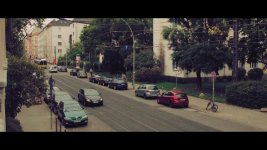
Paul, maybe that is the reason for the color artefacts that we see in your picture.

I have started to test v-log v footage in Sony Vegas, using the Magic Bullet Looks plugin to apply the LUT. If I use the Vegas internal color correction to push saturation up dramatically (so something about 250%), I start to see similar color artefacts. BUT without doing that I do not see these artefacts. Neither in the internal recorded 8bit GH4 footage, nor in the 10bit ProRes 422 Shogun footage.

I have also started to test other LUTs - the Convergent design LUT, or the ArtAdams LUT. And compared them with the Panasonic VLogL to V709 GH4. Sure, there are some differences int those LUTs, but I do not have the impression that those differences are huge.

I am satisfied with first tests of shooting skin tones - the faces shoot internal seems to occure quite well and natural. Especially the difference in skin tones between CinemaD and v-logv is significant! While you have very organic skin tones with v-logv, Cinema D delivers an anorganic footage that has a clear videolook - not very nice in my first tests.
 
Last edited:
Im just maybe having a chance to look at Vlog.

The shadows go a little wonk.. (seems typlical of shadow compression) but I think it it pretty :)

Might pull out my 1080 recorder in a bit!

'Filmic' and 'Correct' grades..

vlog_1.9.1.jpg
vlog_1.9.2.jpg
 
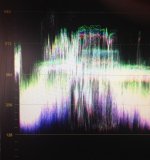
BTW - that road scene I would say it is underexposed by a stop really (in Resolve) there is not much above 600 - over protection of the sky top left would not IMO be the way to go as it would put too much noise in the rest of the image.

Scopes before LUT is applied.
gh_scopes.jpg
 
Back
Top