GH4 Exposing V-LOG L

Bern Caughey

Veteran
Since V-LOG L is out in the wild it's probably best to start a thread on exposing it.

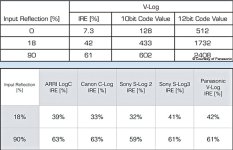
I haven't used VLOG-L on a GH4 so cannot say how it's been implemented. On the DVX200, VLOG-L sits middle gray at 42 IRE, and 90% white at around 61 IRE. Nothing will exceed 79 IRE, so --you have to know how it works to expose properly.

http://www.dvxuser.com/V6/showthread.php?333445-GH4-V-log&p=1986572379&viewfull=1#post1986572379

IF V-LOG L is implemented on the GH4 in a similar manner to the DVX200's then it MAY be useful to set a Zebra to 60% & use a 90% White Card for determining exposure.

Sony's SLOG3 sits 18% Grey at 41 IRE, & 90% White at 61 IRE, so exposing V LOG L MAY be similar.

Alistar Chapman has a post explaining this in depth, but it's about Sony's FS7, so you'll need to weed thru.

http://www.xdcam-user.com/2014/12/ultimate-guide-for-cine-ei-on-the-sony-pxw-fs7/
 
Last edited:
Is this the thread where everyone should post their exposure expriments, findings, best settings etc? It's weird Panny releases log, then has almost no instructions for usage. Where to set Zebras, what to expect from histo, maybe even how to veiw with settings on LCD
 
I shot a project today with Natural and VLOG side by side. You get a extra stop in the highlights so I found myself exposing using Natural and dropping a stop when switching to VLOG. In Post I am finding while noisier, the VLOG footage looks good with more accurate colors. Using Resolve denoiser, I am able to cleanup the footage pretty easily. I did a shot where I was under 2 stops compared to Natural and I was able to bring the footage back in the proper range of exposure at the cost of additional noise and 8bit starting to show it's face. I used 80% zebras with the VLOG but also found it easy to see the detail lost in overexposure on the LCD. The footage is a lot of interiors shooting out through windows and the VLOG clearly shows a extra stop outside.
 
Would be interesting to test it out with an external recorder to see if 10bit 422 makes a big difference. I have a Ninja Blade but I'm wondering if a Shogun (or Assassin or Pix-E) would be a good companion to the GH4.
 
for the 8-bit GH4? Does that mean set zebra to 80% like I read? I can't find the IRE setting on GH4. Is 400 ISO the cleanest? Use the Varicam LUT as is on GH4 to expand back?
 
for the 8-bit GH4? Does that mean set zebra to 80% like I read? I can't find the IRE setting on GH4. Is 400 ISO the cleanest? Use the Varicam LUT as is on GH4 to expand back?

That is the data from Varicam V-Log, and GH4 V-Log L has less DR Stops than Varicam. So IRE% won't be the same but similar.

My guess is when shooting V-Log L, Zebras 70% is close to overexposed for V-Log L
 
After a lot of testing using the app-derived setting of VLog-L, I've come to the conclusion that at least internally at 8bit 4:2:0, it is not worth the $99 upgrade, as well as being fundamentally buggy.

Before you jump on me for my testing methodology, or that I don't know how to deal with log footage etc, understand that I have been shooting, exposing and grading for almost a decade with RAW R3D footage, so I'm very familiar with correct exposure, ETTR etc.

Note also that I do not have access to an external recorder, which by all accounts appears to greatly help the image, given that you can then output 10bit, 4:2:2 uncompressed pictures which seem not to be affected by the internal bug.

What am I talking about?

I'm talking about the strange, magenta/cyan macroblocking we're seeing with internal recording, on neutral grey surfaces primarily (though you can see its effects throughout the image if you look carefully). See the pavement, car bonnet (hood) etc in the VLog-L shot 1, and the building wall in shot 3.

I'm not privy to the way the camera records or compresses the image into 8bit, but something is definitely wrong. For comparison, I shot the exact same camera settings in Portrait mode, which seems to fill out the histogram much better, and there was no evidence of this magenta/cyan macroblocking in the Portrait style.

All shots were ETTR to make sure I was using the maximum bit quality of encoding the available spectrum.

I added the Panasonic-provided VLog to Rec709 LUT to bring both images to the same space, then tweaked the images to be as close as possible to the same overall curve.

As you can see, with the various tests, the Portrait images don't have any weird artifacting, whereas VLog does.

Given that I can hold almost as much dynamic range using Portrait with contrast at -5, it would seem to be superior to VLog, at least internally (and given the macroblocking bug we see here). Externally is a different argument, so hopefully someone with access to a 10bit 4:2:2 recorder can confirm these tests for us.

I'm glad I got to test VLog-L before spending $99, because for internal recording, it would have been a complete waste of money, unless Panasonic fix the magenta/cyan macroblocking issue and prove it for internal 8bit recording.

Look forward to everyone's tests and thoughts!

Cheers from Berlin,

Paul :)


Portrait 1:

VLogL-Test-1-Portrait.jpg


VLog-L 1:

VLogL-Test-1-VLOG.jpg


Portrait 2:

VLogL-Test-2-Portrait.jpg


VLog-L 2:

VLogL-Test-2-VLOG.jpg


Portrait 3:

VLogL-Test-3-Portrait.jpg


VLog-L 3:

VLogL-Test-3-VLOG.jpg
 
Last edited:
what about that noise in the blacks?
hotter exposer does not bring it down to acceptable levels. will have to add a lot of contrast and rely on heavy software de-noising (which I hate).
 
visceralpsyche, I agree even though I have way less experience than you. I'm only using internal recording and less than happy about the coloring going on, just like you found. But, I'm waiting for other experienced people to post up thier findings and settings that may make things better. Maybe 800 is better iso for some backwards reason. And I read over exposing, then lowering in post cleans up low noise a bit.

Did Panny say "Not recommended for internal recording" in the V-Log sales material? I must have missed that part. (even though we all know external can be much better)
But, if they did say that, maybe I would not have thrown away $99 for a gimmick feature that isn't helping me much at all. In my tests, NATURAL produced a better looking end result than VLOG.... deeper colors, less noise, maybe only a 1/2 stop difference in a sky where no one would notice or care.

Do they have a money back satisfaction guarentee?
 
Same LOG curve, but V-Log L covers only 12 F-stops compared to the Varicam's 16 F-stop LOG curve.

Are we 100% sure about this? Because Panny sure made it seem like a big deal to adapt V-Log into V-Log L, which should mean there's more to it than just the number of f-stops the LOG curve covers.
 
So IRE% won't be the same but similar.
Incorrect. The zebra values are, in fact, pretty much identical up to the clipping point. VLOG-L is mapped exactly the same as VLOG, up until the GH4 sensor clips at 12 f-stops (about 79 IRE on the DVX200, I don't know what the exact point would be on the GH4).
 
Back
Top