GH4 Exposing V-LOG L

Are we 100% sure about this? Because Panny sure made it seem like a big deal to adapt V-Log into V-Log L, which should mean there's more to it than just the number of f-stops the LOG curve covers.

I'm sure implementation was unique to the GH4's hardware, but going by the info Barry Green has posted it appears that 12 F-stop V-Log L is a sub-set of 16 F-stop V-log, thus the SAME color LUTs will work for both formats.
 
Are we 100% sure about this? Because Panny sure made it seem like a big deal to adapt V-Log into V-Log L, which should mean there's more to it than just the number of f-stops the LOG curve covers.

Yes we're sure about it. VLOG-L and VLOG are identical over the course of the first 12 stops, as implemented on the DVX200 at least. It would be impossible to imagine that they would implement it differently on the GH4 and then still call it by the same name. If it were customized to the GH4, it would probably be called VLOG-G or something like that.

The VLOG curve is not optimized for any particular sensor, it's designed to render the densities of a scanned film negative. It's modeled after the original CINEON.
 
Bern, if Barry's finding says nothing exceeds 79 IRE, doesnt it make sense to set zebras at 80% then?

Setting the second Zebra to 80% would be useful to monitor clipping but not so good for determining exposure.

Lacking Waveform, &/or False Color, the best way to determine exposure would be to use a 18% Grey, or 90% White, card with a Zebra set to the appropriate IRE. Unfortunately the GH4's Zebras bottom out at 50% so using a 18% Grey card is impractical, but (in theory) setting a Zebra to 60% & reading off a 90% White card should place most values near Panasonic's recommended levels. Alister Chapman explains this all much better so I suggest reading the article I linked earlier.

Instead of a calibrated 90% White card you could use a sheet of bleached white paper but these are typically brighter so you'll need to adjust exposure a bit to compensate. Alistar recommends an extra 4%, but 5% would likely work fine. I carry a pop-up Lastolite EzyBalance for use with my FS7.

http://www.xdcam-user.com/2014/07/l...rd-pop-up-grey-card-and-90-white-card-review/
 
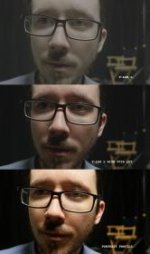
Here's an exposure test I did. I found setting the zebras to 50% was a good marker for my skin tones. (It's also as low as the zebra settings go.) Attached is V-LOG L still, V709 LUT applied, and the same exposure settings with Portrait Profile (all settings to 0 except for sharpening and NR, at -5).

EDIT: Argh, that upload didn't work great. Here's a Dropbox link: https://www.dropbox.com/s/u08shefxoy61tgv/V LOG L test 1.png?dl=0
 

Attachments

  • V LOG L test 1.jpg
    V LOG L test 1.jpg
    8 KB · Views: 0
Yep - this is why I'm going to keep using V-LOG L even though I don't have an external recorder (yet) - skin tones are night and day. Just going to have to be careful of bland walls - that's where the 8-bit codec really falls apart.
 
Yep - this is why I'm going to keep using V-LOG L even though I don't have an external recorder (yet) - skin tones are night and day. Just going to have to be careful of bland walls - that's where the 8-bit codec really falls apart.
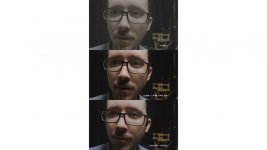
Or you could just grade your portrait footage to look 99% of your Vlog footage for that shot. I titled this image on export "$99" .
$99.jpg
 
I've found using cineon convertor, log-linear is a decent starting point. From there, You can use a lut or just bring it into filmconvert or both. Magic Bullet look seems to do excellent with v log footage as does colorista. With the exception of using the key feature in secondary's. The image just isn't showing up in the monitor windows but is Fine in all the other settings If anyone's interested.
 
Or you could just grade your portrait footage to look 99% of your Vlog footage for that shot. I titled this image on export "$99" .
View attachment 105218

Nice job - but I don't care for the way the highlights on the modified portrait profile lose saturation. There's an unnatural plastic quality to my forehead and nose (ha!). I agree there are major MAJOR issues with 8-bit V-LOG L use - which is why I've already got the wheels turning on how to get an Atomos Ninja Assassin! Gonna need to kill some debt and get some more side jobs rolling, but I think I can make it happen by spring, and would rather invest in an external 10-bit 4K recorder than another camera body that only offers 4:2:0 8-bit blech.
 
Okay, after a day of testing I'm pretty confident that the color uniformity errors I am seeing are a compression artifact, not a color error in the V-LOG L profile itself. The same artifacts exist in all footage no matter the profile, it's just that when you "expand" V-LOG L footage you exaggerate the problem. Unfortunately, this is more or less to be expected. It is exactly this kind of low contrast subtlety that compressors are designed to smoosh (yes, "smooth" is my technical term) and when decompressed there will be slight errors. In fact, I was able to get very similar results by making a synthetic image, compressing it via AME and then grading the decompressed image.

The best way I've found so far to mitigate the problem (certainly not eliminate it) is to allow the camera to apply some noise reduction before compressions (less noise means more data can be allocated to actual picture information.) The stock setting of "0" seems to do the best. Anything above 0 doesn't seem to make much difference, and the image gets plastic looking.

I think V-LOG L is going to sell a lot of Atomos recorders!
 
I think V-LOG L is going to sell a lot of Atomos recorders!

I'm already prepping myself for that purchase! Probably can't pull it off 'til spring, so I don't know if I'll be using V-LOG L a ton until then... but it will be a better investment than yet another camera body that records 4:2:0 8-bit internally. The great thing about an external recorder is you can keep using it when you do decide to upgrade the camera body also...
 
Incorrect. The zebra values are, in fact, pretty much identical up to the clipping point. VLOG-L is mapped exactly the same as VLOG, up until the GH4 sensor clips at 12 f-stops (about 79 IRE on the DVX200, I don't know what the exact point would be on the GH4).

To found out the exact point, We need to wait for Panasoinc to release white paper for GH4 V-Log L?

Is that the reason why the Zebrea is not working correctly? Because this was not tweaked for V-Log exposure?
 
To found out the exact point, We need to wait for Panasoinc to release white paper for GH4 V-Log L?

Is that the reason why the Zebrea is not working correctly? Because this was not tweaked for V-Log exposure?
You can easily see where it clips on the histogram. It's just at a different (earlier) point. I put a little piece of tape at that spot. Done.
 
Or you could just grade your portrait footage to look 99% of your Vlog footage for that shot. I titled this image on export "$99".

If you want 99% there, you'll have to do a bit more work, especially with secondaries. Here's my take:

Untouched Portrait
jYTYtLSh.jpg


Untouched V-Log L to rec709
zSWDWbUh.jpg


Graded Portrait
uArl7yWh.jpg


Full res album: https://imgur.com/a/FaH3p

While it can be done, I think the beauty of V-Log is the ability to jump right into grading with an already balanced image that doesn't need much work to "fix" before you begin your creative grade. All I'm noticing about the V-Log shot is a slight green cast in the shadows, which is easily dialed out. And to be completely fair, this same cast was present in the Portrait, it just wasn't noticable until the black levels were matched.
 
Since V-LOG L is out in the wild it's probably best to start a thread on exposing it.


http://www.dvxuser.com/V6/showthread.php?333445-GH4-V-log&p=1986572379&viewfull=1#post1986572379

IF V-LOG L is implemented on the GH4 in a similar manner to the DVX200's then it MAY be useful to set a Zebra to 60% & use a 90% White Card for determining exposure.

Sony's SLOG3 sits 18% Grey at 41 IRE, & 90% White at 61 IRE, so exposing V LOG L MAY be similar.

Alistar Chapman has a post explaining this in depth, but it's about Sony's FS7, so you'll need to weed thru.

http://www.xdcam-user.com/2014/12/ultimate-guide-for-cine-ei-on-the-sony-pxw-fs7/

I'm finding a lot of noise with 18% gray at 41-43 IRE. Cleans up a lot at 55-57 IRE. Thats a bigger push.
 
PIX-E5 10bit 4:2:2 Test

PIX-E5 10bit 4:2:2 Test

I was fortunate to attend a presentation of the new Video Devices PIX-E5 4K recorder/monitor and took my GH4 along to test out the V-Log and 4096x2160 recording capability.

I especially wanted to see if the V-Log 10bit 4:2:2 output from the camera would mitigate the magenta/cyan macroblocking issues I was seeing with 8bit 4:2:0 internal recording.

The TL;DR answer is - 10bit external recording gives better bit depth, BUT it doesn't mitigate the magenta/cyan macroblocking (although it's reduced). V-Log L in its current form is not worth buying, unless Panasonic rebuild it from scratch to use the entire available bit depth of the camera outputs.

The long answer and analysis:

There are two factors that will give you the best possible image quality for external, 10bit 4:2:2 V-Log recording:

1. DON'T use the Panasonic supplied V-Log to Rec709 Varicam 35 LUT. It exacerbates the magenta/cyan macroblocking as well as the noise quality of the image, even in 10bit 4:2:2.

2. DO use a LUT that is designed for high bit depth footage (14 or 16 bit, or float).

As lpowell has already shown in his excellent analysis, the GH4 camera is set up to use a slice of the Varicam 35 V-Log profile, without making use of the GH4's full bit bucket, as it were. This goes for both internal 8 bit recording, as well as external 10 bit recording.

What does this mean in practice? It means you are losing both the low end (less than 10 IRE) as well as the high end (over 80 IRE) for bit depth and colour/tonality discrimination. That works out to roughly 7 bits of depth for internal recording, and just over 9 bits for external recording, which results in the increase in both noise and the colour shifts we are all seeing, where the output from the sensor is being effectively clamped at both ends and has to compensate by squeezing what should be the most dynamic range, into a smaller bit bucket than all the linear profiles.

The examples below all use the same 10 bit, ProRes 422 HQ files from the new PIX-E5 recorder (an awesome device BTW!). The only changes are the LUT applied and some tweaks in Lumetri Color to get them looking similar (they aren't exactly the same I know, but they are done to demonstrate my point about macroblocking).

As you can see, the Varicam LUT exacerbates the problem even in 10 bit 4:2:2 colour space. As this is external recording, the damage to the image is occurring before the recording path.

Something else I noticed is that the PIX-E5 saw the same bit clamping to the image as the internal recording does, meaning there was no way to show over-exposure in the traditional sense (false color on the PIX-E5 never went over yellow, for example).

So even with a 10 bit recorder, the V-Log profile is only feeding out around 9 bits of information, as opposed to the linear profiles sending the full 10 bit signal.

No idea how the beta testers and Panasonic themselves thought this was in any way maximising the camera's potential such that it was worth $99.... when it appears to actually hobble the camera's potential!

Anyway, after seeing the mess that the Varicam LUT made with the footage, I tried a few others available in Premiere. Of all the LUTs, two stood out as giving a pleasing image that mostly eliminated the magenta and cyan macroblocking, although you can still see it if you really look carefully.

One was the RedLogFilm LUT (which needed a large initial exposure shift upwards, but provided a pleasing image once tweaked). The other was the Phantom LUT, which seemed to give the most colour accurate image when compared to the scene as I saw it in real time.

Those two LUTs provided a good starting point without a lot of macroblocking errors. In the high key clip shown below, the RedLogFilm LUT gave the least amount of banding in the corner shadow, without any hint of magenta. The Phantom LUT did almost as good a job. The Varicam LUT gave both banding and magenta macroblocking in the shadow area.

For those of you with 10 bit footage (and even 8 bit internal footage), try my settings as shown on your own footage and see if it gives a more pleasing image free of macroblocks, especially on skintones, which I didn't test today. I'd love to see your results!

In summary though, I feel that Panasonic have short changed us in asking money for a hobbled profile that doesn't even seem designed with the GH4's sensor characteristics and bit depth in mind.

If they focused on making a log profile that was actually designed to maximise the available bit depth of the camera, both internal and external, avoiding the magenta macroblocking so prevalent in everyone's footage, and not hobbled to fit the Varicam which almost none of us own anyway, then perhaps I'd be inclined to buy that version of the log profile. As it stands today, I'm very glad I didn't buy the $99 profile, as my results with the linear profiles in both 8 bit and 10 bit give me finer detail, more colour tonality and far less macroblocking. With Portrait profile I get lovely skin tones, full bit depth and accurate colours as I see with my eye. Until Panasonic can exceed that level of quality, my wallet will stay closed.

Thanks for reading and please feel free to comment or criticise as necessary, so we can all learn!

Cheers from Berlin,

Paul :)


NOTE: Save images to your computer and view at 100% to avoid scaling banding issues by looking at the forum resized image.


RedLogFilm LUT - High Key:

PIX-E5 GH4 V-Log L 10bit 422 RedLogFilm LUT High Key.jpg


Phantom LUT - High Key:

PIX-E5 GH4 V-Log L 10bit 422 Phantom LUT High Key.jpg


Varicam LUT - High Key:

PIX-E5 GH4 V-Log L 10bit 422 Varicam LUT High Key.jpg


RedLogFilm LUT - Normal Scene:

PIX-E5 GH4 V-Log L 10bit 422 RedLogFilm LUT.jpg


Phantom LUT - Normal Scene:

PIX-E5 GH4 V-Log L 10bit 422 Phantom LUT.jpg


Varicam LUT - Normal Scene (notice magenta banding/blocking!):

PIX-E5 GH4 V-Log L 10bit 422 Varicam LUT.jpg
 
I just wrapped up a little shoot today with the GH4 V-LOG L in 10bit mode recorded to the 7Q+. I think it worked pretty well.

VLOG TEST.10bit no grade.jpg
Here is an ungraded grab

VLOG TEST.10bit Graded.jpg
Quick grade with Varicam LUT and a few tweaks. I do some magenta in the jacket.

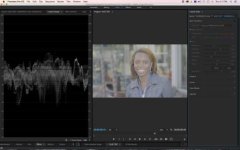
VLOG TEST.10bit no grade with scoop.jpg
Ungraded shot in Lumerti Color with waveform.

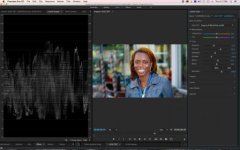
VLOG TEST.10bit graded with scoops.jpg
Graded shot with waveform

I did push harder to make sure the image had less noise and it does seem to work. IRE for skin is around 54-62 range. ISO set at 400. I wish I could have also shot internal as well but no time for that on this shoot. I went from not sure to pretty good on V Log L and feel you really have to push the exposure to get the noise out. Bummer is the histogram is off on the GH4. It pushed to the right a lot compared to the 7Q+ and if you don't have a waveform then it's going to be tougher. I forgot to test he zebras. Sorry. The magenta issue is still plaguing the image and that is a huge bummer.
 
Last edited:
Back
Top