FS7: Exposing S-log3 in the snow

Martin.G

Well-known member
Hi

I was shooting in grey conditions yesterday. Overcast, snow in the air, snow covered ground. While trying to expose for the brighest snow with "zebras on white at 60%" in S-log3, resulted for me under these conditions around 1-2 stops under exposure pretty consistently. Indoors in studio lighting it was spot on when exposing 60% on white.

What is your way of setting smooth and consistent exposure in snowy conditions when shooting s-log?
 
I have placed any highly reflective part of snow in the sun (like the edges or crest of snow) at 60% and let everything else fall in place, similar to what you have described.

You can go a bit higher than this (like 70%) because 60% in slog is actually 90% white like a white t-shirt or piece of paper. I think snow can give you a lot of false readings too depending on the sun, so generally if you use 60%-70% on shiny parts of it, it means the flatter looking "snow" surfaces are falling below that.

This seems to work for me.

Is it consistent? No. If you want constancy you'd have to use a waveform monitor and get your actual snow to hit the same spot on your WFM each time as you change setups or light conditions change, etc..

cheers,
 
Last edited:
I have placed any highly reflective part of snow in the sun (like the edges or crest of snow) at 60% and let everything else fall in place, similar to what you have described.

This seems to work for me.

Cheers, i guess theres nothing wrong with what i was doing then, so back to the testing board.

Im not sure what could be the issue. A 60% zebra on white snow should translate directly to give or take 90% REC709 LUT white, am i right? But the parts of the snow that i exposed to zebra and a little above too (large area covered in zebras), are exposed at 75-80 IRE.

I was shooting S-log3 CineEI with LUT off - but has anyone else had a bug where LUTS came on? I saw that one time yesterday. Contrast and colors suddenly changing abruptly. Recording unaffected. Menu setting still showing LUTs completely off of all outputs. Took a while, and then it went away. Sort of like when you start the camera, it boots a LUT before flattening out the image with s-log, even though you have LUTs off.
 
Yes 60% in slog3 should translate to 90% in REC709. If you get a white piece of paper and light it for 60% zebras in slog3, when you turn on REC709 MLUT it should be the same stripes if you set them for 90%. Test it out and try.

Also here is a handy table I created to show the mapped values for various MLUTS:

Screen%20Shot%202015-10-04%20at%209.00.23%20PM_zpsngajezby.png
 
Yes 60% in slog3 should translate to 90% in REC709. If you get a white piece of paper and light it for 60% zebras in slog3, when you turn on REC709 MLUT it should be the same stripes if you set them for 90%. Test it out and try.

Also here is a handy table I created to show the mapped values for various MLUTS:

Screen%20Shot%202015-10-04%20at%209.00.23%20PM_zpsngajezby.png

That's a very handy chart. Thanks for that Dennis.
Of course we can add that the original SLOG is at 38% Middle Grey and 68% White.

As an ex-Buffalo boy (pretty close to Dennis), saw these kind of issues all the time.
The issue is contrast.
Martin, if there are no bright edges or hard shadows (grey overcast day), you risk having grey mush.
As SLOG encourages that process, you need to pay particular attention to your white balance.
It is likely that you were shooting in extremely blue conditions (7900K-10000K) and the meters are reading the spike in the blue layer.
However, if you look closely chances are you are missing information in the Red layer.
This is why you had different results in the studio. You had a full balanced color spectrum in your light, especially your highlights.
Something you may not have at all outside.
To put it simply, on overcast days with snow, it is advisable to warm up your image slightly and rebalance (cool it down) later in post.
I think you will find that you have much greater seperation.
 
Last edited:
It is likely that you were shooting in extremely blue conditions (7900K-10000K).
This is why you had different results in the studio. You had the full color spectrum in your light.
To put it simply, on overcast days with snow, it is advisable to warm up your image and rebalance (cool it down) later in post.
I think you will find that you have much greater seperation.

Yeah i found severe banding in the sky on my test shots of snow from the days before my real world shoot.

But theres no .cine colors in Custom mode, so im locked into 5500K whitebalance for this project. Sony should add a 7000K option for us that lives up north :-)
 
Ferdige sekvenser.00_04_19_23.Still010.jpgFerdige sekvenser.00_05_43_24.Still009.jpgFerdige sekvenser.00_06_00_14.Still008.jpgFerdige sekvenser.00_06_16_24.Still001.jpgFerdige sekvenser.00_06_29_15.Still002.jpgFerdige sekvenser.00_06_34_00.Still003.jpgFerdige sekvenser.00_06_48_23.Still005.jpgFerdige sekvenser.00_06_56_14.Still004.jpgFerdige sekvenser.00_07_33_17.Still006.jpgFerdige sekvenser.00_07_56_03.Still007.jpg
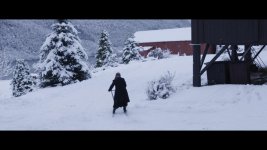
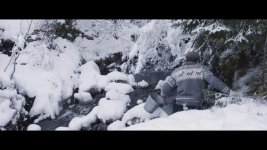
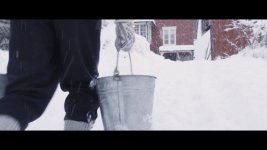
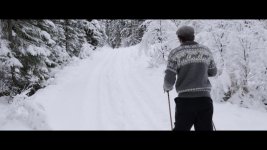
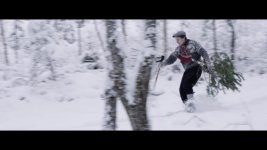
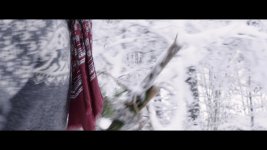
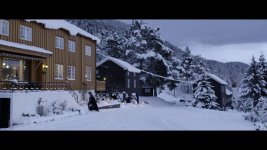
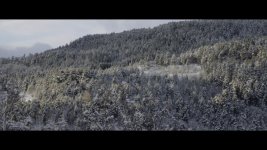
Heres som screengrabs for you to see. Im really excited about this project, allthough its low budget. We are recreating the 1930s rural Norway complete with christmas and everything. Im doing everything myself, its very low budget. Client wants to make a film about his father, so his children and grandchildren can see where they come from. Who their grandparents and forefathers was.

All shots are just 709A V-gamut, with exposure adjustments applied.
 
Yes was going to say.. whats the problem !.. why dont you shoot with an MLUT 709.. then you can set your exposure far more easily.. judging off Slog is nuts.. no one is ever meant to see it except in post.. very hard in those conditions with a very low contrast image in your VF too.. I was in Norway beginning of the year and just exposed with 709 MLUT.. easy ..
 
I had to lift some of the above images quite alot. They are very dark with just a LUT added. But the indoor is perfect. No adjustment has been done.

We dont get the waveform with the LUT on, so i am trying to find a great way to expose with the FS7 fast and easy while still being able to check with the waveform quickly whats clipping and not.

The slog exposure was spot on in the other scenes. I need to test to see what went wrong with the snow shoots. 60% slog is 90% with LUT, so it should be consistent.
 
Yes was going to say.. whats the problem !.. why dont you shoot with an MLUT 709.. then you can set your exposure far more easily.. judging off Slog is nuts.. no one is ever meant to see it except in post.. very hard in those conditions with a very low contrast image in your VF too.. I was in Norway beginning of the year and just exposed with 709 MLUT.. easy ..

That's funny, I've been shooting with S-LOG for 2.5 years with my F55 and more than one year with my FS7 and I have NEVER used an MLUT. Not once. An MLUT offers no advantages at all to setting exposure if someone understands S-LOG.

Getting back to the original topic, I have shot S-LOG in the snow many times over the last couple of yeas and have never noticed a problem with exposure. I do recommend exposing it a little brighter than normal, around 75%-80%, because snow is brighter than normal white cards, paper, etc. The beauty of S-LOG and XAVC-I (not to mention RAW) is that there is plenty of headroom to bring the highlights into line in post as long as you don't blow anything out while shooting.
 
Thanks for the advice Doug! Saves me the trouble of experimenting myself up to what IRE level i should expose for.

I am coming from the "exposure on caucasian skin school", and i am now trying the slog way after watching your Master class. Trial and error is to be expected, especially since ive never used snow as a metering tool before ;-) But i like this style. Its very consistent, and like you say, theres always something white you can use for exposure, somewhere around you!
 
Martin, the images you posted are a good start but some of them are not quite there. I would expect to see more texture and detail in the snow than what you are getting, particularly on the shot of the bucket being carried. The issue could be how you are processing them in post rather than the exposure settings. You might try the scene file from my training video called UNIVERSAL-1 which would make post-processing easier.
 
Last edited:
Yes, im still only in Premiere with just a basic LUT applied. Will test your scene files later.

Is there a nice trick you use to boost mid-range contrast perhaps? Get some more pop?
 
Yes, there is a trick to getting good results: DaVinci Resolve. :-)

Learn it, use it, love it. It is a skill that everyone who shoots or edits should have. You can't do justice to S-LOG without a real dedicated grading program. Catalyst, Premiere, FCPX, etc. are just not up to the task of grading S-LOG or RAW.
 
Last edited:
Some good advice that still holds true in the old thread. Cameras come and go but good shooting skills last forever.
 
Very true! I do own a lightmeter, but did not bring it on this "cinematic run and gun" shoot for time reasons.
 
For particularly high-key locations (i.e. Where the bulk of the frame is white or brighter), my standard practice is simply to rate the camera a stop higher to help preserve an extra stop of highlight detail, and then push all of the footage a stop in post.

Since the sensor in my F5 responds natively at 1125 ISO, I set my light meter for 2250 ISO to take me from 6 stops of highlight latitude to 7 stops.

I've found this to work nicely. For the same approach with Alexa I rate the camera at 1600 ISO and Red Dragon at 800 ISO. As a general rule, I'm not a fan of lifting the mid-tones and shadows more than a stop with any of these cameras, as the noise starts to become a lot more visible past that point.
 
That's funny, I've been shooting with S-LOG for 2.5 years with my F55 and more than one year with my FS7 and I have NEVER used an MLUT. Not once. An MLUT offers no advantages at all to setting exposure if someone understands S-LOG.

Getting back to the original topic, I have shot S-LOG in the snow many times over the last couple of yeas and have never noticed a problem with exposure. I do recommend exposing it a little brighter than normal, around 75%-80%, because snow is brighter than normal white cards, paper, etc. The beauty of S-LOG and XAVC-I (not to mention RAW) is that there is plenty of headroom to bring the highlights into line in post as long as you don't blow anything out while shooting.

Doug you are special .. :) for mere mortals I would think to expose by Slog is a tough call.. in this shooting situation ..
 
Back
Top