DVXuser Forum Upgrade: Feedback, Questions, Answers...

Got it. It's a Firefox accessability setting.

Problem is that I'm using a small screen (the win7 box is a 17" laptop, 1920 x 1080). In order to be able to read most websites, I have to increase the font size. If I make the maximum font size small enough (about 12 point) Firefox can display all the text as it should.

But the final result is the same -- I can't read it either way. If the text is big enough for me to read, it gets chopped off. If it's small enough to not get chopped off, it's not big enough for me to read!

Sigh...

What's interesting is that this is only a problem on vBulletin systems (at least, I've yet to run into it anywhere else on the 'net), and just the current upgrade (I've found it in two completely separate implementations). IOW, I didn't have this problem last week when DVXuser was running the older version.

Probably vBulletin neglected to test accessability settings for the various browsers. When I used to do software for a living I ran into the same problem -- QA not testing for the users setting font size and colors, etc.

I spent a week as a pariah for pointing that out! That was only a few years ago. Amazing how quickly I've forgotten.
 
It's got to be something more than accessibility... I just blew my font up and down through a massive range, and still could not reproduce this issue.

I was came across an ubuntu forum posting that was somewhat related. folks were reporting similar issues, but not just with vbulletin but other sites as well.... seems some of them fixed it by installing the msttcorefonts. I don't know that that solution would work for you (as it relates specifically to people using ubuntu OS, but it's the only thing I've come across so far in my brief searching about people having a similar issue when browsing sites with firefox.
 
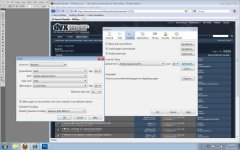
my firefox font settings

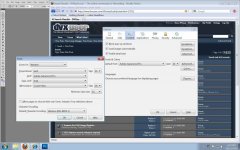
my firefox font settings

firefox font settings new.jpg

Tools...Options...Fonts and Colors...Advanced.

These are the settings that are "causing the problem." If I now change the settings to this:


firefox font settings.jpg

the webpage reads correctly, as you can see by looking at the copy of DVXuser in the background.

All it is, is that "minimum font size" option. Whether that "allow pages to choose their own fonts" checkbox is checked or not. A minimum of 12 pts is OK, bigger than 12 chops off the bottoms of the text -- the bigger the font, the more gets chopped off.

Maybe what should happen is that the bounding box should get bigger as the font gets bigger. IDK.
 
Last edited:
instead of changing yoru fonts there, have you ever tried just "blowing up the pages" by using ctrl +/- on your keyboard, or ctrl and scroll your mouse wheel?

Rather than messing with those fonts and sizes, i think you will find that pages scale better by leaving those alone and just using ctrl and +/-, or ctrl and scroll wheel on your mouse.

And, we'll continue to look into fixing the issue with back-end browser font changes in the meantime.

later,
Jason
 
instead of changing yoru fonts there, have you ever tried just "blowing up the pages" by using ctrl +/- on your keyboard, or ctrl and scroll your mouse wheel?

Rather than messing with those fonts and sizes, i think you will find that pages scale better by leaving those alone and just using ctrl and +/-, or ctrl and scroll wheel on your mouse.

The reason to set a minimum font size is to avoid having to ctrl +/- every single web site visited. Setting a minimum font size has worked fine for every website I visit on the web, except those running this latest version of vBulletin. I've been working with this same basic setup in Firefox for like the past five years or more. Doesn't mean I was doing the right thing though.

If I do set the minimum font size to 12 pts, then do the ctrl + thing, it does work as you'd hope. So perhaps this is what I'll have to do from now on. It's a viable work around anyway.

Thanks Jason. You've been working your tail off for this community and I for one thank you for it.
 
thanks.

well, consider it a temporary work-around then I suppose. I'll have Larry look into this particular issue and hopefully we'll have it fixed sooner rather than later.
 
Based on your last post I was able to re-create this. Got it now. Has to do with assigning a minimum font size in firefox....

Larry's flagged this in our little bug tracker and it's on the list :)
 
Bug report:

Today I noticed that the page numbers suddenly change on threads with a lot of pages.

One had 93 pages (931 comments) and when I clicked on the previous page number 92, it jumped there. But it reported it as page number 32 now. And all the high page numbers were apparently disappeared. It happened again on a page with 76 pages.

Also the height of the login fields isn't sufficient with large fonts. It chops off half the characters.
 
Probably not a big thing but I just noticed that in my private messages folder, The "unread mail" icon is an OPEN letter and the "read" mail is a closed letter. Seems kinda backward to me. Also applies to the mail in my box, NOT just the icons.
 
Just a little update, since we haven't said anything in a few days... :)

We're documenting the bugs and suggestions in the bug tracker and are working on those things of course. Larry is also working on some changes to the layout dealing with replies/views, and last post stuff, and adding checkering to the posts and thread lists.... meaning alternating grey colors to help with easier reading... probably this next stuff will hit the live site in the next couple/few days or so...

We've also sneaked in a few things over the last couple of days that you may or may not have noticed :)
 
There might be some funkyness with the site over the next 15 minutes as we roll out the next batch of changes.... nothing major.
 
Iphone Problem: No Field To Enter Password?

Iphone Problem: No Field To Enter Password?

When trying to log-in via Iphone, there is no field to enter my password, only user name. Am I missing something? thanks
 
How do I search a specific forum now? When I click "Advanced search" I no longer have the choice to search in a specific one. If I am looking for an item in the marketplace for instance it has now become impossible to find anything.
 
When trying to log-in via Iphone, there is no field to enter my password, only user name. Am I missing something? thanks

Where it says "Username" is actually where you enter your Username. and the blank field next to it is where you enter your password.
I know where it says Username might look like a label and that you should enter the username next to it - but no, enter your username OVER username and your password in the blank field next to it.
Would be lest confusing if the blank field said "password" like the username field says "Username". -- I thought the same as you at first.
 
How do I search a specific forum now? When I click "Advanced search" I no longer have the choice to search in a specific one. If I am looking for an item in the marketplace for instance it has now become impossible to find anything.


No one?
 
Back
Top