DvRack workflow and use...

DV Rack doesn't change the recording format (codec), it simply wraps the data in the container format of your choice (AVI or QT). If your system has a DVCProHD codec (like Macs with FCP or PCs with Edius), then you can simply import / drag the file into your project and you're done.

If your system does NOT have a DVCProHD codec, then you can use the DVCProHD Decoder included with DV Rack 2.0 HD. This is a decode-only codec which allows any DirectShow-compliant program to decode the DVCProHD video. Using the decoder you can open, edit, transcode etc., but you cannot output a new DVCProHD-encoded video.
 
THoff said:
DV Rack doesn't change the recording format (codec), it simply wraps the data in the container format of your choice (AVI or QT). If your system has a DVCProHD codec (like Macs with FCP or PCs with Edius), then you can simply import / drag the file into your project and you're done.

If your system does NOT have a DVCProHD codec, then you can use the DVCProHD Decoder included with DV Rack 2.0 HD. This is a decode-only codec which allows any DirectShow-compliant program to decode the DVCProHD video. Using the decoder you can open, edit, transcode etc., but you cannot output a new DVCProHD-encoded video.

Thanks again, THoff, I am not sure if Avid Xpress Pro HD has DVCProHD codec; we pull the MXF files directly to the bin. Anyway, when you say the Decoder included with DV Rack 2.0 HD, is it the thing that change the avi or QT files back to MXF format?

Thanks.

King
 
Yes. The DVCProHD Decoder comes with a Batch Converter utility that can take MXF files and churn out AVI or QT files. The DVCProHD Decoder in turn is bundled with DV Rack 2.0 HD.

If you are using DV Rack to record to disk, then the output will already be in an AVI or QT container, DV Rack does not create MXF containers.

I do believe that Avid has its own DVCProHD codec, so you would not need to use either the Serious Magic DVCProHD codec or the Batch Converter.
 
Are there limitations on the trial version?
I am trying to drop clips recorded with DVrack HD into Vegas and all I get is the audio track! weird...

I can view them in DVrack and with windows' player after I eject them...
 
USLatinContent said:
Are there limitations on the trial version?
I am trying to drop clips recorded with DVrack HD into Vegas and all I get is the audio track! weird...

I can view them in DVrack and with windows' player after I eject them...

I think the trial is only good for DV, but not 100% sure. Please correct if it is wrong.
 
I haven't used the trial, but AFAIK DV Rack 2.0 HD is 100% functional and includes support for HD. I do believe that there is a watermark in the output of the DVCProHD Decoder if it is a trial version, but you should still get both audio and video. It sounds like you installed DV Rack 2.0 HD but not the DVCProHD Decoder.
 
duhhhhh.... yea, somehow I think that might have something to do with it, it just sounds relevant, lol... I'm sorry... thank you very much for pointing it out
 
Last edited:
OK, here's a related question I'm hoping someone can help with.

We are planning to get DVRack Pro. But for the footage we have already captured using the FireStore, can I somehow use DVRack Pro to convert it from MXF into AVIs that Premiere can use, or will I also have to buy Raylight to do the conversion on the already-captured files?

Also, if one owns DVRack, are there any other compelling reasons to also own Raylight?
 
You need DV Rack 2.0 HD for DVCProHD material -- I'm not sure if that is what you meant by "Pro", but I wanted to make that clear.

DV Rack 2.0 HD comes with their DVCProHD Decoder and Batch Converter. The Batch Converter allows you to take MXF files and convert them to AVIs, and the DVCProHD Decoder in turn allows those AVIs to be opened in Premiere.
 
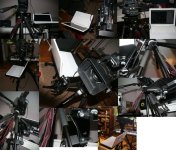
here are the pix for the mounted laptop to tripod variation.
The part number for the manfrotto table is 183 then you need an arm and a clamp.
It works pretty well.
 

Attachments

  • laptopsupport_web.jpg
    laptopsupport_web.jpg
    247.7 KB · Views: 0
well the platform has an edge and gravity keeps it in place. It feels very safe. I just screw the arm very tight.I would remove the laptop before moving the tripod.The macbook is small and light ,im not sure this would work with a beefy 17inch. These arms have different quality and price i got the cheapone. I guess some models are stronger.I got the idea when i saw that setup at the photovideo store here in montreal.
 
hey. Pierre. How heavy is your Macbook? and how much delay are you having from real time to when it shows up on DV rack. I get about 1/4 second delay on my machine.
 
I did not buy the dvrack yet. For the moment i capture with final cut pro. I dont notice any delay.I did try the demo a while ago and it kept freezing on me.

Macbook weight from the apple website:5.2 pounds (2.36 kg).
The macbook is an amazing little laptop. Im still hesitating to get dvrack. Installing windows on my mac book will mean reducing disk space......
 
I'm thinking it might actually be possible to run Windows and DV Rack off a CD and not even install either on the hard drive -- there is a program called "Bart PE" that builds a bootable Windows XP CD or DVD.

I've used it with Acronis TrueImage (a backup program), and it might be possible to run DV Rack that way as well, depending on how finicky the Softwrap copy-protection code used by DV Rack is.
 
Back
Top