DNG issues - FS700 and BMC

Gene Sung

Veteran
I've tried to open a number of .dng files shot on an FS700 in either Photoshop CS 5.1 or After Effects CS 6, and every time there is a drastic color shift.

I went and downloaded some .dng files shot on the Black Magic Camera and they look FINE. No color issues at all.

What am I missing here? Aren't they both .dng files and shouldn't they work the same? Here's an example of what is happening
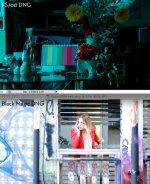
dngproblem.jpg
 
That still doesn't work. Maybe I need to update to CS6 photoshop. Weird how BMC DNG looks great while Sony's is so off. I know a number of people on the FS700 forum experienced the exact same problem with drastic color shifts using Adobe products. Did anyone figure out how to fix this?
 
I have up to date versions of photoshop cc, after effects cc and Premiere cc. All still read the DNG's wrong. Very annoying. I thought the most recent update would add support for sure, but its bright pink in premiere and bright green in photoshop and After effects (both use camera raw when importing)
The best bet is to use Resolve for now and cross your fingers for support from Adobe.
 
Filippo seemed sure in that thread that Adobe were adding Sony DNG support in the October updates, but it never came. I wonder if anyone has any new insight about this?
I'm also curious if this is a Convergent Design problem because of the way it reads and records the raw stream from the camera, or is it just the way the Sony outputs the data that gives us such a crazy result in any adobe application?
 
So I did a little research and here's what Adobe wrote about their very latest DNG support. This is super annoying.

To be very clear, for this 7.1 release, we are only supporting CinemaDNG media from the Blackmagic Camera. No other format is being supported at this time. The pink overlay problem with DNG derived from Canon RAW media is a known issue.We are currently in discussions of how to expand our CinemaDNG support going forward, and user input is a vital factor. Nonetheless, Premiere support for the CinemaDNG format is different from the support in other Adobe applications. For more on this, see the section "Enhanced BlackMagic Cinema Camera support" at this link:https://helpx.adobe.com/premiere-pro/using/whats-new-7-1.html#Supportf ornewcameraformats-- Andy-- Premiere Pro Team​
 
The O7Q .DNG files open fine in Resolve 10, with a default colorspace of RGB. If I change the colorspace to YUV or HSL, I get that green cast.
 
The O7Q .DNG files open fine in Resolve 10, with a default colorspace of RGB. If I change the colorspace to YUV or HSL, I get that green cast.

Yeah, I think it just doesn't work in Adobe products unless it's a BMC DNG. I switched every color color space Photoshop and After Effects, and it was always off :( Going to download Resolve Lite tonight.

Hopefully Adobe will fix this soon.
 
We're just extremely lucky Blackmagic are very nice people who released Resolve Lite for free! Without them, what would our options even be with the 7Q files?
 
The Adobe problem is well known. It should be fixed soon.

CD may come out with a fix as well.

I have mada a couple LUTs for Resolve, they can be downloaded here:

http://westsideav.com/LUTs/OdysseyLogtoSTDlook.cube
http://westsideav.com/LUTs/7Q2Kraw-1.cube

These are not perfect but they get you in the ballpark, the standard one is like a 709 LUT, the RAW is close to the raw as seen in the 7Q WF and screen.

Right click links to download. And make sure the suffix is .cube. Then install in:
Hard Drive > Library > Application Support > Blackmagic Design > Davinci Resolve > LUT on a Mac. PC has a different path, I don't use PCs for Resolve so I don't know it.

These work in Resolve light 9 and 10.
 
Last edited:
As noted in our manual, Adobe currently does not support this. But we are in contact with them and hope for a solution soon. In the meantime we recommend Resolve.
 
  • Like
Reactions: saw
Thanks so much for providing these Olof. Very much appreciated :)

The path for LUT files on the PC for Resolve is:
C:\ProgramData\Blackmagic Design\DaVinci Resolve\Support\LUT
 
DNG raw files are captured in CIE RGB values, not component video YUV values. You have to make sure your DNG default settings are sRGB color space in any raw processor. No two raw processors will interpret camera metadata the same way or give you images that look alike from the same file. You have to create or load a custom color profile for your specific make and model of camera. For Adobe products that use camera raw, you can download the free DNG profile editor and have it create custom profiles for daylight and tungsten light automatically from shots of a Macbeth chart (X-rite color checker or passport) under the appropriate light.
 
Arrggghhhh... Apparently my old Gen One 8 Core Mac Pro cannot run Resolve as it's too old. Any other ways of opening an FS700 Cinema DNG without getting the off-colors? I've bought too much camera stuff to buy a new computer at this point, especially with the 7Q coming out.

I know Resolve is really popular right now, but the thing is, I really have no need or desire to learn Resolve. I only wanted to use it to open the Cinema DNG file. I'm A-OK with After Effects for grading.

Is Resolve currently the only way to get proper color from FS700 Cinema DNG files? Is there any other way? If not, Adobe please come to the rescue.
 
Last edited:
If someone will post dng frames of a Macbeth chart shot under daylight and tungsten I would love to try creating profiles for Adobe camera raw.
 
You could try Assimilate Scratch Lab. It's only a few bucks but I don't know what the hardware requirements are.

I understand from our communications that Adobe promises a solution soon.
 
Hi Mitch,

Any word on when an Adobe solution will be available for 7Q DNG? My 7Q is about to arrive, but since my old-computer cannot use Resolve, I'm reliant on Adobe.

At your suggestion, I'm going to test Scratch Lab Play right now, but yeah... my workflow is very Adobe oriented.
 
Back
Top