FEATURE: DEUCE OF SPADES - How I made a period full feature film all by myself on ZERO budget

Yay Faith! Animated Logos are fun...

Another question! I know your probably getting sick of me by now.

I've got less than a month to prepare for principal photography, and while we are currently on schedule.. I still want to make sure I have everything set.

When scheduling what you were going to shoot when, how did you go about doing that?

For example, in my film. I've got one actress who is driving 4 hrs one way.. to the set. She doesn't have a big role, but she does have non speaking scenes scattered throughout the film. In order to save her hassle of having to be here constantly.. I'd like to figure out a way to film so that we can do all of her stuff at once and lessen the amount of time she needs to be on set.

Ideally it won't make sense to shoot in scene order. I was just wondering how you decided what order to shoot what scene on what day in?
 
Yay Faith! Animated Logos are fun...

Another question! I know your probably getting sick of me by now.

I've got less than a month to prepare for principal photography, and while we are currently on schedule.. I still want to make sure I have everything set.

When scheduling what you were going to shoot when, how did you go about doing that?

For example, in my film. I've got one actress who is driving 4 hrs one way.. to the set. She doesn't have a big role, but she does have non speaking scenes scattered throughout the film. In order to save her hassle of having to be here constantly.. I'd like to figure out a way to film so that we can do all of her stuff at once and lessen the amount of time she needs to be on set.

Ideally it won't make sense to shoot in scene order. I was just wondering how you decided what order to shoot what scene on what day in?

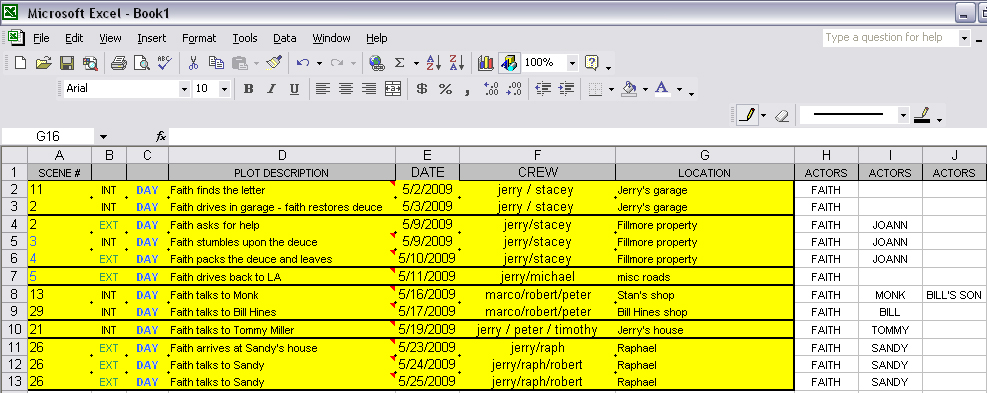
yes, you usually never shoot in chronological order. You need a scene breakdown and shooting schedule. It was a bit of a puzzle to me at first, but i found I quickly got the hang of it and this is how I did it.

1- Set up a microsoft excel document, in which there will be many spreadsheets.

2- Each spreadsheet will hold important info. For exemple: One page for list of actors, their email addresses and phones and the name of their character. Same for crew. Same for locations. the most important pages will be one for scene breakdown and one for shooting schedule.

A)- SCENE BREAKDOWN: make a list of all your scenes. One line per scene, each line will imlcude several columns each holding vital info: [Column#1=Scene number] [#2= int/ext day or night] [#3 = scene description - for ex: "Johnny races Zip"] [#3 = shooting date] [#4=location] [#5 = crew volunteers names] then further to the right make column with the name of each of your main actors at the top and if they are in a scene drop their name in that column, in the row of the scene.

B)- SHOOTING SCHEDULE: Now make a copy of this scene breakdown spreadsheet and remane it "Shooting schedule". the scene breakdown will remain your back up copy where you can see all the scene in chronological order and what actors are in each, what locations are etc etc... Kinda like a blue print to your film production. The shooting schedule spreadsheet will become your working page, the one you will use most. Now that everything is listed on that page you can sort the spreadsheet by location column or by actor column and it will give you a different perspective each time. For exemple, if I can only get the 1950's gas station for one day but know I have 4 scenes that happen there, I will need to plan to film all 4 scenes that same day. So i would sort by location, look at the "gas station" section and see I have 4 scenes at that same location, I will also know what actors are involved, since their names are in the column and I can then plan accordingly. First thing to do is call locaiton owner and see when they will let you have location (especially if it is for free - you are fully at their mercy) the day they say you can have locaiton for free is the day you will shoot. next round of calls is to the actors, to make sure they are available that day (cause you don't oftentimes have any other options location dates wise - cause it's for free). Then you line up volunteers for that shoot - camera help, grips, blablabla.

You can do the same thing by sorting by actors name. Say my actor lives far away, I can try to see if I can schedule all their scenes back to back so they come down from Oregaon for a week and get wrapped. I did that with my actor Gary. I sorted the spreadsheet by his name column (make sure to "expend selection" when using the sort function in Microsoft excel)... that showed me all his scenes and location, I then regrouped locations togather and had a plan of attack: We would film for 7 days in teh desert (Location #1) and then two more days in Camarillo (location #2) he would then be wrapped.

CONCLUSION:

You have to be very orgazined and the spreadsheet allows you to do that. Each time I filmed a scene I highlighted it in yellow and moved it up. So at a glance I could see what scenes were done (top of list), what were not (bottom of list) and how much I had accomplished (how yellow the entire spreadsheet was- very white at beginning of production, and more and more yellow looking as months went by). eventually my whole page was yellow: I WAS WRAPPED.

:D

Sometimes shi* happens and a location owners flake or an actor is sick and you are forced to reschedule. This forces you to reorganize things, shuffle dates, etc etc... Thsi can quickly become a logistic's nightmare!!! The spreadsheet is very useful and will save your ass. It's flexible because you can move rows up and down (copy paste) and create a new shooting schedule in minutes and visually reorganize yourself.

here is a screengrab of a tiny section of my schedule so you have a visual: click on thumbnail below to see fulll size.


Note that you will see little triangles in eth corner of the scene description cells. If you hover over the cell it will open a "comment box" which contains additional notes I made to myself about the scene. Ex: "props needed = plates, lemonade pitcher, old photos, photo album, grandfather's clock" or even "remember to call raphael to confirm date" or "still don't have a shooter for that scene!!!" - Usually the comment box will hold a list of props and wardrobe needed, or cars, or even mental notes. To add a comment to a cell right click on it, select "add comment" and type away :). Comments remain hidden so they don't clutter your space and if you want to read them you just hover on the cell and they pop up. To add or change content you select "edit comment"... (maybe you already know how to use microsoft excel very well but if not then now you know how to do it).

Initially I had looked into expensive software that do shooting schedules. They were so darn pricey I gave up. In the end Excel served me well and did the job. And I had a complicated schedule with 150 actors and no less than 85 scenes and 60 locations. So there save your bucks and think outside the box!
 
Last edited:
Thanks once again Faith. I will use this advice for sure. We have a production meeting this Saturday after the final auditions are done. I'll bring this up.
 
Weeheee, the thread just earned one more star !!! Now five star thread!! :thumbsup:

Had a great shoot yesterday, with a crew of one. Redid one very challenging shot and three single shots for my grand finale climax sunset scene. Got to tell you, you learn everyday when you make a film. I needed roses so went back to the nursery to buy a pot like I did when I originally filmed the scene, only to find that ALL rose shrubs had been CUT DOWN TO NOTHING. Not even ONE leave left on ANY of the hundreds of pots :furious3:

So I had to get rose stems and turn my one crew guy into a "living rose bush", he was holding the roses with his hands, to fill the frame, as though it was a shrub. You can't tell the difference when watching the shot but boy did my crew guy suffer, holding up these roses for about 60 minutes straight.

But we got the shot and it looks 300% better than the original shot...

Then I filmed my Single shot of my lead actress only to find out that now we it's winter and the sun no longer hits the front of the house, so the lighting will not match, never ever, no matter what I do, the master shot filmed in June.

:furious3: X 2

Fortunately, her looks and performence were captured so much better in the new shots that the very slight discrepency of background soft lighting is going to be a negligeable price to pay... Well worth it!!

I came home and downloaded the footage and shlapped it in the scene right there and then and became very excited when I saw how much my climax scene was enhanced, thanks to this last shoot. Redoing these 4 shots was well worth it and the film is now even better than it was.

And now guess what? I AM ALL DONE WITH FILMING !!!!!!!!!!!!!!!!!!!!!

:thumbsup:

"Never give up, never surrender!" - Photo below from a shoot last Spring.

2009%20TREE%20scene%20BTS%206.jpg
 
I always use people to hold branches, flowers etc. to help with composition, aid parallax on dolly shots etc.

I'm glad you're delaying the DVD release, (got the email earlier today), to rework your sound design and continue the refinement process on Deuce of Spades. (Never rush a fine wine!) So far, you've used time brilliantly as an ally to really produce something special and I think continuing to use a strategy which has worked for you all along is going to be so much more satisfying in the end.

I've been DPing a feature for a local producer here since the summer. (Everybody works so we can only shoot on weekends.) Allowing everyone to see your blog at DVXuser and the quality of what you've been accomplishing by taking your time has helped everyone here see the benefits that taking their time can have.)

Keep up the fantastic work Faith!
 
I've been DPing a feature for a local producer here since the summer. (Everybody works so we can only shoot on weekends.) Allowing everyone to see your blog at DVXuser and the quality of what you've been accomplishing by taking your time has helped everyone here see the benefits that taking their time can have.)

Keep up the fantastic work Faith!

Yes, this is so true and I am glad the thread can help show them the path to enlightenment HAHA!

Nothing good ever comes from rushing. That said I am also a firm believer in getting things rolling, keeping at it, getting it done (right) and not procrastinating. but it's just that if you want it to look and sound good you have to accept the fact it is going to take TIME, lots of time. So it is a constant balance between wanting to get it out there and wanting to get it out there looking GOOD.... I would not recommend going on and on for years editing cause some people are anal and never happy... At some point you have to stop and say: This now is GOOD and it is time to stop fussing with it and send this child into the world :thumbsup:.
 
Hey Faith, I've got the schedule thing up and running I believe. Did you have all this info on one sheet, I know your post said many sheets.. but I'm not understanding how your tying different sheets together, so you can sort by actors/location.

I'm using Open Office, since its free.
 
Hey Faith, I've got the schedule thing up and running I believe. Did you have all this info on one sheet, I know your post said many sheets.. but I'm not understanding how your tying different sheets together, so you can sort by actors/location.

I'm using Open Office, since its free.

I'm not familiar with Open Office. I use Microsoft Excell. I think it comes standard with some windows, like maybe XP pro ?? I'm sure you can get it or maybe already have it on your PC? With excell you can sort by column.
 
Great night yesterday! I went by bel Air camera and bought photo gear AT LONG LAST!! My last decent photo camera I had was when I was 14, my dad gave it to me and taught me the ropes. So at 14, the first camera I ever touched was not an instant point and shoot mini camera, like most kids get, but rather a big bulky fully manual Ricoh LOL... And that forced me to learned about iris, exposure, apperture, blablabla...

Many years later (how many exactely I am not at liberty to disclose HA!) :Drogar-BigGrin(DBG) here I am buying a camera again. It was about time. Saved for a year and splurged and got a Canon 7D with a nice 18 - 270 macro zoom lense. Way cool. I was smart and got an adapter so I can use my prime Nikon lenses, which I already own, on the Canon body, too hehehehehe... ironically I didn't buy this camera because it can film, although I will explore that side of it down the road and see if I can use it for behind the scene stuff. I picked it becuase in that proce range it was a nice step up from the 50D both in resolution and low light performence.

So last night I went by fellow dvxuser Chris Simmons, who owns the same Canon model and he gave me a two hour crash course on all the buttons, to get me rolling in no time. Took some nice shots :dankk2:and generally speaking had a blast. We were shooting each other shooting each other LOL and also shooting some cool champaign glasses with misc lenses and comparing results... Today I'll install the software and download some of the shots, look at them on the large HD screen... So far I am happy with the camera and the lense. I have a few days to push its limits and see what it can really do in low lights etc, cause Saturday I have a very important shoot with my lead actor Timothy Luke, for the new film poster :D weeeheeeeee...

Many thanks to Chris for his kind help !!!
 
I'm not familiar with Open Office. I use Microsoft Excell. I think it comes standard with some windows, like maybe XP pro ?? I'm sure you can get it or maybe already have it on your PC? With excell you can sort by column.

OpenOffice opens allmost all Excell sheets. Shouldn't be a problem, exept for maybe some details (cell allignment, a missing typical microsoft font).

Just try. You can't break anything. I hope :Drogar-BigGrin(DBG)
 
OpenOffice opens allmost all Excell sheets. Shouldn't be a problem, exept for maybe some details (cell allignment, a missing typical microsoft font).

Just try. You can't break anything. I hope :Drogar-BigGrin(DBG)

Only trial version of Excel come with new PCs. If you have a student ID, you can get the steeply discounted student version, should work for this type of application just fine.
 
[ot]
Only trial version of Excel come with new PCs. If you have a student ID, you can get the steeply discounted student version, should work for this type of application just fine.
I know, but this is about OpenOffice.org (a free office suite from another company). OpenOffice includes Calc as Exell counterpart. Calc is compatible with Excell so one can open, modify and save Excell sheets with it.
[/ot]
 
Last edited:
OK, I've tried out OpenOffice in the past, but didn't really like it. But horses for courses and in this economy, openoffice might just be the ticket. Are you aware of any movie project templates out there for it?

If one has to purchase MS Office, then several of the dedicated scheduling programs out there might be a better choice. Several of them will import a script from Final Draft or Movie Magic.
Then...there is always Celtix.
 
I really can't comment on any of above, since I've never seen / used OpenOffice. but if OpenOffice allows you to create simple worksheet with column and rows and you can sort the data by column, then that's all you need to do yoru shooting schedule like I did. Cost? ZERO.
 
Not to hijack the thread, but I made it work with Open Office.. the key was figuring out how to sort it.

Here's how it looks..

29xfybr.jpg
 
Great, Azmyth! I thought it should work and I'm glad it did. (Big fan of Excell, but equally proud of the Open Source counterpart. I use them both.)

And it nicely and positively closes up this small slightly-off-Deuce of Spades-topic spawn.

(I hope Faith posts some more cool and inspiring updates soon. Allways happy to read those.)

Groet,
Jasper
 
Great, Azmyth! I thought it should work and I'm glad it did. (Big fan of Excell, but equally proud of the Open Source counterpart. I use them both.)

And it nicely and positively closes up this small slightly-off-Deuce of Spades-topic spawn.

(I hope Faith posts some more cool and inspiring updates soon. Allways happy to read those.)

Groet,
Jasper


OK, Hhhhhmmmmmmm "cool and inspiring updates" eh? let's see...

Well, hows this:

Just received the latest issue of AMERICAN MUSCLE CAR AND HOT ROD MAGAZINE (France) and they should rename it : DEUCE OF SPADES MAGAZINE :) - the film is ALL OVER that magazine and I mean ALL OVER.

I got a picture on the cover, a half page photo on page 3 , a TWELVE PAGE SPREAD starting at page 70 and ending at page 81 !!!!!!!!

PLUS an 18X24 centerfold poster of Johnny and his deuce.

I'm gonna frame me that sucker!!!! LOL

Having this magazine in hand didn't hurt any at my important meeting yesterday. Patrick has recruited a crew of four up and coming young Hollywood sound mixers to work on the film and they came by to see DEUCE OF SPADES so they could make a decision whether to join the project and volunteer their help for free or not. I am happy to report they left with a big smile on their faces. It appears they really liked the movie. They complimented me on the shots, cars, etc etc... Now I wait to hear from Patrick for a final confirmation (hopefully). And we start spotting the film next week.

Meanwhile, my photoshoot last week-end was A GREAT SUCCESS. I came back with no less than 600 photos all RAW format, and must say that about 40% of them are poster material. The dry lake, roadster and most importantly my lead man, looked dropped dead gorgeous. Timothy has never looked so hot as Johnny Callaway. Dang. The boy is going to go far if he plays his cards right. As for me, I quicked ass behind the Canon, despite the fact it was my first time using it. I got some super cool angles and shots hehehehehe...

On another note, the drive back, the next day, was quite the adventure. The storm arrived two days early and caught me with my pants down aka: I had to drive all the way back from the desert (basically 2 hours worth of freeway driving) under POURING RAIN - it never stopped raining the whole way back and I was at the wheel of my roadster, no top, no windows and NO WINDSHIELD. Oh and Bias Plys tires (those HATE water) I was like F** it I'm gonna make it home darn it! And so I drove. With my goggles and aviator cap... This was a very dangerous trip and I was grateful to make it back in one piece, to say the least.

That's about it for now, I'll post some of the photos here soon, I'm just too busy right now, cause I am preparing for a private screening of the film at my house saturday for my main cast :) and still working on massaging my timelines, of course.


below: The Deuce, in it's natural habitat - photo taken by my friend Garth Rattlif last year.

THE%20DEUCE%20OF%20SPADES%20AT%20SUNSET.jpg
 
Back
Top