D800

  • Thread starter Thread starter Guest
  • Start date Start date
(I'm always upset when people talk about "Apple's Thunderbolt interface"; you know it is Intel that developed that, right? all Apple did was be the first one to use it; I wouldn't say this is quite enough for it to be their interface; it's definitely Intel's)
+1
 
(I'm always upset when people talk about "Apple's Thunderbolt interface"; you know it is Intel that developed that, right? all Apple did was be the first one to use it; I wouldn't say this is quite enough for it to be their interface; it's definitely Intel's)

I stand corrected. the mistake was probably due to the fact that most interfaces are designed by consortia, as was firewire.
 
yes, but whereas Apple had a clear lead in the development process for Firewire, Intel had a clear lead in the development process for Thunderbolt (actually, I think they did all by themselves, and only brought Apple in at the end of the process, for bringing it to market)
I had been reading about Thunderbolt for years before Apple jumped in (it was originally called Light Peak, and was supposed to be using optical cables, but they concluded it was too early for that and changed the name)
 
There are two nice remote controls for the Canons from Manfrotto and Okii which use the usb-port to control Focus, Iris and more. I wonder if this is possible for the D800 or do one have to use the WT-4???. Does the WT-5 works on the D800?????
For the Canon, you now can place the cam on a jib and do remote focusing even focus racking.
 
There are two nice remote controls for the Canons from Manfrotto and Okii which use the usb-port to control Focus, Iris and more. I wonder if this is possible for the D800 or do one have to use the WT-4???. Does the WT-5 works on the D800?????
For the Canon, you now can place the cam on a jib and do remote focusing even focus racking.

The D800 does not support the WT-5, only the WT-4.
 
It's clear that HDMI out, weather 1080p or 1080i is way better than artifact'd data from internal camera codecs.

HDMI is a physical transport layer designed to convey uncompressed video. Its primary application is consumer (end-use) video playback.
All HD-capable HDMI devices are capable of sourcing and sinking either 1080i 50/60 or 720p 50/60 (or both), 24-bit full-bandwidth colour.

To put it bluntly, nothing stops you from generating crappy quality video with horrible compression artifacts, and displaying it via HDMI. HDMI won't make crappy video better, but it also won't degrade high-quality, pristine video.

This is what nikon and others have started to refer to as Uncompressed Out or "Clean HDMI".

This implies that the video stream delivered by the D4/D800 image processor to the HDMI output interface is significantly higher quality than the severely compressed h.264 video delivered via data files stored on the memory card.

Based on this, what advantage is offered in HDSDI, a recognized pro standard interface for HD signal transfer? In other words, is there a difference in the Specs for HDSDI vs HDMI (for recording) with respect to the flavor of 1080?

Advantages of HD-SDI physical transport layer:

Signal link is a single 75-ohm coax, ubiquitous in the professional broadcast industry
SDI and HD-SDI are commonly available on professional video gear
A broad selection of professional video devices directly support SDI and HD-SDI links
SDI and HD-SDI include or support industry-standard error-detection mechanism (e.g. SMPTE-RP168 EDH) in the signal protocol (HDMI does not)
Typical signal is "10-bit video", with colour-difference channels 50% under-sampled ("4:2:2").
Support for timecode

Advantages of HDMI physical transport layer:
Ubiquitous in low-cost consumer gear (e.g. Blu-Ray players, LCDs, computer video cards).
Low-cost, flexible cables
EDID (source device can 'read' a list of capabilities from the sink device)
HDMI output interface is already ubiquitous in dSLR designs (primarily for image review link to LCD)
Typical signal is 24-bit ("8-bit video") full-bandwidth on all channels
Interface includes source clock, clock recovery is not required. This allows much cheaper implementation of receivers, using inexpensive standard logic (e.g. FPGAs).

I'm sure I left out a few things...

-- Bob Elkind
 
Last edited:
Actually SDI is the grand daddy. There was, and still is, thousands of miles of HD-SDI and SD-SDI cabling in the world. Plus interfaces,etc.

Agreed.

In the professional broadcast world the dominant digital video links are SDI/HD-SDI (coax) and (now) network cable.
In the consumer (end user) market, the dominant digital video links are HDMI (they are everywhere) and... network cable!

A bit of ancient history:

It is said -- with some good reason -- that Roman horse carts determined the width of roads and (ultimately) the spacing of modern railroad rails.

In the case of SDI, the SMPTE standard folks were constrained to fit the infrastructure of the existing analogue television plant, which was built around 75-ohm coax with 50-ohm BNC connectors on the ends.

Analogue video has 75-ohm source impedance and can be daisy-chained with passive loopthrough. So serial digital video was specified for 75-ohm source impedance and ability for passive loopthrough (a real pain in the rear!).

Video plant technicians had the tools, parts, and materials to make (and repair) cables on their own, to any length. And so it was ordained for SDI cabling.

SMPTE does not have a budget for tooling, so SMPTE almost always builds new interconnects from existing connectors. Tooling cost for new connectors is not cheap! So standard 50-ohm BNCs are used for SDI, and the slightly older parallel digital interconnect was built on... DB-25 connectors (also used for RS-232 serial links) and ribbon cable (the stuff used for floppy disk drives, serial ports, and Centronics parallel ports). Cheap!

For the last year or two of polishing up the digital video standards, I was a participating member of some of the working groups (I am proud to say!). We were a somewhat baudy lot, and many adult beverages were consumed in the process of working out compromises needed to wrap things up.

-- Bob Elkind
 
Hey Bob, Welcome to DVXUSER, glad you here with a lot of knowledge to share, This is certainly my favorite place to learn, and I hope it will be yours too.[FONT=arial, sans-serif][/FONT]
 
+1!
Any reasons we have not moved to ethernet cable for basically everything? I just don't get why we needed HDMI connectors, if ethernet cables are everywhere and have the bandwith for that task too (10Gb ethernet was published the same year as HDMI, though 10GBASE-T had to wait until 2006)


also: the *edit* D4 review at dxomark is out:
http://www.dxomark.com/index.php/News/DxOMark-news/The-Nikon-D4-to-the-test
"only" 13 stops of DR in RAW stills mode - everything else, outstanding

and btw: that "only" is just for ISO 100: from ISO 400 onwards, DR is outstanding too:
http://www.dxomark.com/index.php/Cameras/Compare-Camera-Sensors/Compare-cameras-side-by-side/(appareil1)/767|0/(brand)/Nikon/(appareil2)/676|0/(brand2)/Pentax/(appareil3)/483|0/(brand3)/Canon
 
Last edited:
Any reasons we have not moved to ethernet cable for basically everything? I just don't get why we needed HDMI connectors, if ethernet cables are everywhere and have the bandwith for that task too (10Gb ethernet was published the same year as HDMI, though 10GBASE-T had to wait until 2006)

My lazy guess would be... the plastic connections themselves seem to be a weak point as they seem to have evolved from POTS wiring.
 
Nikon D4/D800, 1080p24 on HDMI, and a SONY FS100 video

Nikon D4/D800, 1080p24 on HDMI, and a SONY FS100 video

This post wraps several nagging issues and whinings together...

#1 There is quite a bit missing from the D4/D800 manuals. Here's my "hot" list for today (with updates from first-hand accounts):
  • audio on HDMI in LIVE mode? (UPDATE: YES) From all sources, or just external MIC?
  • 1080p24 on HDMI? (UPDATE: YES) Or converted to 1080i60 via 3:2 pulldown?
  • 1080p25/30 on HDMI? (UPDATE: YES) or 1080i50/60 via 2:2 pulldown?
  • 10bit 4:2:2 YCbCr or 8bit 4:4:4 RGB on HDMI? (UPDATE: 8-bit 4:2:2 YCbCr)
  • timecode and/or pulldown markers on HDMI?

On the subject of 24p possibly encoded to 60i through the wonders (and troubles) of 3:2 pulldown, this may be interesting reading--

#2 1080p24 is the problem format. Converting 1080p24 to 1080i60 with 3:2 pulldown, for recording purposes, and then reconverting from 1080i60 to 1080p24 is not lossless. This process could be made lossless with modifications or tweaks, but:
  • such tweaks at the source would need to be matched with complementary design changes in the device which performs recovery from the 3:2 pulldown conversion.
  • all devices between the signal source and the "reversing" device must preserve the "clues" in the video signal which enable lossless 3:2 pulldown recovery.

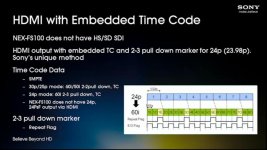
#3 The Sony NEX-FS100 camcorder supports 24p, and uses its HDMI output port as a recording signal interface. In this camcorder, Sony uses a proprietary protocol to insert both timecode and pulldown markers into the HDMI data stream, while using pulldown to convert 24p to 60i video. The caveats and warnings listed above apply in full.

In other words, Sony has implemented a 24p-over-HDMI workaround for Nikon to emulate (although NAB 2011, when the NEX-FS100 was introduced, was almost certainly too late for Nikon to incorporate into the D800 and D4). It is not a perfect solution, but it can be a harmless solution, allowing perfect reversal of pulldown.

It is almost certain that the Atomos Ninja, for example, does not support this proprietary solution.

I looked for an hour or so for disclosure of the details of Sony's encoding scheme, but I found nothing. I am quite eager to learn these details! The protocol is most likely "auxiliary data" inserted in the vertical blanking lines, but interpreting this protocol correctly requires very specific and exacting details.

#4 By the way, if anyone is interested in clear and compelling reasons why dSLRs-as-video-cameras "suck", you should listen to this marketing/technical presentation of the Sony NEX-FS100 camcorder. Much of the presentation would be useful for explaining how the Nikon D4 and D800 are set apart from the other video-capable dSLRs -- in some ways, but not all ways. Link is here. The presentation is almost 30 minutes long. At 28:30 of this presentation, Sony diagrams the timecode and pulldown markers (in non-specific terms). Here is a screen grab from this portion of the video:

p1030925243-6.jpg

-- Bob Elkind
 
Last edited:
The problem is almost always caused by compression. That's why we wrestle with moire, aliasing and all the rest of problems with DSLRs.

The solution is Raw. The Digital Bolex may or may not come to pass, but it promises Raw for 3,500 bucks. No bells and whistles, just turn on the camera, shoot Raw. Probably no zebras, histograms, maybe only manual control of iris (in other words your fingers on the lens, no buttons), but it will shoot Raw. Kind of like using an old film camera.

The Canon Raw DSLR is on the way. No idea if the price will be ridiculously expensive, but the point is Raw is the way to go and those cameras are going to be here soon.

Maybe this camera produces a pretty image, but for my next cam I want something that shoots Raw and costs less than the Scarlet (including all the proprietary batteries, storage media etc. that you have to buy from Red).

We all want to color grade the crap out of these images without them breaking down, and it would be nice to know that you can produce a pretty 2k image for the big screen.
 
@Gillvane: To which post are you replying?

Given that every camera has a unique combination of

  • optical low-pass filter (anti-aliasing filter)
  • colour filter array (Bayer pattern filter) with unique pigments for each colour channel
  • sensor noise characteristics (to be filtered)
  • analogue-to-digital converter offsets, biases, curves, and noise patterns

How will you convince each of the video rendering tools to support each of the camera models in the marketplace?

Adobe commits extensive resources to characterising new cameras and incorporating new profiles into Adobe Camera Raw, their raw conversion tool for still image cameras.

I'm not sure that will be a popular or worthwhile venture. Even if only one or two software firms go that route, do you really want to be locked into those one or two rendering applications?
Having the raw conversion performed in the camera, designed by the folks who designed the rest of the camera (including the raw conversion algorithms used in the same camera for still images), may be the best use of resources.

A year ago, I was a vocal advocate for "video RAW". This was driven primarily by a profound disgust with h.264 compression.
With uncompressed 4:2:2 (12-bit) or 4:4:4 video (8-bit resolution) via HDMI, the incremental rewards for "video RAW" don't seem worth the effort required to implement and maintain such a rendering tool.

I understand the benefits of 14-bit RAW vs. 12-bit "rendered" source material, particularly in high dynamic range situations. But realise also that the improvement from 20Mbit/sec h.264 to uncompressed 12-bit 4:2:2 will be far far greater than the likely improvement to be realised from 12-bit 4:2:2 to 14-bit RAW.

Note: You may wonder why I use a 12-bit 4:2:2 example rather than 10-bit 4:2:2. The reason is simple. The same HDMI hardware interface which supports 1920x1080 (at any given frame rate) with 8-bit RGB (which is inherently 4:4:4) will also support 12-bit YCrCb 4:2:2 -- no timing or frequency changes are required. The only barrier to implementing 12-bit 4:2:2 over HDMI today is a firmware update or a slightly faster rendering engine. Once you have implemented multipliers and adders for rendering image data, extending the retained calculation results by 2 additional bits is a very small design change.

-- Bob Elkind
 
Last edited:
no idea, but aliasing/moire appears because of line skipping and debayering, not compression, and the upcoming Canon shoots 4K, but may or may not be recording RAW
 
(when I posted only the first line of your post was there!) - also, to me, the main advantage of RAW is that nothing gets baked-in: current cameras, apart from debayering, apply a look, which kills a big chunk of the DR recorded by the sensor (in the case of the D7000, at least >3 stops get crushed, no matter what you do; in the Canon world, custom picture styles like Flaat_4 may alleviate this, but still, RAW would be a lot nicer) - and CS6 should work seamlessly with files in Adobe Cinema DNG, right?
 
Back
Top