D-Lighting Curves and video?

Hi !

Maybe somebody could do a comparaison on a D800 of your picture control with mine (which I did for D7000: https://vimeo.com/24173440) and Milk one also designed for D7000 (http://www.youtube.com/watch?v=lix6dl19uUo).
Maybe there are others flat picture control for Nikon that i'm not aware of which could be include.

The problem of picture control with Nikon (and Canon also) is that we don't have access to all DR the sensor has because we just make a curve after a already processed signal (except for Raw still which keeps everything). I don't understand why doesn't Nikon developed a proper picture control similar to Log which preserve DR and skin tones ! I would love to have the ability of doing such a thing. Anyway if that happens 8 bit YUV won't be enough and 10 bit won't be too much.
 
I've tested Milk and TassinFlat, but only developing stills in viewNX, not shooting video (and I think the camera processes the image in a different way than viewNX, so I'm not sure this is actually correct)

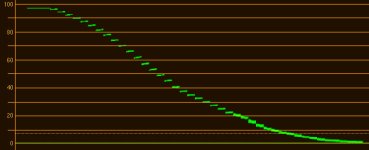
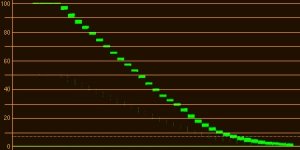
in any case, from my testing, this is the light response of flaat_13p_beta1:
flaat_13p_beta1.jpg
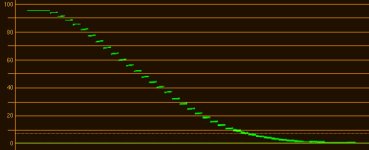
this is tassinflat:
tassinflat.jpg
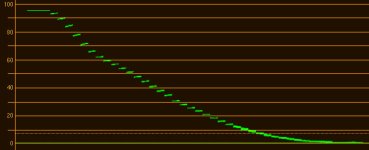
this is milk:
milk.jpg
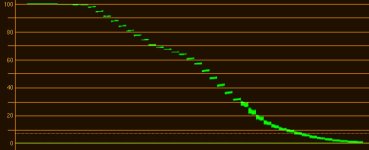
this is ultralight:
ultralight.jpg
if I had to choose one of those for use today, it would be tassinflat
flaat_13p_beta1 is clearly work in progress
ultralight is just silly; milk tries to replicate what CineStyle does, and succeeds; I don't like CineStyle, so I don't like milk
 
Flaat is a log-like curve, but it can only get as far as the in-camera image pre-processing will allow :(
flaat_3.jpg

also: today's tests with a1ex using a couple of new magic lantern features and my 550D did not lead to nice results - it might be different with the 5D3... or maybe not
 
Nikon should let us do in depth modifying the color matrix but it won't happen.
I think that their curves are actually color matrixes which can't be modified. When we export a custom curve from picture Control utility, it just export a 4 ko .NCP file which, I think, only contain few data: The original curve (Neutral/landscape/standard...) and the mathematical function which modified it. It doesn't contain full matrix, that's for sure. At this moment, we can't get too far with those limitations.
The community of Nikonhacker.com could maybe extract one of the original matrix (standard/Neutral...), customize it and put it back in a hacked firmware. It may actually work but i don't have the requiring hacking skills. I should ask them if that's even possible.
 
@ Blackpeppers. Very much appreciate your insights.
@ Samuel H. Thanks for verifying the limits of current processing path and software.

Nikon picture profiles (Neutral, Landscape, Portrait, etc.) = color matrixes makes total sense. Thus their knowledge of how their sensor responds to colors remains proprietary and companies like Adobe need to reverse-engineer to develop NEFs in ACR.

Seems to me they should be able to apply a matrix to the video transformation process, rather than downstream of it. That is, if they want to. Maybe Capture/View NX3 will have video capabilities, along with more sophisticated video profiling functions.

In any case, 8-bit is a hard limit, but with their knowledge of how the sensor/asics develop a video file, seems they should be able to replicate some of the stills profiling looks and flexibility. Though as Blackpeppers indicated yesterday, I'm not sure an 8-bit s-log profile is the holy grail here.

@macgregor. If you already know this is a hopeless cause, please let us know - and why. :smile:
 
For sure, if we can't get any 10 bit video output, it's almost useless to go for an even flatter picture control. When trying to get it graded, everything we would get is artefacts and banding which is pretty awful and useless.
Let's hope for a 10bit (12 bit ?) hack or firmware upgrade but I think we'll have to wait for next HDSLR generation. Magic lantern and GH2 hack could only solve the low bitrate recording but never outperform 4:2:0 sampling and 8 bit quantization.
 
even limited to 8-bit 4:2:0, I'd rather have the option of going for 12 or 13 stops of DR if I really need that (e.g. shoot in car, want outside to be visible, can't use huge lights)
of course it's going to have issues, 13 stops in 256 brightness values means 20 discrete values per stop of light...
but it's better than clipped black or clipped white

in any case this is NOT a generic use picture style that can be used as a workhorse and graded to taste later: it will be a waste of color space almost always, it's going to look horrible compared to the same shot taken with a more "compact" picture style
it's just for that one shot that can't be shot in any other way
 
For sure, if we can't get any 10 bit video output, it's almost useless to go for an even flatter picture control. When trying to get it graded, everything we would get is artefacts and banding.

As far as I know, artifacts are not caused (or masked or prevented) by 8-bit or 10-bit or 12-bit video data.

The term "banding" means one thing in the still photography world and something entirely different in the videography world. We still photographers use the term "posterised", rather than "banded", to refer to insufficient tonal resolution (smoothness) due to limited colour palette depth.

If you are shooting material with greater emphasis on shadows, midtones, or highlights (pick one and only one), does it make sense to alter the camera tone curves to add tonal resolution to the most interesting range of tones?

-- Bob Elkind
 
does it make sense to alter the camera tone curves to add tonal resolution to the most interesting range of tones?

that's exactly what I'm trying to do

the problem that we've found so far (a1ex, ML developer, and I) is that both Canon and Nikon do some image pre-procesing before applying picture styles; that initial pre-processing includes the debayering, and its result seems to be a 422 image that we're not sure if it's 10-bit or even only 8-bit; it's good to push that around to where you want your tonal resolution to be, before the 420 H.264 encoding comes in, but if you push that too much severe noise and banding issues arise

today I sent the beta-2 version of Flaat_13p to some testers; it is less aggressive than beta-1, let's hope it gets better results...

in any case, I've also started work on the "workhorse" versions, Flaat_10 and Flaat_11, which are the ones that don't deliver crazy dynamic range but "only" nice, easy-to-grade images
 
seeing the Flaat_13p_beta1 results on the D800, I would say it's something like that; originally, from those tests, I thought it was 444, but a1ex says on the canons it's definitely 422, so it could be 422 on the nikons too
the big issue, however, is bit depth: if it's 8-bit 422, pushing too much will create big issues
but still, if you're going to push that much anyway, better to do it on uncompressed 8-bit 422 and then run the H.264 420 codec, than run it over the compressed H.264 420 stream

and again: something like Flaat_13p is not to be used as a workhorse option ("no matter what happens in front of the camera, I have my image, and then I can fix it in post"), but for cases where you absolutely need as much DR as you need
another example: if you want a stablishing shot that looks like this, and it has some movement (i.e. can't be an HDR timelapse):
b472c8a8f938864e45e49924f900bc31.jpg
 
Last edited:
Wouldn't it stand to reason that the D800 is most definitely 422 before processing as it exports 422 out of the HDMI?

Almost all of the dSLRs are inherently RGB because

  • their sensors are nominally RGB (Bayer pattern colour filter arrays)
  • image processing pipeline has traditionally been RGB
  • still image files (.JPG or .TIF) are saved as 8-bit RGB
  • HDMI output has traditionally been 4:4:4 8-bit RGB (for image review and video playback)

For video, dSLR h.264 codecs have traditionally used YCbCr profiles... usually 4:2:0.

I have no doubt that with greater number-crunching horsepower in the camera, any of the dSLRs could (and would) generate HDMI video in any and all of the following:

  • 8-bit 4:4:4 RGB (this is the format currently used for still image review)
  • 8-bit 4:4:4 YCbCr
  • 12-bit 4:2:2 YCbCr (this is the HDMI signal format used for D4/D800 LIVE video output, with data truncated or rounded to 8-bit values)

I choose these 3 output formats because all 3 of these formats are commonly supported by HDMI receivers, and all use the same pixel/data clock frequency on the HDMI interface.

Consider that 6-MPixel to 36-MPixel source data from the sensor (nominally 2:1:1 12-bit or 14-bit RGB from the sensor analogue/digital converters) is crunched down to 2-MPixel video. Somewhere along the image processing datapath data is being tossed away to end up with only 8-bit (rather than 12-bit) 4:2:2 YCbCr output data.

Keep in mind that LCDs (displays) are also inherently RGB devices, and almost all of them are 6-bit devices. So-called 8-bit LCDs are natively 6-bit with internal logic to spatially and temporally dither to 8-bits.

-- Bob Elkind
 
Many people sometime don't understand what you can do with a flatter profile. Too many think about global changes, but there are the local changes. In photography I use Nik viveza, what it gives you is a way to choose to +/- expose selected part of the image mainly in the colour range. So for example you can underexpose an image a little bit and to preserve the sky. Now you can easily underexpose just the sky without affecting a human face. Then finally with a curve put the exposure and contrast back on the human face. The result is that you will have the face expose correctly and the sky in the background. If you had exposed for the face from the start when shooting you could have lost the sky completely. But it also depend on the scene contrast level, you cannot expect to do it with an actor in a dark room with the noon blazing sun through a window behind him.

But with this technique you can get 1 to 2 stop underexposure on the human face depending on the camera and the sensor shadow recovery. At base ISO those latest Sony/nikon sensor are extraordinary in what you can recover from the shadows. Now video it is another matter, but a software like Davinci Resolve with its tracker would be a good substitute to Viveza. But the 8 bit and shadow recovery are another factor compared to the 4.2.0 codec. With the high bitrate gh2 I could recover a lot of detail into the shadows, this could be the same for the hdmi output. I hope to be getting my D800 in the month, I will be very interested to work with the profile from Flaat etc.
 
^ that's precisely the kind of shot that the high-DR versions of Flaat are designed to tacke

this is the opinion of a Flaat user after shooting a very difficult scene in terms of DR with his Canon DSLR (shot inside a train, willing to have outside visible): http://twitter.com/#!/CameraRick/status/181130291639885824

beta-2 for the Nikons is shaping up, and I would declare the D800 the DR winner: 12 stops definitely useable, 12.7 if you don't mind running heavy noise reduction (vs 11.5 on the Canons)
 
@Bob Elkind. Isn't coulour banding just an unwanted posterization resulting from a low bit depth. Anyway 8 bit is in most cases enough for displaying images but not for grading it.

Isn't the RGB output useless at full resolution for a bayer sensor because of demosaicing which interpolate partial color data from RGB Bayer filter ? So raw stills are most likely 4:2:2 in terms of chroma resolution ? Anyway, at lower definition, the RGB (which is inevitably 4:4:4) can be well reconstructed from a bayer image (as F65 does) but in full definition still jpeg RGB over YCrCb has only been chosen for simplicity. Am I right ?
So in theory, RGB is useless at full resolution from a bayer sensor but if the camera well recompose RGB pixels at lower definition for video, it could be interesting but it's not there yet so RGB or 4:4:4 YCrCb is quite useless at the moment since almost every digital camera can only output true 4:2:2 signal or interpolated 4:4:4 signals which won't results in a better image quality but just in a heavier file size, increasing bit depth will be much more useful.
 
Last edited:
@Bob Elkind. Isn't coulour banding just an unwanted posterization resulting from a low bit depth. Anyway 8 bit is in most cases enough for displaying images but not for grading it.
Agreed 100%. Blue skies are famous for in-your-face posterisation.

Isn't the RGB output useless at full resolution for a bayer sensor because of demosaicing which interpolate partial color data from RGB Bayer filter ? So raw stills are most likely 4:2:2 in terms of chroma resolution ?
I think I understand what you are trying to say. I disagree with your assessment, for the most part, but this isn't an important debating point in the context of video output. Much as I like to be a smart ass, I'll pass (for now).

Anyway, at lower definition, the RGB (which is inevitably 4:4:4) can be well reconstructed from a bayer image (as F65 does) but in full definition still jpeg RGB over YCrCb has only been chosen for simplicity. Am I right ?
If you are explaining why still images use RGB (mostly) and video uses YCbCr, I would explain it very differently.

Broadcast analogue video has traditionally been bandwith limited. The original video format was composite monochrome. Colour didn't happen until much later, and the colour-difference IQ subcarrier modulation scheme was developed to maximise backward compatibility with home TVs as well as studio editing/routing/distribution/broadcast equipment. Under-sampling of the colour difference channels is a form of data compression, just as interlace is a form of data compression.

In the case of still images, RGB is based on the additive colour primaries and CMYK is based on subtractive colour primaries, well before the days of video. Prisms can separate the Red, Green, and Blue ranges of the visible spectrum. There is no prism which can separate Y (luminance) from Cb or Cr colour-difference channels.

Old habits (and software) are hard to change. Video editing is done in YCbCr, not RGB. So video output from dSLRs is typically compressed YCbCr.

-- Bob Elkind
 
Back
Top