D-Lighting Curves and video?

Grug

Veteran
Hey guys,

Does anyone know if you can apply the D-Lighting curves in Nikon cameras to the video footage you record? It's such a great curve for pulling up shadows in still images, I figure it'd be superb for video purposes.

Can anyone with a video-capable Nikon DSLR comment on this? (I've only got a D300)

Cheers
 
The closest thing you can do is shoot RAW + JPG, go into Capture NX with the RAW, turn off D-lighting in the settings, and tweak the curve so the RAW matches the appearance of the corresponding JPG. Then make a custom Picture Control curve in View NX based on that curve you just made.
 
The closest thing you can do is shoot RAW + JPG, go into Capture NX with the RAW, turn off D-lighting in the settings, and tweak the curve so the RAW matches the appearance of the corresponding JPG. Then make a custom Picture Control curve in View NX based on that curve you just made.

Is it possible to transfer custom curves from Capture NX into the camera's picture profile settings? If so, that might just work.
 
It should be possible

It should be possible

See here:

http://www.dpnotes.com/how-to-use-the-nikon-picture-control-utility/

it is a guide on editing custom tone curve and downloading it to camera.
I assume it can be used for video as well, at least Nikon says that custom picture controls can be used for video on D800.
Hopefully that includes tone curves.

Is it possible to transfer custom curves from Capture NX into the camera's picture profile settings? If so, that might just work.
 
I am VERY VERY interested in this - since Canon DSLRs are limited to 11.5 stops of DR in software (picture styles won't take you any further, no matter how hard you try, so DR is the same in the 5D3 and the T2i), and the D800 scored 14 stops of DR in the dxomark tests, I would LOVE to make a version of my Flaat picture styles for the D800 - can anybody confirm that custom picture controls work in video mode in the D800?
 
I am VERY VERY interested in this - since Canon DSLRs are limited to 11.5 stops of DR in software (picture styles won't take you any further, no matter how hard you try, so DR is the same in the 5D3 and the T2i), and the D800 scored 14 stops of DR in the dxomark tests, I would LOVE to make a version of my Flaat picture styles for the D800 - can anybody confirm that custom picture controls work in video mode in the D800?

I don't have a d800, so I can't confirm 100%, but all newer Nikon DSLRs have this feature, so I would be VERY surprised if it isn't in the D800.
 
I am VERY VERY interested in this - since Canon DSLRs are limited to 11.5 stops of DR in software (picture styles won't take you any further, no matter how hard you try, so DR is the same in the 5D3 and the T2i), and the D800 scored 14 stops of DR in the dxomark tests, I would LOVE to make a version of my Flaat picture styles for the D800 - can anybody confirm that custom picture controls work in video mode in the D800?

Would be great if you could create some custom picture styles for Nikon. Hope you give it a try :)
 
I've got the software already, and I've been playing with it, so now I have a reasonably accurate idea of what I can do with it and what I can't, how to export the file, what will it look like in the camera, etc

the good news: lots of nice surprises, e.g. learning that you can carry as many picture controls in your card as you want (well, I think it's 100, but compared with Canon's 3 that's infinity); that's nice, considering the Flaat suite of picture styles has 8 members (and if I can get the 14 stops of the D800 to shine in video mode it would be a family of 12)

the bad news: I'm not sure this thing may actually increase dynamic range above a certain threshold: it may have the same limitations of Canon's picture styles, which clip several stops of DR in the shadows no matter what you do - we'll see...

next step: get a bunch of very specific (but very easy to shoot too) RAW stills taken with the D800 (starting with a D7000 would work too)

then, work for 5 or 6 hours, then, if all goes well, release suite of picture controls for Nikon DSLRs :)

so: I need a D800 or D7000 user, write to similaar.feedback at gmail.com if you have interest in this and some time to spare (threat: if I don't get any messages, I'll start bugging people...)

and even if you don't have that much time: quick question: which basic picture styles do you Nikon users like most? Neutral? Standard?
 
Last edited:
I've got the software already, and I've been playing with it, so now I have a reasonably accurate idea of what I can do with it and what I can't, how to export the file, what will it look like in the camera, etc

the good news: lots of nice surprises, e.g. learning that you can carry as many picture controls in your card as you want (well, I think it's 100, but compared with Canon's 3 that's infinity); that's nice, considering the Flaat suite of picture styles has 8 members (and if I can get the 14 stops of the D800 to shine in video mode it would be a family of 12)

the bad news: I'm not sure this thing may actually increase dynamic range above a certain threshold: it may have the same limitations of Canon's picture styles, which clip several stops of DR in the shadows no matter what you do - we'll see...

next step: get a bunch of very specific (but very easy to shoot too) RAW stills taken with the D800 (starting with a D7000 would work too)

then, work for 5 or 6 hours, then, if all goes well, release suite of picture controls for Nikon DSLRs :)

so: I need a D800 or D7000 user, write to similaar.feedback at gmail.com if you have interest in this and some time to spare (threat: if I don't get any messages, I'll start bugging people...)

and even if you don't have that much time: quick question: which basic picture styles do you Nikon users like most? Neutral? Standard?
Let me know if you don't get anything over the next week. I should be getting my d7000 back this next week.
 
thanks a lot everybody, I've already got a set of D800 stills, I'll play with them later today - (Ford Harrison voice) let's see what this baby can do...
 
status report:
the Nikon software (viewNX 2) is a stinking piece of crap, slow and buggy, 10 minutes for evaluating each minor change, if it doesn't crash - so it's taking forever to do this
but it's looking good: I think I may get the D800 to record 13 stops of DR in video mode
so far I'm using Landscape as base, because it's the path to maximizing DR; any known color issues with that one? (development uses mostly b/w stills)
 
Are you using NX2.3? They tried to make it 64 bit for Mac, but it was too buggy, so it needs to be changed to 32 bit in the "Get Info" window. But even running 32 bit 2.3 is WAY faster than the previous version. I believe 2.3 for Windows is 64bit.

I'd actually rather see Portrait used as a base. I don't know your process, but to my eye Landscape has more contrast built in, and skin colors are definitely best in Portrait.
 
Wow, great progress!

I know nothing about Nikon picture profiles, but I am curious about why the Landscape profile is the best starting point? I know Landscape profiles are usually boosted in blue and green channels, and I would have thought a flatter style would be the starting point. Like I said I know absolutely nothing about this, so I am just curious :)
 
so far I've only looked at light response and dynamic range, absolutely no color whatsoever, that's why I asked
my take is that Nikon also implements the same kind of hard clips that Canon has, but they change with base picture profile
for landscape pictures, DR is very important (dxomark has a test for "landscape: dynamic range"), so their base profile offers more headroom; Neutral seems to top out at a bit less than 12 stops of DR, Landscape at about 13 stops
I haven't tried any other base picture style yet beyond Neutral and Landscape

the app has crashed 4 times since my last post, I haven't got an inch further (btw it's 2.3.1 for win32)
for some reason, it takes about 30 seconds per RAW picture to update the picture style metadata, then another 30 to create the jpg; does anybody know how to avoid that first step? Canon does that first step in basycally 0s, don't know why viewNX is so dumb and slow

edit: ok, I know why it's crashing: it's hitting the 2GB memory limit of the 32bit OS; what a dumb app; it's 2am here in Madrid, I'll go on tomorrow...
 
Last edited:
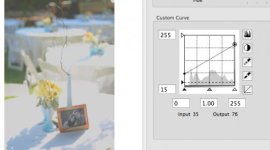
Nice thing about the nikon curve tool, is that one can change the black point.Screen Shot 2012-03-29 at 8.45.19 PM.jpg
 
Keep playing with curves. Sadly you won´t get any extra DR by doing that...
Is that proven? Sad.

At least, Nikon colors are close enough to where I like them, that I don't need to do much picture style editing. Anyways, I most likely won't be getting another dslr, though I had been hoping to get a new full frame for stills this year(personal use), but will probably end up putting that towards a video camera next year.
 
Back
Top