
Someone asked me to explain how to convert to DNxHD using Avanti so here it is:
Install:
Avanti - http://avanti.arrozcru.com/
AviSynth - http://www.free-codecs.com/download/AviSynth.htm
K-lite codec pack - http://www.free-codecs.com/download/K_Lite_Mega_Codec_Pack.htm
DNxHD codec - http://avidtechnology.custhelp.com/...tbl=9&p_id=76710&p_created=1223479730&p_olh=0
After installing, download FFmpeg: http://tripp.arrozcru.org/counter/u...p://tripp.arrozcru.com/builds/ffmpeg-15815.7z
Or any new build from here: http://tripp.arrozcru.org/
Extract it to where you installed Avanti-gui in a sub-directory called "ffmpeg".
create a text file containing:
DirectShowSource("<file name>", fps=<fps of file>, convertfps=true)
E.G: DirectShowSource("00030.MTS", fps=25, convertfps=true)
note: you don't have to add: "fps=<fps of file>, convertfps=true" but sometimes HMC151 files comes with the wrong FPS tag in their header, so that fixes it, you can fix it later on in avanti if you want to)
Rename text file to <Any file name>.avs
Run avanti-gui.
Press the folder button on the upper menu:

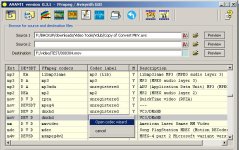
Than Find DNxHD codec and make sure it's got a name (By right clicking, choosing the wizard and changing the label).
Than press the arrow icon above and do the following:
1. Choose the Avs file as source.
2. Choose a destinated .mov file for export.
3. Change Audio codec to wav/48000 (Bit rate make no difference with this)
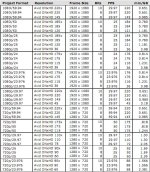
4. Change video settings to: Container: mov, Codec: DNxHD (Or any name you have given it), everything else keep at source and change bitrate according to your needs. (you can find all availible bitrates here: http://www.avid.com/resources/whitepapers/dnxhd.pdf (Don't use any bit rate other than these or it won't work)
5. enter on User video options: "-threads 8" (This improves performance)
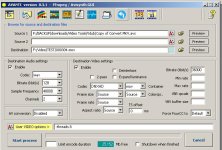
Just make it identical to this: (Except filenames and bitrate)
Enjoy!
Install:
Avanti - http://avanti.arrozcru.com/
AviSynth - http://www.free-codecs.com/download/AviSynth.htm
K-lite codec pack - http://www.free-codecs.com/download/K_Lite_Mega_Codec_Pack.htm
DNxHD codec - http://avidtechnology.custhelp.com/...tbl=9&p_id=76710&p_created=1223479730&p_olh=0
After installing, download FFmpeg: http://tripp.arrozcru.org/counter/u...p://tripp.arrozcru.com/builds/ffmpeg-15815.7z
Or any new build from here: http://tripp.arrozcru.org/
Extract it to where you installed Avanti-gui in a sub-directory called "ffmpeg".
create a text file containing:
DirectShowSource("<file name>", fps=<fps of file>, convertfps=true)
E.G: DirectShowSource("00030.MTS", fps=25, convertfps=true)
note: you don't have to add: "fps=<fps of file>, convertfps=true" but sometimes HMC151 files comes with the wrong FPS tag in their header, so that fixes it, you can fix it later on in avanti if you want to)
Rename text file to <Any file name>.avs
Run avanti-gui.
Press the folder button on the upper menu:
Than Find DNxHD codec and make sure it's got a name (By right clicking, choosing the wizard and changing the label).
Than press the arrow icon above and do the following:
1. Choose the Avs file as source.
2. Choose a destinated .mov file for export.
3. Change Audio codec to wav/48000 (Bit rate make no difference with this)
4. Change video settings to: Container: mov, Codec: DNxHD (Or any name you have given it), everything else keep at source and change bitrate according to your needs. (you can find all availible bitrates here: http://www.avid.com/resources/whitepapers/dnxhd.pdf (Don't use any bit rate other than these or it won't work)
5. enter on User video options: "-threads 8" (This improves performance)
Just make it identical to this: (Except filenames and bitrate)
Enjoy!


