Controlling Aperture on Canon FD Lens

VidE

Active member
Can I manually control the iris/f-stop setting of an fd lens, (an off-of-ebay 24mm f2 prime fd lens) or is it always stuck on open?

Other posts seem to imply I can control the iris but so far I don't see how. I have tried some things..
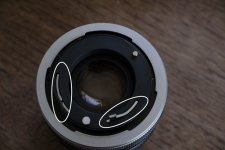
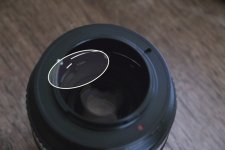
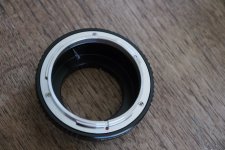
BackOfLens.jpgAdapterPinEngaged.jpgAdapterReverseSide.jpg

By pressing that little tab, I can get both the silver levers 'unlocked' and moving (see pic with 2 white circles) and when I put on the lens the adapter the adapter pin seems to engage that one silver lever (see pic with the 1 white circle).

But the f-stop ring doesn't change anything no matter what (adapter on or off). Looking through the lens I see no iris leaves closing/opening and was told by one camera store guy that the only way to see or make any change would be to mount on an old Canon camera body. Aside from the 2 silver levers and that one little tab that I pressed, I don't see what else to do.
 
What adapter do you have (it's hard to tell from the picture)?

Some adapters have a rotating ring marked "Locked <> Open" (or similar). On adapters like these, certain FD lenses require that the ring on the adapter is turned all the way to the "Open" position prior to mounting the lens. This is so that the pin can catch the levers that control the aperture on the lens.
 
Back in the bad old days of 35mm adaptors we inserted a small wedge behind the lever (I used part of a plastic toothpick). Your adapter should have a small pin that moves the lever - I'm now using ciecio7 adaptors (best) and they are fixed but still allow control of the iris.

I suspect you're not fitting the adaptor correctly - look for the pin inside the adapter, locate that pin BEHIND the lever (2nd pic) and then rotate anitclockwise (looking at the adaptor) and watch the pin engage and move the lever and then lock into place. If you're fitting it correctly the lever (2nd circle in 1st pic) should be halfway across. It is possible to fit the adapter incorrectly.
 
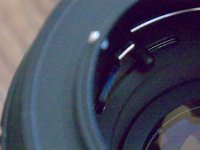
First, thanks both of you for responding. I was beginning to worry... Jive-the box the adapter came in says 'Pixco'. tired-This is a close-up version of the 2nd pic (re:"If you're fitting it correctly the lever (2nd circle in 1st pic) should be halfway across.") I think the adapter is doing what you're talking about.
AdapterEngagedCU.jpg

A seperate but related question- If the lens is unlocked, w/o the adapter, should I be able to see the iris change when turning the f-stop ring?
 
J, the reason why I asked was because both the ebay seller (Southside Camera) and a guy at a respected camera store in San Francisco both told me that unless the lens was mounted on the camera body (of an old Canon), I wouldn't see the iris leaves close in. The camera store guy took out an old fd lens from the sales case and I tried pressing the little tab under the locking ring which unlocked the 2nd lever and then tried turning the f-stop ring. Still no visible change. So either his lens is broken too or I need to do something else. Getting confused and frustrated.
 
It's likely they simply don't know about adapters. An old Canon body has no electronic connections to the lens, so it would only have mechanical connections just like an adapter would.

See example here:
 
Last edited:
No you shouldn't. The only way to adjust the aperture is with the lens locked on to a camera/adaptor. I have two FD's bought from new and both have always required being connected to a camera to change the aperture (the 50mm F1.8 kit lens and a 28 mm F2.8 sigma)
 
No you shouldn't. The only way to adjust the aperture is with the lens locked on to a camera/adaptor. I have two FD's bought from new and both have always required being connected to a camera to change the aperture (the 50mm F1.8 kit lens and a 28 mm F2.8 sigma)

With any FD to m43 adapter out there, if the lens is fitted correctly to it (or an old FD body), you should be able to adjust the aperture easily without the lens and adapter being fitted to anything.

The key thing is fitting the lens to the adapter correctly. Watch very carefully in the above Ciecio7 video, especially how he aligns the dots when fitting. This video shows precisely the way to do it for both old and new Canon FDs. His adapters are also the best!
 
Back
Top