Color Profiles and FCP X (and others)

IMHO - FS can't stray far enough from 709 to make a inverse LUT usefull

If you really wanted to, you can try to build a inverse LUT by shooting a ChromaDuMonde chart, grade it to satifaction, and use a LUT builder program to build a LUT from the resualting grade... then look about for a LUT to ICC translation, i have never had a use for that, but it probbaly exists as the software we use for callibrating our mon's can create both... worse case is that you learn a bunch of cool things ;-)

d

Well the 709 describes a fixed gamma (which varies depending on who is documenting it!), which presumably matches the 709 gamma setting in the FS. There are other gamma settings though plus we can modify the shapes. So whilst not a log curve or anything the question is can we adjust the shape enough to warrant a different LUT? Perhaps not

As you say: for me, worst case is i get a better understanding of colour in profiles and pipelines from camera to film out, something that i've tended to just accept before.

EDIT: Frank, i'll look into the LUT Buddy, thanks

cheers
Paul
 
There is also the need to handle highlights while previewing during grading/compositing.
Unless the output color space LUT takes care of this (technically it shouldn't), you would still need to apply some knee and roll-off slope, or they would simply clip (assuming correct expansion to linear, taking the camera roll-off into consideration). Well, maybe on some high contrast, high precision display, they wouldn't. But then they would show banding because of the low preserved resolution in the roll-off zone.
So, in away, you would expand the compressed highlights, then compress them back for preview.

That's all in the case of standard DR transfers where exposure correction in post is not really an option. In log-style transfers (and especially 10-bit or more encoded video) perfect linearization will be helpful because of the ability to correct exposure due to the preserved resolution at the extremes.
 
CPC;
I think you are right if you are working from the assumption that your gradeing software clipped & crushed into legal range without options to avoid that.. but i have not worked with a gradeing / finishing software that does that... So the assumption i work with is that the entire range will be preserved intact, and the need to apply anything to avoid clipping and crushing is not needed.

As to the high contrast high precision display? Every grade A mon i've worked with shows full range. I'm watching a render right now... infront of me is an image at full range, displayed on a 16 foot screen via a Christe 2200 set for P3, and beside my UI is a Sony BVM-OLED, also set to P3.. this is a dark comedy, emphsis on dark...

I can see issues with some video centric editing software that clips/crushes and then trying to grade from that would be hard to impossiable for sure, but again i'm not familiar with software that does that, but if that's the horse that you are rideing, then yea, an input transform to keep the mids fat and the top & bottom spread out makes perfect sense to me.

I have seen this with chase Qt's from FCP, but i always go back to the camera orignals and conform from there, so i don't know where the clip/crush happens.. this seems to be a good case for useing input LUT's like Clog/Slog/LogC etc... and maybe there is something to be gained by creating an input LUT specfic to a PP in an FS100..

i can take a shot of a ChromaDuMonde chart and turn it into a video range LUT designed to be displayed on a 2.35 gamma screen with a 709 color model in a few min, what i can't do tho is turn that 3D 64x64 LUT into a ICC profile, nothing would be crushed or clipped.. i do this to for dalies with shows shot on film, and transfered Dmin/Dmax, pretty much everythign else has mfg provided LUT's or does not need them, again the FS seems to fall into that slot for me.

d
 
Last edited:
That's not the point.
I am talking display clipping due to out of (display) range brightness. Not software clipping values. I don't think any 32-bit software clips anything.
Say, you have 12 stops encoded in 8-bits. Because the highlights are rolled and the shadows slightly compressed, your monitor is actually displaying like 8 to 9 stops contrast ratio. If you unroll them to linear taking the correct roll-off slope into consideration the monitor will need to display 12 stops. Well, most monitors won't do that (contrast ratios of 1000:1 - around 10 stops - or lower are typical even for grading monitors, and then I would take the manufacturer specified contrast ratio with a grain of salt). They will simply clip to their highest white level, or will bring the blacks up (unless a curve is applied to accommodate the range into the range of the display). And if a monitor actually displays the extreme highlights without pushing the blacks up, they will show banding due to low resolution above the knee point in the camera encoded video (in 8 bits).
 
I thought I have banding and posterisation in some material, till I got a HP Dreamcolor monitor.
Made a huge difference. Actually some of the problems with red faces and all we had with the FS100, are gone when you look at them on a 709 display.
Magic Bullet has this skin overlay grid in Looks, Cosmo and Mojo. All the time I dialed it in, faces looked like cooked lobster.
Now on the Dreamcolor, they are spot on.

Frank
 
Last edited:
CPC;

ok i'm spolied, but in the three suites i work inbetween two of them have mon's can display everything that comes out of the 444 spigot, one has a mon that shows 97% of P3, and all of 709.

suite 1 = Christe2200/16' screen & Sony BVM OLED
suite 2 = Dolby 4200
suite 3 = DreamColor

all fed 444 duallink to BMD HDlinkPro with callibration LUTs - nothing is clipped or crushed by the mon, or the signal chain.

I might be fair to question the DreamColor in P3, but in 709 it's on target - the new ones have been reported to be better than the first one's tho.
But the Christe projector, the Sony OLED, and the Dolby reference monitor are rock solid, and their spec's can be taken to the bank - verified by a Hubble probe.

Oh and one more thought.. the Dolby has a ton of menu's - includeing the ablity to set it to display only video legal range and the option to either scale it or clip/crush the signal.. much like running through a legaliser... seems much like what you are thinking?

d

And yea, i love the Dreamcolor enough to have one at home - amazing piece of kit for so little outlay
 
Last edited:
@Dermot - I have my Dreamcolor hooked up to the second DVI of my graphic card, so I use it as a secondary monitor.
But actually I want to hook it up to my BM card.
From what I understand, you need to hook it up via HDMI or DisplayPort and feed it progressive RGB, to use the full features.

But the BM cards only output YUV.
When I buy a BM HDLinkPro3D with display port, would that do the trick?

Thanks, Frank
 
yes, i own two of them, one of the very first, and a new one..

the older one is on my Avid/Nuke playtime toy at home, it's sends HDSDI to an Aja, and then on to HDMI in.. this one is not used for critical color work tho, i replaced a older Sony LMD230w that started going pink & green at the edges, works really well in 709 mode with the packaged OneEye callibration... could be used for mastering without a doubt.

The new one is on a DS editing & finishing system, dualLink out to a BMD HDlinkPro, then displayPort in, this one is in native, and we use a Hubble probe to create pair of LUT's to load into the BMD to choke the monitor's native down to 709 or P3 depending on what we are working on... this maachine is mainly usd for commericals & music video's, but some times i've graded films in that room when scheduales collide

The DreamColor is surpriseingly good in P3, and spot on in 709 this way... full 30bit color top to tail.

I'd get the packaged probe and callibration for it.. that's where it really turns into a fantastic deal.

I'm a fan boy...

and hummm... i've not really had an issue with skintones on my FS, but always monitor on the DreamColor/Dolby/Christe/Sony.. never really see anything on a consumer screen... i wonder how much of the issues are monitoring? I remember on teh first thread you posted about your looks we discussed this a bit...

d
 
Last edited:
To use the dreamcolor as a video monitor it needs a rgb true progressive signal to use the on board colour management. If the box cross coverts yuv to rgb it'll probably only output 720p as progressive.

There's a Gefen box that outputs a true 1080p progressive frame that HP recommend.
 
Last edited:
You are by-passing all the onboard colour management of the dreamcolor when you stuff YUV interlace into it, which defeats the object of having a dreamcolor. Any reasonable quality LCD + LUT would suffice.
 
@dermot:

Color space coverage is mostly in terms of chromaticities. Mapping the luminance range, on the other hand, is a bit variable. Displays (and projectors) do some sort of tone mapping. Projectors in particular always map the brightest white at maximum intensity. If they lack contrast, they will either crush blacks or lower precision (lower local contrast) in blacks. While a reference projector is expected to have sequential contrast of at least 2000:1, theater projectors have some slack cut and may be as low as 1200:1. Intra-frame contrast is much lower though (150:1). Light emitting displays also lower their contrast when in p3 mode (because of the dimmer white point - 48 cd/m2).
Anyway, when sending the image to a 10bit display (like the Dreamcolor) the software needs to quantize the 32 bit floating point values to 10-bit (and even worse for 8-bit displays). To do that, it needs to pick a maxium white value (cut the whites as some linear value) + apply the appropriate transfer function (and if the white point is too high the image will appear overly dark). And that's where highlights roll off for display (through a mapping curve) comes into play. Note that this is for display purposes only, clipping doesn't occur in the actual linear 32 bit data. Also note that this cut can only happen if the image is relatively high DR and the highlights were unrolled to linear with the opposite transform of the roll done in the camera. So I don't think you can observe it with typical 8-bit footage. Well, maybe if you apply a hand-made LUT in a software that supports over-brights (AE, for example).
 
You are by-passing all the onboard colour management of the dreamcolor when you stuff YUV interlace into it.

Not in our install - we have the onboard choices avb.. but as i mentioned we do use outboard LUTs for one of them that pretty much lives in 444 anyway,

The older DreamColor is only in YUV, due to the machine feeding it, and the workflow i use that machine for - with an Aja HDP that only supports single link HDSDI, and i use the onboard color management on that one.

The onboard color management on the new one is also working when fed from the BMD HDlinkPro, i just tried it a min ago... changed my settings to YUV proxie, bypassed the LUT's in the BMD, went to the OSD and selected 709, it works fine.

d
 
@dermot:
the software needs to quantize the 32 bit floating point values to 10-bit (and even worse for 8-bit displays). To do that, it needs to pick a maxium white value (cut the whites as some linear value) + apply the appropriate transfer function (and if the white point is too high the image will appear overly dark). And that's where highlights roll off for display (through a mapping curve) comes into play. Note that this is for display purposes only, clipping doesn't occur in the actual linear 32 bit data. Also note that this cut can only happen if the image is relatively high DR and the highlights were unrolled to linear with the opposite transform of the roll done in the camera. So I don't think you can observe it with typical 8-bit footage. Well, maybe if you apply a hand-made LUT in a software that supports over-brights (AE, for example).

That makes total sense, if we are gradeing with the mon working correctly then it should not be a problem?

And the varaiable display charteristics is the main reason we went to the expense of running callibration LUT's, so we are not using the onboard color mapping of the display's...
 
Last edited:
Most consumer panels are still 6 bit anyway. There are definitely artefacts and banding due to display on these. I've had to monitor to panasonic plasmas in the past which have a nice feel to them but boy did they have some issues with colour and shadows.

Even within the REC709 colour space different software does different things - Nirv you mentioned that FCP X brings stuff in that 'just looks right' well if you take a frame in FCP X and AE, both in 709 and output to sRGB (which seems to be the only thing FCPX will do with a frame). You can see the FCP version or interpretation looks different to AE (and across platforms). It's 'punchier'. This is with no work or grading, just in and out.

I'm inclined to agree about skin tones and lack of redness in general. I've never really encountered them that bad. Frank, you make a really good point about monitoring differences. Of course these days an awful lot of our hard work will be seen on consumer panels and therefore perhaps will manifest in dodgy reds.

I reread some of my posts and i think i do seem a bit obsessive about this. To put it in some context it's just i have a big project with a lot of comping of VFX shots, glass & reflection passes and ethereal translucent scenes so i'm really picking apart the highlights and the shadow detail is very important to me. There is a reason for my madness :)

cheers
paul
 
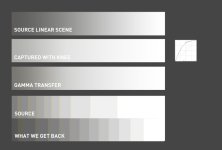
Here an illustration demonstrating what *i think* might be happening. It's via photoshop and curves and perhaps there's a problem with my method?

There's a highlight range of a linear scene, the same again through a curve that simulates a knee. Then we take that through a reverse simple gamma curve.

The two at the bottom shown in posterised form are what the original looked like and under that what the gamma transferred version looks like. Ideally they should match. But you can see the highlight handling through this process is quite different to the original scene we're trying to capture. I'd hesitate to use the term but more video'y on the bottom and more film like on the top?

Yes, we could take the Gamma Transferred version and grade the highlights back, the information *should* all be there unless there are quantising issues with the 8 bit container. That bit about quantising i'm not sure how to calculate and it's probably scene dependant. At the end of the day that is perhaps the simplest method and it's what Nirv et al are probably doing right now. No problem with that. But tagging the source with a suitable profile would make life a little easier i would say.

Also that linear scene grad at the top is for showing the highlight, i think the highlights in the real world would be more stretched and extreme, perhaps leading to more quantisation errors

gammatransfer.jpg

cheers
Paul
 
Not in our install - we have the onboard choices avb.. but as i mentioned we do use outboard LUTs for one of them that pretty much lives in 444 anyway,

The older DreamColor is only in YUV, due to the machine feeding it, and the workflow i use that machine for - with an Aja HDP that only supports single link HDSDI, and i use the onboard color management on that one.

The onboard color management on the new one is also working when fed from the BMD HDlinkPro, i just tried it a min ago... changed my settings to YUV proxie, bypassed the LUT's in the BMD, went to the OSD and selected 709, it works fine.

d

The Dreamcolor does not work as you describe.

I have one and I know for a fact that it does not accept YUV and use its colour gamut remapping.

This monitor only colour remaps with RGB true progressive (i.e. not PsF) as anything else and the monitor just falls back to native gamut which is enormous and therefore over saturated compared to 709.

I have even looked at the HP Dreamcolor site and they make now mention of a "new" version nor have they updated any of their white papers advising how to use the monitor for critical colour correction in video applications. So, I have emailed HP for clarification as if they have silently upgraded their monitor I'm interested in getting one.

I suspect the BMD box was still outputting RGB Prog that's why you could select an alternate colourspace on the Dreamcolor.

Edit:

Here's the response from HP:
"There has not been a hardware change to the display and unfortunately you must still use an outboard converter to work with YUV signals. We certainly would like to address this in any future DreamColor display, but cannot go back and make this change to the current display without completely redesigning the hardware."

Unfortunately no change in Dreamcolor but some hope this might be addressed in future versions.
 
Last edited:
Most consumer panels are still 6 bit anyway. There are definitely artefacts and banding due to display on these. I've had to monitor to panasonic plasmas in the past which have a nice feel to them but boy did they have some issues with colour and shadows.

Even within the REC709 colour space different software does different things - Nirv you mentioned that FCP X brings stuff in that 'just looks right' well if you take a frame in FCP X and AE, both in 709 and output to sRGB (which seems to be the only thing FCPX will do with a frame). You can see the FCP version or interpretation looks different to AE (and across platforms). It's 'punchier'. This is with no work or grading, just in and out.

l

A lot of the cheaper panel also dither to give an impression of higher bit depth too.

I have calibrated all my display devices and checked against broadcast monitors. The most interesting thing I noticed is how accurate the new iPad retina display is up against my Dreamcolor. I couldn't believe it, it was giving my £2k monitor a run for its money. FXGuide recently confirmed what I thought as they had noticed it too and went to the trouble of calibrating one. In their tests it's so close to 709 as not to matter.

You really do have to get anal regarding colour management as there's so much in the chain that has to be right otherwise it's like colour based chinese whispers. What you end up with can be miles away from where you started.

I've no idea why AE would be different, I fell out with Adobe years ago over UK pricing and as a result never use their software. I more than cope without them. I have seen people on other forums say different versions of CS give different results with AVCHD media so their colour management may not be up to snuff.

I have also seen different codecs give widely different results, but touch wood, FCPX/Compressor output is bang on what I'm expecting on every device I have control over. But there lies the problem as soon as the media hits the client's uncalibrated world the fun starts...
 
@Paul,

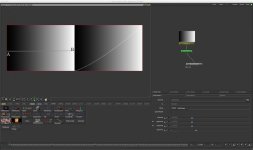
This is the workflow I used to get an idea of the shape of the gamma curves of a previous camera.

I shot a linear gradient with each curve then in Shake I used a macro called Slicetool to show me the shape of the gamma curve. I was then able to create a correction gamma curve in Color to take out the cinegamma and match a std gamma. It took a bit of time going to Shake and back with tests but it certainly helped matching shots quickly with further minor adjustments.

This isn't a scientific solution nor is it perfectly accurate but a close approximation that the pragmatist in me was happy with.

I understand this macro has been created for NUKE too if that is of any interest.

Slicetool.jpg
 
Nirv,

I considered that but wondered how i was going to shoot a reflective chart that would give me the whole dynamic range without some kind of super expensive testing gizmo/apparatus.

How did you physically shoot it?

thanks
Paul
 
Back
Top