Color Profiles and FCP X (and others)

Nirv, my basic tests so far with black levels (assuming that smallHD false colour is accurate) shows that i can quite easily clip black at -15, not so easy at 0 and impossible at +15. This is cinegamma 1.

so onwards and upwards, or rather downwards into the depths of black...

cheers
Paul

Ignore my hyperbole re: black clipping. :) Of course you can clip the blacks but it is happening a lot lower than indicated on the LCD and histo. It's really quite difficult to judge. I can understand why people are lifting the blacks if nothing more than to see them on the LCD! :)

I did some tests in the garden in a shady area and I kept stopping down until the LCD was black thinking I must've hit the bottom. I was able to bring the blacks up in FCPX. Right at the very end of the test where I went for broke there was only a slight loss of detail. When the camera does eventually clip it does so gracefully with only minor macro blocking becoming visible. There's very good reason why Sony didn't put 10bit out on this camera!

In like for like tests I couldn't see any point using +15 other than have a profile rigged with raised blacks as a LUT profile to assist exposure. Expose with the LUT then record with a profile with a -ve value (TBA) black level. +15 definitely makes exposure easier that's for sure but obviously limits you in post.

Sony's Twitter did reply to me but only to say they had passed the question on to their production team regarding xvYCC. I suspect, as I said earlier, that it is just the gamma that is being extended. Let's see what Sony says because they make some interesting comments about the cinema tone colour settings but they're vague.
 
Care to explain please?

My understanding is, the signal to noise ratio is reduced (less effective bits to play with) when they use a flat profile as they're trying to lift the usable tonal range out of the area codec mangles. The Codec in the DSLRs is relatively unsophisticated and macro blocks in the black region which is what I though they were trying to avoid with the flatter profiles?

Where does the noise come from? Lifting the blacks? And how does detail come up too?

If you could spare the time to explain I'd be very grateful, cheers.


The idea of the flat profile really is to increase tonal precision in the blacks and in the rolled off highlights. The flat profile redistributes the coding range by taking values from the mids and giving them to the blacks and the extreme whites.
It is really just a tradeoff: gaining blacks and whites precision, losing mids precision.
Now, blacks have much more limited SNR compared to mids, and especially whites. That's because most of the noise is not related to the photon flux itself but is infrastructure noise (read noise, dark noise). So noise is more or less equal in all the areas of the image, but mids and whites get more signal than blacks. That's why cameras map the recorded DR at the upper limit of the RAW DR. And when you push a RAW image up it gets noisy. It is really the same with flat profiles: when the flat profile expands the blacks, it also expands the noise in the blacks and makes it more noticeable.

Here is a bit on Canon flat profiles that I've written. The principles apply for any camera though. You can check the flat profiles explanation there for more details.

MattDavis said:
Which begs the question - if using the 0-16 and 235-255 ends of our brightness range effectively - should legalisation (to Rec709 presumably) be a process of squishing, or decapitation?


It is a bit of a mess really.
For example, for h.264 there is a "full range luma" flag in the metadata (Canons DSLR cameras raise it in their output). If the flag is on, the NLE software decides that the whole encoding range is used for normal range (no overbrights) and squeezes the 0-255 range into 16-235 on import. If the flag is off, the range is imported as it is: overbrights stay overbrights, etc. This is how Premiere and Blender handle stuff, and possibly most other NLEs.
But then, AE ignores this flag and imports clean.
Here for more info:
http://blendervse.wordpress.com/2012/04/02/waiving-the-fullrange-flag/
http://www.cinema5d.com/viewtopic.php?f=56&t=40521&start=10

One should really test for a specific camera output + software combo.

 
2) I'm not convinced about the xvYCC side of things, and if it is doing this then what's coming out of the HDMI. Because AFAIK it's RGB, not YUV and correct me if i'm wrong but the xvYCC space is greater than the sRGB, so a 24 bit RGB signal might not be able to represent a full range. This puts us into an interesting situation that means the AVCHD YUV could be a greater gamut than the uncompressed HDMI. I've just done some comparisons between uncompressed and AVCHD with negative black levels so i will dredge through that later.
l

Since the FS100 HDMI is 1.3, it should be totally capable to transport xvYCC while running in circles around any 3G SDI.

HDMI 1.3 has a bandwith of 340 MHz (10.2 Gbit/s). It supports deep color, with 30-bit, 36-bit and 48-bit xvYCC, sRGB, or YCbCr.

Frank
 
This is how Premiere and Blender handle stuff, and possibly most other NLEs.
But then, AE ignores this flag and imports clean.

? My AE imports H264 files from the 7d without anything done to the levels. And the 7d makes 0-255 files. So the import should work fine.
 
Nirv: Just making sure your FS isn't blacker than mine. I see down to about -6 on the waveform which i think works out to the 0-16 range.

Frank: I'm pretty sure i read that the sony HDMI out was running at RGB full signal, meaning technically 4:4:4 at 8bit. I know the HDMI standard is capable of a lot more.

So far the uncompressed/AVCHD versions seem identical. I'm really not convinced about the xvColor side of things because i really think Sony would have made a big deal about it, like they do on the NXCAMs.


cheers
Paul
 
? My AE imports H264 files from the 7d without anything done to the levels. And the 7d makes 0-255 files. So the import should work fine.

Yes, that's what I mean with "AE imports clean". Try the same with Premiere to see the difference. :)
 
So far the uncompressed/AVCHD versions seem identical.

For fun: http://www.mdma.tv/420v422/ - all PIX recordings were using ProResHQ.

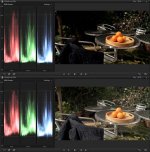
Okay, so tried Squishing - not in After Effects with proper custom curves, just by nudging the Exposure pucks in the Color Board in FCPX:

bigupyourblacks.jpg

There is so much that isn't right, I'm not even sure that this is xvYCC at work, but I can see the need for a set of curves that will scoop up the sub-0 and tamp down the super-235 in a sort of CineGamma-ish sort of way. However, relying on pulling up the sub-0 blacks may look good as a given frame, but there's still a lot of 'boil' down there. We're looking at a very S shaped curve...

When Red were explaining their high dynamic range, there was - IIRC - a shot of a girl emerging from a swimming pool - the highlights are captured, but at a 'normal' gamma curve, the shot looks horribly underexposed. Push it through even Red Cine X, and suddenly a flimic picture appears.

With all the talk of 'Flat' profiles, many of us from the DSLR camp (raises hand) took solice in avoiding the bottom end of the brightness curve, and we think that a high dynamic range image will look like that (hence the +15 Black camp). Only now, with that Red image in mind (the darkness, not the wet girl), have I dared play around with the bottom end.

The odd thing is that - based on the 'Garden' tests I've done - I don't see much between the AVCHD and the Pix220 ProRes material.
 
Last edited:
There is so much that isn't right, I'm not even sure that this is xvYCC at work, but I can see the need for a set of curves that will scoop up the sub-0 and tamp down the super-235 in a sort of CineGamma-ish sort of way. However, relying on pulling up the sub-0 blacks may look good as a given frame, but there's still a lot of 'boil' down there. We're looking at a very S shaped curve...

This was kind of the point about starting the thread. There is up to 11ish stops of range in that 8 bit container, squished through a curve that isn't a simple gamma curve. Ideally what we need is a profile/LUT that's the reverse of what we're capturing and compressing with our PP to not so much tame those highlights and shadows, but to place them correctly within a wider range (be it linear, log or whatever). Simply using the transfer in REC709 makes something look okayish but it's not correct, meaning that we need to grade from that point and, nice as the tools in FCP X are, they're not good enough to sort those shadows and highlights out very easily.

Even if the camera is outputting xvYCC i don't see FCP using it, i've found almost no information anywhere about it.

And for you, in your experience, what is so much that isn't right, specifically?

IMHO the issue with uncompressed/prores is that in motion it is much more robust and pulling keys and secondaries is a little easier with cleaner uncompressed data.

cheers
Paul
 
you need to have a mon set to "xvYCC", 'wide gamut" or "P3" to see the colors, if your mon is 709 then the colors cannot be reproduced
 
This was kind of the point about starting the thread.

LOL - exactly! So sorry, have been dawdling down the Road to Damascus... Got your point now.

in your experience, what is so much that isn't right, specifically?

In FCPX, one can see the sub-0 and super-235 info, and it's preserved in the NLE environment (export, reimport - it's still there), but lost when you skip out of it. Transcoding apps like Episode Pro and Turbo264 honour it, but apps such as Photoshop and Vimeo ignore anything below 16 and above 235 - lobotomisation.

However, having spent most of this afternoon looking at footage that has stuff below 16 and above 235, I feel that the non-broadcast spec screen of my MacBook Pro is not showing the detail, it only shows what's between 0% and 100%. Therefore, we have to squish.

If I bring a simple Photoshop doc with a black (000,000,000), 'video black' (016,016, 016), 'video white' (235,235,235) and 'data white' (255,255,255) into FCPX, I see all levels on the WFM. I export a PNG, and when I play with the levels, I get a standard '0 is black, 100 is white' response - so FCPX is setting a colour management profile that tells apps to clip at these levels. FCPX knows there's more, Photoshop ignores the extra info.

So rinse, repeat: we need a curve to put the 0-16 blacks into 0-4 or 0-6 IRE of the final curve. We need to take the last dregs of white detail from 100 to 109 and fold them into 96-99.9. My oranges were too pale and lacking in contrast when I just pushed up the blacks and pulled down the whites. Then there's the saturation. There are delicate curves that need to control the exponential nature of chrominance when you start pulling the luminance around. A little more for the highlights and shadows when there's a little less for the mid-tones - or is that the other way round?

in motion it is much more robust and pulling keys and secondaries is a little easier with cleaner uncompressed data.

T'was ever thus - FCPX has only a subset of Motion's abilities, even though it has the Motion engine built in. I fear it may be to do with 'Marketing'. A dear colleague was about to release an FCPX plug-in for chromakey by enabling the 'hidden' Motion functions when Apple did the 10.0.4 thing with the new 'improved' chromakey features.


you need to have a mon set to "xvYCC", 'wide gamut" or "P3" to see the colors, if your mon is 709 then the colors cannot be reproduced

This is the crux, I think. If we're to make videos for the bigger audience, we can't get involved with stuff that starts with a caption 'please ensure your screen is set to "interactive omlette badger" setting to truly experience the wonder of our new technology' because our viewers are duty bound to send out a lynch mob to us - the producers - with a bagful of manuals to stuff where the sun don't shine.

Our duty is to stuff 24 stops of latitude - or whatever we can manage - into the current Rec709 hole so that it looks gorgeous. If you look at a bit of film exposed by Ansel Adams or a bit of home video caught by a ghastly Nokia cameraphone, it's got to pass through the birthing canal of whatever broadcast spec (and in this case it may have to be Rec709) is on our viewer's screen. So what if Rec709 is 5 stops? Great film still looks better than video because of the curves.

We need CURVES!

But the nurse says I must rest now...
 
Last edited:
you need to have a mon set to "xvYCC", 'wide gamut" or "P3" to see the colors, if your mon is 709 then the colors cannot be reproduced

And that's probably why Sony include xvYCC on their consumer cams as their owners bypass any broadcast network by plugging their camera via HDMI into their Bravia TVs.

Psst!

You want curves Matt?
http://forums.creativecow.net/thread/344/10324

Not quite all the control you need but getting close. Nattress has a similar plugin for $49 that has curve control. The moment I spend money on a plugin is the day that Apple releases 10.0.5 with gamma curves! That's how life rolls for me.

FCPX users, please keep up your assault on Apple via the Feedback form. We will get gamma curves!!
 
FS100 does NOT record xvColor according to Sony.

So colour is restricted to REC709 with overbrights and underdarks.

Nevermind, my testing has concluded that the FS100 really is quite good as many of you have known for many months.

I'm ready to crack on and use it in anger now with a full compliment of profiles for every lighting condition. So I'll be inundated with animation work for the foreseeable then!

BTW, thanks to cpc for the info on flat DSLR profiles, it raised more questions than answers and means I've got to do some more reading on the subject.
 
FS100 does NOT record xvColor according to Sony.
So colour is restricted to REC709 with overbrights and underdarks.

Is the colour restriction to REC709 officially from sony too, because if that's the case what is the point of the other colour profiles if everything is a subset of 709? No point in moving out of 709 if that's the case...

I'm quite surprised, well no, i'd assumed it wasn't xvColor, but i am surprised that they didn't do it for the FS series. It would seem a likely candidate.

cheers
Paul
 
I've always assumed that the Rec709 setups are for folk who need to shoot and edit for a broadcast environment without much time/inclination for grading.

After all, we can shoot high dynamic range stuff with amazing colours, then force feed them into a legal Rec709 field in post... (with due nod to all those wonderful curves plugins for FCPX)

The ITU709 option been a fairly 'safe' setup for colour handling, if trying to avoid the dreaded Red-Clip syndrome, though it's also interesting to note the difference in reds if flipping between Rec709 and CineTone-1 set at -2.

CineGammas - sigh, it may be the only reason I trade in my FS100 for an FS700.
 
I've always assumed that the Rec709 setups are for folk who need to shoot and edit for a broadcast environment without much time/inclination for grading.

After all, we can shoot high dynamic range stuff with amazing colours, then force feed them into a legal Rec709 field in post... (with due nod to all those wonderful curves plugins for FCPX)

The ITU709 option been a fairly 'safe' setup for colour handling, if trying to avoid the dreaded Red-Clip syndrome, though it's also interesting to note the difference in reds if flipping between Rec709 and CineTone-1 set at -2.

CineGammas - sigh, it may be the only reason I trade in my FS100 for an FS700.

The REC709 range isn't too bad, it lacks cyan/green/emerald type colours. My beef with it is all this stupid luminance clipping. I've failed to export a frame from FCPX with full range for example, it just seems so pointless. Hopefully i can get my hands on CS6 soon and run through that.

Well that trade in cost would be very high. I've been through the figures and i really don't know if it's worth it - not until we see more detail.

I'm seeing whether i can get a stouffler wedge from somewhere - something that would help me understand the shadows and highlights through the PP.

cheers
paul
 
I think the most annoying thing in 709 is the Gamma. When you grade for TV it's too bright on computer monitors and vice versa.
 
Back
Top