Color Profiles and FCP X (and others)

paulcurtis

Veteran
When you import a mov into FCP X it guesses the source colour profile, so out of the FS100 it will assume a REC709 profile. Now to my mind this is not 100% correct. If we use a different gamma and then go on to change knee and black gamma we are actually then misinterpreting the source as we bring it in (let alone loosing out of gamut colour). I suspect other NLEs would do the same, i know PPro does (but not in front of it right now). I know in AE i can apply LUTs though.

FCP X is built on top of colorsync, so whilst it is not possible to manually apply a source LUT in FCP itself, you can change the ICC profile in the quicktime movie.

An extreme example of this would be if you took a C300 log movie into FCP X you're pretty screwed in terms of getting it to look right, you'd be having to grade it and that's not really the point. You want to apply a reverse LUT to bring the log back into the linear and *then* start grading.

There are ICC profiles for a lot of other sony cameras using the cinegammas, so it would be feasible to bring correct colour interpretation across.

But i can't find anything for the FS100 and in our experiments with extreme knees and black gammas we are generating curves that no longer look like gamma curves. In some cases we are approaching S curves or pseudo log curves. Therefore bringing these in as REC709 is doing them a disservice. Yes we *can* do that but we're then trying to grade back into our original intent and the tools in FCP X are quite limited.

So along with our experiments into curve modification shouldn't we also be looking to solutions for correctly interpreting these non REC709 curves in our NLEs?

Anyone know how to generate an ICC profile? It would be so simple if we could set up a PP on the camera and could generate a ICC profile for that.

Please shoot me down if you think i'm barking up the wrong tree...

cheers
Paul
 
Paul,

FCPX does support colour profiles or at least the foundations have been laid for their use. If you look at the EXIF view in the metadata setting there is an entry. Currently there is an entry: HD (1-1-1) for colour profile. But this value is the same no matter what Picture Profile I have set in camera so I've no idea what info it contains or how FCPX actually interprets the footage and whether it is different to another NLE, I suspect not. 709 is a good place to start given the cinegammas are not actually Log gammas.

When I was using FCP and Color I did create my own LUTs for a previous camera to degamma the images. I just saved them as a base grade and bosh it worked. It did take some gaffing about with a macro in Shake then once I could see the shape of the gamma curve I could degamma in Color.

I'm sure if enough of use request these colour tools they will eventually arrive but unless we get more information from Sony et al it won't be full utilised as a feature. Even getting any sensible information out of Sony re: firmware update was like drawing blood from a stone. I'm not holding my breath.

We are missing gamma curve tools for master and individual channels in FCPX and when we get them we should be able to degamma the cinegammas and save the presets, we also need a better way of storing preset grades but that's another feature request. I have requested these controls every time there's a new release, if you haven't done it yet please use the feedback form and if there's enough noise we'll get them. These tools will be more useful than icc profiles or camera profiles etc as we can do the work ourselves.

To be fair the grading tools in FCPX are very good and combined with a custom effects stack I built in Motion I have some mighty powerful colour tools working in RT in the way Color never could nor can Resolve do now actually. To live grade, with titles and graphic overlays over the footage is a real boon and I don't mis roundtripping. Anyway I digress.

We're barking up the same tree.

Just keep firing off those feedback forms. They seem to be listening as many of my moans have been addressed!
 
Like Frank, and many others i use a system that allows control of the input gamma, i use a Linear input LUT for FS100 footage.

I tend to use a 709LUT as a source effect for cutting, then bypass that to see the Lin underneath for gradeing.. advantage here being that i'm not transforminng anything before i start gradeing, but do have pleasant images to chop away with

What you might be asking for is an inverse 709 LUT to transform to linear during injest? Not a great idea to do that generaly... if your system only works in 709, then rather than fight it, i would work within that limitation or change tools... Resolve is free but you would need to re-conform from the camera orignals to avoid the 709 input LUT that's been applied already.

d
 
Everything coming off the FS100 is in REC709 colour space but depending on what gamma curve you've selected determines whether you're using a non standard gamma curve.

Paul is on the right track with an ICC colour profile as that would be the best way for FCPX but I can't see Sony ever playing ball and being so helpful. Maybe on their cinealta line but not on their consumer grade equipment.

It's late and I've been busy all day but I can't fathom why you'd want to degamma 709 and what that gets you? I can't see any benefit to rec709 without the monitor gamma correction. What am I missing Dermot?
 
Dermot, Nirv, Frank

Ultimately i want linear in my pipeline so my question is really about how to move the output from the FS into linear, bearing in mind that if we apply picture profiles then we're not shooting through a simple gamma curve. This is on ingest only, whatever NLE you're in should handle a viewing LUT for whatever display target you have (from lin to display). I was looking specifically at FCP X because i have that here on my laptop and, Nirv, i read something on an apple developer note that HD 1-1-1 is REC709, although i presume that not only includes the color space but also the standard gamma correction.

I'm sort of wrapping my head around what is really happening and i'm thinking aloud so i apologise for any waffling (normally i'm not too fussed or obsessive but i have a large complicated grading/vfx project coming up and because of integration of many sources i want to truly get to the nuts and bolts, maximise the range for my needs and i'm working on my pipeline now)

So we use PP to compress a wider dynamic range into our little 8 bit container. Then we need to unwrap that image back to its linear representation. At the moment we're limited to unwrapping it using a simple gamma correction whereas i believe we ideally want to use something that matches closer to the S curve we are attempting to create.

Dermot, you say you apply a linear LUT to the footage coming in but what is that actually doing - is it transforming anything or just saying this data is linear? It must be transforming because you say you can see the lin underneath - but how is that lin version being generated? Technically once FCP X, for example, has ingested a file it's internally in 32bit RGB float and i presume that's linear so all grading/comp operations are in linear space. Same for PPro/AE and Resolve for that matter.

Frank, the LUTs for the F3 are along the right lines but i suspect the F3 and FS100 curves are very different plus also how do we account for knee and black gamma corrections?

Am i just being too over the top here? Does it actually matter? I believe that by applying the correct LUT we will gain a bit of range (or make that range more accurate) as the luminance is unwrapped correctly to lin, if we apply a standard gamma lut then the luminance is being unwrapped so that the shadows and highlights aren't rolling off in the way we intended. This is perhaps why a lower knee looks awful because it's not being mapped correctly afterwards.

Nirv, there are some tools to generate ICC, opencolorio is an interesting project from SPI that can generate ICC but this issue is how to create the details in the first place. Perhaps we can just shoot a greyscale and interpret that to understand how the curve is working?

thanks
paul
 
Just think of the cinegammas as pre-graded REC709 and I was thinking you wanted to take the cinegamma out of the image. This is what I was doing with Color.

If you are working in a VFX pipeline any modern software will understand linear workflow. I use Cinema 4D for my animation work and any files I bring in will be stripped of the rec709 gamma so Cinema 4D doesn't apply the gamma again to the textures or background images when it's rendering.

I can't see why anyone would want to strip out the rec709 gamma as we human look at the image through a rec709 compliant display device. The image needs that gamma to look correct. Nothing is gained by taking it out.
 
REC709 defines a certain colour space and a default transfer (gamma correction), lets ignore the colour space for the time being and concentrate on the transfer (which is perhaps is a better word for this). I do want to take the transfer/cinegamma/capture curve out of the image. And the most painless way would be a LUT at ingest.

Are we on the same page here? More to the point, am i making sense!?

Once we've turned the source into linear we can work on it within whatever software we want, and when we composite/faff around with the image, the math is correct as it's linear (there are plenty of examples of why that makes a huge difference). So if you're using cinema4D i don't know whether that outputs linear or images that have gamma correction in already. Same deal with textures, are your textures linear or getting double gamma'd (different conversation probably!). Either way all source going into the comp should be liner or have a LUT so that it is linear.

Whilst the internal representation of all that image data is linear we apply a LUT to see it on screen. The LUT we choose may depend on where the final images will end up, from REC709 to film LUTs.

So we do want to strip out the REC709 so the internal math is correct but we have a display LUT that puts that back on for our viewing pleasure. If we didn't need to work with the footage then we can keep the footage tagged as REC709 so that it displays correctly straight away.

It goes something like this

REALWORLD(Linear) -> FS100 Sensor Raw -> Transfer Curve Squeeze RAW into 255 levels -> INGEST -> LUT to turn 255 back into linear -> COMP/GRADE/FINISH -> Display LUT 709/Film/Linear (switch between them)

And all i'm banging on about (much to the annoyance of the forum no doubt) is with extreme knee and black gamma adjustments that LUT/transfer back to linear isn't correct. This applies for all cameras not just the FS100. But you have REDlog, Alexa LOG etc,. They are KNOWN transfer curves and so that conversion is easy. If you did nothing to the FS100 PP then that REC709 interpretation would be pretty correct.

So ARE we loosing or misinterpreting highlights and shadows because of this?


If we come back to colour for a moment:

If we choose a different colour gamut (PRO,CINEGAMMA1, CINEGAMMA2) and we interpret that as REC709 (as most things do) then is the colour space going to be incorrect? Unless the other colour gamuts are subsets of REC709? In which case just stick to REC709... Or unless the output from the FS100 isn't REC709 but full RGB, but the colour profiles are restricting the gamut within that RGB, that could be the case.

Perhaps we can ignore the colour side and concentrate on the transfer.

Maybe i've had too much coffee, i perhaps shouldn't go an get another one - but i will

cheers
Paul
 
Just think of the cinegammas as pre-graded REC709 and I was thinking you wanted to take the cinegamma out of the image. This is what I was doing with Color.

But are they? Aren't they new transfer curves? You have a REC709 curve and a cinegamma curve. Then you tweak them (quite a bit) to produce a custom transfer curve.

cheers
paul
 
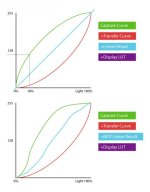
Just because i'm waiting for lots of renders to finish up, i've drawn a diagram to show what i mean and i hope illustrate what i believe is happening technically. Perhaps the reality is i am missing something or that it's just not that important.

The top curve shows what i think is happening, we shoot the scene with a curve, we apply a correction/transfer and then work with it, then we output with a display LUT.

If we use the same correction/transfer curve with a heavily modified PP then we're not going to get a true linear representation out. It might look alright but perhaps the grads in the highlights will be off, perhaps the shadows will fall off incorrectly. If we're working hard to squeeze the best we can get into 8 bits i think if we could convert this properly then we'd get better shadows and highlights.

The drawing is not accurate just for illustration!


curves.jpg
 
Paul

I thought I understood what you wanted but I'm now completely confused.

Log files are a million miles away from cinegammas. Log files look the way they do because their data set looks weird in REC709. We apply a LUT to take that data to make sense of it through the world of rec709 displays. Those LUTs convert log data to linear plus gamma space preserving much more image information in the process.

Cinemgammas are just rec709 files with a baked in grade. Since there are no data on the exact shape of these curves the only way to degamma these curves it to grade it out.

The only way you can do this accurately is to shoot some test charts with the cinegamma curves and fixed knee settings and develop a grade to undo the curves. Then this information can be given to your VFX pipeline and they'll be able to replicate those curves when they come to compositing.

If I were to shoot a background scene with Cinegamma 2 and I sent this to C4D any CGI I wanted to sit in the scene would need a corresponding Cinegamma 2 curve applied. C4D has no understanding of Cinegamma 2 so I would just render out my animation. In compositing I would add the Cinegamma 2 gamma to my 3d elements to match the Camera footage. I would raise and lower the gamma of the whole composite (called gamma slamming) to see that both the original footage and the 3d inserts both tracked their gammas in an identical fashion.

Pretty much everyone who has worked in VFX has Steve Wright's book, I'm one of the many! Here's a good video that shows gamma slamming.
http://vfxio.com/images/movies/gammaSlamming.html

I have just guessed at what you're trying to achieve so I might still be way off target. If so let me know what the ultimate goal is?
 
Last edited:
Nirv, no you're 100% right that is what i'm trying to achieve and perhaps i'm not explaining it clearly enough.

However i disagree that conceptually log and cinegamma are miles apart because they both take a linear real world scene and represent that within an 8 bit container. The log is able to represent so much more data because of the nature of log curve and cinegamma is a poor second cousin, however we can push and pull cinegammas to maximise that conversion for our uses. Sony could do a Canon and give us an 8 bit log as a gamma option (god i wish)

So in the same way we would HAVE to have a LUT to deal with log (because the curve is so different it would look wrong), we OUGHT to have a LUT to deal with our custom cinegammas.

I think i have steves book around here too but been a while since i looked at it, must dig it out! My background is early Alias PowerAnimator days and SGIs, so usually not dealing with entire pipelines and i'm scrutinising what i have in front of me now. I decided to go back to first principles in case i missed something.

In your example though, wouldn't you work in linear rather than add a cinegamma to your C4D before comping? If you did that and were to add motion blur, change exposure or comp additive layers then it will look and act wrong. In your case if you were to comp say, a ghostly render, ontop of a FS100 background then simply ADDing it would create blown highlights. If both layers were true linear then the add operation would look correct. A lot of people use Screen but that's just mathematically wrong.

cheers
Paul
 
There's a bit of a geeky overview of linear here, with some interesting yellow clipped highlights in CG(!)

http://http.developer.nvidia.com/GPUGems3/gpugems3_ch24.html

and a C4D linear plug in

http://www.helloluxx.com/cinema4d-rendering/linear-workflow-in-cinema4d-and-after-effects/

And i do remember seeing a long time ago a fantastic overview on the pitfalls of non linear comping but i can't find that right now which is a shame because it illustrates exactly the point. It's pretty simple in AE or Nuke to set some.

cheers
paul
 
Cinemgammas are just rec709 files with a baked in grade. Since there are no data on the exact shape of these curves the only way to degamma these curves it to grade it out.

If that was the case then we wouldn't be able to capture a better dynamic range with them? You're implying that the camera takes the REC709 and grades it via the cinegamma curve, but i don't think it does, it takes the sensor output and applies the cinegamma instead of applying a simple REC709 gamma transfer.

EDIT : i've just found this which is interesting http://www.xdcam-user.com/2012/04/r...ra-should-only-have-5-stops-of-dynamic-range/

cheers
paul
 
Last edited:
There's a bit of a geeky overview of linear here, with some interesting yellow clipped highlights in CG(!)

http://http.developer.nvidia.com/GPUGems3/gpugems3_ch24.html

and a C4D linear plug in

http://www.helloluxx.com/cinema4d-rendering/linear-workflow-in-cinema4d-and-after-effects/

And i do remember seeing a long time ago a fantastic overview on the pitfalls of non linear comping but i can't find that right now which is a shame because it illustrates exactly the point. It's pretty simple in AE or Nuke to set some.

cheers
paul

Yep, I do all that Paul.

Linear workflow is not so much about converting your footage to linear but making sure the software in the pipeline correctly interprets the colour profiles of input footage, strips that gamma then works in its own linear space, then outputs the combined image to your target profile.

If I were to use a photograph as a texture in C4D it would read the profile in the metadata realise it had to convert the image to linear, then it would apply it to the object in question, the render would happen and would spit out a file with the appropriate gamma. If you don't do a linear workflow the image texture retains its gamma then when the scene is rendered that texture receives another gamma correction upon out put. The image no longer looks correct in the scene.

It's only recently that Linear workflow has been made painless in many apps. The pitfalls are well known which makes it all the more surprising apps have only just caught up.

When I render out of C4D, all objects have their own mattes and these mattes also contain the motion blur. As long as you know your premults from your unpremults you're go to go.

I can render out any format with what ever profile I want as long the compositor also is Linear workflow aware and either read image profiles or be set to ignore gammas etc.

It depends on the scale of the job and whether I'm working alone or in an established pipeline I'm normally told what to deliver, i.e. OpenEXR Linear.
 
Linear workflow is not so much about converting your footage to linear but making sure the software in the pipeline correctly interprets the colour profiles of input footage, strips that gamma then works in its own linear space, then outputs the combined image to your target profile.

I'm in 100% agreement. My point is not to physically transcode material but as you say to ensure the correct profiles are in place on ingest.

And bringing it back to my original rant/point/comment* (*delete as applicable) we have no profile to assign to FS100 footage to enable the apps to do that conversion.

cheers
Paul
 
]It's late and I've been busy all day but I can't fathom why you'd want to degamma 709 and what that gets you? I can't see any benefit to rec709 without the monitor gamma correction. What am I missing Dermot?

One advantage is flexibality, I often work in several display gamma's, 2.2 for web, 2.35 for broadcast and 2.6 for DCP, the color tools i use can switch between LOG and LIN control and pivot points, much like the soon to arrive Resolve9.. i grade it once, and apply output LUTs to match each deliverable

Another advantage is working with the flat image & LOG tools gives me very controlable shadows and highlights.

I don't "de-gamma" - on injest i can pick an LUT to apply; lin/video lin/sRGB/709/P3/any 3D or 1D LUT in Quantel or Iridas's format, if i chose LIN then i get the camera's output without a gamma curve added

if i know something i am doing has short lifespan ( i did a commerical last week that will only air four times, but all in the upcoming hockey's Standley Cup final games) then picking the color model to match is reasonable choice, but as it takes me only a few seconds to add or remove a LUT for clip or a series of clips i'm not saveing any time, and am cutting off possiable flexibility choices.

I really don't suggest that you take a basicly flat image from the camera, injest it into a system that is locked to a 2.35 gamma color model, then try to undo that gamma change by using a reverse lut before transforming it further... not a great idea unless you are working in 32float, even then not a great idea...

Rather than fight it, i'd embrace 709 and work with the tools one has... if you really need to work with flat images then maybe look at using tools that are designed to work that way.
 
Last edited:
And bringing it back to my original rant/point/comment* (*delete as applicable) we have no profile to assign to FS100 footage to enable the apps to do that conversion.

Are you thinking something like the input LUTs that i chose from? 709 seems to make pretty pictures straight away from the FS

Or are you thinking of matching LUTs to PP curves like Slog/Clog/LogC? All of those are miles diffrent from anything you can make a FS do, really.. apples and oranges... and i don't use the inverse LUT's in gradeing anyway, the only use for them is to generate dailes...

IMHO - FS can't stray far enough from 709 to make a inverse LUT usefull

If you really wanted to, you can try to build a inverse LUT by shooting a ChromaDuMonde chart, grade it to satifaction, and use a LUT builder program to build a LUT from the resualting grade... then look about for a LUT to ICC translation, i have never had a use for that, but it probbaly exists as the software we use for callibrating our mon's can create both... worse case is that you learn a bunch of cool things ;-)

d
 
Last edited:
One advantage is flexibality, I often work in several display gamma's, 2.2 for web, 2.35 for broadcast and 2.6 for DCP, the color tools i use can switch between LOG and LIN control and pivot points, much like the soon to arrive Resolve9.. i grade it once, and apply output LUTs to match each deliverable

I think we all agree that this is the case. Although might be worth underlining that a 3DLUT is not a simple gamma adjustment. I think one of the simplest colour management systems is in After Effects, assign profiles, get your working space and switch between display LUTS. You can see if you display REC709 and up the exposure you start getting yellow highlights but swap to a Kodak Film display and it interprets that completely differently. Simple but effective demonstration? It perhaps even suggests that this yellowing of highlights is being compounded by being in the REC709 colour gamut - i don't know if that's really true but when you work in 709 and over expose it does seem to be heading that way.

I really don't suggest that you take a basicly flat image from the camera, injest it into a system that is locked to a 2.35 gamma color model, then try to undo that gamma change by using a reverse lut before transforming it further... not a great idea unless you are working in 32float, even then not a great idea... Rather than fight it, i'd embrace 709 and work with the tools one has... if you really need to work with flat images then maybe look at using tools that are designed to work that way.

I think we're suggesting tagging the footage with the appropriate profile and, if there is no choice but 709. then so be it. I just have a feeling we'd get better results if we could tag it with a more accurate profile taking black gamma and highlights into account.

Maybe it's just not necessary.

But i'm still working how to create a LUT so i can at least experiment and convinced myself i'm wasting my time, or not...!

thanks
paul
 
Back
Top