Color temp is certainly useful, but you still need a colorimeter to tell you what the temp is. Phones must have some sort of colorimeter, but it probably varies from device to device. It's so easy on a computer, you just plug in the calibration device, it measures the ambient light, the screen light, and corrects it. Certainly a "grey card" function would allow you to use the cams built in colorimeter, and you could also have a tie-in the Speedgrade's color chart interface.

Navigation
Install the app
How to install the app on iOS
Follow along with the video below to see how to install our site as a web app on your home screen.
Note: This feature may not be available in some browsers.
More options
You are using an out of date browser. It may not display this or other websites correctly.
You should upgrade or use an alternative browser.
You should upgrade or use an alternative browser.
GH2 COLOR CARDS - My first App
- Thread starter Lez
- Start date
Will Turner
Well-known member
This doesn't make sense to me. Surely white balance cards are useless on an iPad because it is backlit, instead of reflecting the ambient light off it's surface..?
This doesn't make sense to me. Surely white balance cards are useless on an iPad because it is backlit, instead of reflecting the ambient light off it's surface..?
Yes. This app is useless for white balancing, no matter how you adjust the display. Sorry Lez, but I think perhaps you don't understand camera white balance.
As I mentioned in the other thread that Lez started about this product, it will work as a focus target, in exactly the same way a jpg focus chart loaded on the device would.

Thomas Smet
Veteran
Hi Thomas... great to hear from another app developer... I have to agree to disagree.. I just did another test with the GH2 using the manual White Balance Preset .. assigning a new profile and white balancing to the various cards and the white balance shift was easy to achieve...
As you say the backlight might not be optimum as it is not reflecting the color temp of the scene...
But I must say the app was developed from a set of cards I'd been using for a longtime on the iPad...
Doing allot of corporate-heads single operator shoots ... I double head the HPX302 with the GH1 (then Later Gh2).. 302 recorded the audio and GH handled the vision...
To sync I would do a hand clap near the talent and flick through a few cards for color reference ... the reference cards were useful in post...
Cheers Les
That is the whole point to white balance however. To know what the color is of the scene. I mean how the light and environment alter the colors in the scene. Even a color chart can only get you so far since you could shoot a color chart in two totally different environments but yet the colors would end up being the same. I really want this to work for you but honestly I think you are battling the law of physics here. Perhaps they have a partial use but they can in no way be true white balance cards or color charts. At least not in the way most professionals use those type of calibration tools. I have looked into this over two years ago already and if you search many others have tried white balance and grey card apps and they just never worked out for most people. People stopped developing them awhile ago since the concept just cannot work the way we all hope it to work.
Hi… sorry I've been away the last few days but I've just put my mum in the hospice.
I think what we've got to look at with this app … and device .. and re-think in the way they work in a real environment.
The device will not reflect the true ambient light of the scene.
Being a backlight device we have to use that to our advantage though.
The ability to be able to bring up a white card that will give the camera a certain colour temperature constantly.
Now some cameras like the GH2 have the ability to dial in a colour temp.. 'Great' … other's like my HPX302 does not.
When shooting on the 302.. I rarely reset my white balance… I have 2 pre set's.. one on 5200k and one on 3200k.. unless things are really screwy.. I'll go with them all the time.. knowing that I can easily bring the temp back and forth in post… (bit like using Tungsten and Daylight stock)..
The app developed from a real world situation where I was shooting talking heads across the country over a 4 week period .. using the same setup and backdrop…
I was double-heading it .. using the 7D (at that time).. and the 302 for audio (and backup vision)..
I'd roll the camera's.. zap over to the talent and do a hand clap sync and flick through a few cards for focus and colour reference..
When it came to edit.. I found that almost imminently I could see the subtle difference that had come into the shoot … and by using the reference frames that I'd captured.. I could achieve a better result in colour correcting.. than if I did not have those reference frames..
And that's the basis of the app.. not to replace the high end tools available but to give everybody a way of making colour correcting just that little bit easier..
I've got a few promo codes so if you want to PM me I'll give 5 free apps away…
Cheers Les
I think what we've got to look at with this app … and device .. and re-think in the way they work in a real environment.
The device will not reflect the true ambient light of the scene.
Being a backlight device we have to use that to our advantage though.
The ability to be able to bring up a white card that will give the camera a certain colour temperature constantly.
Now some cameras like the GH2 have the ability to dial in a colour temp.. 'Great' … other's like my HPX302 does not.
When shooting on the 302.. I rarely reset my white balance… I have 2 pre set's.. one on 5200k and one on 3200k.. unless things are really screwy.. I'll go with them all the time.. knowing that I can easily bring the temp back and forth in post… (bit like using Tungsten and Daylight stock)..
The app developed from a real world situation where I was shooting talking heads across the country over a 4 week period .. using the same setup and backdrop…
I was double-heading it .. using the 7D (at that time).. and the 302 for audio (and backup vision)..
I'd roll the camera's.. zap over to the talent and do a hand clap sync and flick through a few cards for focus and colour reference..
When it came to edit.. I found that almost imminently I could see the subtle difference that had come into the shoot … and by using the reference frames that I'd captured.. I could achieve a better result in colour correcting.. than if I did not have those reference frames..
And that's the basis of the app.. not to replace the high end tools available but to give everybody a way of making colour correcting just that little bit easier..
I've got a few promo codes so if you want to PM me I'll give 5 free apps away…
Cheers Les
Quote from NOTHING " Yes. This app is useless for white balancing, no matter how you adjust the display. Sorry Lez, but I think perhaps you don't understand camera white balance."
I think I do understand the concept of white balancing..
My father had a processing lab when I was born... I'm a motion picture processor / printer and projectionist ... I'm a member of the ACS and have been filming since 1984..
I was the staff projectionist on 'Dead Calm' staring Sam Neil and Nicole Kidman , Directed by Phil Noyce...
I printed Crocodile Dundee 2 at Color Film for the Japanese Market...
I've directed and produced that many TV commercials I've forgotten the number..
And THE SNOWY RIVER doco won awards all over the world...
The App does work in a similar way to the DSC backlit charts... obviously not to the critical tolerance of their charts...
Making films is all about workflow... this app worked for me in the real world... it's not a replacement for other tools but a complementary asset.
@ $2.99 it's not a huge investment...
The Focus charts are cool on the iPhone for talent to keep in their pockets...
Cheers LeZ
I think I do understand the concept of white balancing..
My father had a processing lab when I was born... I'm a motion picture processor / printer and projectionist ... I'm a member of the ACS and have been filming since 1984..
I was the staff projectionist on 'Dead Calm' staring Sam Neil and Nicole Kidman , Directed by Phil Noyce...
I printed Crocodile Dundee 2 at Color Film for the Japanese Market...
I've directed and produced that many TV commercials I've forgotten the number..
And THE SNOWY RIVER doco won awards all over the world...
The App does work in a similar way to the DSC backlit charts... obviously not to the critical tolerance of their charts...
Making films is all about workflow... this app worked for me in the real world... it's not a replacement for other tools but a complementary asset.
@ $2.99 it's not a huge investment...
The Focus charts are cool on the iPhone for talent to keep in their pockets...
Cheers LeZ

Zephyrnoid
Veteran
Not read the whole thead. The problem with screen generated 'color charts' is the variance in screen quality and the fact that these cards are useless for capturing the effect of ambient light on the scene as... the charts ARE light. Sorry to be a killjoy.
The device is similar in concept to the backlit DSC charts... http://dsclabs.com/Rear_Lit_Systems.htm both systems have their limitations...
The fact is in over 23 years of shooting I've never invested in a Macbeth Chart... I use to use grey cards and a key set chain of cards when I was shooting 16mm with the Arri SR but then again very infrequently... we don't white balance for film... there is only 2 forms of stock .. Daylight / Tungsten...
And on the level of calibration of the screen... how many people have actually balanced their computer screen with a Spyder.. once again in 15 years of editing non-linear I've never used a Spyder ... in fact I worked in an advertising agency (ADCORP) with offices all over Australia with 100's of graphic designers... have a guess ... the screens we're never calibrated...
So has anybody actually used a DSC chart with the GH2 and then compared the chinese model to the Japanese and see if the the colour registration is exactly the same... I bet you they are not...
I don't know how many times I've turned up to a corporate shoot and the lighting is all over the place... ie : Keylight is 5200K led ... hair light is 3200k Dedo with a blue gel... fluro's are blaring overhead (can't turn them off because the whole floor will go out) there's daylight streaming through the window with no curtains ... and there's a bunch of computer screens in the background... using the HPX300 I'd be searching around for whites to balance off and they are all crap... image in viewfinder looks **** and I can't get dial in a color temp....
This is where having a White Balance chart that is not effected by ambient light comes into play...
Cheers
The fact is in over 23 years of shooting I've never invested in a Macbeth Chart... I use to use grey cards and a key set chain of cards when I was shooting 16mm with the Arri SR but then again very infrequently... we don't white balance for film... there is only 2 forms of stock .. Daylight / Tungsten...
And on the level of calibration of the screen... how many people have actually balanced their computer screen with a Spyder.. once again in 15 years of editing non-linear I've never used a Spyder ... in fact I worked in an advertising agency (ADCORP) with offices all over Australia with 100's of graphic designers... have a guess ... the screens we're never calibrated...
So has anybody actually used a DSC chart with the GH2 and then compared the chinese model to the Japanese and see if the the colour registration is exactly the same... I bet you they are not...
I don't know how many times I've turned up to a corporate shoot and the lighting is all over the place... ie : Keylight is 5200K led ... hair light is 3200k Dedo with a blue gel... fluro's are blaring overhead (can't turn them off because the whole floor will go out) there's daylight streaming through the window with no curtains ... and there's a bunch of computer screens in the background... using the HPX300 I'd be searching around for whites to balance off and they are all crap... image in viewfinder looks **** and I can't get dial in a color temp....
This is where having a White Balance chart that is not effected by ambient light comes into play...
Cheers
Barry_Green
Moderator
Lez let me see a review copy of the app, so I've played with it but only a little...
There's some validity in what both sides are saying, but perhaps they're talking over each other?
You can't use a generated color chart to manually white balance to a lit scene, no. That's not possible, and in fact would defeat the whole point of doing a white balance. You need a white card that's illuminated by the light that's hitting your scene, to get an accurate white balance.
So for using as a replacement for a real white card, in a scene, no. Not a valid use of this.
But for using to generate an absolute reference for comparable color, it's totally appropriate. A usage for that might be when you're trying to shoot an AF100 as A-camera, and a GH2 as B-camera. Using an absolute reference as your image source, will let the post color correction person know what they should adjust to get the cameras delivering a comparable color rendition. If one camera renders the blues hotter than another camera does, this absolute reference will let you know what that difference is, in an unbiased way because it's not dependent on the ambient light hitting the scene.
Again, as Lez is saying, the type of scenario where a backlit DSC chart would be quite useful.
I think the problem here is, not that many of us have use for, or would get benefit from, a backlit DSC chart. I would, but in a lab setting, not so much in the field.
I think folks are looking for a substitute for a pack of warm cards, and -- no, this won't do that job. Well, mostly. It would still work as a substitute for a preset, I guess... if you were otherwise going to use the daylight preset, but wanted it a little warmer, then Lez's warm cards might work fine for a case like that. A case in point being a mixed-light scene, as Lez suggested, where the light's all over the place and you want to force the white balance to a known quantity, such as a 5600k preset but maybe a little warmer or a little cooler or a little greener.
I think people are reacting to the idea of electronic white balance cards, as in -- would be nice if it worked, but it can't work, and for the most typical purposes I think they're right. As an absolute reference they could work, but for conventional white balancing (the way most people would probably anticipate wanting to use this), it wouldn't be a valid technique.
As for displaying a JPG of a focus chart on your phone -- yes, that would probably be as effective. You could get around the $2.99 the app is charging, for that functionality... if $2.99 is that big of a deal, sure, go down to your camera rental house and take photos of their focus charts or whatever, no problem with that. At that point, it's really just down to convenience... packaging them all into an easy-to-access app doesn't seem like a bad idea at all, instead of having to dig through whatever dozens or hundreds or thousands of photos might be on your ipad.
In the end, it's an app that displays images of lots of convenient test patterns and color displays, for very little money. If you find it useful and convenient, it's available. If not, no harm, no foul. But yes, it should be pointed out (maybe in the app itself) that you can't white-balance a scene to ambient light using a self-generated-light chart like this, in case people were to get confused.
There's some validity in what both sides are saying, but perhaps they're talking over each other?
You can't use a generated color chart to manually white balance to a lit scene, no. That's not possible, and in fact would defeat the whole point of doing a white balance. You need a white card that's illuminated by the light that's hitting your scene, to get an accurate white balance.
So for using as a replacement for a real white card, in a scene, no. Not a valid use of this.
But for using to generate an absolute reference for comparable color, it's totally appropriate. A usage for that might be when you're trying to shoot an AF100 as A-camera, and a GH2 as B-camera. Using an absolute reference as your image source, will let the post color correction person know what they should adjust to get the cameras delivering a comparable color rendition. If one camera renders the blues hotter than another camera does, this absolute reference will let you know what that difference is, in an unbiased way because it's not dependent on the ambient light hitting the scene.
Again, as Lez is saying, the type of scenario where a backlit DSC chart would be quite useful.
I think the problem here is, not that many of us have use for, or would get benefit from, a backlit DSC chart. I would, but in a lab setting, not so much in the field.
I think folks are looking for a substitute for a pack of warm cards, and -- no, this won't do that job. Well, mostly. It would still work as a substitute for a preset, I guess... if you were otherwise going to use the daylight preset, but wanted it a little warmer, then Lez's warm cards might work fine for a case like that. A case in point being a mixed-light scene, as Lez suggested, where the light's all over the place and you want to force the white balance to a known quantity, such as a 5600k preset but maybe a little warmer or a little cooler or a little greener.
I think people are reacting to the idea of electronic white balance cards, as in -- would be nice if it worked, but it can't work, and for the most typical purposes I think they're right. As an absolute reference they could work, but for conventional white balancing (the way most people would probably anticipate wanting to use this), it wouldn't be a valid technique.
As for displaying a JPG of a focus chart on your phone -- yes, that would probably be as effective. You could get around the $2.99 the app is charging, for that functionality... if $2.99 is that big of a deal, sure, go down to your camera rental house and take photos of their focus charts or whatever, no problem with that. At that point, it's really just down to convenience... packaging them all into an easy-to-access app doesn't seem like a bad idea at all, instead of having to dig through whatever dozens or hundreds or thousands of photos might be on your ipad.
In the end, it's an app that displays images of lots of convenient test patterns and color displays, for very little money. If you find it useful and convenient, it's available. If not, no harm, no foul. But yes, it should be pointed out (maybe in the app itself) that you can't white-balance a scene to ambient light using a self-generated-light chart like this, in case people were to get confused.
Thanks Barry...
There seems allot of conjecture to the value of the Color Cards and White Balance Cards due to the backlight of the device not being able to reflect the colour temp of the scene..
But then again I believe having a device that can constantly reproduce a particular setting is where the value lays..
Having said that I've stripped out those features and uploaded a new app called 'Focus Charts'... it's waiting for review at Apple..
When it's available I'll give some Promo Codes away ...(it will be a 99c app anyhow).
Thanks for everybody's input...
Cheers Lez
There seems allot of conjecture to the value of the Color Cards and White Balance Cards due to the backlight of the device not being able to reflect the colour temp of the scene..
But then again I believe having a device that can constantly reproduce a particular setting is where the value lays..
Having said that I've stripped out those features and uploaded a new app called 'Focus Charts'... it's waiting for review at Apple..
When it's available I'll give some Promo Codes away ...(it will be a 99c app anyhow).
Thanks for everybody's input...
Cheers Lez
The device is similar in concept to the backlit DSC charts...
And that's why the app is useless to purposes that are discussed here:
Backlit charts are used to measure the capacities of sensors, lenses, cameras. And pro-shooters usually don't do that...
Unless you want to write a review e.g. for the GH2, the backlit solutions (like the app) won't "help" people who are shooting. It's NOT an instrument for shooting people.
IMHO best example: fashion photography! - Professionals in this domain need ABSOLUTE COLOR ACCURACY. So - why would they never work with backlit solutions? - Because they want to measure the light that actually reigns the set. To measure and calibrate the actual light of the set and its consequences on each single color, professional color-fetishists (as I am) need charts that can be lit BY the light of the setting.
One specific problem:
Infrared light!
It's influencing the blacks in your picture. - And it may differ even by using light with the same color temperature. EACH set has its own light. Even if you use the very same light-setting (e.g. from ARRI), you won't get the same colors. Because also the decoration of the set will have influence of the colors
 rogar-Shock(DBG): : if you have a lot of red velvet seats in the setting, a blue vase on the table will have a different "blue" than the same vase with the same lights but surrounded by green seats. Each single object of the setting acts as a COLORFILTER itself. And outdoor it's even more complex: the UV light is so extremely inconsistent - depending on place, time, actual air pollution, actual weather, actual humidity etc. that standard settings (e.g. Kelvin or colorfilters or color profiles) can never be used more than one single time for some few moments (depending on how fast the light and air changes at the set) IF you want color accuracy. That's why the most accurate way is to use "frontlit" / "environment-lit" charts each single time and sometimes even at different places within one "frame" of the set.
Sorry, but I can't see the use of this app other than for sensor-reviews etc. - ooc color-profile. That's also the reason, why no such hardware with consistant backlight (e.g. LED colorchart) is beeing sold. Would be so easy and cheap to produce, so easy to calibrate with PC etc. .... but backlit is not helpful for color accurancy at a set.
Last edited:
Hi... sorry I've been on the river filming for the past week for my doco..
I've stripped back the app to FOCUS CHARTS ...
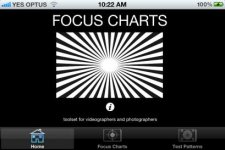
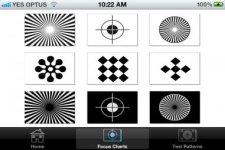
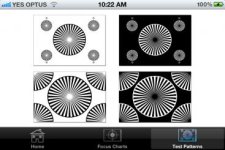
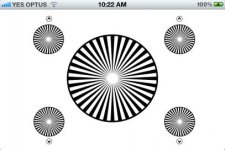
Here are 5 free Promo Codes for the FOCUS CHARTS App..
ARN4YNWT33NA
A3E9HTX97NM4
KFY7L3NM3YFW
39ARJETNPLAA
R3TNPFXFX3EJ
COLOR CARDS
The COLOR CARDS app has found support from users who are outputting the iPad to monitors for calibration...
I did not think of that when designing the app...
Cheers Lez
I've stripped back the app to FOCUS CHARTS ...
Here are 5 free Promo Codes for the FOCUS CHARTS App..
ARN4YNWT33NA
A3E9HTX97NM4
KFY7L3NM3YFW
39ARJETNPLAA
R3TNPFXFX3EJ
COLOR CARDS
The COLOR CARDS app has found support from users who are outputting the iPad to monitors for calibration...
I did not think of that when designing the app...
Cheers Lez
Attachments
Last edited:
Will Turner
Well-known member
Now that sounds handy! Can I run the app on my macbook air?

Bern Caughey
Veteran
Les,
Forget absolute Color Correction, but how about marketing the Color Cast feature.
Leave it to the user to reckon the temperature, & build the app to account for their estimate & adds a cast, say 30 points of Green, or 1/4 Staw. Maybe link a preview thru the Phone's camera.
Seems you had some version of this already, but add more options & I'd buy in. From a convience standpoint it beat carrying a bunch of filters to balance through.
Best,
B
Forget absolute Color Correction, but how about marketing the Color Cast feature.
Leave it to the user to reckon the temperature, & build the app to account for their estimate & adds a cast, say 30 points of Green, or 1/4 Staw. Maybe link a preview thru the Phone's camera.
Seems you had some version of this already, but add more options & I'd buy in. From a convience standpoint it beat carrying a bunch of filters to balance through.
Best,
B
Last edited: