GH2 COLOR CARDS - My first App

Lez

Well-known member
Hi Guys...

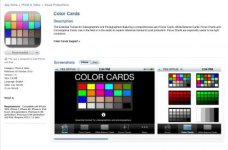
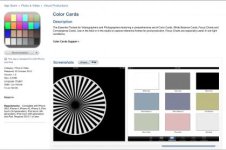
I've developed an iPhone/iPad app called COLOR CARDS.


COLOR CARDS

It's a photographers / videographers assistant tool for focus, white balance and color reference.

As a fellow DVXuser from way back I designed the concept when the iPad first came out ... (about 3 years ago).

Using it extensively myself during shoots for color reference, focus and white balance.

I'd love your feedback and maybe I can incorporate some of your ideas in future releases.

Cheers LeZ

Some Screen shots of the App in store...

Attachment 60950


Attachment 60951

attachment.php


attachment.php


attachment.php


iTunes Screen Shot.jpg iTunes Screen Shot_2.jpg
 
Yeah I'll try and get one out for Android also.. this is only version 1.0 so we are looking at allot of further improvements and updates...

The Color Cards are of absolute RGB values... I've got a set of Cards that displayed these values that I'll put up on the website...
I've also looked at including a function on the device that will allow these values to be displayed. Some sort of long press gesture or something similar...
But in reality I've found that if I can see the values in post (i.e. a PDF version of the card with absolute RGB values) .. that's the easiest for color correcting..

Cheers LeZ
 
@Lez Is there any chance of creating alternate color calibrated versions?

As in different Color Cards or custom white balance cards???
 
@Lez Maybe "alternate versions" was the wrong approach.

With a chart, the illumination of the colors is based on the lighting at that point. With an iPhone or iPad, the lighting of the device itself means that the colors should be more consistent from one place to another (though less so with the device's lighting disabled).

What I am trying to say is, how do I compensate for this? Won't the RGB values displayed vary somewhat from one product version to another, etc.? So it seems that some sort of conversion matrix as to what the original RGB values are vs. how they display on each screen might be helpful.

Or are the screens really similar enough that all of them will shoot as exactly the same RGB values?
 
Last edited:
I agree there could be subtle difference between devices.. but in reality the quality build of the iPhone/iPad seems pretty good in our tests..

Obviously the Retina Display has a bit more pop than the standard..

I almost managed to get my hands on an iPhone 5 but missed it by 5mins so I've mot tested it on that device... Personally I'd imagine it will only look cleaner and sharper..

The most important thing I've found is that the device is set so auto brightness is OFF and it is set to FULL BRIGHTNESS...

Also screen protectors can have a role in diffusing the colour saturation...

At the end of the day color correcting is subjective and subtle and having a point of reference can only help... and once you find your favourite card you tend to get use to how it preforms and how it works into your workflow...

Cheers LeZ
 
Fair enough. To what extent do you find that correcting the chart in footage to the correct values is allowing you to get the same colors in different lighting without additional manual intervention?
 
Last edited:
Fair enough. To what extent do you find that correcting the chart to the correct values is allowing you to get the same colors in different lighting without additional manual intervention?

Well it depends on the chart and your approach to color correcting... in FCP I use the picker to select the whites in the charts and try and match the scenes like that first..

In After Effects I might go into the channels and have a look at how the individual colors are standing up...

I don't think the cards are in any way a replacement for color correcting in post ...

Rather see it as a tool to assist in this process...

Cheers
 
@Lez I apologize, I wasn't very clear. :) What I mean is, I watched a colorist I worked with start their process by using the DSC chart we shot to get all the colors on the chart exactly matched to their predetermined values. This was done consistently for the different footage and we were able to get the colors close enough to start grading without having to base the color correction on any non-chart part of the scene.
So my question is whether the difference in lighting makes a difference in whether this app can be used similarly? Since an iPhone is obviously much cheaper than the DSC charts I have looked at, it would of course be quite a steal to be able to use the app similarly.
 
I watched a colorist I worked with start their process by using the DSC chart we shot to get all the colors on the chart exactly matched to their predetermined values. This was done consistently for the different footage and we were able to get the colors close enough to start grading without having to base the color correction on any non-chart part of the scene.

So my question is whether the difference in lighting makes a difference in whether this app can be used similarly? Since an iPhone is obviously much cheaper than the DSC charts I have looked at, it would of course be quite a steal to be able to use the app similarly.

In reality I guess you've nailed what we really should be striving for ... lets see if we can develop the product so it will achieve what you need...

I feel both the device's and the product could mature to achieve this high level of calibration...

Cheers
 
Cool... looks interesting this film convert stuff...

Have a great day ... cheers LeZ
 
Oh I forgot to add... the beauty of the iPad/iPhone app environment is that all future releases come free of charge ..

With a notification appearing on the app about these updates...

Cheers LeZ..
 
It is my understanding that for white balance a backlit display cannot work for a couple of reasons.

1. they always have the same color temperature no matter what environment you are in. regardless if you are lighting for 5600 or 3200 the iPad could show the same color which would be wrong.
2. Because the screen itself is lit and gives off light it in no way matches the brightness of the subject you are shooting.
3. Apple screens do fluctuate a lot and sometimes change their color slightly depending on the environment they are in. It is virtually impossible to make a color app that is 100% consistent across devices for this reason.

I commend you for creating this app and I think the focus charts are great. As a app developer myself I have looked into the option for white balance and other app developers have made white balance apps in the past and the reviews have said it just cannot work for the above reasons. I would love to be proved wrong but a LCD display is designed to have the same look regardless of the environment it is in which makes white balance virtually impossible. As a color chart it would also give you the same colors regardless of environment. Not to say that couldn't be used in some way but it is not the same as a true color chart that will show different tints depending on lighting and environment.
 
Hi Thomas... great to hear from another app developer... I have to agree to disagree.. I just did another test with the GH2 using the manual White Balance Preset .. assigning a new profile and white balancing to the various cards and the white balance shift was easy to achieve...

As you say the backlight might not be optimum as it is not reflecting the color temp of the scene...

But I must say the app was developed from a set of cards I'd been using for a longtime on the iPad...

Doing allot of corporate-heads single operator shoots ... I double head the HPX302 with the GH1 (then Later Gh2).. 302 recorded the audio and GH handled the vision...

To sync I would do a hand clap near the talent and flick through a few cards for color reference ... the reference cards were useful in post...

Cheers Les
 
What would be cool is a color app that calibrates the display to a standard Macbeth Chart via the built in camera.
After all, you can't use it if you can't calibrate it--the display, like any display, will look different in different light.
 
So we need something like this built into the app...

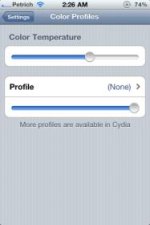
color-profiles-11.jpg

A way of adjusting the color temp of the device...

Cheers LeZ
 
Back
Top