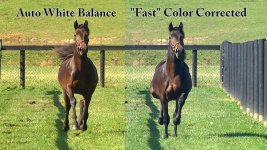
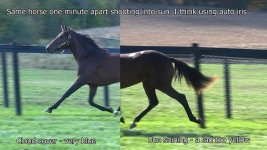
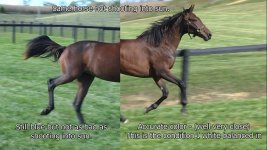
ALL: Color Balance variance outside sunny vs temporary cloud passing by.

ELN614

Well-known member
Note: Camera set on manual white balance .
This is the same horse.
All footage was shot in the same time period ie no more than 5 minutes apart.
2nd image right side is the condition I white balanced in.
No color correction or enhancement was done - just a little sharpen when I made the jpg.
Each photo has the horse in nearly the same spot along the fence line. (but not perfect)

Has anyone else experienced a color balance changes when pointing you camera in different directions. Notice the large variance among all 4. Example into the sun and then away from the sun and then again when a cloud passes by and then when just plain sunny. It seems I get a lot of blue hue when clouds pass by.

I never thought I had this issue with other cameras. Is it just me??? and all cameras do this, to this degree?
I have white balanced my ENG cameras and I never recalled this variance.
horse1.jpg
horse2.jpg
Am I crazy?
 
Note: Camera set on manual white balance .
I never thought I had this issue with other cameras. Is it just me??? and all cameras do this, to this degree?
I have white balanced my ENG cameras and I never recalled this variance.

This has been my experience with manual white balance on any consumer or pro camera I've used in the last 40 years. In fact, I was being frustrated by it just yesterday with a consumer class Panasonic camcorder when clouds kept passing over.

Am I crazy?

Unfortunately, I'm not qualified to answer that question, but I suspect you are just as crazy as the rest of us.
 
I found that the AWT on the 130 was very prone to go towards yellow in either manual or auto..If I left mine in auto in a Church with white walls it would be fairly consistently yellowish even with changing light so maybe a tweak on the scene file is all you need to sort that issue out. As far as I know the colour temperature of open sunshine will be a lot different to the colour temperature with the sun behind a cloud so if you have done a manual WB then technically when the cloud comes over the image will have a blue cast.
I'm no technical expert either but with changing sky conditions I stick with ATW unless you can do a new manual WB. I'm sure Barry can answer this one but if the WB is set for full sun and a cloud comes over, yes the image should change.

I just just wondering (apart from the crazy part) if you still have any hair left or have you ripped it all out with your autofocus issues???? Yeah, we are all a bit crazy!!

Chris
 
Hi ELN614,

If you were in manual white balance would this not be the expected outcome? You balanced in one quality of light and it changed but you haven't told the camera. (or have I misunderstood your question)


What would have been interesting would be to have seen how ATW coped with it. In my experience the 160 can cope reasonably well with small changes in white balance. It is however veeeery slow in extreme changes. (mine is anyway-probably 4 seconds to switch from exterior to interior)
Rod

PS: oops , Chris beat me (er- that's not a request!)
 
Hi Rod

Unintentional of course!! I never tested the AC series but on the HMC cameras you can also do a "quasi-manual" balance with ATW on... Just wave a white cloth in front of the camera or just point at a white wall or similar and any error due to light changes is corrected by the ATW ....on my HMC's if there is a significant light change that looks like it's beyond the range of the ATW I just do that ..giving the camera a nice white subject in the new lighting conditions makes for very accurate lighting. One thing I have noticed is the AC manuals don't have a WB range chart!! The HMC cams and even older GS manuals always had a range chart that showed colour temps from maybe +7000 K right down to as low as 2000K and then showed you the range that the camera's ATW could handle automatically. Just a note that IF the 160 does have this quasi function, then I find it does take maybe a couple of seconds for the ATW to correct itself...My usual procedure is to walk into the room and zoom into a white tablecloth and the LCD/EVF will change and you can immediately see that the colour looks correct. I often have cloud moving over during outdoor weddings but on the HMC's auto seems to do a good job handling it but I'm pretty sure that if it was on a manual setting you would see a difference on any camera. The 130 and 160 definately need a scene file tweak with Chroma Phase to keep the yellow cast out!!


Chris
 
Shooting into bright lights can mess with white balance alright. My lesson here is do not set wb with the cam pointing into bright sunlight-or bright spots indoors too. It can throw it off.
My HMC's have done something similar every now and then. Between them, I find the AC160 to be a bit "cooler" than the HMC150. Sometimes that's a good thing, but when shooting them together, makes life difficult in post to match them up. I can get close using New Blue FX Colorfast, otherwise....
 
The color temperature in daylight can vary by thousands of degrees K. Morning sunrise can be as low as 2700k, and a cloudy day can be 10,000k. So yes, you can certainly get huge swings in color temperature throughout the day.
 
Am I crazy?

No. Your camera is just showing you what's actually there. No camera can rival the human visual system's ability to auto-white balance, which is actually a survivial characteristic brought to near perfection by countless generations of evolution. It's really quite good. That said, you can see this blue shift if you want to. But you have to be willing to look for it, and it takes some practice. In daylight, shadows are blue.

The fact is, when a cloud goes over, the color temperature of the light jumps up. Depending on where you are, time of year, etc.... you can get a 10,000K jump (from, say 5000K to 15000K). Very blue indeed. And since you locked your camera's white balance down, it can't track the color temperature changes -- all it can do is show it to you.

The impressionist school of painting was one that tried to give you the impression of what was actually there. If you look at their shadows (shade of trees, shade from a moving swing, etc.) you'll see they painted them blue. That wasn't an accident.

So no, you aren't crazy. And no, your camera isn't broken.
 
thanks all!! I'l try auto WB but in the past I was disappointed - DVC30 sometimes would just change to an awkward color for no reason.
 
Below is the reason why I never use Auto White balance. The camera (especially this one) can't get it right.

AWB.jpg

Please note I am not expert on grading -- so don't spam me for being off a little. This type of work is not color critical.
 
Now you see a major reason for color correction - fixing variance from shot to shot even when everything was set "correctly" in camera. I find it funny when people dismiss CC as unnecessary if you "get it right in camera."
 
Back
Top