FS7: Cine EI and LUTs

That's correct Dennis. Also, in CineEI mode you can only shoot at ISO2000 no matter what EI you set. It's something lots of people are misunderstanding; EI is NOT the same as ISO. Related, but NOT the same. For example, raising EI to 4000 because it's a little dark is not the same as changing the ISO to 4000. It's somewhat counter intuitive; ISO affects the whole recording and EI just moves the mid data point.

So my other question is, is raising the ISO in Custom which raises the gain it in camera, basically the same thing as setting EI to 4000 and having the gain raised in post? Do you get the same amount of noise if Noise Reduction is turned off?

Is raising the ISO in camera, basically something you could do in post and get the same results? But for convenience, the camera just does it for you so you can skip the post step?

I'm eager to test this stuff, but stuck on a post job for a few days.

Also to what Dennis said. I definitely feel that CineEI has a certain magic that is missing in Custom, and now I know that it's because of the SGamut3Cine.
 
Joobny,
morgans description of custom mode was a bias not an explanation .
All video cameras use a matrix of some kind - it tells the individual RGB channels how to mix colors so it looks natural or "good"

Custom mode is the traditional way video cameras have worked for the last 40 years prior to Log low contrast recording which requires heavy post correction . Custom allows you to shoot video that looks like you want it out if the box .
Sam Morgan Moore hates this look hence his bias . It can look quite good IMHO.

The odd lettering system in user matrix is not specific to Sony but is the same in every brand of professional camera. The gamma is the way it responds to brightness - thus how contrasty and how it feathers the shadow & highlights .
Sony starts by offering you their best shot at a "standard " matrix with a few stock choices and then you can also create your own but it takes great skill to do that .

if you turn matrix off in custom your picture will lose most saturation - not advised .
Shooting custom slog3 is not advised as slog is designed for a specific color space - slog3.cine , which is only in CINE EI . Maybe one could make a matrix to work with that but you are taking big chances and will have to find your own way in post - feel free but you are experimenting .

To to learn more about custom settings a terrific resource is alister chapman's blog - google it
Like Sam you may hate traditional video in which case try to shoot cine EI .

Sam - your a beautiful dude but - that was unfair to someone who was asking for information not your opinion - which is legitimate , but only that and not common usage .
Lenny
 
Last edited:
Hey Dennis,

I think this has been asked before, but is it possible to have the CineEI look (which I love), but add customized / preset White Balance and adjust the ISO? Essentially, make it operate like a normal video camera but retain the great CineEI look?

Wait.... if I add the monitoring LUT, then I can see the ISO change on the FS7 in CineEI? I don't have the camera in front of me to test it.

On the Red Epic, you can have that great cinematic look, but still adjust the WB (more than 3 presets) and ISO and see it in-camera. What is stopping Sony from doing the same thing with CineEI?
 
Last edited:
That's correct Dennis. Also, in CineEI mode you can only shoot at ISO2000 no matter what EI you set.

There is an exception to this however even in CineEI mode. If you turn the MLUT "ON" for SDI1 & Internal REC then it will adjust the gain on the recording like it does in Custom Mode - but of course it will also burn in any LUT that is turned on.


So my other question is, is raising the ISO in Custom which raises the gain it in camera, basically the same thing as setting EI to 4000 and having the gain raised in post? Do you get the same amount of noise if Noise Reduction is turned off?

Is raising the ISO in camera, basically something you could do in post and get the same results? But for convenience, the camera just does it for you so you can skip the post step?

Also to what Dennis said. I definitely feel that CineEI has a certain magic that is missing in Custom, and now I know that it's because of the SGamut3Cine.

CineEI mode is really meant to only affect the brightness (gain) you see in the viewfinder and your exposure tools so that you adjust your lighting or iris to make it look properly exposed again. Of course in the meantime underneath the underlying recording to SXS cards are affected being too bright or too dark but then you adjust that back to "normal" in post.

There shouldn't be any more or less noise to have the camera do it compared to if you do it in post. But I always had theories that the camera perhaps does extra magic noise reduction at higher ISO's but of course I have no way to prove that.

CineEI mode and Custom mode are both missing things that the other itself seems to have!


if you turn matrix off in custom your picture will lose most saturation - not advised .
Shooting custom slog3 is not advised as slog is designed for a specific color space - slog3.cine , which is only in CINE EI . Maybe one could make a matrix to work with that but you are taking big chances and will have to find your own way in post - feel free but you are experimenting

If you turn matrix off in custom mode the camera is working in some color space that I don't think is known. From my tests I would say it's some type of 709 gamut. You can see that even with an slog gamma selected that the image has punchy color.

I don't agree that slog3 is designed for any particular color space. Slog is just a gamma curve with its own inherent properties, as is color space ie. REC709, S-Gamut, S-Gamut3.Cine, S-Gamut3, etc..
 
Gain, ISO, and Exposure Index(EI) are interesting things. In camera "gain" is related to the bias voltage placed across the sensor. In effect, one wants to use the nmanufacturers native "gain" because it optimizes the signal to noise (S/N) ratio of the sensor physics. Raise the gain above optimum and you get higher signal, but, also higher noise. Lower the gain below optimum and you get lower signal but threshhold noise stays the same. Applying gain in post is a little different animal. When you boost the gain in post, you amplify a pre-existing signal, so the S/N stays the same...thus the noise is amplified together with the signal. Generally, you're always better off making changes in-camera than in post, but, the differences are subtle. The audio analogy applies because it is recording to the highest possible audio signal level, as opposed to raising the entire signal gain in post. Raising the gain in post raises the noise the same as raising the signal.

ISO really is a number that relates the same information as in camera gain, but with different units of measure. While gain is in dB, ISO is expressed in electron volts(ev), but, they are interchangeable. EI is a term derived from photography, which doesn't relate to signal amplification at all. EI is simply a reference number for viewing the image. As you noted, it changes the display in the VF, but, the recorded signal is unchanged. It is the photographic equivalent to push processing film exposure to move the key image brightness up or down the response curve, in this case the gamma curve. Because the dynamic range of film and modern CMOS sensors usually exceeds the DR of a scene, push processing or changing EI is possible. It's critical to look at the histogram before changing the EI, however. If the scene DR occupies the entire histogram, or clips, especially at the high end, then dropping the EI will exacerbate the clipping...not a good thing to do.The objective, here, is to always fill the entire "bit bucket" as completely as possible to maximize image color fidelity. Shooting CINEEI in a low DR scene really wastes about half the available bit bucket space. Really, another way to look at EI changes is to think of it as modifying the amount of headroom available in a shot. Likewise, decreasing headroom means increasing shadow detail, and increasing headroom means crushing shadow detail. If acquisition has a modified EI, that "push" needs to be conveyed to the post processing software so that the "push" is de-embedded from the file. Sony's Catalyst Browser willread the file header info and correct for off standard EI's used during acquisition. Resolve 11 won't do this, the operator has to manually adjust the exposure in post according to the EI used.

To flatly proclaim that CINEEI is always a preferable mode of shooting is to not really understand the tool you're using. Hypergamma modes(in CUSTOM) work as well or better than CINEEI modes when the scene has a limited dynamic range, such as controlled lighting on a set. Given the exposure is right, a hypergamma can match an slog gamma. Shoot slog if your sceene has a very high DR, or if you're uncertain of the exposure and want to have more room to recover exposure in post. I'd go as far as to say a well exposed low DR scene shot in a hypergamma will be superior in fidelity to a well exposed and post processed low DR scene in an Slog gamma.

As for color gamuts, I would agree that slog gammas are built to match certain color gamuts. Sgammut.cine is a subset of the Sgammut3 color space, both of which encompass the REC2020 specification. Slog2/sgammut is designed for a smaller colorspace, ie REC709. It is illogical to apply an slog2 gamma to an sgamut3 color space, altho' people are doing it. Both sgamut3 and sgamut3.cine are color spaces much larger than traditional REC709 color space monitors. While it may "look" better on a REC709 monitor, you really have no way to view a REC2020 color space with today's monitor technology. In a way, you must reduce the sgamut3 colorspace to REC709 to get an accurate representation of the colors in yout final delivery. Much in the way HD acquired footage makes DV delivery look better, so REC2020(or Sgamut3) acquired footage looks nicer in HD, just because there's more data bits to process.
 
Last edited:
There is an exception to this however even in CineEI mode. If you turn the MLUT "ON" for SDI1 & Internal REC then it will adjust the gain on the recording like it does in Custom Mode - but of course it will also burn in any LUT that is turned on.

On the FS7, I thought the MLUT is only burned in if the Waveform or Histogram is ON. If they are off, I think you can just have a Monitor LUT and still get flat S-Log 3 footage in the recording. Am I wrong?

I thought I tested this the other day and that's what I got.
 
Gain, ISO, and Exposure Index(EI) are interesting things. In camera "gain" is related to the bias voltage placed across the sensor. In effect, one wants to use the nmanufacturers native "gain" because it optimizes the signal to noise (S/N) ratio of the sensor physics. Raise the gain above optimum and you get higher signal, but, also higher noise. Lower the gain below optimum and you get lower signal but more noise. Applying gain in post is a little different animal. When you boost the gain in post, you aplify a pre-existing signal, so the S/N stays the same...thus the noise is amplified together with the signal. Generally, you're always better off making changes in-camera than in post, but, the differences are subtle. The audio analogy is recording to the highest possible audio signal level, as opposed to raising the entire signal gain in post. Raising the gain in post raises the noise the same as raising the signal.

ISO really is a number that relates the same information as in camera gain, but with different units of measure. While gain is in dB, ISO is expressed in electron volts(ev), but, they are interchangeable. EI is a term derived from photography, which doesn't relate to signal amplification at all. EI is simply a reference number for viewing the image. As you noted, it changes the display in the VF, but, the recorded signal is unchanged. It is the photographic equivalent to push processing film exposure to move the key image brightness up or down the response curve, in this case the gamma curve. Because the dynamic range of film and modern CMOS sensors usually exceeds the DR of a scene, push processing or changing EI is possible. It's critical to look at the histogram before changing the EI, however. If the scene DR occupies the entire histogram, or clips, especially at the high end, then dropping the EI will exacerbate the clipping...not a good thing to do.The objective, here, is to always fill the entire "bit bucket" as completely as possible to maximize image color fidelity. Shooting CINEEI in a low DR scene really wastes about half the available bit bucket space. Really, another way to look at EI changes is to think of it as modifying the amount of headroom available in a shot. Likewise, decreasing headroom means increasing shadow detail, and increasing headroom means crushing shadow detail. If acquisition has a modified EI, that "push" needs to be conveyed to the post processing software so that the "push" is de-embedded from the file. Sony's Catalyst Browser willread the file header info and correct for off standard EI's used during acquisition. Resolve 11 won't do this, the operator has to manually adjust the exposure in post according to the EI used.

To flatly proclaim that CINEEI is always a preferable mode of shooting is to not really understand the tool you're using. Hypergamma modes(in CUSTOM) work as well or better than CINEEI modes when the scene has a limited dynamic range, such as controlled lighting on a set. Given the exposure is right, a hypergamma can match an slog gamma. Shoot slog if your sceene has a very high DR, or if you're uncertain of the exposure and want to have more room to recover exposure in post.

As for color gamuts, I would agree that slog gammas are built to match certain color gamuts. Sgammut.cine is a subset of the Sgammut3 color space, both of which encompass the REC2020 specification. Slog2/sgammut is designed for a smaller colorspace, ie REC709. It is illogical to apply an slog2 gamma to an sgamut3 color space, altho' people are doing it. Both sgamut3 and sgamut3.cine are color spaces much larger than traditional REC709 color space monitors. While it may "look" better on a REC709 monitor, you really have no way to view a REC2020 color space with today's monitor technology. In a way, you must reduce the sgamut3 colorspace to REC709 to get an accurate representation of the colors in yout final delivery. Much in the way HD acquired footage makes DV delivery look better, so REC2020(or Sgamut3) acquired footage looks nicer in HD, just because there's more data bits to process.

Great post Cuervo. It's all gold.
 
On the FS7, I thought the MLUT is only burned in if the Waveform or Histogram is ON. If they are off, I think you can just have a Monitor LUT and still get flat S-Log 3 footage in the recording. Am I wrong?

I thought I tested this the other day and that's what I got.

You can choose to burn the LUT in or not. It has nothing to do with waveform/histogram. The annoying thing is you can't have Waveform on and have a LUT selected. It would be ideal if you could monitor the underlying Slog3 whilst using a monitor LUT.
 
I've just been trying Alister Chapman's suggestion to shoot w 709 800% LUT and just eyeball exposure using high Key & Low Key on a button to double check highlights and shadows. Its not a bad way to go and very easy for when you don't have a monitor. I think I'll go with an Odussey 7Q+ also as my monitor and that's got all the tools + a LUT.
 
As for color gamuts, I would agree that slog gammas are built to match certain color gamuts. Sgammut.cine is a subset of the Sgammut3 color space, both of which encompass the REC2020 specification. Slog2/sgammut is designed for a smaller colorspace, ie REC709. It is illogical to apply an slog2 gamma to an sgamut3 color space, altho' people are doing it.

Where are you getting this information from?

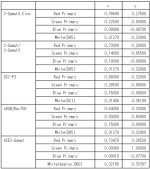
S.Gamut and S.Gamut3 are both very large color spaces, but they are actually the same color gamut from what I've read – the only difference being the math behind them which renders them into smaller spaces and hence why they end up looking differently.

ScreenShot2015-01-20at44128PM_zps1b71ab7e.png


Choosing S.Gamut, S.Gamut3 or S.Gamut3.Cine or whatever other flavour of color space are just different ways to work with whatever log gamma you chose. I tend to think of gamma as luminance, and gamut as chrominance. Although drastically simplified in that analogy.

Currently recording internally to the camera, the combinations of gamma/gamut are limited because of how Sony decided to set them up but if you record Sony RAW you can end up picking whatever color space or gamma curve you would like.

It's fascinating topic to be honest.
 
yeah, I know you and I disagree on some of these points, Dennis. Really, IMHO, consider the "knee" and "toe" of the gamma curve (they are, afterall, an "s" shape) then the break point of the knee is most certainly related to where it falls on the gamut space. The "white point" of the gamma curve, is likewise related to the white point on the sgamut; and, that point is the same for sgamut and sgamut3 and even REC709. Agreed, that sgamut3.cine and sgamut3 are likely the same base gamut definition, but, look at the CIE chart you posted, above. Regardless of how the RGB primaries points are derived, sgamut3.cine is a smaller space than sgamut3, and a larger space than REC709. But both fit the REC2020 definition. In addition the Green vertex is quite different for sgamut3. Green is a very significant point because it is the one color channel that is fully sampled. R and B are sampled at half the rate. Sgamut3.cine was derived to fit closer to the Arri slog space, not really the same as sgamut3. I believe slog3 works with sgammut3 or sgammut3.cine because the white point is the same, with in a margin of error, but the primary color coordinates are drastically different. I hear you when you say gamma is luma and gamut is chroma. But luma is a vector sum of the RGB chroma; and so, they are linked and not independent variables. So, i find it difficult to accept that slog2 fits sgamut3. To demonstrate, I do believe the big problem with the FS700 magenta issue is because Sony tried to make an slog2 gamma fit the original sgamut color space.

As kind of a side note, I don't think there's really anything magic about any of these sgamut color spaces, whether it's Sony's slog or Arri's clog or cineon. They don't represent anything in the real world. They're simply a result of the empirical performance of each vendor's sensor and math processing of that data. I love Art Adams experiments with modifying saturation as a function of luma to match Sony and Arri gamut space. The gammas and sgamuts are tied to sensor performance, not physical reality. An in my judgment, Sony saves money by applying a known gamma and gamut to a sensor that doesn't match the original definition for those derived algorithms.

Yannow, i gotta thank Sony, in their wisdom, to provide such little supporting information for their gamuts and gamma. It leaves a lot of room for discussions like this...LOL. A lot of what i just wrote is psycho-babble....but, I had fun writing it.
 
Last edited:
You guys are way ahead of me here, but just out of curiosity - where is the white point you keep mentioning - would that be at the center of each triangle?
 
in effect, it's the center of the triangle, even monitors, when calibrated, are cal'ed to this white point for D65....here's an extract from a sony paper...

When you calibrate a display monitor with a Spyder or Xrite Colorimeter, you are basically calibrating to this white point. The calibration does nothing to adjust the Color primaries or how the monitor changes with brightness (luma). Most consumer LCD monitors can't even make the REC709 green primary, much less the increased space of REC2020.
 

Attachments

  • colorspace.JPG
    colorspace.JPG
    106.7 KB · Views: 0
Last edited:
Len is correct - my description of matrix was a little glib.

Matrix allows tuning if the colour in camera

With five or so variables to play off quickly you have billions of options to try - that is well beyond me.

If you are shooting 8bit or live to broadcast they are certainly worth exploring - but if your footy is going into any form of colour post it seems far simpler to me to use slog and a lut.
 
i can't see any difference in a simple test .

It really depends on what color space you get when you turn the matrix function off. Note that you also need to turn Gamma setting off. In a Sony White Paper, they say, "Color space of SGamut3 is kept the same area of original sgamut, altho' color reproduction inside sgamut3 is more accurate than sgamut." So, if the color space in Custom mode is sgamut or sgamut3 the only difference is color accuracy, or what I would call color fidelity.

And, by the way, and this is critical, if a person is evaluating things on an 8-bit monitor, they'll never see any differences. All these different gammas and gamuts start to become significant only in 10-bit space, i.e. when viewed on a 10-bit monitor.
 
Last edited:
And how many people will ever see anything on a 10 bit monitor????

Its too bad they don't offer slog3.cine color space in Custom so you then could do white balance adjustments , but Maybe that's not technically possible anyway.
 
well, exactly, Lenny. Right now, it's picking the flys*%t from the pepper. But, i think things are moving towards 4K, 10-bit, and eventually REC2020 consumer display. The REC2020 display space is not in the technology now or for the next 5 years. But, i really do think 10-bit is real close. Realistically, 8-bit is fine for distribution. But, for those of us involved in image editing and creation, 10-bit acquisition, FX, and display is a minimum requirement for us.
 
Last edited:
Back
Top