FS7: Cine EI and LUTs

I've been running 800/1050/2000

Anything higher than 2000 I find too noisy and you are losing DR anyway same goes for using anything below 500. For anytime I would think of using EI 500 or above 2000 I use HG8/7 for these situations as they have about 11-12 stops which is probably what you would end up with using EI500 or EI4000 anyway.

I agree 500,1000,2000 for Slog EI

Above 2000 I use Custom, Slog, NR on medium - happy at 4000, OK at 8000

Snow might of course be one of those cases where the 'rules' change though.

S
 
Cool! I think you might be right about the amount of noise by underexposing actually so I'm going to stick with 500, 1000 and 2000 just now.

I was just looking over this footage again and if you look at the blacks on the boarder's hood there's actually quite a lot of noise. Also in the dark patches on the mountains in the background when he lands on the snow. This was all shot with the histogram slap bang in the middle so I think I'm going to have to start exposing slightly to the right to reduce it - unless there's a better way of cleaning it up in post so I can continue maximising the dynamic range?
 
Two points...

1. Your footage is underexposed. Judging a snow scene on a histogram you need to expose to the right, not the middle. But really it's an ineffective tool for this type of exposure. It's much easier to judge on the waveform.

2. Your footage is ungraded. With a simple curve you will improve the overall contrast and and hide the noise.
 
Quick question regarding what function the ISO/EI switch has in Cine-EI mode. If it makes no difference to the recording and makes no difference to the brightness of the log image you're viewing and makes no difference to the waveform, is it 100% just for use with LUT monitoring, where it DOES affect the image in the viewfinder?
 
Quick question regarding what function the ISO/EI switch has in Cine-EI mode. If it makes no difference to the recording and makes no difference to the brightness of the log image you're viewing and makes no difference to the waveform, is it 100% just for use with LUT monitoring, where it DOES affect the image in the viewfinder?
exactly

also it adds meta data so in CatBrowse - you images will look correctly exposed - I am in conversation with Resolve and hopefully they will pick the meta data up soon.

this can be important because say you shoot all at 500 and hand over to a colourist then they will think you are a muppet who over exposed everything by two stops

also that meta data can save a step in post
 
Just cos you have lut off EI will still change the meta data - this is really worth thinking about for a fast post workflow.

My intention is to be able to say to a client you just need to add a single lut - with EI variance and non supporting software that is a little complex.

imagine if your Red had put every shot to 320 or 800 and 55k - not too good
 
But none of the other metadata that I'd want to edit like wb / curves etc so I may as well do it at the same time.

I might have to dig out a meter again and do some of this shizz the old fashioned way, at which point I could see it being more helpful tallying exposure contorl to lower than 2000 isos.

Or I'll just shoot raw on the 7Q and avoid all this fannying about :)
 
'I' - absolutely if you do your colour then no matter - if you are passing off then you want the colourist to at least know where you were.
 
The edited post makes sense up there ^^^

I'm still finding a balance for exposure methods out of all the great ways people on here and elsewhere have prescribed. Like you, I'm trying to fit it in with my preferred workflow instead of starting my workflow from scratch again.

Although to be honest I think I shot absolutely everything on the Red at 800iso 5600k and tried to include a chart for later fun :)
 
Two points...

1. Your footage is underexposed. Judging a snow scene on a histogram you need to expose to the right, not the middle. But really it's an ineffective tool for this type of exposure. It's much easier to judge on the waveform.

2. Your footage is ungraded. With a simple curve you will improve the overall contrast and and hide the noise.

Hey Liam,

Thanks for the pointers. Does the footage really look under exposed? I didn't expose to the right because I wanted to retain the details of the highlights in the snow and there weren't many dark patches/shadows to be worried about in terms of noise.

The footage has a LUT and some minor adjustments in speedgrade (shadows and midtones mostly to try and reduce noise and a little contrast and saturation added). I've tweaked this a little more and added a simple curve to see if you think it's an improvement:

https://www.youtube.com/watch?v=Z0Wypt59UCY

Here's the original Slog3 footage so you can see how it was exposed:

https://www.youtube.com/watch?v=r6HR7vnTYdk

Please let me know what you think.

Cheers.
 
Interesting, the original Slog3 shot looks bang-on exposure wise. Your whites are perfectly exposed, slightly to the right if looking on a histogram, and up around 55/60IRE on a WFM, plus there's no noise in that shot at all. Your grade looks a tad heavy to my eye. If I were grading, I'd go LC709TypeA LUT, a touch of saturation and maybe a secondary to bring out the sky. Certainly though, there's nothing wrong with your exposure on this shot, just down to personal taste on the grade.
 
Hi Joobny,

Liam is correct that the footage can look much better with a good grade. I downloaded the ungraded video from youtube, and did a quick grade (which you should NEVER do for obvious quality reasons). You can quickly see that even in this diminished quality, there is the potential for a very good looking image. The mids in your grade were a bit low and the color wasn't strong enough; notice the blue in the sky and the green in the trees, neither of which was very noticeable in your grade.


Correction_1.2.1.jpg
 
After reading this article and various opinions on Cine EI vs. Custom Mode, I'm starting to experiment with Custom Mode to see if it might work better with the kind of projects that I'm currently involved with.

http://www.anticipatemedia.com/blog/2014/12/1/snowlight-a-new-fs7-film-with-our-updated-thoughts

I have a few more questions...

1. I've noticed that when in Custom mode (whether using a Hypergamma or Slog2 or Slog3) you can turn Matrix on or off. What does Matrix actually do?
2. Other than being fixed at an ISO of 2000, is there any difference between shooting in Slog3 in Custom Mode compared to Cine EI?
3. I shot some test footage to see how each Hypergamma looks, but is there any documentation about what each one does?
4. When in Custom Mode, why is the minimum ISO setting 2000?

Hope you can help. Thanks again.
 
1) Matrix is the weird sony colour settings that no one understands - I turn it off and use Slog custom!

2) I Custom mode you can add Noise Reduction and sharpening etc - IMO using NR above 2000 ISO is valuable - you can also do click WBalance

3) google ' sony hyper gamma curves' - you will see the toe and knees are different - personally I like none of them - they create 'The (dreaded) Sony Look'

4) 2000 is the 'lowest' ISO of the camera that sustains your headroom - 500 and 1000 EI are just 2000 'exposed to the right' and with an appropriate adjustment to the LUT (if used)
 
Thanks both for the helpful replies.

Christopher, would you mind giving me some info on how you graded? Which program did you use, which LUT and which effects?

Thanks again!
 
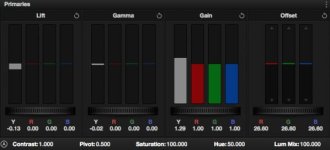
Sure thing! Graded in Davinci Resolve. No LUTs or special settings. I only had one color node (I also had a node with Noise Reduction to just smooth out some of the compression noise). You can see the settings below.
Screen Shot 2015-01-20 at 10.21.00 AM.jpg
 
1) Matrix is the weird sony colour settings that no one understands - I turn it off and use Slog custom!

2) I Custom mode you can add Noise Reduction and sharpening etc - IMO using NR above 2000 ISO is valuable - you can also do click WBalance

3) google ' sony hyper gamma curves' - you will see the toe and knees are different - personally I like none of them - they create 'The (dreaded) Sony Look'

4) 2000 is the 'lowest' ISO of the camera that sustains your headroom - 500 and 1000 EI are just 2000 'exposed to the right' and with an appropriate adjustment to the LUT (if used)

So if you use Custom mode with Matrix turned off and have custom S-Log 3, it should look exactly like CineEI?

I've messed around with Custom (but Matrix must have been on) because at the same WB (I shot a card for Custom to avoid the magenta bug) and same ISO; it still looked different than CineEl color wise.
 
So if you use Custom mode with Matrix turned off and have custom S-Log 3, it should look exactly like CineEI?

No it shouldn't because only the CineEI mode gives you color space options: S-Gamut3 and S-Gamut3.cine.

In custom mode you can turn matrix off, but no matter what Custom Mode is still set to regular S-Gamut (not S-Gamut3 flavour) for color.

I don't get my FS7 until next week, so can't actually verify this. But I expect it to perform identical to the F5.
 
That's correct Dennis. Also, in CineEI mode you can only shoot at ISO2000 no matter what EI you set. It's something lots of people are misunderstanding; EI is NOT the same as ISO. Related, but NOT the same. For example, raising EI to 4000 because it's a little dark is not the same as changing the ISO to 4000. It's somewhat counter intuitive; ISO affects the whole recording and EI just moves the mid data point.
 
Back
Top