T2i Canon T2i 550D exposer question

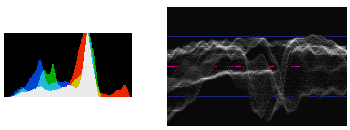
I'm still learning how to expose my camera though I've gotten a lot of it down but still have much to learn. But is there a way to view something like a histogram in video mode? I have a hard time judging sometimes if my exposure is close to what it should be. Is there anything anyone does to help them with this? I've tried doing the trick I've read which is take a picture of where your exactly shooting at then view the histogram, which is great if your not in a hurry but when your documenting a live event you can't do that quick enough. I've read through the manuel and fooled around with my camera but I can't find anything.
Any suggestions?
 
Last edited:
Install Magic Lantern and then yes, you have Histogram, Zebras, False Color, Peaking, and a ton of other video specific options. ML is essential for shooting video on the T2i. I've been using it for over 2 years now and I still love it. I will rent an FS100 or a Black Magic for a lot of shoots, but my T2i is perfectly wonderful for most of the web content I shoot.
 
I've heard about Magic Lantern I've been interested in checking it out. But I've heard a lot of people think it damages your camera or could, honestly I haven't read much on it, I'll have to dig into it more, if it will help its worth a try.
 
You mean exposure?

Your first tool is the light meter that displays on your camera's LCD screen. I have found that my T2i meters a little hot, so whatever the meter says I will usually drop by 1/2 stop or a full stop. If you start losing detail in your highlights, your exposure is too hot.

Past that, Magic Lantern is the greatest thing since sliced bread when it comes to the T2i. It will offer a waveform monitor, which is even better than a histogram for judging video exposure.
 
You mean exposure?

Past that, Magic Lantern is the greatest thing since sliced bread when it comes to the T2i. It will offer a waveform monitor, which is even better than a histogram for judging video exposure.

Alex, have you had any issues with the waveform being inaccurate? I shoot with an Ikan D7W and I've noticed that the waveform on that does not jibe with the ML waveform. I have not done detailed studies of this, but I've noticed it most in the green channel when I'm doing greenscreen shoots.
 
Magic Lantern all the way.

Regarding internal vs external waveform: Canon does all kinds of stuff to the video signal before sending it out through HDMI, I wouldn't be surprised if there are differences. The internal one should be the accurate one.
I know about this extra processing because when the RAW buffers were found, the first idea was to send the RAW data out through HDMI so it could be recorded externally, uncompressed, then recoded into standard DNGs; but all that Canon processing made it impossible to restore the original information, thus the need for internal recording in super-expensive CF cards.
 
But I've heard a lot of people think it damages your camera or could
Driving a car can cause accidents as well. But people are driving anyway!
Installed it after a couple months of bare use and never had any issue. If it freezes, turn it off, remove battery and SD card. Then restart. But only happened with the nighty builds. With stable version, you can use it "safely".
Your first tool is the light meter that displays on your camera's LCD screen.
Could you give more info about that, I'm interested. I'm used to use the Histogram, slowly learning how to use the Waveforms.
Magic Lantern all the way.
Yep. Once you've tasted Magic Lantern, you will feel like Tom Hanks in Cast Away when using the bare camera. At least, for video! ;)
 
Could you give more info about that, I'm interested. I'm used to use the Histogram, slowly learning how to use the Waveforms.

Well, all Canon cameras come factory-programmed with a basic exposure meter like any stills camera (film or digital SLR). The meter on the T2i runs from -2 (stops) to +2 (stops), with 0 being what the camera considers "ideal" exposure. Unless you have your metering mode set to Partial or Spot, the meter is taking an average value of multiple spots in the frame. Higher dynamic range can throw the average off, so where the camera thinks the ideal exposure lies, you could be up to a stop off. In my experience, the T2i and other Canon EOS cameras usually average toward overexposure. I can set my exposure so that the meter is zeroed, but then my stills will have clipped highlights. If I drop it down a couple notches on the meter, I recover the highlights.

Turn the ML display off, or use a card that doesn't have it. Go to still mode, full manual. Step outside on a sunny day and take some pictures. Keeping your aperture , ISO, and white balance constant, shoot the same subject 2 or 3 times: once metered at 0, once dropped by a partial stop (one or two meter segments), and maybe once dropped by a full stop (-1). Pull them into your computer and compare.

A histogram is much more accurate as it gives you a full-spectrum view of light distribution rather than a single, averaged value. For video, a waveform is even better.
 
Thanks I'll give the Firmware a shot. It just goes on your memory card right? if I decide I don't want it to use it I just don't put the card in, is that how it works?
 
You have to make a small change in the camera's firmware, only once (IIRC, it's just changing a flag to allow additional firmware stuff to be loaded from the card). From there on, it just goes on your memory card.
 
Back
Top