Canon R5 Announced with 8k

The C500MKII and (I'm assuming) the C300MKIII have added the option for a second manual focus box. It kills the ability to do face tracking, but it does give you the ability to easily do a two point focus pull without much fiddling. The cameras also have the option for a manual focus assist in which the AF motors don't take control until the focus box is very close to being in focus. It works like a manual focus override tool that makes sure you don't buzz focus at the end of a focus pull. You can also assign buttons for turning the continuous AF on/off or marking a tracking spot. If you actually test the cameras, you find out that Canon added quite a few tools for working with DPAF, but most ops I've met don't realize what is available. The DSLR's are missing many of these tools, probably because there just aren't enough assignable buttons or Canon is worried that the menu system would become overly complicated.
 
The mirrorless cameras are definitely missing that manual focus assist option in which the camera takes over when you're very close, but everything else is way better on the stills, IMO.

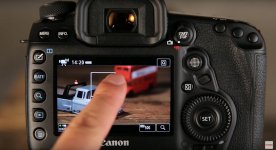
You can track, rack, change modes, or turn it off by just touching the screen. No physical buttons unless you want to use one of them to pause servo (which is very nice as well).
 
The C500MKII and (I'm assuming) the C300MKIII have added the option for a second manual focus box. It kills the ability to do face tracking, but it does give you the ability to easily do a two point focus pull without much fiddling. The cameras also have the option for a manual focus assist in which the AF motors don't take control until the focus box is very close to being in focus. It works like a manual focus override tool that makes sure you don't buzz focus at the end of a focus pull. You can also assign buttons for turning the continuous AF on/off or marking a tracking spot.

That all sounds extremely interesting and I like the complexity and range of options.

What does "marking a tracking spot" mean? An area of the frame?
 
So what does it mean to assign a button to mark a tracking spot? The button enables you to push the screen and mark the spot? Or the button initiates a tracking mode in which the spot was already selected? And what happens when you turn off the tracking spot? Back to face tracking?
 
I'm not sure what he's referring to.

But the best that could mean is maybe some new feature like setting up a rack focus in the camera to happen after a certain amount of time (like with Magic Lantern).

"Here's point A, here's point B." Rack focus.

And the worst it could mean is how you enable tracking on the C200 by using a button on the camera to engage the mode and then set a point (instead of just touching the LCD at anytime when you want to track something).

Tracking can work by looking for a face or by going back to a box. If there's no face then AF will turn itself into a box and look for what's inside there. And you can make a box big (wider area) or small, and move it around with your finger.

___

***Prerequisite for DPAF***

 
Last edited:
it's almost one week after the presentation of the R5.
For me the most annoying thing is not the heating issue but all these talking heads
on youtube talking 10mins about overheating.
(Get a life guys and come back when you have the camera.)

You can Google slfa-r5 for even more fun during waiting.
This is the ultimate device to fix the overheating issue with the 5R!
 
https://www.youtube.com/watch?v=_byYwav5ccM

my impression in this video was that when she put her lens on the r5 it focused better "because" the r5 had "eye detect" and of course the 5DmkIV does not...giving the r5 a great advantage when she was shooting thru a cluster of leaves and branches well in front of he subject. like she was nearly standing in the leaves and branches and the model was 15' away. its easy to see where any cameras AF (without eye detect) would fail or at least snuggle to find the models face let alone her eye. no doubt the eye detection is a potent feature option.

At least from a stills perspective, how can someone not love the R5? There’s no wonder it will probably be Presidents Day before Canon fills all the pre-orders(being slightly facetious). And the stuff at the end with the old 85, which was a dog... If anyone had any doubts left about the AF capability of the R5, they should be gone.
 
Yeah for stills I think it's the cat's meow. It's funny to see her stabilized video footage shot walking through the grass. Nope - still looks like handheld crap, just less jittery. Get a gimbal or a better way to grip and balance the camera. Or at least some video practice
 
Dove deeper into this card situation and it looks like those lower capacities like the 64GB (even with its up to 800 MB/s claim) will be barely useful for any RAW (reports of only a few seconds, literally).

Also found this on Canon's 1DX Mark III's page (RAW is the same bitrate on the R5).

Maybe I'll keep the Ninja V for now and use it until companies discontinue/release better cards (which SanDisk has done a lot in its history).

View attachment 139712

Never mind, I went with the Lexar 128 GB. It's supported and you get a free $40 card reader with it.

If Canon tested it and it passed, and the 64/128 GB SanDisk didn't, that's good enough for me.

No-brainer, expires in a few days.

https://www.bhphotovideo.com/c/prod...rbna_128gb_professional_cfexpress_type_b.html
 
So what does it mean to assign a button to mark a tracking spot? The button enables you to push the screen and mark the spot? Or the button initiates a tracking mode in which the spot was already selected? And what happens when you turn off the tracking spot? Back to face tracking?

it means you assign a button and when you push it a kind of cross hairs / target mark pops up. you navigate the mark to your target and push the assigned button again. Then focus locks to the subject you have selected and the mark changes into the focus area rectangle. Works great. Finally I am able to use my 70-200 at 200mm 2.8
 
A cool box?

That looked great. I can mostly handle someone walking (with a focus buzz now and then) or cars driving that speed still in the distance. When they start to get that much closer, it's murder and impossible for me to nail. I would probably shoot 4+ attempts of such a shot if I needed it, and that's a lot of time wasted waiting for traffic lights to change even if I manage to get a keeper!
 
A cool box?

maxresdefault.jpg


I am not very good at focus pulling. The manual focus throw of the 70-200 / 2.8 is so short, I always failed. And for very much shots I don't have a second chance or the option to re-shoot
 
I see - it's only a matter of time before someone starts selling cold packs that can cling to the base or the front of the camera!
 
it means you assign a button and when you push it a kind of cross hairs / target mark pops up. you navigate the mark to your target and push the assigned button again. Then focus locks to the subject you have selected and the mark changes into the focus area rectangle. Works great. Finally I am able to use my 70-200 at 200mm 2.8

But this is archaic...it's insanity.

This is what I keep talking about.

All you have to do is touch the car or the person walking on the LCD screen to start tracking on the stills cameras.

Really beating this, but after this announcement I have more than ever noticed that there is an incredible disconnect between Canon cinema camera operators and Canon stills camera for video operators.

Makes sense...maybe not many people used the DSLRs for video to know. But these AF features that people think are only in the cinema cameras (besides the "Face-only" leaving the frame option and the "AF-Boosted MF" option) have been in the DSLRs for years!

They have had all of the good stuff way before the cinema cameras.
 
But this is archaic...it's insanity.

This is what I keep talking about.

All you have to do is touch the car or the person walking on the LCD screen to start tracking on the stills cameras.

Really beating this, but after this announcement I have more than ever noticed that there is an incredible disconnect between Canon cinema camera operators and Canon stills camera for video operators.

Makes sense...maybe not many people used the DSLRs for video to know. But these AF features that people think are only in the cinema cameras (besides the "Face-only" leaving the frame option and the "AF-Boosted MF" option) have been in the DSLRs for years!

They have had all of the good stuff way before the cinema cameras.

You can also use the touch screen on the cinema cameras to choose a tracking point, you just need to assign a button to start the tracking function. Otherwise it defaults to a fixed box or face tracking. I often use the focus tracking button as a way to turn continuous AF on and off while shooting if the thing I am tracking is leaving frame. You can also assign a button for AF lock like on the DSLR's. My only point is that you need to know these options exist in order to use them. It's not quite as intuitive as just touching the screen on the DSLR. The reason I prefer the cinema camera bodies is that I don't like relying on the touch screen for changing options. Every time I have to tap the touch screen, it causes the image to shake. This is especially true on a gimbal.
 
Back
Top