
Navigation
Install the app
How to install the app on iOS
Follow along with the video below to see how to install our site as a web app on your home screen.
Note: This feature may not be available in some browsers.
More options
You are using an out of date browser. It may not display this or other websites correctly.
You should upgrade or use an alternative browser.
You should upgrade or use an alternative browser.
Canon ENG B4 Lens on GH1
- Thread starter bumkicho
- Start date
RobTrujillo
Active member
Maybe at some point it'll be within a budget, thanks for posting the info though!
Last edited:
RobTrujillo
Active member
Does anyone know about the threads on an eng style lens? I think these threaded areas are used to screw in a mini-handle for the zoom and iris, but i don't know what they are called. I'm guessing i can use a standard type screw of the right size, but i don't know the thread type so would rather not just test it and take a chance on "screwing the threads" up.
RobTrujillo
Active member
I have a box full somewhere, that's a great idea, thanks!
RobTrujillo
Active member
I have the servo powered and working. Does anyone have experience with this? I connected the power leads, and the
iris servo just spins full throttle when the iris auto/manual is set to either auto or the "r" position. It's a three position switch, auto, manual and "r", i don't know what R is. The zoom servo doesn't spin though. I'm using the gnd and the +ve pins. If i keep it connected that way and touch the -ve to the gnd too, the servo spins briefly then stops, and doesn't start again unless i disconnect -ve and reconnect, which makes it spin briefly again and stop. Probably one of the other pins needs either positive or negative from the power supply also but i didn't want to chance frying something.
This is is pin layout that seems to work so far..
Pin 1: +ve
Pin 2: -ve
Pin 3: Gnd
Pin 4: VTR
Pin 5: RET
Pin 6: ID/CO (Iris control)
Pin 7: IE/IND (Extender indication)
Pin 8: AT/RM (Iris remote selection)
Pin 9: AT/MA (Iris manual selection)
Pin 10: P.P
Pin 11: Z/IND (Zoom position indication)
Pin 12: F/IND (Focus position indication)
iris servo just spins full throttle when the iris auto/manual is set to either auto or the "r" position. It's a three position switch, auto, manual and "r", i don't know what R is. The zoom servo doesn't spin though. I'm using the gnd and the +ve pins. If i keep it connected that way and touch the -ve to the gnd too, the servo spins briefly then stops, and doesn't start again unless i disconnect -ve and reconnect, which makes it spin briefly again and stop. Probably one of the other pins needs either positive or negative from the power supply also but i didn't want to chance frying something.
This is is pin layout that seems to work so far..
Pin 1: +ve
Pin 2: -ve
Pin 3: Gnd
Pin 4: VTR
Pin 5: RET
Pin 6: ID/CO (Iris control)
Pin 7: IE/IND (Extender indication)
Pin 8: AT/RM (Iris remote selection)
Pin 9: AT/MA (Iris manual selection)
Pin 10: P.P
Pin 11: Z/IND (Zoom position indication)
Pin 12: F/IND (Focus position indication)
B4 pin out scheme
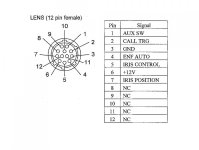
AUX SW is the return button on the lens
CALL TRG is the start/stop button
ENF AUTO is the auto iris control
For our needs pins 2, 3 and 6 are the ones to care of; pin 1 (AUX SW) can be used as the half-press shutter button on the camera, to activate the meter for still images
AUX SW is the return button on the lens
CALL TRG is the start/stop button
ENF AUTO is the auto iris control
For our needs pins 2, 3 and 6 are the ones to care of; pin 1 (AUX SW) can be used as the half-press shutter button on the camera, to activate the meter for still images
RobTrujillo
Active member
Thanks for posting. I think my lens is different though, i'm able to get the servos spinning by using pins 1 and 3 if i remember right. Have you successfully powered yours yet? Even though they are different, some info may be similar. Earlier tonight i was able to hook it up so that the rocker powers the zoom servo. But the servo spins in the same direction, no matter which direction i press the rocker.
Are you able to make your zoom rocker spin the zoom servo in either direction by only connecting pins 3 and 6, or is another wire required?
Are you able to make your zoom rocker spin the zoom servo in either direction by only connecting pins 3 and 6, or is another wire required?
Thanks for posting. I think my lens is different though, i'm able to get the servos spinning by using pins 1 and 3 if i remember right. Have you successfully powered yours yet? Even though they are different, some info may be similar. Earlier tonight i was able to hook it up so that the rocker powers the zoom servo. But the servo spins in the same direction, no matter which direction i press the rocker.
Are you able to make your zoom rocker spin the zoom servo in either direction by only connecting pins 3 and 6, or is another wire required?
I'm still investigating on the real usefulness to power or not my B4 lenses. About your specific case, if your is a B3 lens (same 12 pin Hirose connector, but different pin-out scheme), the right pins are the n.1 (+12V); n.2 (GND) and n.3 (common). I think you need to solder these three pins, check with your cable if it is soldered in the right way.
RobTrujillo
Active member
For me there's no question, the slow even zooms are pretty much mandatory, but so are snap zooms so manual zooming is nice to have too. I mistyped that, i meant to say pins 1 and 2 in the last sentence.
But my lens came with the hirose cut off, so it wasn't clear what pin numbers go to what wires so i opened the box and found a mark on the pcb where the wires connect via a ribbon type connector, figured that the mark meant pin 1, does this look right to you:
Black pin 1 +ve
Brown pin 2 -ve
Red Pin3 Gnd
I have black going to positive and brown going to negative. Where would the third (red i think?) go? As i have it now, the zoom motor spins with the rocker, but only in one direction.
But my lens came with the hirose cut off, so it wasn't clear what pin numbers go to what wires so i opened the box and found a mark on the pcb where the wires connect via a ribbon type connector, figured that the mark meant pin 1, does this look right to you:
Black pin 1 +ve
Brown pin 2 -ve
Red Pin3 Gnd
I have black going to positive and brown going to negative. Where would the third (red i think?) go? As i have it now, the zoom motor spins with the rocker, but only in one direction.
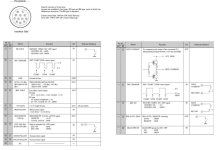
RobTrujillo
Active member
Thanks for the diagram i hadn't seen that before. Since the hirose cable was cut on mine, hopefully i have it right which pins go with which numbers.
Swapping those two i think means connecting red instead of brown to negative battery terminal, and that makes the iris servo spin constantly, but zoom doesn't function. Maybe i have the pin numbers/colors wrong after all.
Swapping those two i think means connecting red instead of brown to negative battery terminal, and that makes the iris servo spin constantly, but zoom doesn't function. Maybe i have the pin numbers/colors wrong after all.
RobTrujillo
Active member
Yeah, i just confirmed, i think you are right on the pins numbers for b3, but still i couldn't get it to work right, the closest i've been able to get is the zoom servo spins in one direction only (using pins one and two connected directly to power). Wiring it the other way makes the iris servo spin constantly.
I think the correct diagram to follow is connecting pin 1 (12V) and pin 3 (intermediate between power imput and ground) to pin 2 (ground).
If servo starts to spin it's because other pins have been connected, maybe 6 and 9. Try to locate correctly the pin numbers.
Pin 3 is common also to the rec trigger and return button, this is a peculiar scheme of B3 lens only, B4 type has no such kind of complication.
If servo starts to spin it's because other pins have been connected, maybe 6 and 9. Try to locate correctly the pin numbers.
Pin 3 is common also to the rec trigger and return button, this is a peculiar scheme of B3 lens only, B4 type has no such kind of complication.
RobTrujillo
Active member
You're saying to connect pin1 and pin3 to pin2? In other words the same as connecting all three together but that doesn't make sense, so maybe i'm just not reading right?
Last edited:
In the scheme I posted (from an Ikegami manual), pin 3 is connected with pin 1 (12V) and both have the ground as reference. Of course, not soldered all 3 together.
I think you have to use the "trial and error" mode and see what happnen.
I'm looking around for other info about this electric wiring scheme.
I think you have to use the "trial and error" mode and see what happnen.
I'm looking around for other info about this electric wiring scheme.

Muttondraw
Well-known member
Hi Rob. I had a B3 version of the Canon J8 many years ago. I dug up an old service manual and as luck would have it I had scrawled the colours of the wires going to the hirose connector, there is a good chance the cable colours correspond with the colours on your j13.
Pin 1. Black wire: +VE. - Connect 12V here
Pin 2. Brown wire: -VE. - Connect 0V here
Pin 3. Red wire: Gnd. - You need to connect 6V here
Pin 4. Orange wire: VTR
Pin 5. Yellow wire: RET
Pin 6. Green wire: ID/CO
Pin 7. Blue wire: IE/IND
Pin 8. Purple wire: AT/RM
Pin 9. White wire: AT/MA
Pin 10. Grey wire: P.P.
Pin 11. Pink wire: Z/IND
Pin 12. Cyan: F/IND
At one stage I was using that lens on a B4 camera via an optical adapter to correct for the different flange difference and different prism in B3 cameras. There was also an inline electrical adapter. The electrical adapter failed after some years of use and wasn't repairable because it was a sealed unit with the components embedded in potting compound. Rather than buy a new one I had a look at the circuit diagram and realised that it was relatively straightforward to adapt the connection to work with a Sony camera. I generated the 6v using an opamp which was intended as the focus indicator buffer (not needed in my case because I wasn't using a remote focus demand controller). I connected the output of that opamp to GND (the 6V rail), the - input of that opamp also to GND and the + input to 2 100K resistors providing a voltage divider between the negative and positive supply. So that Opamp was just acting as a unity gain buffer. It seemed to supply enough current, all worked fine for me.
Pin 1. Black wire: +VE. - Connect 12V here
Pin 2. Brown wire: -VE. - Connect 0V here
Pin 3. Red wire: Gnd. - You need to connect 6V here
Pin 4. Orange wire: VTR
Pin 5. Yellow wire: RET
Pin 6. Green wire: ID/CO
Pin 7. Blue wire: IE/IND
Pin 8. Purple wire: AT/RM
Pin 9. White wire: AT/MA
Pin 10. Grey wire: P.P.
Pin 11. Pink wire: Z/IND
Pin 12. Cyan: F/IND
At one stage I was using that lens on a B4 camera via an optical adapter to correct for the different flange difference and different prism in B3 cameras. There was also an inline electrical adapter. The electrical adapter failed after some years of use and wasn't repairable because it was a sealed unit with the components embedded in potting compound. Rather than buy a new one I had a look at the circuit diagram and realised that it was relatively straightforward to adapt the connection to work with a Sony camera. I generated the 6v using an opamp which was intended as the focus indicator buffer (not needed in my case because I wasn't using a remote focus demand controller). I connected the output of that opamp to GND (the 6V rail), the - input of that opamp also to GND and the + input to 2 100K resistors providing a voltage divider between the negative and positive supply. So that Opamp was just acting as a unity gain buffer. It seemed to supply enough current, all worked fine for me.
Last edited:
Muttondraw
Well-known member
Incidentally. The reason why the opamp buffer has enough grunt is that all the heavy lifting is between the +VE and -VE supply.
RobTrujillo
Active member
That's fantastic thanks for the info, it confirms that i do have the right colors, and also other people here can use the info. Hirose cables must be very difficult to manufacture since they cost anywhere from $50 to $150(!). People can just cut the super expensive connector off now, but should still open the casing first to make sure the color sequence on the pcb connector matches.
Some of that was over my head. If i have it right though, a simple split rail power supply like this:
http://gpete-neil.blogspot.com/2012/06/configuring-split-rail-power-supply.html
or even this
http://www.instructables.com/id/Split-rail-power-supply-from-a-single-rail-supply/
won't work because the servos draw more current than it can supply? I'll try to wire it up this weekend to give it a try.
Some of that was over my head. If i have it right though, a simple split rail power supply like this:
http://gpete-neil.blogspot.com/2012/06/configuring-split-rail-power-supply.html
or even this
http://www.instructables.com/id/Split-rail-power-supply-from-a-single-rail-supply/
won't work because the servos draw more current than it can supply? I'll try to wire it up this weekend to give it a try.
Muttondraw
Well-known member
Go for this one:
http://www.paulinthelab.com/2012/06/op-amp-power-from-single-supply.html
That is basically the same type of circuit I used, though I managed to do it using a spare opamp within the lens itself which made it even simpler. The servos aren't powered from the centre rail so you don't actually need a lot of current.
http://www.paulinthelab.com/2012/06/op-amp-power-from-single-supply.html
That is basically the same type of circuit I used, though I managed to do it using a spare opamp within the lens itself which made it even simpler. The servos aren't powered from the centre rail so you don't actually need a lot of current.