C500: C500 Mark II: Observations from a C300MkII point of view

I was really happy to read this as I’m quite in the same position as a one man show working for my own production and doing stills and video both. For me the price point of the C500II is hard to justify at the moment. I have a double investment for both stills and video equipment but only one man’s working power and hours to earn the money. Do clients pay higher rates for offering both? No. Nevertheless it’s a business model that makes good profit. The clients don’t care if I am shooting with a C300 FS7 or EVA1 as long it’s looking good and I’m not charging ARRI rates for DSLR shots.
What makes a big difference for my profit In general is efficiency. That’s why I sold my FS7 and went for the EVA1 two years ago. Color science is just great and it saves me so much time in post. But that’s also the reason I did not go for the C200. 4K/50p in 10bit is a must but converting hours of raw is not very efficient. As a one man shooter without a focus puller I often wished I had AF though. I’m quite happy with the results of the EVA1 and so the question is: will the investment of 16,000€ return? Is “I would like to have” reasonable? For me it’s not answered yet.

Definitely to each his own on this. For me AF has become increasingly important, so the Eva was never a consideration. I happily charge my clients extra for combo shoots (more gear at risk, more to load and take home, and the days are just harder) Although, generally we are booked for one or the other more often. (and my video day is 25% more than my photo day.) I think if I was sitting with a c200, or happily with an EVA, I would probably put the money into workflow enhancements rather than the c500II. But that wasn’t my situation. 2 weeks in with the camera, I feel it was a good investment, for me.
 
Definitely to each his own on this. For me AF has become increasingly important, so the Eva was never a consideration. I happily charge my clients extra for combo shoots (more gear at risk, more to load and take home, and the days are just harder) Although, generally we are booked for one or the other more often. (and my video day is 25% more than my photo day.) I think if I was sitting with a c200, or happily with an EVA, I would probably put the money into workflow enhancements rather than the c500II. But that wasn’t my situation. 2 weeks in with the camera, I feel it was a good investment, for me.

I think it could be a good investment too. I was always missing AF but so far I put 10bit XAVC and 60p over it.

May I bother you with questions?
With what color settings did you shoot the street scenes?
As far as I understood the Nellie Rodeo scene was shot in RAW light?
Did you grade the CF edit directly in FCPX? from RAW lite?
How did you transform then to the ungraded footage? Which kind of log is that after converting?

I have only little experience with Canon Log. As some stated that the
genuine Canon LUTs are crap which one would you recommend as a
good starting point? Thanks much again!
 
I’d just say, avoid buying an expensive camera if funds are tight. It can take a few months before the camera starts paying for itself. Skill makes a bigger difference than cameras these days. Although, clients still don’t know that yet.
 
I’d just say, avoid buying an expensive camera if funds are tight. It can take a few months before the camera starts paying for itself. Skill makes a bigger difference than cameras these days. Although, clients still don’t know that yet.

that's right - and my focus pulling skills are fare behind the camera AF capabilities.

I don't see other camera options except FX9 with AF + 60p + 10bit XAVC
From the guts I'd say clients will talk about full frame soon. As soon as one of
the competitor starts promoting it. It doesn't mean it would make a difference for
their videos but clients need to have the feeling their supplier is up to date
 
Last edited:
If i still shot a lot of interviews, and had moved to FF35, i’d be sure to get AF. Sitting for 45min, or more, micro adjusting focus can be quite the task. Back when interviews were shot on 2/3”, we had the opposite problem, and were looking to reduce dof. Even then, dof was pretty forgiving, and sitting through long interviews, focus was rarely an issue.
 
Apologies if that’s a sheepish question. On my information the output of the C200 on sdi/hdmi is also only 8bit? What’s the advantage of the external recorder if it’s just 8bit in a ProRes container?

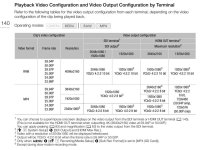
Actually, the C200 outputs 4:2:2 10-bit FHD and 2K via SDI or HDMI. The Ninja Blade is a 1080 only recorder. Most clients, at least our clients, specifically DON'T want 4K. Yes, in 2020. 1080 is still the majority. Interestingly we have two clients though who now only want 4K DCI RAW. So it goes both ways.

C200 outputs.jpg
 
Last edited:
Actually, the C200 outputs 4:2:2 10-bit FHD and 2K via SDI or HDMI. The Ninja Blade is a 1080 only recorder. Most clients, at least our clients, specifically DON'T want 4K. Yes, in 2020. 1080 is still the majority. Interestingly we have two clients though who now only want 4K DCI RAW. So it goes both ways.

thanks for the information. I didn't have 1080 in mind as 90% is requested in UHD.
 
I downloaded a copy of Color Finale Pro 2 and tried a "prettier" grade of the material. (I like how CFP2 rolls off the highlights better than FCPX's native tools, but there is enough to hate a about that plug-in currently that I'll be un-installing it today :-(.

Barry - first of all - this is nice work. Secondly, although I'm not really in the market for a new camera - your "tests" & methodology here are very much appreciated and certainly help me understand what the camera is capable of. And totally off topic - but am curious about CFP 2.0 and what's to hate?
I'm a CFP 1.0 user and agree with you that it can roll highlights better than FCP - and have been thinking up updating / upgrading.... so would certain welcome more info. Will be happy to discuss out of this thread by pm, etc if that's preferred... Thanks!
 
And totally off topic - but am curious about CFP 2.0 and what's to hate?
I'm a CFP 1.0 user and agree with you that it can roll highlights better than FCP - and have been thinking up updating / upgrading.... so would certain welcome more info. Will be happy to discuss out of this thread by pm, etc if that's preferred... Thanks!

I was involved in early stage testing and I can say that it’s a great step from CF1 to CF2. Just one note if you decide to test it: make sure that you have a backup of your library before working on it with CF2. CF2 does transform your settings smoothly in the background and from there it’s no way back to CF1 once that it’s done. If you decide to stick with CF1 you wil have to use the old backup library. Send me a pm if you have questions or join the fab group https://www.facebook.com/groups/2876015042408628
 
May I bother you with questions?
With what color settings did you shoot the street scenes?
As far as I understood the Nellie Rodeo scene was shot in RAW light?
Did you grade the CF edit directly in FCPX? from RAW lite?
How did you transform then to the ungraded footage? Which kind of log is that after converting?

I have only little experience with Canon Log. As some stated that the
genuine Canon LUTs are crap which one would you recommend as a
good starting point? Thanks much again!

Color Street scenes: Canon Log3, Neutral matrix, Not sure White balance, but it was probably the daylight preset or a 5600k setting.

Nellie -- shot in CRL. I've done several grades...some with FCPX tools, although the "final" edit was with color finale 2 Pro plugin inside FCPX. I also did some white balance adjustments on one clip in Canon Raw Development, and that's probably the most accurate workflow, but I wanted to work directly with the raw files in FCP just to see.

CRL comes into FCPX by default as Canon Log 2, and I don't think it matters what gamma you shoot with as it will display as CLog2 with a LUT automatically applied. For the Ungraded, I just turned off all the applied settings, and the LUT, so I'd guess that upload is in clog2. If you process the files in Canon Raw Development, you can convert to a range of output Gammas and color spaces and output formats. If you are trying to adjust white balance, it's best to do in Canon Raw Develop, as it's really a metadata workflow, and gives a very precise result. FCP doesn't have this ability as far as I can tell. Not sure if exposure is handled this way as well.

I wouldn't say canon's LUTS are crap...the new 2.0 version is better than the v1.1 that I have..they just make choices that I wouldn't make. If you were looking for a more modern "baked" neutral skin rendering, you might find that the LUT is a very good starting point for that. I've found that It's really hard to get the same results when comparing "LUT developed" versus "Tools Developed" --there is definitely some secret sauce going on there. They are probably pretty accurate for a broadcast spec Rec709, but I find they make skin tones too red in the shadows and too desaturated in the highlights, and the blues and greens are off more that they should be. I'm working on developing some settings that will allow me a good starting point without using a LUT, and may experiment with lutcalc to develop something I like, but I'm aways from that.

Generally, canon Log 3 is pretty easy to grade by simple adjusting contrast and Saturation. Canon Log 2 can be graded that way, but is in general a fair bit trickier, and a LUT can be helpful.
 
And totally off topic - but am curious about CFP 2.0 and what's to hate?

Ha...I brought it up.

Let me say this. there are some really great things in CFP2. I love the sharpening, the color wheels seem more responsive and the curves produce a result that is more expected than FCP's curves. The vector control is simpler than apples tool. The highlight thing is big. I might be convinced to buy it all but for the last thing on my ***** list below...although all of them add up to a program that simply isn't ready. FWIW, I'm working on a mid spec iMac PRO, which should be able to handle anything this plug in throws at it.

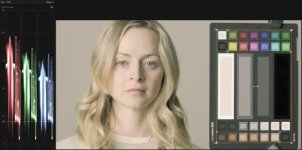
I think the "hate" started when I went to experiment with the Chart calibration feature, as I thought this was a great idea. Compare the image of a chart with some known numbers and you should be able to wrestle a cameras "color science" or lack of into something bordering on accuracy. The fact that they had added the Color Checker Video to the new version made this an interesting diversion for me. After a number of attempts at using it, under a whole variety of inputs and settings choices, I got wholly inconsistent results none of which were anywhere near as accurate as simply applying a LUT and calling it a day ( some results were just damn weird). This was on a perfectly exposed and balanced chart, not some dslr shot at 6400 in the forest. After some chit chat with the developer via email, it became clear that this tool doesn't "do" anything (he questioned why, if my LUT-ed result was good, would I need to apply this feature, and bluntly said that calibration was simply not within it's ability, that no software could correct that many colors..."uhhh...really," I said..."so that's not what X-rite's whole business is"), and went on to say that the feature was meant to match various cameras (this although the workflow is specifically "match chart" not match camera and if it can't get one camera remotely accurate, how is it going to get "two" cameras to be anything but a mess.) So this feature doesn't work in anyway like a normal person would assume.

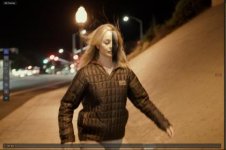
Next the tracking -- I tried the tracking feature on some of the early "underpass" shots of nellie. In these there were a few times when she moved across the frame at a slightly higher rate than at other times. When this happened, the mask tracked with her just fine, but for some reason the "correction tile" (my term)...that is the masked area that contains the image corrections would lag behind, leaving a rather prominent edge visible in the shot. I tried this several times with the same result. I sent the developer this note, and I didn't receive a response. (I have done a few other tracking tests that did work, but for now, I'll say that this feature doesn't work.).

Next the "make LUT" feature. I thought as I'm probably not going to buy the program, I should save the setting I had on that grade I posted as a LUT. this is a really nice feature. Unfortunately, the LUT that written by CFP2 bore very little resemblance to the settings used to produce it. Even when applied to the same clip. So I'd say this feature doesn't work.

If you make an adjustment in a layer, and want to reverse it, hit Command-z, it removes the plug in from the inspector, and you lose all the work you just did.

While CFP2's all in one approach makes a lot of workflow sense, there are times when I want to remove specific settings from a grade for some reason. Final Cuts "departmentalization" of this aspect can have it's benefits.

Lastly, and this is why I won't buy it., and will be removing it from my system....Something about CFP2 is taxing FCPX's resources, even when it's not in use, and for some reason I can no long scrub clips in the browser smoothly (as soon as I drop them into the timeline they are fine, but in the browser they are unusable for trimming, the playhead sticks and stays stuck till it's good and ready. That on top of re-rendering every time I open the program,(something FCP likes to do with 3rd party plug-ins, so not necessarily CFP2's fault,) but it really has made the workflow unbearable, so I'll be removing it later this weekend.

Screen Shot 2020-01-21 at 9.13.07 AM.jpgScreen Shot 2020-01-21 at 5.30.02 PM.jpg
 
Lastly, and this is why I won't buy it., and will be removing it from my system....Something about CFP2 is taxing FCPX's resources, even when it's not in use, and for some reason I can no long scrub clips in the browser smoothly (as soon as I drop them into the timeline they are fine, but in the browser they are unusable for trimming, the playhead sticks and stays stuck till it's good and ready. That on top of re-rendering every time I open the program,(something FCP likes to do with 3rd party plug-ins, so not necessarily CFP2's fault,) but it really has made the workflow unbearable, so I'll be removing it later this weekend.

Thanks for sharing Barry. From everything you describe - I would do the same. Does not sound ready for prime time yet - and my whole thing with staying inside FCPX is for the speed / simplicity.
I'm on a near maxed out non-pro iMac - so would likely experience even worse. I will stick with 1.0 for now - and my occasional dive into Resolve for certain projects.
If I do demo it - at a future time - will let you know how it goes. Cheers.
 
thanks for the information. I didn't have 1080 in mind as 90% is requested in UHD.

Yes, definitely depends on the clients. The majority of our work is for the studios EPK, Home Entertainment and Publicity Departments, most of who only deal with 1080.
We have one client at Fox who likes us to shoot 4K RAW. When I roll 1080 with the Ninja Blade, I am always shooting a UHD XF-AVC as a backup and once in a while, it
gets used. For our own content we are developing, we only shoot 4K RAW.
 
This is an overexposure test that was motivated by a poorly implemented test published by CVP awhile back. (we believe their test was compromised by improper application of a LUT in post processing). Unfortunately their test has been widely circulated, and appears to show the C500 II as severely hampered by even modest overexposure. I knew this couldn't be true, but figured I'd better test it for myself.

This was shot in XF-AVC CLog2, Neutral Color Matrix, Cinema Gamut and graded using Contrast and Saturation tools in Final Cut Pro (no LUT was used). Whites clip at 5 stops over, and colors begin clipping at 5.5 stops. Skintones are not clipped at 5.5 stops. I would rate the C500II, in XFAVC as having 4-4.5 stops of highlight latitude.

 
Thanks- what happens when there’s a live face in the frame at+5? (the CVP test didn’t appear to clip the chip chart for skin tones).
 
You'll have to rent a camera, and find that out. :-) The CVP test chart is a print chart and doesn't have a full range of skin values like the video chart. Based on every chart test like this that I've ever seen, light Caucasian skin tones clip at 1/2 to 1 stop higher exposure than chart white. You should be able to interpolate that. If you can't, or won't. I can't help you. This test isn't for you. It's for me.

While you zero in on whether your pale toe-headed model will look good on this camera, let me remind you that awhile back you said "lets stick to the color and the highlights, Barry". So, whatever your name is... Lets stick to the color and the highlights. One of the big problems with the CVP test was that the C500 color starts fading from the get go...literally at 1/2 stop over and gets progressively worse until the image clips. This is what Liam and I cued in on when we said it was a bad test. You invented a term for it (Ghosting -- which sorry, is already used in video). You can see from my test that when the image is processed properly, the image from the C500 doesn't lose saturation until the image starts to clip. This is a very good result. Now, sit with the Fx9 test at CVP and you'll see that the FX9 colors stay more saturated to the bitter end. this is spectacular, although we need to temper that excitement, as their chart is spectacularly over saturated from the get go. I've tried to match the chart colors as closely as possible in my test, and the camera is doing a very good job at staying very accurate at 4.5 stops over...spilling into 5 stops over. That's something. I'd love to see what the Fx9 looks like with the colors rendered natural to that chart (my guess is the skin tones aren't going to look quite so colorful...but you know..you get what you pay for.)
 
Last edited:
Again, who I am and my experience doesn't matter in debate- all that matters is evidence, facts, logic, and proofs. My name is John (jcs are initials), and you can see some of my patents in imaging and video here (it appears you don't think I have any experience in this space): https://patents.justia.com/assignee/yoostar-entertainment-group-inc .

Motion blur can be called ghosting and cameras that make people look like Casper are appropriately ghosting skin tones. People disappearing in conversations: ghosting. Many uses of the word when appropriate. Thanks for recognizing the coining of a new use. I think you meant tow-headed? Toe-headed sounds like something from Thumb Wars:

As you may know, cameras know about skintones (and faces) and sometimes perform different color processing in those areas. I've also found that static photos of people don't seem to work as well as a live person for testing.

If the C500 II can do better than CVP in overexposed skin, cool. The debate started when the FX9 was stated as having the best IQ vs. the C500 II: we still need a side by side test ideally to see if the C500 II can match or exceed the FX9 in the same conditions. I'd estimate the FX9 would still win based on sensor tech, however the only way to know is by doing the test.

A friend may be doing a test soon, let them know my thoughts on what should be tested, not sure if I can be there during the test. Perhaps they'll share results on this forum.
 
Ha...if it doesn't matter, why bring it up? I never asked what you did. It's nice to know your name, John, but see ...you have a little problem acknowledging when you see evidence of something, you seem incapable of grasping the Logic you toss around like a fuzzball, at least when someone else is dishing it up. You've spent a LOT of time crapping on the quality of a camera you've never touched, with nothing but largely "anecdotal" evidence to back you up. If you're an engineer, tell me how often does "anecdotal" get tossed around when you're writing briefs for your patents?

I've shown you that the test you relied on for much of your argument ("the CVP test shows me what I knew all along") was fatally flawed. I've shown you that the C500II has excellent color when overexposed. I've showed you how known skin tone values respond to over exposure. But you literally are incapable of saying..."hmm...yeah..you know...that looks a lot better than what I thought. I wish it was a skin tone test, but yeah...I guess you guys were talking about stuff you understood, that I somehow missed" .

Don't worry, I don't need you to say it...so don't. I know, that in your mind it ALL started with you and what you wanted to see. But that's simply not true. Liam started the thread, and I was in it from the very beginning. We were talking about lots of issues regarding these cameras. Because no one aspect is the one that makes you buy it.

Now if I might make a respectful request: I'd really wish you'd take this fight back to the A vs B thread. This thread is about reporting data from one camera. It might be lonely over here, but I'm just fine with that.
 
Maybe that used to be the case, but these days whenever I get a client contacting me saying they'd like a Red camera, or they shot their last project on Red, or anything to do with mentioning a Red, they're a lower budget, lower end, less informed, less knowledgeable, etc., client. Clueless music video musicians reach out and say, "We love you work, want to hire you with your Red camera." Me, "I don't own a Red cameras because they are crap. I have Arris which were used to shoot most Hollywood movies like Avengers." Them, "Never heard of Arri. I have $500 budget. Can you bring yourself and a Red out for that?" Me, "No."

Most Red owner/ops I know are indie filmmakers making diddly squat day rates, going out for around $250 to $600 per day with their $20k Red with a cheap Rokinon lens set and Manfrotto tripod. Sometimes for a corporate project you can get $1500 as a Red owner/op, but I rarely see Red budgets beyond that, and people can easily get those rates with a cheaper C300 Mark II camera in the corporate world.

Red has had a serious decline in the past few years, so people still asking for them thinking they're the best are really just uninformed.
What is interesting, now that Red brand cameras are actually good, no one wants them anymore. Haha!

But so true about the cheap lens and lens addons, and walking out the door for whatever is offered.

Anyway, i guess all the cameras are good these days. The Canon C500ii is the first Canon C i am interested in.
 
Back
Top