C300: C300 MKII Reset the Clip number back to 001

ChristianMoriarty

Well-known member
Stuck on this one: in MetaData

I can change the camera letter
I can change the reel number
I can raise the clip number higher
Cannot reset the clip number to 001 (even after reinitializing CFAST)

I must be missing something

UPDATE:
I can change the clip number to 999 and roll over from C999 to D001 - but - when I change D001 to D999 and press record I get a CFAST error & must reinitialize that card along with SD card -
So.... Maybe I just ignore this functionality altogether
 
Last edited:
I must be missing something
I had a similar problem when I first got my hands on my XF100.
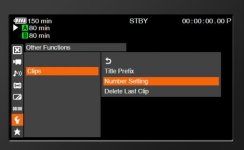
C300 menu.jpg
Menu > Other Functions > Clips > Number Settings. You can reset, add a particular number, etc.

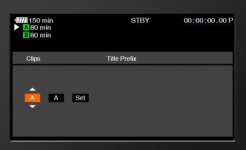
Title Prefix in that same menu could help for your camera letter:
C300 menu2.jpg
 
I had a similar experience with my Mk2 and getting clip info to reset. I did learn that if you format the card the reel # changes and clip number changes will happen as expected. If you have clips already on a card, it doesn't seem possible to go into the metadata settings for clip info and effect changes. I'm not sure completely as to why this would be the case as it wasn't that way on the Mk1.

If anyone has some insight into this issue of changing clip metadata, I would certainly like to hear about that.
 
Also keep in mind the camera will read the last clip number from the proxy files on the SD Card and continue on from there.

So even with a fresh CFast Card in and you reset the numbering to 001, it will not change if there is an SD Card in there with Proxies on it.
 
Also keep in mind the camera will read the last clip number from the proxy files on the SD Card and continue on from there.

So even with a fresh CFast Card in and you reset the numbering to 001, it will not change if there is an SD Card in there with Proxies on it.
Yes, that seems to be it & make perfect sense - thank you.
 
Also keep in mind the camera will read the last clip number from the proxy files on the SD Card and continue on from there.

So even with a fresh CFast Card in and you reset the numbering to 001, it will not change if there is an SD Card in there with Proxies on it.


Follow up question: If I have and SD card in the camera and I am not recording proxies is the reset of metadata some how still affected by the presence of the SD card even though proxy recording is not enabled?
 
The best answer I seem to come up with is that the clip number cannot be changed unless the CFast card is reformatted. If you have a card wth clips on it, You can change the reel number and camera designation, but the next clip number will automatically be the next higher clip number in order relative to the existing clips on the card. If you format the Cfast card, the clip number info can be reset to '001'.
 
Follow up question: If I have and SD card in the camera and I am not recording proxies is the reset of metadata some how still affected by the presence of the SD card even though proxy recording is not enabled?

The Proxy numbering wont effect your CFast numbering unless you have Proxy Recording enabled. You can test it by Resetting your clip count, then turning off your proxies. Once you turn off that proxy, your CFast count should go back down to 001.

It didn't seem to matter what order I did things in, reformat the card first then reset the numbering or vice-versa.

To simplify it, you basically can't have any existing media or numbering present on any card or else the camera will continue from the last number.
 
Is there a way to make the Proxy recordings have the same exact file name as the CFast recordings? I've been using Adobe Bridge to batch rename both, but it would be one less step if I could do it in-camera.
 
Is there a way to make the Proxy recordings have the same exact file name as the CFast recordings? I've been using Adobe Bridge to batch rename both, but it would be one less step if I could do it in-camera.
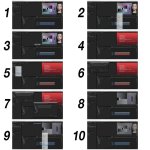
In Pr I just edit with the proxy as named - then "unlink - relink" to the 4K media by timecode.
 
a quick way - starts a "Save as" Pr project file
1. Sequence with 1080 Proxy
2. Make offline in timeline
3. Media remains on disk
4. Media is now offline
5. Link media in browser to what was proxy
6. Locate & Match file properties "Media Start"
7. Locate and select 1st 4k file
8. 4k is now linked
9. Select all 4k clips and set to frame size
10. Proxy is now 4K
Proxie to 4K.jpg
Disclaimer: I'm not stating that this method is standard or endorsed -
 
Last edited:
Back
Top