C300: C300 MKII Mac Users - Which Reader?

puredrifting

Major Contributor
I am looking to buy a CFast reader and I work with an older MBP in the field for downloading footage and in the edit bay with a 2012 iMac. Both have Thunderbolt although it is not Thunderbolt 2. I am looking at the card readers and the Lexar Professional Workflow CR2 CFast 2.0 Thunderbolt/USB 3.0 Reader - model LRWCR2TBNA https://www.amazon.com/Lexar-Profes...-1&keywords=Thunderbolt+CFast+2.0+card+reader looks like a likely candidate but I cannot find a picture of the rear of the reader to see if it only has USB 2.0/3.0 or if it also has a Thunderbolt connector? I am also looking at the new cool Sonnet dual card reader which is sweet, but that reader only has a USB-C connector. I like the idea of being able to download two cards at once but neither computer I own has a USB-C connector. https://www.amazon.com/Sonnet-CFast...8&qid=1496684268&sr=8-1&keywords=Sonnet+CFast Fine, you say, just order the Apple USB-C to Thunderbolt adapter, but if you read the fine print on the Apple adapter, using this adapter requires your Macs to be running OSX Sierra, which I am not and don't intend to for at least a while as I have lots of applications and programs that won't play nice with Sierra.

So are any of you using older Macs with Thunderbolt CFast 2.0 card readers? If so, which card reader?
 
The Lexar you linked has both; USB and Thunderbolt?

(There is a cheaper Lexar reader that only has USB.)

If you're wondering if Thunderbolt 2 is backwards compatible, it is.
 
The Lexar you linked has both - USB and Thunderbolt? You even wrote it?

(There is a cheaper Lexar reader that only has USB.)

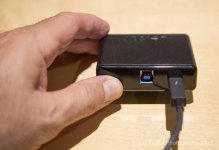
That's the confusing part of it. The Lexar I linked to is designed to slip into a larger four port hub. That hub is definitely Thunderbolt capable but also is close to $300.00. I would prefer something really small, light and cheap like this reader for field use and travel but not if I can only get Thunderbolt speeds out of it when it is hooked up to the hub. See what I mean? I can't get a straight answer anywhere on if you can plug this single reader directly into a Thunderbolt connection, the matrix that compares it below on the Amazon page just lists it as "USB 2.0/3.0" with no mention of Thunderbolt? I cannot find an image on-line of the rear of this reader to see which connections it has.
 
Awesome dude, I bow to your Google Fu. Guess that's the one for me to get. The hub is cool too but both of my computers have SD slots, USB ports open, although I guess I could get a couple of these readers for the slots eventually to download two or three cards at once?
 
haha, thanks. It really depends on your workflow and what you find best.

For offloading in the field, I use a MacBook Air, the Lexar USB reader (if I'm using CFast cards), and Sandisk Extreme Pro SSDs via an Apricorn cable.

https://www.bhphotovideo.com/c/product/848762-REG/Apricorn_ASW_USB3_25_SATA_Wire_3_0_Notebook.html

(I like that cable even though it's short because it's very solid. Through trial and error, I had others break.)

Depending on which computer you're using at the time and how you're using your ports, you may consider a different set up.
 
Tried this on a new 2017 27" 5K iMac to test the USB vs Thunderbolt 2: seems Thunderbolt 2 gives only about a ~15-20% speed increase.

That's maybe a minute less time copying a full 256Gb card.

So for the extra expense of buying the Thunderbolt version + Thunderbolt 2 to 3 adapter it's probably not worth it for most people.

But it's only money right! That one minute I'll never get back.

BTW the iMac PCIe SSD comes in at ~1950MB/s write speed.
 
I have the lexar CR2 and use it with my 2012 macbook pro with either thunderbolt or usb 3. THe TB option is great if you are copying to 2 USB drives simultaneously with an app like Shot put pro.
 
Yeah, TB2 is the best option, it just doesn't appear to be significantly better than USB3.1 on the new iMac considering you need to buy a TB2->TB3 adapter.
 
Back
Top