C300: C300 Mark II HELP - Strange artifacts in Blacks

k0bayashi

Well-known member
I've had the camera for over a year now, but never seen this strange blue/green line pattern in the blacks !! Strange thing is it happend only in the car shots, then we shot some interiors and all was fine with the rest of the shots.

Here's a summary of settings:

C300 II - 4K XF_AVC 10bit 422 at 25p
Canon LOG 2/Cinema Gamut
Natural light
SDI Mon out, HDMI out
Powered via D-tap via IDX Battery in this setup

See example below? What is this?? Has any one seen this on their C300 II? Sensor smear? bad sensor? Anyone? :(
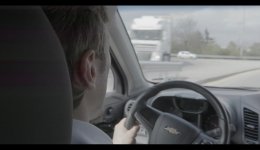
Screen Shot 2019-04-19 at 12.10.38.jpg
 
Was there an LED or dome light on? (I know you specified "Natural Light", just checking)
What was your Shutter Speed/Angle?
What was your gain setting?
Is this an uncorrected frame?
What was WB set to?
When was the last Black Balance performed?

Any other settings enabled in-camera such as Chromatic Aberration Correction, etc?
 
Was there an LED or dome light on? (I know you specified "Natural Light", just checking)
What was your Shutter Speed/Angle?
What was your gain setting?
Is this an uncorrected frame?
What was WB set to?
When was the last Black Balance performed?

Any other settings enabled in-camera such as Chromatic Aberration Correction, etc?

Hi Bill, see my answers below. Many thanks,

No LEDs, no additional lighting except the Sun.

What was your Shutter Speed/Angle? - 180 degrees
What was your gain setting? - ISO 800
Is this an uncorrected frame? - yes, footage straight from camera, no colour grading whatsoever
What was WB set to? - WB was set to 5600K manually
When was the last Black Balance performed? - last BB, was done this same morning of the shoot.
 
This is unfortunately a limitation of the sensor when shooting a high contrast image on the C300 Mk II. See here on how to avoid - http://www.dvxuser.com/V6/showthread.php?359784-C300-MKII-Ways-to-avoid-cmos-smear-banding-issues

many thanks for your help Dustin - I had seen that thread some time ago, but was hoping it wasnt a CMOS smear... looks like it is. So, is Canon doing anything about this? Maybe a firmware or re-call fix? Or pretty much it is what it is .... huge thanks again,
 
My understanding is that this is just a matter of how the sensor works. So it is what it is, and even if it could be fixed I doubt that canon will do a firmware update this late in life for the camera.
 
I will do some tests tomorrow with WideDr and C-Log3 and report back, will lower the ISO as well.... hoping that we can get away with less of it. Thanks for the suggestions and link too.
 
My suggestion would be to view with a LUT applied accept that you can't save the blacks in post when you have a bright image side by side with a dark image. In general, I don't notice the smear with a well balanced image of brights and darks, but I have come to accept that the functional DR of the Canon cameras is very limited if you you have a big section of dark next to a big section of whites. The only fix seems to be to crush the darks until the smear is unnoticeable. This is functionally the same as lowering the ISO until you no longer see the smear in the monitor with the LUT applied.
 
I've had the camera for over a year now, but never seen this strange blue/green line pattern in the blacks !! Strange thing is it happend only in the car shots, then we shot some interiors and all was fine with the rest of the shots.

Here's a summary of settings:

C300 II - 4K XF_AVC 10bit 422 at 25p
Canon LOG 2/Cinema Gamut
Natural light
SDI Mon out, HDMI out
Powered via D-tap via IDX Battery in this setup

See example below? What is this?? Has any one seen this on their C300 II? Sensor smear? bad sensor? Anyone? :(

View attachment 135427
Could you dropbox an unaltered 10-bit frame from the log2 source?
 
Yup, it's a feature not a bug. It's a limitation of the sensor. It's on all the canons that use that sensor. Usually it's not a big deal and grades out easily enough in the shadows. Tough part is when it goes across skin tones and strips out the green channel, leaving people purple/magenta looking.

I did a test with some window blinds. It tends to be a problem when you've got a line of pixels above a certain IRE in a big row

If you wanna feel better watch any show shot with the panavision DXL same issue.
 
Hi Bill, see my answers below. Many thanks,

No LEDs, no additional lighting except the Sun.

What was your Shutter Speed/Angle? - 180 degrees
What was your gain setting? - ISO 800
Is this an uncorrected frame? - yes, footage straight from camera, no colour grading whatsoever
What was WB set to? - WB was set to 5600K manually
When was the last Black Balance performed? - last BB, was done this same morning of the shoot.

Sorry for all the questions, sounds like the hive have documented this behavior.
I had to grade this particular frame a little aggressively but it corrected out.

C300 MKII frame.jpg
 
Wow, Bill , no worries - thank you for taking the time. Top job on the grade, looks like you've managed to save it! Impressive!

I am uploading some more frames shortly as requested by a previous poster, but yes I believe you are correct - I have come to accept it is a common issue with the C300 II sensor, that others have also experienced and documented. Just gotta be extra careful I guess. Will test Wide DR and Clog3 as well and post new frames from the latest tests in a few days , since our feature shoot will be mostly car interiors ....
 
Last edited:
Could you dropbox an unaltered 10-bit frame from the log2 source?

Hi Cary,

I have uploaded a selection of TIFFs where the artifacts are most evident in the blacks for those of you who want to have a play.

https://www.dropbox.com/s/iofsmfmvrqmaolf/C300 II Tests - 4K DCI C-Log2 TIFFs.zip?dl=0

Some info behind these:

All shot in 4K DCI 10bit internal 422 XF-AVC in C-Log2/CinemaGamut, no grading applied, I exported these TIFFs straight from the raw material. Natural light, ISO 800, internal NDs only used in a few of the shots.

Huge thanks to all for your feedback and suggestions.
 
That pretty bad.

There is no consistent way to remove this with an HSL qualifier.

If you use Resolve you can write a DCTL to mitigate the issue by making sure the green channel does not drop below the red and blue channel below a certain threshold, for instance, the following DCTL (use with the DCTL OFX), applied to the log format removes quite a bit already (I set some parameter defaults that worked for me):

Code:
// Remove color cast

DEFINE_UI_PARAMS(threshold, Threshold,    DCTLUI_SLIDER_FLOAT,  0.23,   0,     0.3,   0.001)
DEFINE_UI_PARAMS(red,       Red,          DCTLUI_SLIDER_FLOAT, -0.016, -0.02,  0.02,  0.001)
DEFINE_UI_PARAMS(blue,      Blue,         DCTLUI_SLIDER_FLOAT,  0.003, -0.01,  0.01,  0.001)
DEFINE_UI_PARAMS(adjust,    Green Adjust, DCTLUI_SLIDER_FLOAT,  0.027, -0.05,  0.05,  0.001)
DEFINE_UI_PARAMS(boost,     Luma Boost,   DCTLUI_SLIDER_FLOAT,  0,     -0.15,  0.15,  0.001)
DEFINE_UI_PARAMS(mask,      Mask,         DCTLUI_CHECK_BOX, 0)

__DEVICE__ float3 transform(int p_Width, int p_Height, int p_X, int p_Y, float p_R, float p_G, float p_B)
{
    float r, g, b, gr, gb;
    
    r = p_R, g = p_G, b= p_B;
    if (g < threshold)
    {
      if (g < r &&  g < b)
        if (mask) g = r = b = 1;
        else
        {
          g = g + red + blue + adjust;
          r = r + r * boost;
          g = g + g * boost;
          b = b + b * boost;
        }
      else if (mask) g = r = b = 0;
    }
    else if (mask) g = r = b = 0;

    return make_float3(r, g, b);
}

There is a mask checkbox, so you can also apply adjustments based on the mask, you may also want to apply a blur on the mask.
 
Tricky one. In a bad case like this depending on how long the clip is I would export as a bunch of sequential numbered TIF's and Roto the first one and then apply the Roto corrections to the other clips making any fine adjustment as required along the way then import the sequence as a clip and LGG adjust as required. Not a nice problem to solve really quickly.

Chris Young

correct01.jpg
 
That pretty bad.

If you use Resolve you can write a DCTL to mitigate the issue by making sure the green channel does not drop below the red and blue channel below a certain threshold, for instance, the following DCTL (use with the DCTL OFX), applied to the log format removes quite a bit already (I set some parameter defaults that worked for me):

Pretty cool- was going to make a pun "I C", then noticed it looks a bit like shader code. Googling found that DCTLs run on the GPU which means FAST (Resolve 15 (or later) Studio only?).

Thought perhaps they're doing a generalized translation of generic shader code to whatever the underlying shader language is being used, apparently that's not the case? https://github.com/baldavenger/ACES_DCTL/issues/1

Some older projects that translate shader code (demonstrating the concept):

https://www.khronos.org/registry/webgl/conformance-suites/2.0.0/extra/webgl-translate-shader.html
https://github.com/aras-p/hlsl2glslfork
 
Cary, much appreciated. I am not too well versed in Resolve, but I will forward your code to our colourist. I understand there is no one-size-fits all solution to this problem, we'll have to deal with such issues as they come along, but will definitely do more tests i Clog3 and WideDR as Clog2 in high contrast is now out of the question based on these initial tests.

Many thanks again for all your help.
 
Tricky one. In a bad case like this depending on how long the clip is I would export as a bunch of sequential numbered TIF's and Roto the first one and then apply the Roto corrections to the other clips making any fine adjustment as required along the way then import the sequence as a clip and LGG adjust as required. Not a nice problem to solve really quickly.

Chris Young

Good suggestion Chris, forwarding it to my colourist. Hoping to see less of this issue in Clog3 tests in a few days time. Many thanks again for your suggestions and help, that graded still you did is top notch, looks very , very usable.
 
It's the old story most things are fixable but some take longer. In the days of tape the only way we could fix issues like drop outs etc was to grab the footage into Paintbox Roto it and print back to tape for subsequent editing. These days a lot of that Roto type work can be done in Photoshop and various other programs. Hope CLog 3 is an easier path for you.

Chris Young
 
Back
Top