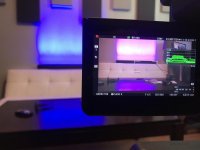
C300: C300 Mark II Blue LED light issue

I did a bunch more tests trying to match my XC-15 and C100 II to the c300 II. A couple of conclusions:
- the Kelvin scale matches about 200 to 400 less on the C300 II when white balancing. 3200 on the c100 II matches to 3000 on the C300 II. If you try to manually match the cameras using the same Kelvin setting, you will end up with the C300 II looking more red
- the C100 II emphasizes green in the skin tones relative to the C300 II in neutral settings. In the production camera setting on the C300, greens are much more emphasized and blues are diminished.
- in all settings, the C300 II tends to add reds to the blue at a higher proportion than the C100 II. Neutral is the closest setting for maintaining blues. If you want more blue to violet, you can add a couple to the phase or change the b-r and/or r-b setting in the profile. It's really a very slight difference, but the effect on the appearance of those saturated LED lights is significant.

Implicted may have a broken sensor, but for those people unhappy with the blues straight out of the camera, I would suggest using the neutral profile and then changing the r-b setting.
 
I did a bunch more tests trying to match my XC-15 and C100 II to the c300 II. A couple of conclusions:
- the Kelvin scale matches about 200 to 400 less on the C300 II when white balancing. 3200 on the c100 II matches to 3000 on the C300 II. If you try to manually match the cameras using the same Kelvin setting, you will end up with the C300 II looking more red
- the C100 II emphasizes green in the skin tones relative to the C300 II in neutral settings. In the production camera setting on the C300, greens are much more emphasized and blues are diminished.
- in all settings, the C300 II tends to add reds to the blue at a higher proportion than the C100 II. Neutral is the closest setting for maintaining blues. If you want more blue to violet, you can add a couple to the phase or change the b-r and/or r-b setting in the profile. It's really a very slight difference, but the effect on the appearance of those saturated LED lights is significant.

Implicted may have a broken sensor, but for those people unhappy with the blues straight out of the camera, I would suggest using the neutral profile and then changing the r-b setting.

It's not a white balance issue.
Adjusting the R-B setting does not resolve the issue. it takes +26 for the violet to appear blue under these conditions, in which case the other colors are affected.
Canon have replaced the sensor in my camera at least twice, along with the mainboard and just about every component in the camera over the course of the 1.5 years dealing with this camera... believe me, i wish it was a simple sensor replacement.
 
C300 Mark II Repair Returned from CANON

C300 Mark II Repair Returned from CANON

So, after about a month of testing, forwarding my unit to the "lead technician specialist", and many many phone calls.. I finally received the C300 Mark II back from the factory addressing the "Blue Issue"....
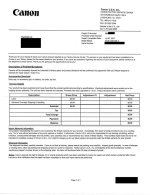
Here is the paperwork submitted with camera upon return:
REPAIR Return Form from CANON.jpg

... The first thing that I noticed when my Repair was updated by Canon was the note that "NO PAPERWORK WAS SUBMITTED WITH THE UNIT" !! That was completely incorrect. I called the factory repair to raise concern about the submitted paperwork to which Canon claims there was none in the box... unfortunately for Canon Repair, I don't have confidence in them anymore, so I made sure and took pictures of everything before putting into the box including descriptions, pictures, examples, and links... all of which have been discussed in this forum. Factory Service confirmed that the paperwork was submitted and attached to repair after emailing all paperwork... I received confirmation email as well as verbal confirmation. I then called a couple days later to check updates, I was informed by the Factory service rep on the phone that no paperwork was attached to the repair. I immediately contacted my Customer Service Rep who was also copied on the emails. he then confirmed again that the repair states that no paperwork was submitted and that no paperwork was attached from email.... a week or so had passed by this point. My dealing with the CSR Supervisor has always been honest, so i believed when he confirmed the attachment of paperwork to the repair.. finally.

Anyhoo, After weeks of no updates from "Raffi" (main tech supposedly), and no one being able to tell me anything about what's wrong or if anything was wrong, or if I'm just making s*%t up, I finally hear that the camera is being returned and that repair paperwork will be in the box.... as you can see above, that paperwork just states that they cleaned my camera and the camera functions properly... that response is unsatisfactory.

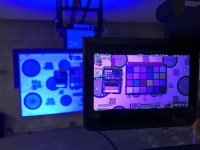
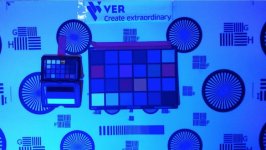
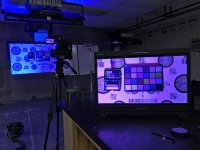
So, I wanted to do a legitimate test AGAIN. I stopped by a local scenic and design shop to pick up a standard professional stage light and headed over to my friends at Cineverse (VER) to have full control and a team of equipment experts behind me as we test this "fixed" camera.
Here is that fun result:
IMG_9031.jpg

All conditions, settings, color profiles, etc... again.. No difference.
Here is a Dropbox link to a video of the occurrence: https://www.dropbox.com/s/qpw3qsvasxche0b/IMG_9043.MOV?dl=0

I recorded the issue in 4K onto CFAST cards with every preset including white/color chart with BLUE Light on it, with Blue light and above Kino, and with NO BLUE LIGHT with KINO to show that the camera is white balanced, exposed, etc.
IMG_9035_1.jpg

I also conducted the SAME COLOR test using my iPHONE as the camera in the same situation... Looked GREAT!
Screen Shot 2017-07-19 at 11.42.39 AM (2).jpg

I can upload all test from the camera and iPhone if requested.. unfortunately this forum does not allow me to attach... but it's an unfortunate comparison.

... So with the team at VER behind me wondering why this issue still exists, trying IR Filters to remove, etc... I called Canon support in an attempt to facetime someone there to live showcase the issue still exists. ideally I would contact a tech or the tech supervisor to eliminate a lot of third party message relaying... Everyone directed me to my good old supervisor friend in Canon Customer Service.. I was finally able to speak with him at the location and requested we facetime. Not being a technical person, the video conversation would be useless.... but he did inform me of some new developing information.

I was informed that Raffi, Senior Technical Person, has confirmed that the camera does have a phenomenon resulting in the issues described. He has forwarded notes and escalated the situation to Canon Japan. Supposedly, at Canon Japan is where any changes/updates, etc would take place, but that Canon has stated that the "phenomenon" does exist and affects the C300 Mark II. When I requested that documentation from the CSR supervisor, I was denied access to the notes because it is in instant messaging discussions internally and not a part of the paperwork included in my repair. I argued that as far as I'm concerned, the paperwork states Canon cleaned my camera and it works with no issues, so the internal conversations to me are vaporware without documentation. He did assure me that the conversations exist and that the "phenomenon" is noted within Canon's system... unfortunately accessing that information is not available to me, so I will have to use the word of the CSR Supervisor.

This is still developing and I'll keep everyone in the loop, but please do not stop sharing experiences via this forum or email/PM ... it is all building up to a longstanding issue that has been continually tossed aside and ignored by CanonUSA. Though they drop the price $6000, it doesn't take away from the fact that this is substandard performance from what was once a $16000 camera. Ongoing issues with the camera have gone ignored and unresolved for years with no resolutions from Canon... these practices are unacceptable.
 
It's not a white balance issue.
Adjusting the R-B setting does not resolve the issue. it takes +26 for the violet to appear blue under these conditions, in which case the other colors are affected.
Canon have replaced the sensor in my camera at least twice, along with the mainboard and just about every component in the camera over the course of the 1.5 years dealing with this camera... believe me, i wish it was a simple sensor replacement.

So what you are saying is that there is nothing wrong with the camera, you just don't like the color science.
 
Good on you for sticking with it, Implicted. That's definitely not right, and shouldn't be ignored. I've noticed the same issue with blue LED lighting on my C300ii also, and I do alot of work in musical theatre. Thankfully, it hasn't bitten me yet but I'm sure one day it will. Hopefully Canon have jumped on it by then.
 
So, have you tried it?

I'm not sure who this is directed at since you replied to yourself, but I will answer. The recording mode does not have any visual effect on the image. The camera doesn't have any change whatsoever to the viewed image when the recording mode is changed unless a new aspect ratio or resolution is selected and then the screen flashes briefly. You can jump back and forth between 12bitRGB and 10bitYUV and nothing changes on the monitor.

What does make a difference is removing the red bias in the blues in the picture profile, setting the camera to a neutral color profile, or adjusting the white balance to a lower Kelvin.
 
Hi Implicit,

Loren Simons here and I'm a Field Applications Engineer for Canon - also a long time DVXuser but first time post under this new Canon Specific account. I saw this thread and thought it was really interesting. I took some time and I was able to replicate what you're seeing under a pure blue (0,0,255) light source. As others like cpreston has pointed out here, this is part of our color science and it is simply the way the engineers developed the camera to achieve our Canon "film stock". If this hue swing is an issue for your work, which I can see it is, there are some local in camera color correction options you can take advantage of, basically think of it as the camera saying "if a color is read as this phase and chroma, make it this phase and chroma instead."

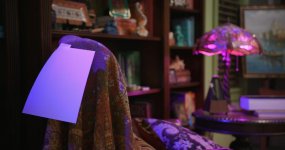
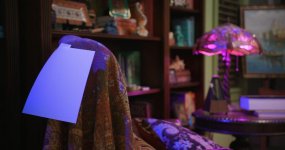
I set up a quick environment to test this, setting an Arri L5C to pure blue (hitting the white paper) and a Philips Hue bulb (in the lamp) to magenta via DMX. I was successfully able to set the color correction to swing that pure blue source back to blue, while maintaining the original magenta lights as you can see in these image.

As the camera sees it in Color Matrix - Neutral:
1_Neutral_NoCC.jpg
Utilizing in camera Color Correcion and Color Matrix - Neutral:
1B_Neutral_CC.jpg

The in camera color correction can be accessed by changing the settings Menu>Custom Picture>Other Settings>Color Correction to the following:

Select Area: Area A
Area A Setting Phase: 2
Area A Setting Chroma: 31
Area A Setting Area: 20
Area A Setting Y Level: 31
Area A Revision Level: 0
Area A Revision Phase: -18

I hope this solution works for your situation. I've been doing a bit of shooting with these settings and have yet to see any adverse effects, including skintones underneath this blue source as well.

----

Loren Simons
Sr. Engineer, Field Applications
Canon USA

Disclaimer: I am here to continue being a helpful and informative part of the DVXuser community - as I have been in one capacity or another for the last ten years. I am not here to comment on future products, features, or firmwares.
 
Last edited:
Fantastic! Thank you and I will have to add this to one of my saved picture profiles. And it is great that you are now posting as a Canon rep on the boards. That seems like a huge shift in the approach to dealing with customers and I hope it works out. Are there are any profiles floating around Canon that directly match each of the Canon cameras to each other since they all seem to have a slightly different look? I've found that frustrating as a user and it leads to issues like the one that caused this thread.

Edit to add that more than anything else regarding picture, I wish that Canon would standardize their kelvin scale in relation to RGB. It seems bizarre that every Canon seems to have a different Kelvin interpretation.
 
Last edited:
Cpreston,

Thanks hope that works out for your needs!

I've always felt it was very important to have this types of communication for support as well as feedback. I've been on this forum as an independent filmmaker, a Redrock Micro technical specialist, an Express Video Supply representative and now with Canon - and I've always found it an incredibly helpful resource.

I've been at Canon for over 3 years now, but with a recent roll change I've pushed to get back onto the forums. In addition, I will hopefully have more time to do exactly what you are asking about. As of now there are no Canon produced Custom Picture profiles other than the ability to change the Color Matrix of the EOS C300 Mark II to Cinema EOS Original and get in a pretty close ball park to the original EOS C300 - but I'm hoping to lock myself in a dark room for a few days soon and dial in exactly what you are talking about.

----

Loren Simons
Sr. Engineer, Field Applications
Canon USA

Disclaimer: I am here to continue being a helpful and informative part of the DVXuser community - as I have been in one capacity or another for the last ten years. I am not here to comment on future products, features, or firmwares.
 
Loren-
I tried the settings you posted and here is the result...
IMG_9835.jpg

It's great that you were able to remedy the issue in your setting, but I think there is an inconsistency in your test. The Arri L5C is designed for video/film use and event though your were able to find a resolution under those circumstances, the issue still remains when the scene/venue provides stage lighting for concerts/presentations/etc (designed for stages, not film) I've received that same result from $10 Amazon LED lights to Standard Professional Stage Lighting colored Blue... give non-film lights a try and the resulting magenta is exponentially prominent.

I do appreciate your directly working on the issue.

Thanks,
Brandon
 
Wanted to update everyone as this is still ongoing. Loren from Canon (above) physically has my camera at the Hollywood Canon Facility... hopefully this is the end of a long discussion and all c300II owners can have the ability to capture properly in any situation... Good Luck, Loren! Be in touch soon and thank you for personally taking a vested interest in this situation.
 
You know what would be better than Canon giving a specialized color profile for those blue LED lights? If AV groups stopped using those blue LED. I've been doing a bunch of stage shows and conferences recently, and the blue LED background seems to have become a standard. I hate it. The speaker is hit with tungsten and the background is hit with blue LED. If you expose and white balance for the tungsten hitting the speaker, the blue channel is fully clipped bordering on white on the background. The actual perception from the audience is that everybody on stage is dark orange (which might be the purpose of the blue background). And, of course, the camera doesn't know what to do with the LED light and interprets it as magenta.
 
I thought it had been determined that it wasn't just blue LED's rendering as purple, but gelled tungsten, too.

But I totatily get the argument against using colored LED's, because of "overloading" the sensor and clipping the color channel, because they're so pure and intense.
 
You’re correct in that it’s not only wih blue LED’s... but it’s the exaggerated case and more prominent.. especially on a large stage.

Canon ordered the same everyday LED bar that I have to do a 1:1 issue resolution... in theory, if they can fix this issue with the LED bar, everything else should fall into line.
 
Loren and the team at Canon Hollywood had my camera for a bit to ensure that the results were conclusive on their end with my actual camera that was in question.... I received my camera back and was told to apply the settings Loren suggested in an earlier post. Turns out, my personal camera's sensor was way out of wack somehow and needed to have electronic calibration or something.... so with a "working calibrated" sensor I should be able to apply the Color Correction settings in camera and see the proper image.
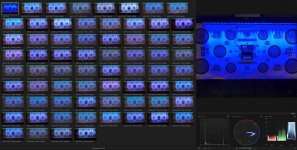
Took my camera to Cineverse and performed a similar setup as before... here are the quick look results of a variety of Color Space, Color Matrix, and Gamma... the first image thumbnail is from iphone which was taken earlier to showcase what "blue" should look like.. not comparing the C300II to iphone, but as shown previously, the image is true/similar to real life and C100 (shown in previous thread posts)

C300II BLUE COLOR COMPARISON.jpg

As soon as I can, I'm going to dig into the footage and check settings/LUTs/Adjustments possible and re-test a better scenario separating the color chart and blue light.. therefore giving an accurate color chart along with the blue light in the background... I will also record the same scenario with various cameras to directly compare.
 
Hi Brandon and others,

When we bought the c300ii as an upgrade of our c300 we also noticed color 'problems'. I searched the internet probably 1.5 years ago, but couldn't find any other user reports, so thought it was not that big of a deal.
Shooting at a lower Kelvin made the color a bit less disturbing, and lowering the color temperature and red colors in post production also helped a bit.
Still we struggled a lot. Some productions more then others, maybe because of the use of natural lighting vs artificial lighting.

When our latest production had bad colors again, I searched the internet and found this topic.
First of all thanks for your report and all other users for your help! :-)

I'm not sure if we experience exactly the same problem as you have. I don't notice struggling with a blue color/lighting becoming slightly red.
For us the biggest problem is that white people many times look very red, sometimes like a tomato. Also the whole picture looks sometimes a bit pink, as if there is a pink solid over the picture with 20% opacity. Sometimes it's directly noticable, other times it's visible when applying a simple S-curve or some contrast in post.

We also noticed like you did that in multicam productions the picture of the older c300 (and even 5dii) looks more 'normal' (less red) then the c300ii.
We also tested all the available gammas and color spaces, but none had a pleasing ('natural') look for us (and our clients).

For now I just want to say you are not the only one having color problems with the c300ii.
I'm also curious if you have made some progression after november last year.

@ Loren Simons from Canon
Thanks for the custom picture settings! I will try it with our camera, maybe it's a solution for our problem too, I hope so! :-)


Greetings Joren
 
Interesting thread. In my first test matching the C300 II with custom color settings (including matrix etc.) to the 1DX II with my Filmic Skin picture style, using a Magewell 4-channel HDMI capture card and OBS to view both cameras onscreen, live side-by-side, I notice my blue shirt looked correct on the 1DX II, however on the C300 II it was shifted toward magenta (red was added to blue). This issue may affect anything blue, not just blue lights. Will try Loren's color correction to see if that helps.
 
Back
Top