C300: C300 Mark II - 120fps Highlight Clipping

jcs

Veteran
First time testing 120fps (cropped) on the C300 Mark II, there may be an issue with highlight clipping. Not clear if the issue is the camera or Premiere Pro CC 2015:

HighlightClipping.jpg

See the brightest whites in the teeth: should be white but wrapped around into black/gray (should be clipped to white).

Settings: Gamma: Canon Log, Color Space: DCI-P3, Color Matrix: EOS Standard.

I don't have time to debug this (and I'll likely use the A7SII for 120fps and the FS700 for 240fps); just passing this along in case anyone else encounters it.
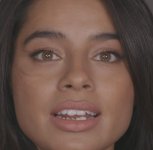
 
Looks like a reflection.

Curious why you chose DCI-P3?

P3 looked the best on the monitor when testing different values. While larger than 709 color space, it should not cause clipping bugs: final out of range values should clip with no issue. Here's 60p (no crop) under exactly the same conditions and camera settings (P3), no clipping bug on highlights on the teeth; the issue is not reflections:

NoHighlightClipping.jpg

See also upper lip-teeth boundary for the 120p crop version compared to this 60p no crop. The 120p crop has black boundary issues there as well.
 
Last edited:
Interesting. I'm doing more testing over the next two weeks of the crop mode, I'll update if I find anything concrete.
 
There is also something else going on in addition to clipping......are these shots soft.... or is this what can be expected @ 120fps on this camera?
 
Last edited:
Without knowing more about shutter speed and f stop and how much motion was involved by both the subject and the camera I wouldn't make too many judgements about softness.
 
Yes, these shots were resized larger via nearest neighbor to make the issues easier to see.
Shutter was 1/250th; she wasn't moving fast.

120p/crop is softer than non-cropped. It's perhaps a bit softer than the 5D3's H.264. Here's a full 120p/crop frame sharpened in post:
120FullFrame.jpg
 
Seriously, you zoomed in by crop to complain about reflections in the teeth of your model? You watched that wide frame and it was the teeth that stopped you? OK.....
 
When playing the footage at normal size I noticed something on her teeth. Looked like food or lipstick etc. Zoomed in and found the artifacts. Footage is unusable without masking, tracking, and hiding the issue.
 
Back
Top