C200: C200 transcoding options 2023

I had Edit Ready, I cannot remember why... FCP7 non reading early sony files - whatever. ??

I beleive Edit Ready to be competent and good

But see no place for it in a Resolve world.

Especially where one might for example be doing a quick scale change from canon 17:9 to client 16:9 - such stunts are effortless if you have any competence in Resolve.

Having worked in broadcast, I was thinking of creating a workflow (grade, encode, backup to cloud) with hundreds of clips. But if the use case is just grading a few clips every now and then, Edit Ready would not provide any additional benefits.
 
I principally use FCP but I have Resolve and Compressor. There's nothing I can do in Edit Ready that I can't do with the other Apps.

That said I use Edit Ready frequently because a) it's super fast, b) it's super stable / reliable, c) you can throw anything at it d) it's incredibly simple.

I haven't run a test for a while but when I did it was much faster at transcoding to Prores than anything else. And because it basically just does the one thing (and opens in a second), it's a nice to have.

Back to Rob's question, for transcoding (fast and simply) C200 Raw to 1080p prores files, it's ideal.

By the way Rob, when I had a C200 Edit Ready couldn't deal with Canon Raw (it now can). At that time I often transcoded C200 Raw Lite to 2k Prores using Cinema Raw Development which is a free download from Canon. That worked just fine too.
 
I think that's what I'll do Sam, I am 100% living in resolve now - have all unedited footage on the timeline then export everything as individual clips.

I might even do the slight reframe for them, rather than adding a note to adjust for the 4K DCI aspect ratio.

The other nice thing with Resolve is if you need to tweak any of the clips for WB or ISO, exposure etc. before you push them out. Just select Decode Quality - Full Res Canon and that will use the full Canon SDK and give you access to all the controls.

Chris Young

Resolve Canon RAW.jpg
 
Having worked in broadcast, I was thinking of creating a workflow (grade, encode, backup to cloud) with hundreds of clips. But if the use case is just grading a few clips every now and then, Edit Ready would not provide any additional benefits.

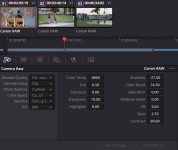
so edit ready has stronger bath/comand line processing. im just interested :)
 
The other nice thing with Resolve is if you need to tweak any of the clips for WB or ISO, exposure etc. before you push them out. Just select Decode Quality - Full Res Canon and that will use the full Canon SDK and give you access to all the controls.

Chris Young


Something I went over with Perter Chambarlain off Resolve was that 'the raw controls are no different' So you can add red using a raw temp slider or just the controls on the regular colour page.
I was not convinced, but may be now.
Do you agree with this?
 
That's a good question and it's something I've pondered about here and there for many years.

Like...does having direct access to specific RAW controls in software (or a certain piece of software) make a difference.

You would think it would but how can you be sure, you know? Especially if it's something that isn't provided by the company making the product.

In the end, for me, it didn't really make a difference visually with non-RED cameras (RAW controls or other controls somewhere else) so never cared too much about diving any deeper into it.
 
It depends.

The order is important in resolve. The RAW controls (which ever they are) do get applied before the time line controls (nodes).

Im not sure it really means anything when it’s all in 32bit float.

And I think it depends on the SDK supplied by the maker of the camera. I remember you used to be able to choose Resolve Debayer Vs Arri Debayer and same for Sony RAW but I think that’s gone now.
 
So you can add red using a raw temp slider or just the controls on the regular colour page. I was not convinced, but may be now. Do you agree with this?

On the face of it, yes. But using nodes on the color page to get the image I desire usually requires in the order of three to five nodes to treat individual parameters of the image. Whereas, I can generally achieve all the steps of image manipulation I require just using the Canon RAW tab with its adjustments. Also, having the ability to adjust ISO is something that is not available via the nodes. To the best of my knowledge from talking to BM, is that what we have under the RAW tab is Canon's full SDK allowing everything to be done at Bayer data level prior to any node manipulations which are additive RGB manipulation steps as opposed to changing values at the sensor information level prior to any additive RGB manipulations. To the best of my knowledge, you are better off for maximum quality to be working at the sensor data level, so prefer to do as many of the image adjustments as possible under the RAW tab. Not to say I don't add nodes after the RAW adjustments if I'm after a specific "look". RAW adjustments are just such a simple way of working. The fact that under the RAW adjustments you can drive any of the values to 100% with less image degradation than you can under node manipulations makes me believe if you can adjust your WB under the RAW controls as opposed to under the color tab settings, you are better off doing so. Though to be honest, I really don't see any noticeable difference in the final product quality between the two approaches. My preferred workflows generally are, given the right footage, 1. RAW, 2. CSTs and 3 a distant last LUTs.

Chris Young
 
Thanks everyone for the replies.

I really like the look of editready but I think for my minimal requirements and after some testing, I'll be able to export individual clips in resolve.

As an experiment before the upcoming actual shoot, I tested with a separate project using 374GB of CRL (all 50fps), which was about 2 hours and 35 minutes on a timeline. I exported all individual clips as "Apple ProRes 422" (1920x1080) and it gave me 83GB, completed in 30 minutes - not bad! "Apple ProRes 422 HQ" (1920x1080) was 132GB. You can definitely hear the fans working in the MBP but this is an absolute no brainer vs. either using a recorder or different camera entirely.

I feel like the shelf life has been extended on the little c200 - 8 bit MP4/XFAVC, 12 bit CRL (10 bit slow motion), and now 10 bit apple prores flavours IF people I'm collaborating with can tolerate this extra (small but still extra) step.

Now I just need to experiment with 4k prores exports for all of my own personal footage for an upcoming showreel to see if I can buy back some hard drive space. Although like CY alludes to, it's quite handy having all RAW adjustments still available. I'm a big fan of changing WB and moving through different ISOs to see how it looks after the fact.
 
On the face of it, yes. But using nodes on the color page to get the image I desire usually requires in the order of three to five nodes to treat individual parameters of the image. Whereas, I can generally achieve all the steps of image manipulation I require just using the Canon RAW tab with its adjustments. Also, having the ability to adjust ISO is something that is not available via the nodes. To the best of my knowledge from talking to BM, is that what we have under the RAW tab is Canon's full SDK allowing everything to be done at Bayer data level prior to any node manipulations which are additive RGB manipulation steps as opposed to changing values at the sensor information level prior to any additive RGB manipulations. To the best of my knowledge, you are better off for maximum quality to be working at the sensor data level, so prefer to do as many of the image adjustments as possible under the RAW tab. Not to say I don't add nodes after the RAW adjustments if I'm after a specific "look". RAW adjustments are just such a simple way of working. The fact that under the RAW adjustments you can drive any of the values to 100% with less image degradation than you can under node manipulations makes me believe if you can adjust your WB under the RAW controls as opposed to under the color tab settings, you are better off doing so. Though to be honest, I really don't see any noticeable difference in the final product quality between the two approaches. My preferred workflows generally are, given the right footage, 1. RAW, 2. CSTs and 3 a distant last LUTs.

Chris Young

Im not quite following you here.

It would seem that you would disagree that using the raw tab is 'pointless'

My observation is that a raw still in C1 will have a load to be pulled back from 'clipped' areas and is useful. While the raw sliders will not pull back any clipping ??
 
Im not quite following you here.

It would seem that you would disagree that using the raw tab is 'pointless'

My observation is that a raw still in C1 will have a load to be pulled back from 'clipped' areas and is useful. While the raw sliders will not pull back any clipping ??

MM. Yes, far from pointless, use the RAW tab. What my experience leads me to conclude that even when you have clipped RAW, which is unrecoverable, you can still recover detail and information in areas of the scene that are involved with the clipped parts of the scene when using the RAW tab that, well, that I can't, recover by using nodes. I didn't have any 'clipped' Canon CRL clips to hand, so trusted I could find one on the WWW for an example. Sure enough, I found a couple that some obliging YT punter put up with links to download those clips, see below. Some Canon C70 12Bit Cinema RAW Light 4K captured in C Log 2. I think the waveform grabs below will indicate what I am finding. It is that the discrimination in what is recoverable in clipped areas of a hot image using the RAW tab is definitely ahead of the scene analysis and recovery capability of Node recovery. Using nodes, I'm having to use five of them to get close to what I can recover using the Canon RAW tab in Resolve. Look at the leaves in the top of shot.

Purely an academic observation. As an aside from what is recoverable under the RAW tab vs Nodes, the other thing I have noticed before, and that can be demonstrated here. Though it does require a bit of pixel peeping, it is that images processed under the Canon RAW tab settings in Resolve hold detail better than when the images that are processed via nodes. Something I never expected to see. The last image below is a half wipe between the 5 x node image process and the RAW tab image process. If one does a 200-300 % zoom in to compare the detail retention in the sand and the definition of the seagulls on the left side, which is node processed vs the definition in the sand and seagulls on the right side, the RAW processed side, one can really see the difference. Not that I ever found anyone to query the image quality of node processed Canon CRL. It's only when you really do a very close analysis that you can see the difference. As I say it's purely an observation because in reality no one is really going to do 200-300% zooms in the general run of things.

Chris Young

Canon CRL comp + txt [1280].jpg

Link to the Canon clips if anyone want to experiment for themselves


Attachments

  • Canon CRL comp + txt [1280].jpg
    Canon CRL comp + txt [1280].jpg
    104.8 KB · Views: 0
MM. Yes, far from pointless, use the RAW tab. What my experience leads me to conclude that even when you have clipped RAW, which is unrecoverable, you can still recover detail and information in areas of the scene that are involved with the clipped parts of the scene when using the RAW tab that, well, that I can't, recover by using nodes. I didn't have any 'clipped' Canon CRL clips to hand, so trusted I could find one on the WWW for an example. Sure enough, I found a couple that some obliging YT punter put up with links to download those clips, see below. Some Canon C70 12Bit Cinema RAW Light 4K captured in C Log 2. I think the waveform grabs below will indicate what I am finding. It is that the discrimination in what is recoverable in clipped areas of a hot image using the RAW tab is definitely ahead of the scene analysis and recovery capability of Node recovery. Using nodes, I'm having to use five of them to get close to what I can recover using the Canon RAW tab in Resolve. Look at the leaves in the top of shot.

Purely an academic observation. As an aside from what is recoverable under the RAW tab vs Nodes, the other thing I have noticed before, and that can be demonstrated here. Though it does require a bit of pixel peeping, it is that images processed under the Canon RAW tab settings in Resolve hold detail better than when the images that are processed via nodes. Something I never expected to see. The last image below is a half wipe between the 5 x node image process and the RAW tab image process. If one does a 200-300 % zoom in to compare the detail retention in the sand and the definition of the seagulls on the left side, which is node processed vs the definition in the sand and seagulls on the right side, the RAW processed side, one can really see the difference. Not that I ever found anyone to query the image quality of node processed Canon CRL. It's only when you really do a very close analysis that you can see the difference. As I say it's purely an observation because in reality no one is really going to do 200-300% zooms in the general run of things.

Thanks for sharing Chris. Could this be a resolve quirk, or was this canon deciding that's how the CRL files will interact with the NLE?

Does it happen just when you simply create a node, or does the detail loss happen once you actually make changes to the node?

Not that it matters, because at least for me it's nearly always a combination of using the raw tab, as well as adding whatever other nodes.

I wish resolve let you adjust white balance to non-raw clips in a similar way of entering kelvin values. Even if it was only a faux estimation of the WB. I know it's simple enough to make colour adjustments but I like entering numbers and pressing enter while looking at the screen, rather than sliding with a mouse. I know you can essentially on/off changes with undo, so it's not a major issue but would still be nice. Unless this already exists?
 
Does it happen just when you simply create a node, or does the detail loss happen once you actually make changes to the node?

An interesting question, that I can't really, answer Rob. If I just add a node, I really don't see any change. If I tweak that node, I don't really see any change. It just appears to me that after you have a series of modified nodes, like in this case five of them, then I do perceive as I said a very slight difference. So I can only assume it's cumulative. But really it is so fine a difference to be almost unnoticeable. If I add the BLur tool and drop the Radius to .49 across the RGB channels, it seems to make up for it visually. Sometimes just .48/.49 on the G channel does it.

Chris Young
 
The file conversion has been working great so far. One extra question.

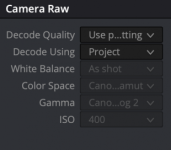
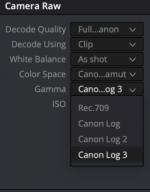
I'm shooting clog3 (can't choose clog2 in camera). When transcoding to prores HQ (in this case exporting untouched individual clips) in resolve in the colour/raw settings, am I better off doing absolutely nothing, or changing the default to clog3? I'm only asking because the greyed out section by default is clog2...

Screenshot 2023-08-01 at 11.11.21 am.png

Screenshot 2023-08-01 at 11.12.46 am.png
 
The file conversion has been working great so far. One extra question.

I'm shooting clog3 (can't choose clog2 in camera). When transcoding to prores HQ (in this case exporting untouched individual clips) in resolve in the colour/raw settings, am I better off doing absolutely nothing, or changing the default to clog3? I'm only asking because the greyed out section by default is clog2...

I have to be honest... I never use the Camera RAW tab for my C-LOG 2 footage in Resolve. It makes life much easier!

I either use CST nodes (non-managed) or fully color managed (in the project settings).

https://filmmakingelements.com/color...vinci-resolve/

If you have footage from multiple cameras, you can use groups to grade the input each camera differently.
 
Thanks norway.

I'm literally just passing on prores files to an editor, no grading from me. I'm double checking that doing nothing (leaving raw tab with its default settings) is the best approach..
 
Thanks norway.

I'm literally just passing on prores files to an editor, no grading from me. I'm double checking that doing nothing (leaving raw tab with its default settings) is the best approach..

Ah, I see what you're saying now. But do we know for certain that since this is a ProRes file (and not a RAW file) that Resolve doesn't do any black magic behind the scenes?
 
Back
Top